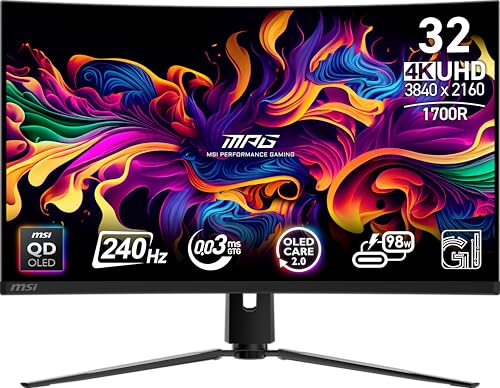
The Samsung Odyssey Neo G8 is the best overall 4K curved monitor, pairing a 240Hz Mini-LED panel with an aggressive 1000R curve. The MSI MPG 321CURX QD-OLED is the best OLED choice, with a 240Hz QD-OLED panel, a 0.03ms response time, and a gentler 1700R curve. The Samsung Odyssey Neo G7 gives you the same Mini-LED backlight at a lower tier, the Gigabyte M32UC is the budget pick, and the 55-inch Samsung Odyssey Ark 2nd Gen is the giant immersive option, though its listing needs a live check first.

This guide is for three kinds of buyers. Competitive PC gamers want high refresh rates and low response times at 4K, solo players and creators want deep contrast and rich color for story-driven games and editing, and desk-space planners need to know whether a 32-inch panel or a 55-inch giant actually fits. Every pick below comes from Amazon product listings and maker spec sheets, chosen for its panel, refresh rate, curve, and ports rather than marketing claims.
Our Top Picks
Top 3 picks at a glance

Quick Picks
As an Amazon Associate we earn from qualifying purchases
| Product | Best for | Key spec from title |
|---|---|---|
| Samsung Odyssey Neo G8 | Best overall 4K curved gaming | 32-inch 4K 240Hz Mini-LED, 1000R |
| MSI MPG 321CURX QD-OLED | Best OLED picture quality | 32-inch 4K 240Hz QD-OLED, 0.03ms |
| Samsung Odyssey Neo G7 | Mini-LED value pick | 32-inch 4K 165Hz Mini-LED, 1000R |
| Gigabyte M32UC | Budget 4K curved gaming | 31.5-inch 4K 144Hz, 1500R |
| Samsung Odyssey Ark 2nd Gen | Giant immersive centerpiece | 55-inch 4K 165Hz, 1000R |
How to Choose
Match the curve to your desk distance
Curvature is measured in R, and a smaller number means a tighter bend, so the figure matters more than the word curved. A 1000R curve wraps around you at normal desk distance and suits a single monitor placed close, while a 1500R curve is a gentler bend and a 1700R curve is barely noticeable at arm’s length. Sit too far from a 1000R panel and the edges pull away from your view; sit too close to a 1700R panel and you lose most of the wraparound effect. Measure your viewing distance first, then pick the curve that matches it instead of assuming tighter is always better.
Pick the panel type before the brand
Every monitor in this roundup is either a VA panel with a Mini-LED backlight or a QD-OLED panel, and that split decides the picture you actually live with. Mini-LED VA panels deliver deep blacks, very high peak brightness, and no burn-in worry, but they can show blooming around bright objects and smearing in fast dark scenes. QD-OLED panels give per-pixel blacks, instant response, and superb color, but they are glossy, show a purple tint in bright rooms, and carry a burn-in risk that the maker counters with OLED Care and a three-year warranty.
Count refresh rate honestly, native versus overclocked
A headline refresh rate means little until you know whether it is native or an overclock, because the two are not the same promise. The Neo G8 and the MPG 321CURX run 240Hz natively, the Neo G7 and the Ark run 165Hz natively, and the Gigabyte M32UC runs 144Hz natively with 160Hz available only as an overclock you must enable yourself. An overclocked figure can also come with quirks at the top end, so treat it as a bonus rather than the headline number. Then check your graphics card, since 4K at 240Hz needs a top-end GPU and a DisplayPort 1.4 connection with DSC or HDMI 2.1.
Check ports and bandwidth before you buy
A 4K curved monitor is only as fast as the cable feeding it, so the port list deserves a real look before you order. Full 4K at 120Hz or above needs HDMI 2.1 with 48Gbps or DisplayPort 1.4 with DSC, and 4K at 240Hz over DisplayPort 1.4a needs DSC as well. Count the HDMI 2.1 ports if you also plan to connect a console, and check whether the USB-C port carries enough power delivery for a laptop, since the MSI models range from 15W to 98W. A KVM switch matters too if one monitor will serve two machines, so confirm it is actually included.
The 5 Best Options
Samsung Odyssey Neo G8
The Neo G8 is the flagship of this roundup and the safest choice for a buyer who wants the fastest 4K curved monitor without switching to OLED. Its 240Hz Mini-LED panel pairs an aggressive 1000R curve with 1,196 dimming zones, so bright highlights stay punchy while dark scenes keep their depth. FreeSync Premium Pro and G-Sync Compatible cover both graphics card camps, and the matte screen suits a bright room far better than a glossy OLED. It is a 2022 design, yet nothing else in this group matches its combination of speed, brightness, and curve.
Specs
- 32-inch VA panel, 3840×2160, 240Hz native, 1ms GtG
- 1000R curve, Quantum Mini-LED with 1,196 dimming zones
- Quantum HDR2000, 1,000,000:1 contrast, matte display
- 2x HDMI 2.1 plus DisplayPort 1.4, FreeSync Premium Pro, G-Sync Compatible
- 1-year warranty
Best for: Competitive and fast-paced PC gaming at 4K in a bright room.
Watch out for: Owners report a recurring vertical split and scan-line defect, so register the monitor and exchange it promptly if lines appear. Quantum HDR2000 is a Samsung label, not a VESA tier, and 4K at 240Hz needs a top-end GPU with DisplayPort 1.4 and DSC or HDMI 2.1.
MSI MPG 321CURX QD-OLED
The MPG 321CURX is the picture-quality pick of this roundup, and the one to buy if you play cinematic games or edit video and care more about contrast than peak brightness. Its third-generation QD-OLED panel delivers per-pixel blacks, a 0.03ms response time, and 99 percent DCI-P3 coverage, with a gentler 1700R curve that suits a normal desk distance. Two full-bandwidth HDMI 2.1 ports, a USB-C port with 98W power delivery, and a built-in KVM make it the most flexible desk monitor here, and the three-year burn-in warranty backs the OLED panel.
Specs
- 32-inch third-generation QD-OLED, 3840×2160, 240Hz native, 0.03ms GtG
- 1700R curve, DisplayHDR True Black 400, 1,500,000:1 contrast
- 99 percent DCI-P3, VESA ClearMR 13000, G-Sync Compatible
- 2x HDMI 2.1 at 48Gbps plus DisplayPort 1.4a and USB-C with 98W power delivery
- KVM switch, OLED Care 2.0, 3-year burn-in warranty
Best for: Story-driven games, photo and video work, and anyone who values OLED contrast.
Watch out for: The glossy screen shows a purple tint and raised blacks in bright rooms, so it needs controlled lighting. Do not confuse it with the flat MPG 321URX, which is a different monitor, and remember that 4K at 240Hz over DisplayPort 1.4a needs DSC.
Samsung Odyssey Neo G7
The Neo G7 is the value way into Samsung’s Mini-LED lineup, offering the same 1,196-zone backlight and 1000R curve as the Neo G8 at a lower refresh rate. Its 165Hz panel is still fast enough for most PC games, and the 1,000-nit typical peak brightness and 95 percent DCI-P3 coverage make it a strong choice for HDR movies and bright-room gaming. CoreSync rear lighting adds ambience without a separate light strip, and the same HDMI 2.1 and DisplayPort 1.4 connections cover modern consoles and PCs. It is the sensible pick when the Neo G8 costs more than your budget allows.
Specs
- 32-inch VA panel, 3840×2160, 165Hz native, 1ms GtG
- 1000R curve, Quantum Mini-LED with 1,196 dimming zones
- Quantum HDR2000, 1,000 cd/m2 typical peak brightness, 95 percent DCI-P3
- 2x HDMI 2.1 plus DisplayPort 1.4, FreeSync Premium Pro, G-Sync Compatible
- CoreSync rear lighting
Best for: HDR gaming and movies at a lower cost than the Neo G8.
Watch out for: Reviews note VRR flicker, blooming, and VA motion artifacts at low refresh rates, so test it with your usual games early. Quantum HDR2000 is a Samsung label, not a VESA tier, and Samsung lists it out of stock at list price, so Amazon is the channel to check.
Gigabyte M32UC
The M32UC is the budget pick of this roundup and the cheapest way into a curved 4K panel, trading some brightness and speed for a much lower outlay. Its 31.5-inch VA panel runs 144Hz natively with 160Hz available as an overclock, and the 1500R curve is gentler than the Samsung 1000R bend, which suits a slightly deeper desk. Built-in speakers and a KVM switch add everyday value, and FreeSync Premium Pro keeps frame pacing smooth on AMD cards. It will not match the Mini-LED or QD-OLED picks on contrast, but it delivers the curved 4K experience for far less money.
Specs
- 31.5-inch SS VA panel, 3840×2160, 144Hz native, 160Hz overclock
- 1500R curve, 1ms MPRT and 2ms GtG, 350 nits typical, 400 nits HDR
- 3000:1 contrast, 8-bit panel, 93 percent DCI-P3, VESA DisplayHDR 400
- DisplayPort 1.4 plus 2x HDMI 2.1 and USB-C with DisplayPort alt mode
- KVM switch, FreeSync Premium Pro, built-in speakers
Best for: Budget buyers who want a curved 4K monitor without paying flagship money.
Watch out for: The response time is 1ms MPRT, not 1ms GtG, and DisplayHDR 400 is entry-level HDR. Reviews note FreeSync works well but G-Sync is unstable on this model, and the listing shows conflicting availability signals, so confirm a new-condition offer live before ordering. Do not confuse it with the flat Gigabyte M32U.
Samsung Odyssey Ark 2nd Gen

The Odyssey Ark 2nd Gen is the most dramatic monitor in this roundup, a 55-inch curved panel that fills your field of view in a way no 32-inch screen can. Its 165Hz Mini-LED panel pairs a 1000R curve with a four-input Multi View mode, and Cockpit Mode rotates the whole screen vertical for a cockpit-style setup that no other monitor here offers. The built-in Sound Dome and height-adjustable rotating stand complete a self-contained command center. It demands a very deep desk and a strong graphics card, but nothing else in this group delivers the same sense of scale.
Specs
- 55-inch VA panel, 3840×2160, 165Hz native, 1ms GtG
- 1000R curve, Quantum Mini-LED, HDR10+, 1,000,000:1 contrast
- 4-input Multi View, Cockpit Mode that rotates the screen vertical
- Sound Dome audio, FreeSync Premium Pro
- Height-adjustable and rotating stand
Best for: An immersive centerpiece setup or a cockpit-style gaming station.
Watch out for: This is the weakest listing in the roundup, with no fresh availability signal in recent months, so check live for a new-condition US offer before ordering and drop it if none exists. It needs a very deep desk, supports HDR10+ only with no Dolby Vision, and it is a monitor, not a TV.
Which One Fits Your Situation
You play competitive games at 4K
Buy the Samsung Odyssey Neo G8. Its 240Hz native refresh rate and 1ms response time give you the fastest panel in this roundup, and the matte Mini-LED screen stays readable in a bright room. If you prefer OLED contrast and can control your lighting, the MSI MPG 321CURX matches the same 240Hz speed with per-pixel blacks instead.
You mostly play story-driven games and edit video
Buy the MSI MPG 321CURX QD-OLED. Its per-pixel blacks, instant 0.03ms response, and 99 percent DCI-P3 coverage make cinematic games and color work look their best, and the gentler 1700R curve suits a normal desk. Keep the room lighting controlled, since the glossy screen lifts blacks in bright light.
Your budget is tight but you still want curved 4K
Buy the Gigabyte M32UC. It is the cheapest curved 4K panel here for everyday gaming and work, with a 144Hz native refresh rate, a gentler 1500R curve, built-in speakers, and a KVM switch. Accept the entry-level HDR and the 2ms GtG response time, and confirm a new-condition offer live before you order.
You want one giant screen as the centerpiece
Buy the Samsung Odyssey Ark 2nd Gen if your desk is deep enough and your graphics card can drive 4K at 165Hz. Its 55-inch 1000R panel, Multi View, and Cockpit Mode turn a desk into a command center. Check live availability first, since this listing is the weakest in the roundup.
Common Mistakes
- Buying a 1440p ultrawide or a flat 4K monitor by mistake, since model names like M32U, 321URX, and the flat Odyssey G7 look nearly identical to the curved picks here.
- Treating an overclocked refresh rate as native, especially the M32UC, which is 144Hz native and only reaches 160Hz as an overclock.
- Reading Quantum HDR2000 as a VESA tier or DisplayHDR 400 as strong HDR, when the first is a Samsung label and the second is entry-level.
- Comparing response times across GtG and MPRT figures, since the M32UC is 1ms MPRT but 2ms GtG while the QD-OLED panels are 0.03ms GtG.
- Connecting a 4K 240Hz monitor over an older cable or port and wondering why the refresh rate caps out, when full speed needs HDMI 2.1 or DisplayPort 1.4 with DSC.
Frequently Asked Questions
Is a 4K curved monitor worth it over a flat 4K monitor?
Yes, if you sit close to a single monitor, since the curve keeps the screen edges at a more even distance from your eyes and fills your peripheral vision. The effect is strongest at 1000R on a 32-inch panel at normal desk distance. If you share the screen with people sitting off to the side, a flat panel suits the group better, since the curve narrows the good viewing angles.
Does a 1000R curve distort games?
No, a 1000R curve does not bend straight lines in a way that harms gameplay, and most players stop noticing it within a few sessions. The curve can make the edges of a desktop or a spreadsheet look slightly bowed, so video editors and CAD users sometimes prefer a gentler 1700R curve or a flat panel. For games and movies, the wraparound effect is the point.
Can my graphics card run 4K at 240Hz?
Only a top-end recent graphics card can push 4K at 240Hz in demanding games, and even then you will likely need upscaling or lowered settings in the heaviest titles. Older or mid-range cards are a better match for the 165Hz or 144Hz picks in this roundup. You also need DisplayPort 1.4 with DSC or HDMI 2.1, since older ports cannot carry the full signal.
Will a QD-OLED monitor burn in?
Burn-in is possible on any OLED panel, including the QD-OLED monitors here, because static elements can wear pixels unevenly over time. In practice, varied content, the built-in OLED Care features, and pixel refresh cycles keep the risk low for most gamers. MSI backs the panel with a three-year burn-in warranty, and mixed use with games, video, and browsing is safer than a static desktop all day.
Related guides
More from Amazon
Programs that pair well with the guide above. Offers and eligibility are set by Amazon and may change.
A free business account with business pricing and bulk-buying tools for work, shop or home office.
Create a business accountFree shipping on eligible items, Prime Video and more. Eligible new members can start with a free trial.
Start a Prime free trialAudiobooks and podcasts to listen to on the go. Eligible new members can start with a free trial.
Try Audible freeAd-free music streaming. Eligible new subscribers can start with a free trial.
Try Music Unlimited freeAs an Amazon Associate we earn from qualifying purchases.