
“All the Best Graphics” is less about naming one winner and more about matching a graphics card to your monitor, games, power supply, and budget. A top-end card is wasted on a 1080p display, while a cheap card can become frustrating when you are aiming for high-refresh 1440p or demanding ray-traced games.
The best starting point is resolution. For 1080p, prioritize value and low power use. For 1440p, spend more on raw performance and memory. For 4K, you will usually need a high-end card, and even then, upscaling is often part of the plan.
Our Top Picks
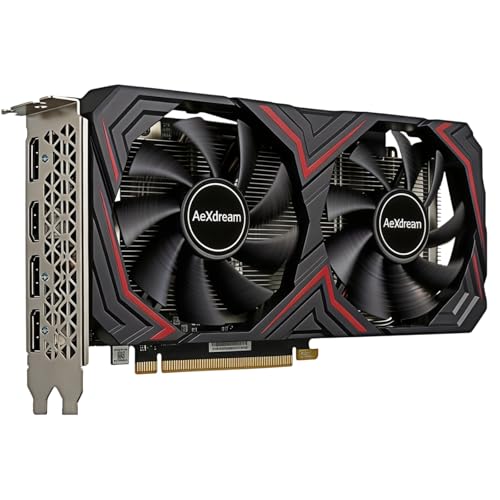

The best graphics card categories at a glance
| Category | Best for | Main advantage | Main compromise |
|---|---|---|---|
| Entry-level | 1080p esports and older games | Lowest price and power draw | Limited headroom for new releases |
| Midrange | 1080p high refresh or 1440p | Best balance for most gamers | May need reduced ray tracing or settings |
| Upper-midrange | 1440p high settings | Strong performance without flagship pricing | Can still struggle with 4K ray tracing |
| High-end | 4K, high refresh, creative workloads | Most performance and memory | Expensive, hot, and power-hungry |
Best for affordable 1080p gaming
An entry-level or lower-midrange card is enough for competitive games, indie titles, simulation games, and older AAA releases at 1080p. This is also the sensible choice if your monitor runs at 60Hz or 75Hz. There is little benefit in paying for hardware capable of hundreds of frames per second if the display cannot show them.
Look for a card with modern video encoders, hardware ray-tracing support, and enough VRAM for the games you actually play. A budget card with 8GB is generally a more comfortable starting point than one with less memory, but memory capacity is not the only measure of speed. A slower card with more VRAM can still perform worse than a faster model with less.
AMD often makes the strongest case in this price range when traditional rasterized performance matters most. NVIDIA can be preferable if you use ray tracing, rely on a specific upscaling feature, or want broad support for creator and productivity software. Intel is worth considering when its price is clearly lower, but check recent game benchmarks rather than assuming all titles perform equally well.
For a basic gaming upgrade, browse budget graphics cards for 1080p gaming. Confirm the card’s physical length and power connector before ordering.
Best for 1440p gaming
1440p is the sweet spot for many new gaming PCs. It looks substantially sharper than 1080p without demanding the same hardware as 4K. The midrange and upper-midrange categories offer the best balance here, especially if you want high settings and a frame rate above 60fps.
AMD cards are often attractive for games using conventional rasterization, where they can deliver strong frame rates for the money. NVIDIA cards tend to be the safer choice for buyers who care about ray tracing, frame-generation technologies, streaming tools, or software compatibility. Intel can offer good value, but driver maturity and game-specific behavior deserve more attention.
Do not judge a 1440p card only by average frame rate. Check one-percent-low results when available: these indicate how often performance dips during busy scenes. A card that averages 90fps but frequently stutters may feel worse than one averaging 80fps with steadier delivery.
Memory also matters more at this resolution. Newer games can exceed the comfortable limit of lower-memory cards when high-resolution textures are enabled. That does not mean you need the largest memory configuration available, but buying too little can force texture reductions sooner than expected.
Best for 4K and demanding visual settings
For 4K gaming, start with an upper-midrange or high-end card. If you want ray tracing, ultra-quality textures, and a high refresh rate at the same time, choose from the fastest current tier rather than expecting a cheaper card to catch up through settings tweaks.
Upscaling is normal at 4K. Technologies from AMD, Intel, and NVIDIA render internally at a lower resolution and reconstruct the image, reducing the workload. They can look very good, but quality varies by game and preset. Frame generation can make motion appear smoother, though it does not eliminate the input latency of the underlying rendered frame. It is a useful extra, not a substitute for adequate native performance.
High-end cards have practical costs beyond the purchase price. They may need a larger power supply, more case airflow, and several free expansion slots. They can also make a compact system noisy. Before buying, measure the case’s maximum GPU length with front fans or radiators installed, and check whether the power supply includes the required connector.
AMD, Intel, or NVIDIA?
AMD is usually the value-focused option for standard rendering. It suits buyers who want the highest conventional gaming performance for a fixed budget and do not place ray tracing at the top of the list.
NVIDIA is often the all-rounder for ray tracing, AI-assisted image features, streaming, and professional applications that use CUDA or other vendor-specific acceleration. The catch is price: you may pay more for those features even when traditional game performance is similar.
Intel is the wildcard. Its newer cards can be compelling at aggressive prices, particularly for modern games and media work. However, older games, unusual APIs, and poorly optimized titles can expose larger performance differences. Intel is best for a buyer willing to check benchmarks for their own library rather than choosing solely by specifications.
Common buying mistakes
Do not buy based on VRAM alone. Memory capacity helps only when the GPU core is fast enough to use it. Also avoid comparing cards using different quality presets, resolutions, or upscaling modes; those charts can make a weak card look competitive.
Check the rest of the system. A very fast graphics card paired with an old processor may show limited gains at 1080p, particularly in esports games. A weak power supply can cause crashes, black screens, or sudden shutdowns. If your current unit is old or lacks the required connectors, budget for a reputable gaming PC power supply rather than relying on adapters of questionable quality.
Finally, consider the monitor you own. If you are staying at 1080p and 60Hz, a midrange card may be unnecessary. If you already have a 1440p high-refresh display, spending a little more on a stable upper-midrange card can be worthwhile because it avoids an immediate second upgrade.
FAQ
Should I buy a graphics card with more VRAM?
More VRAM helps with high-resolution textures and demanding games, but it does not compensate for a weak GPU. Compare real game benchmarks at your target resolution before prioritizing memory capacity.
Is ray tracing worth paying extra for?
It is worthwhile if you play games that support it and care about lighting quality. If you mostly play competitive or older games, conventional rendering performance usually offers better value.
Can my power supply handle a new graphics card?
Check its wattage, age, efficiency, and available connectors against the card maker’s recommendation. Leave some headroom rather than running a power supply at its limit.
Is a used graphics card safe to buy?
It can be, if the seller offers a return period and you can test the card. Ask about mining use, repair history, temperatures, and coil noise. A small saving is not worth losing warranty coverage on an expensive card.



