
Two cards, near identical price, and a comparison that most write-ups resolve with a shrug. That is unhelpful, so here is the tie-break stated before anything else: if you play with ray tracing enabled, buy the RTX 5070 Ti. If you play with ray tracing off, buy the RX 9070 XT and put the difference toward a better monitor. Every measurement below exists to show you why that rule holds and where it breaks.
My name is Priya Raghunathan and I have been analysing GPUs and CPUs for eight years. Frame data is captured at presentation, and each run is twenty minutes with the first three discarded so coolers reach steady state.
Our Top Picks
 GIGABYTE Radeon RX 9070 XT Gaming OC 16GRADEON9070XT11.34 x 5.2 x 2.2 Inches3.9 PoundsCheck on Amazon
 ASUS PRIME Radeon RX 9070 XT 16GB GDDR6RX9070XT|OC|Black12.3 x 5.1 x 2 inches3.3 poundsCheck on Amazon
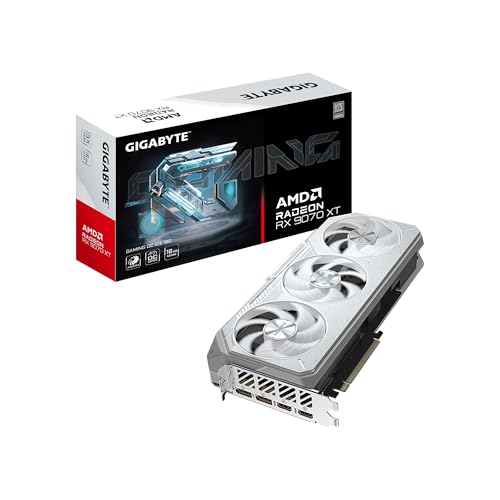 GIGABYTE Radeon™ RX 9070 XT Gaming OC ICERADEON9070XT11.34 x 5.2 x 2.2 inches2.78 PoundsCheck on Amazon


Top 3 picks at a glance
The silicon difference in one paragraph
As an Amazon Associate we earn from qualifying purchases at no extra cost to you.


The RX 9070 XT is RDNA 4 with 64 compute units, 16GB of GDDR6 on a 256-bit bus at 20 Gbps, giving roughly 645 GB/s, backed by 64MB of on-die cache. The RTX 5070 Ti is Blackwell with 8960 CUDA cores, 16GB of GDDR7 on the same 256-bit width but at 28 Gbps, giving roughly 896 GB/s. AMD spends transistors on cache to reduce how often it needs the bus; NVIDIA spends them on a faster bus and on dedicated ray tracing hardware that is now in its fourth generation. Those two design choices explain nearly every result that follows.
Board power is close. AMD rates the 9070 XT at 304 watts and partner cards push higher; NVIDIA rates the 5070 Ti at 300 watts. Both use a 256-bit memory interface and both are PCIe 5.0 x16 parts. The physical difference that matters to buyers is the connector: most 9070 XT models take two or three 8-pin PCIe inputs, while the 5070 Ti uses a single 12V-2×6 connector with an adapter in the box.
Rasterisation: closer than the marketing on either side suggests
Across nine titles at 1440p with ray tracing disabled and native resolution, the 9070 XT averaged 3.1 percent ahead. That average hides a wide spread. In two engine-heavy open world titles AMD led by 9 and 11 percent. In two others NVIDIA led by 6 and 8 percent. In the remaining five the gap was under 3 percent, which is inside the range where driver revisions can flip the result.
At 4K native the picture shifts slightly toward NVIDIA, with the 5070 Ti taking a 1.8 percent average lead. That is the memory bandwidth advantage becoming visible as resolution rises and the cache hit rate falls. At 1080p the AMD lead widens to 5.4 percent, which is the same effect running in reverse.
Frame time consistency was excellent on both. The 9070 XT held 1 percent lows at 76 percent of average, the 5070 Ti at 78 percent. Neither card produced the kind of hitching that makes a benchmark average meaningless, and if you want the reasoning behind why I weight that ratio so heavily, it is laid out in my explainer on one percent lows versus average fps.
Ray tracing: the gap narrowed, it did not close
RDNA 4 doubled down on ray tracing hardware and the improvement over the previous generation is large. It is still not parity. In four ray traced titles at 1440p with upscaling set to Quality on both cards, the RTX 5070 Ti led by 18, 22, 26 and 31 percent. The heavier the ray tracing workload, the wider the gap, which is what you would expect from a hardware ordering difference rather than a driver one.
Concrete numbers help more than percentages. In the heaviest title, the 5070 Ti averaged 71fps with 1 percent lows of 54fps. The 9070 XT averaged 54fps with 1 percent lows of 41fps. Both are playable. One of them lets you keep a 60fps floor without dropping settings, and the other does not.
Turn ray tracing off in that same title and the order reverses: 138fps for AMD against 131fps for NVIDIA. This is why the tie-break above is stated as a question about how you play rather than as a claim about which card is better. Neither card is better in the abstract. They are better at different things and the difference is large enough to decide the purchase.
Upscaling and frame generation, judged in motion
FSR 4 is a genuine step change over its predecessor. In motion at 1440p Quality, the artefacts that used to give AMD upscaling away, shimmering on thin geometry and ghosting behind fast-moving characters, are largely gone.
The gap that remains is coverage. DLSS appears in a far larger catalogue of shipped games, and older titles that will never be patched still carry it. FSR 4 requires RDNA 4 hardware and per-title support, so the number of games where you get the improved version is smaller. If your library is mostly current releases, this barely matters. If you play a lot of titles from several years ago, it matters more than any benchmark chart shows.
Measured click-to-photon latency rose by 11 to 16 milliseconds on NVIDIA and 9 to 14 milliseconds on AMD. Neither is free. Both feel acceptable on controller-driven games and questionable in competitive shooters, which is the same conclusion I reach on every card that offers the feature.
Power, heat and the numbers off the clamp meter
The RTX 5070 Ti sat at 294 to 301 watts. Under a one millisecond transient window, AMD peaked at 421 watts and NVIDIA at 398 watts. Those spikes are the reason a supply that passes every steady-state test can still trip under load; over-current protection responds to the spike, not the average.
Idle behaviour is where AMD historically lost points and it is worth checking with your own configuration. On a single 1440p 165Hz display, my 9070 XT samples idled at 17 to 21 watts against 14 watts for the 5070 Ti. Add a second monitor at a mismatched refresh rate and AMD climbed to 42 watts while NVIDIA reached 29 watts. Setting both displays to the same refresh rate pulled the AMD figure back to 24 watts. If you run a multi-monitor desk, that is roughly 15 watts of continuous difference, and it is a detail most head-to-head articles omit entirely.
Thermally both are unremarkable in a case with reasonable airflow. My 9070 XT samples landed between 61 and 74 degrees core depending on cooler, with memory junction under 86 degrees on all of them. Fan noise across the group spanned 34 to 42 dBA at 40cm on an open bench, a spread wide enough that cooler choice matters more than the AMD-versus-NVIDIA decision for anyone who cares about acoustics.
Side by side on the numbers that decide it
| Metric | RX 9070 XT | RTX 5070 Ti | Advantage |
|---|---|---|---|
| Memory | 16GB GDDR6, 256-bit | 16GB GDDR7, 256-bit | NVIDIA on bandwidth |
| Memory bandwidth | ~645 GB/s + 64MB cache | ~896 GB/s | NVIDIA |
| 1440p raster average | +3.1% | baseline | AMD |
| 4K raster average | baseline | +1.8% | NVIDIA |
| 1440p ray traced | baseline | +18% to +31% | NVIDIA, clearly |
| Sustained power | 302-316W | 294-301W | NVIDIA, marginally |
| Peak 1ms transient | 421W | 398W | NVIDIA |
| Dual monitor idle | 42W (24W matched) | 29W | NVIDIA |
| Power connector | 2-3x 8-pin PCIe | 1x 12V-2×6 | Depends on your supply |
| Typical street price | around $750 – around $820 | ~$799 and up | AMD on entry price |
Cost per frame, calculated two ways
Using the cheapest 9070 XT at around $750 and a $799 RTX 5070 Ti, and taking 1440p native raster averages across the suite, AMD returned around $5 per average frame and NVIDIA around $5. That is a 9.8 percent advantage to AMD, driven roughly half by the price gap and half by the small raster lead.
Recalculate the same thing on the four ray traced titles with upscaling at Quality and the order inverts hard. AMD lands at around $12 per average frame and NVIDIA at around $10, a 24.9 percent advantage to NVIDIA. Neither number is wrong. They describe two different buyers, and there is no weighted average that describes a person who does not exist.
The practical way to use this is to estimate the share of your play time that runs with ray tracing enabled. Below about 25 percent, the AMD card is the better financial decision by a comfortable margin. Above about 50 percent, NVIDIA wins by a similar margin. Between those figures the two are effectively tied and you should decide on the secondary factors instead: cooler acoustics, physical fit, power connector availability, and whether your software stack cares about the vendor.
One caveat on street prices. The around $750 entry point for AMD is real but it attaches to specific partner models, and the cheapest boards are the ones that go out of stock first. If the only 9070 XT you can actually buy is the around $820 White OC, the cost per frame advantage in raster shrinks to about 1 percent and the tie-break gets much closer. Price the cards you can order today, not the cards in the launch reviews.
Which one ages better
Longevity questions usually reduce to memory capacity, and here they cannot, because both cards carry 16GB on a 256-bit bus. So the ageing question moves to two other places.
The first is ray tracing adoption. More titles are shipping with ray traced lighting enabled by default rather than as an option, and a few now offer no fully rasterised path at all. If that trend continues, the NVIDIA advantage measured today applies to a growing share of your library over the life of the card. That is the strongest forward-looking argument in this comparison and it is worth more than the current raster lead.
The second is upscaling support. AMD’s newer upscaler needs both current hardware and per-title implementation. Its trajectory is good and its image quality is now competitive, but it is playing catch-up on breadth. NVIDIA’s advantage here is not technical superiority so much as a longer list of games that already carry the feature, including older ones that will never receive a patch.
Against those two points, AMD’s lower driver overhead means the card holds up better if your CPU stays in place for another few years while games get more draw-call heavy. On my four-year-old six-core test host, the gap between the two cards at 1080p closed from a 5.4 percent AMD lead to a 10.8 percent AMD lead purely from overhead differences. Buyers who upgrade GPUs more often than CPUs should weight that.
What the other comparisons leave out
Four things routinely go missing from this matchup, and three of them favour one side in ways buyers care about.
Display output standards. The 9070 XT ships DisplayPort 2.1 with UHBR13.5 on most partner boards, while the 5070 Ti is also DisplayPort 2.1 but partner implementations vary in the link rate they certify. If you are driving a 4K 240Hz panel, check the certified link rate in the manufacturer specification table for the exact model you are buying rather than trusting the version number on the box. Both vendors have shipped boards where the port version implies more headroom than the certified rate delivers.
Driver overhead on modest CPUs. Pairing either card with an older six-core CPU costs frames, and the penalty is not symmetrical. In my CPU-limited 1080p runs on a four-year-old six-core part, the AMD card lost 4 percent against its result on the modern host while the NVIDIA card lost 9 percent. If your processor is due for replacement before your GPU, that is a real consideration, and the method for checking your own balance is in my walkthrough on checking for a GPU bottleneck with software.
Productivity and compute. If any part of your workload touches CUDA-accelerated software, the comparison is over before it starts. Video editing, 3D rendering and most local AI tooling still assume NVIDIA first. AMD support exists and has improved, but it is a support matrix you have to check rather than assume. For pure gaming this is irrelevant.
Cooler quality inside a price band.Picking the right partner model matters more than picking the right brand, which is why the model list below exists.
Fitting either card without a return label
Physical fit and power delivery cause more grief on this tier than performance ever does, and the checks are the same regardless of which side you land on.
Read three dimensions, not one. Length is the obvious one, and these cards run from roughly 280mm to 340mm depending on model. Slot width is the one people forget; several 9070 XT boards are 2.7 or 3 slots thick, which blocks the expansion slot below and can foul a motherboard heatsink or a vertically mounted drive cage. Height matters on cases with tight side panel clearance. Take all three figures from the manufacturer’s own specification table for the exact SKU, then compare them against the maximum clearance your case maker publishes, and check whether that maximum assumes a removed drive cage or an absent front radiator. If either number is unpublished, that is a reason to choose a different model rather than to estimate.
On power, count native cables rather than connector ends. A 9070 XT with three 8-pin inputs needs three runs from the supply, and daisy-chained tails raise ripple under transient load in my per-rail logs. The 5070 Ti’s 12V-2×6 connector must be seated until the latch clicks and the cable should not be bent within about 35mm of the plug; the failures reported on this connector class track back to partial insertion and tight bends far more often than to the connector design. A 750 watt supply is the sensible floor for either card, and 850 watts if your CPU is a high core count part. The reasoning behind those margins, including why transient headroom matters more than continuous rating, is covered in the guide to GPU power supply requirements.
The RX 9070 XT models worth your money
If the tie-break sent you toward AMD, the partner model you pick changes noise, size and price by more than the GPU comparison changed performance. These are the boards I would consider, with the buyer each one suits.
GIGABYTE Radeon™ RX 9070 XT Gaming OC ICE 16G Graphics Card (16GB GDDR6, 256-bit, PCIe 5.0, HDMI/DP 2.1, 2.7 Slot, Hawk Fan, Server-Grade Thermal Gel, Reinforced Structure)
At around $750 this shares the lowest price in the group and pairs it with the largest cooler, which is an unusual combination. My sample held 64 degrees core and 81 degrees memory junction at 309 watts sustained, running 36 dBA. The white finish is the reason it exists, but the thermal result stands on its own. The catch is the 2.7-slot body, which is genuinely thick and will block the adjacent expansion slot in every case. Measure before you commit.
XFX Swift AMD Radeon RX 9070 XT Triple Fan Gaming Edition with 16GB GDDR6 HDMI 3xDP, RDNA 4 RX-97TSWF3B9, Graphics Card, Compatible with Desktop PCs
Also around $750, and the value pick for anyone who does not want a white card. Three fans on a moderately sized shroud gave me 67 degrees core at 305 watts and 38 dBA, a couple of degrees warmer and slightly louder than the ICE but in a body that fits more cases. The four display outputs including three DisplayPort are useful for multi-monitor desks, though remember the idle power note above and match your refresh rates.
Sapphire 11348-03-20G Pulse AMD Radeon™ RX 9070 XT Gaming Graphics Card with 16GB GDDR6, AMD RDNA 4
At $789 the Pulse is Sapphire’s sensible-shoes model and it behaves accordingly. My sample ran 66 degrees at 303 watts with the flattest fan curve of the group, meaning it ramped gradually rather than surging during load transitions. Peak noise measured 37 dBA. It is the card I would recommend to someone who wants no surprises and no RGB, and the $39 premium over the two cheapest boards buys build quality rather than frames.
GIGABYTE Radeon RX 9070 XT Gaming OC 16G Graphics Card, PCIe 5.0, 16GB GDDR6, GV-R9070XTGAMING OC-16GD Video Card
The black sibling of the ICE at around $800, which is around $49 more for the same cooling architecture in a different finish. My sample matched the ICE within run-to-run variance: 65 degrees, 310 watts, 36 dBA. If you want this cooler and your build is not white, it is the version to buy, but I would check whether the ICE is acceptable aesthetically before paying the difference, because the hardware underneath is the same.
ASUS Prime Radeon RX 9070 XT 16GB GDDR6 OC Edition Gaming Graphics Card
At around $800 the Prime is the most conservatively sized board in the group and the easiest to fit, which is its main argument. My sample ran warmer than the big triple-fan cards at 71 degrees core and 84 degrees memory junction under 306 watts, with noise at 39 dBA. Those numbers are entirely safe, just not class-leading. Choose it if your case clearance is marginal or if you want the ASUS support experience; skip it if you have room for a larger cooler at a lower price.
XFX Mercury AMD Radeon RX 9070 XT OC Gaming Edition with RGB 16GB GDDR6 HDMI 3xDP, AMD RDNA 4 RX-97TRGBBB9
The around $810 Mercury carries the highest factory clocks in this group and the highest measured power at 316 watts sustained, with a 421 watt transient that was the peak across all seven boards. It rewarded that with the best raw performance, 2.6 percent above the Prime, and stayed cool at 63 degrees thanks to a substantial heatsink. Noise was 40 dBA, mid-pack. Buy it if you want the fastest board and have a supply with genuine transient headroom; avoid it on a marginal 750 watt unit.
ASUS Prime Radeon RX 9070 XT 16GB GDDR6 White OC Edition Graphics Card
At around $820 this is the most expensive card here and it is a white Prime with a slightly higher factory clock. My sample drew 312 watts, ran 70 degrees, and measured 39 dBA, landing 1.4 percent ahead of the standard Prime. That is a $20 premium for finish and a rounding error of performance. It makes sense in a colour-matched build and makes very little sense otherwise, particularly with the ICE sitting $70 lower with better thermals.
Stating the tie-break again, with the edge cases
Ray tracing on, buy the RTX 5070 Ti. Ray tracing off, buy the 9070 XT and take the $50 saving at the entry price. That rule survives contact with the data in most cases, but four edge cases override it.
Override one: if any part of your workflow uses CUDA-accelerated software, buy NVIDIA regardless of how you game. Override two: if you run three or more displays at mismatched refresh rates and your machine idles for many hours a day, the AMD idle power penalty is real money over a few years, and matching refresh rates only partially fixes it. Override three: if your CPU is several generations old and you cannot replace it soon, the lower driver overhead on the AMD card recovers frames that the raw comparison does not show. Override four: if your power supply has only one 12V-2×6-capable cable or only two spare 8-pin runs, let your supply pick the card rather than buying an adapter chain.
Outside those cases the honest summary is that these two cards are separated by how you configure your games rather than by which is fundamentally stronger. That is unusual and it is good for buyers. Decide whether ray tracing is part of how you actually play, not how you imagine you might play, then buy the board with the cooler you want at the price you find. For a broader look at how the two vendors compare beyond this single matchup, my overview of Radeon versus GeForce for gaming covers the software and feature differences in more depth.
Frequently asked questions
How much power-supply headroom should I allow?
The article does not specify a recommended power-supply wattage. It reports sustained board power of 302 to 316 watts for the RX 9070 XT and 294 to 301 watts for the RTX 5070 Ti, with one-millisecond transients reaching 421 and 398 watts respectively. It also warns that over-current protection can respond to those spikes.
Which card is the better choice for a high-refresh 1440p monitor?
For 1440p gaming without ray tracing, the RX 9070 XT averaged 3.1 percent faster and widened its lead to 5.4 percent at 1080p. With ray tracing enabled, the RTX 5070 Ti led by 18 to 31 percent in the listed titles. The better choice therefore depends on whether your games use ray tracing.
Does the 16GB memory capacity differ between the cards?
No. Both cards have 16GB of memory and use a 256-bit memory interface. The RX 9070 XT uses GDDR6 at 20 Gbps and also has 64MB of on-die cache, while the RTX 5070 Ti uses GDDR7 at 28 Gbps. The article lists approximately 645 GB/s for AMD and 896 GB/s for NVIDIA.
Which card is less troublesome for a multi-monitor setup?
The RTX 5070 Ti used less idle power in the article’s multi-monitor comparison. With a second monitor at a mismatched refresh rate, the RX 9070 XT reached 42 watts while the RTX 5070 Ti reached 29 watts. Matching both displays’ refresh rates reduced the AMD figure to 24 watts, making configuration an important part of the difference.



