Our Short List of 3

- Best for: Editors cutting long-form projects who want the largest 4K canvas in this guide.
- 31.5-inch IPS Black panel, 3840 x 2160 resolution
- 60 Hz refresh rate, 5 ms gray-to-gray response
- 400 nits brightness, 2000:1 contrast ratio
- 100 percent sRGB, 100 percent Rec.709, 98 percent DCI-P3

- Best for: Editors who grade color for client delivery and need verified accuracy out of the box.
- 27-inch IPS panel, 3840 x 2160 resolution
- 4K HDR display, 178-degree wide-view IPS panel
- 99 percent DCI-P3, 99 percent Adobe RGB
- Color accuracy Delta E under 2, Calman Verified

- Best for: Laptop-first editors who want a simple single-cable 4K setup.
- 27-inch IPS panel, 3840 x 2160 resolution
- 4K UHD, 60 Hz refresh rate, 5 ms response
- DCI-P3 95 percent color gamut, DisplayHDR 400
- USB-C with 90W power delivery, DisplayPort, HDMI
All 4 Picks at a Glance
| Product | Specs | Action |
|---|---|---|
| Dell UltraSharp U3223QE |
| Check price on Amazon |
| ASUS ProArt Display PA279CRV |
| Check price on Amazon |
| LG UltraFine 27UP850K-W |
| Check price on Amazon |
 LG UltraGear 34GP83A-B |
| Check price on Amazon |
The real decision when buying a monitor for film editing is not which screen looks brightest in a shop demo. It is whether the picture you grade still matches the file your audience sees, and whether the timeline, preview, and scopes fit on screen at once. A panel that flatters every shot hides crushed shadows and clipped highlights, while a screen that is too small forces constant zooming through long sequences. Resolution, color coverage, HDR behavior, and connectivity decide the purchase more than refresh speed.
This guide is for editors cutting short films, documentaries, wedding videos, and online content, whether the work runs on a desktop workstation or a laptop. The five monitors below were picked from Amazon listings for color accuracy, resolution, HDR support, and editing-friendly connectivity, and every specification comes from the listing title or product details as the seller states it.
Our Top Picks
 ASUS ProArt PA279CRV 27 Inch 4K UHD USB-C27 Inch24.1 x 8.46 x 16.07 Inches18.25 poundsCheck on Amazon
Top 3 picks at a glance
Quick Picks
As an Amazon Associate we earn from qualifying purchases.
| Product | Best for | Key spec from title |
|---|---|---|
| Dell UltraSharp U3223QE | Long-form edits on a large 4K canvas | 31.5-inch 4K IPS Black, 98 percent DCI-P3, USB-C 90W |
| ASUS ProArt Display PA279CRV | Color grading for client delivery | 27-inch 4K IPS, 99 percent DCI-P3, 99 percent Adobe RGB, Calman Verified |
| BenQ PD2705U | Rec.709 editing with a KVM switch | 27-inch 4K IPS, 99 percent sRGB, 99 percent Rec.709, AQCOLOR |
| LG UltraFine 27UP850K-W | A simple single-cable laptop setup | 27-inch 4K IPS, 95 percent DCI-P3, DisplayHDR 400, USB-C 90W |
| LG UltraGear 34GP83A-B | One ultrawide screen for the whole timeline | 34-inch Nano IPS ultrawide, 3440 x 1440, 98 percent DCI-P3 |
How to Choose
Match the Panel to Your Delivery Format
Color coverage only means something when it names the standard your finished video is delivered in. Web and broadcast work lives in Rec.709, cinema and streaming masters lean on DCI-P3, and a monitor that covers 99 percent of one standard may cover far less of another. Look for the exact figure for your standard on the listing rather than a vague wide-gamut claim. A Delta E figure under 2 describes a deviation most eyes cannot spot, while factory calibration means the panel was measured before it left the factory. Check whether the listing mentions a calibration report in the box and whether the panel supports hardware calibration, because a screen that drifts needs a way back.
Pick Resolution and Size for the Timeline
Resolution decides how sharply you can judge focus and fine detail, and size decides how much of the timeline sits in front of you at once. A 27-inch 4K panel shows texture and small type clearly enough to judge focus, while a 32-inch 4K panel gives the same sharpness with larger interface elements and more room for tracks, bins, and scopes. An ultrawide screen stretches the timeline horizontally so long sequences need less scrolling, though its vertical height is lower than a 16:9 panel of the same diagonal. Match the choice to the projects you open daily: short social clips need less room than feature-length timelines with dozens of tracks.
Read the HDR Claim Before You Trust It
HDR support on a listing can mean very different things, and the label alone does not tell you how the picture will look. DisplayHDR 400 describes a modest brightness level that suits checking HDR content rather than mastering it, while HDR10 support signals the panel accepts HDR signals without guaranteeing the brightness or local dimming a finishing suite needs. Peak brightness matters here: a panel rated around 400 nits shows HDR material, but it will not reproduce the bright highlights of a true mastering display. For most editors, the honest use of HDR on these screens is previewing how a grade holds up, not final delivery mastering.
Check Ports, the Hub, and the Stand
An editing monitor often serves as the desk hub, so its ports decide how many cables and boxes the setup needs. A USB-C port that carries video, data, and laptop charging over one cable keeps a laptop edit bay tidy, and the wattage matters: a port delivering 90W or more covers most editing laptops, while a 65W port may fall short under load. A KVM switch lets one screen and keyboard move between a workstation and a laptop without replugging, and DisplayPort daisy-chaining adds a second screen for scopes or bins. Height, tilt, and pivot adjustment keep long sessions comfortable, so confirm the stand range on the listing before ordering.
The 5 Best Options
Dell UltraSharp U3223QE
- Best for: Editors cutting long-form projects who want the largest 4K canvas in this guide.
- 31.5-inch IPS Black panel, 3840 x 2160 resolution
- 60 Hz refresh rate, 5 ms gray-to-gray response
- 400 nits brightness, 2000:1 contrast ratio
- 100 percent sRGB, 100 percent Rec.709, 98 percent DCI-P3
Editors cutting long-form projects who want the largest 4K canvas in this guide.
Confirm it is still sold before buying. Measure the desk first, since a 31.5-inch screen needs more width and depth than a 27-inch panel.
The U3223QE gives a long timeline the room it needs, stretching 4K resolution across a 31.5-inch IPS Black panel whose 2000:1 contrast ratio keeps shadow detail readable while grading. Its gamut coverage spans 100 percent sRGB and Rec.709 with 98 percent DCI-P3, and the listing states a Delta E under 2 with DisplayHDR 400, so grades judged on this screen translate well to streaming delivery. The USB-C hub carries video, data, and 90W charging over one cable, joined by DisplayPort with daisy-chaining, HDMI, Ethernet, and a USB hub. Choose it when the edit itself is the constraint and the desk has room for a screen that stays put.
Watch out for: Confirm it is still sold before buying. Measure the desk first, since a 31.5-inch screen needs more width and depth than a 27-inch panel.
ASUS ProArt Display PA279CRV
- Best for: Editors who grade color for client delivery and need verified accuracy out of the box.
- 27-inch IPS panel, 3840 x 2160 resolution
- 4K HDR display, 178-degree wide-view IPS panel
- 99 percent DCI-P3, 99 percent Adobe RGB
- Color accuracy Delta E under 2, Calman Verified
Editors who grade color for client delivery and need verified accuracy out of the box.
Confirm it is still sold before buying. The panel is tuned for color work rather than fast motion, so confirm the refresh rate suits any gaming you also plan on it.
The PA279CRV is the grading-first pick, built around a 27-inch 4K IPS panel that claims 99 percent DCI-P3 and 99 percent Adobe RGB coverage with a Delta E under 2. The listing states Calman verification and factory calibration, which matters when a grade leaves your desk for a client screen or a festival projection. A USB-C port with 96W power delivery charges a laptop over the same cable that carries the picture, and DisplayPort daisy-chaining adds a second screen for scopes or a bin panel. This is the monitor to choose when color decisions carry the project and the screen itself takes part in the delivery.
Watch out for: Confirm it is still sold before buying. The panel is tuned for color work rather than fast motion, so confirm the refresh rate suits any gaming you also plan on it.
BenQ PD2705U
The PD2705U earns its place through editing-focused modes: Animation Mode adjusts the picture for frame-by-frame work, and the listing states factory calibration with a report included. Its 27-inch 4K IPS panel claims 99 percent sRGB and 99 percent Rec.709 coverage with a Delta E of 3 or under, which suits web and broadcast delivery where Rec.709 is the target. HDR10 support and AQCOLOR technology round out the picture side, while a Hotkey Puck and KVM switch move between a workstation and a laptop without menu diving. Pick it when the edit bay runs two machines and Rec.709 accuracy is the daily requirement.
Specs
- 27-inch IPS panel, 3840 x 2160 resolution
- 99 percent sRGB, 99 percent Rec.709
- Delta E of 3 or under, factory calibrated
- HDR10 support, AQCOLOR technology
- USB-C with 65W power delivery, DisplayPort, HDMI, KVM
- Hotkey Puck G2, CAD/CAM Mode, Darkroom Mode, Animation Mode
Best for: Editors delivering in Rec.709 who switch between a workstation and a laptop.
Watch out for: Confirm it is still sold before buying. The 65W USB-C charging is lower than some rivals, so check it against your laptop’s draw.
LG UltraFine 27UP850K-W
- Best for: Laptop-first editors who want a simple single-cable 4K setup.
- 27-inch IPS panel, 3840 x 2160 resolution
- 4K UHD, 60 Hz refresh rate, 5 ms response
- DCI-P3 95 percent color gamut, DisplayHDR 400
- USB-C with 90W power delivery, DisplayPort, HDMI
Laptop-first editors who want a simple single-cable 4K setup.
Confirm it is still sold before buying. Its color coverage is narrower than the ProArt and BenQ picks, so it suits cutting and preview checks more than color-critical grading.
The 27UP850K-W suits an editor who works from a laptop and wants the desk to stay simple. Its 27-inch 4K IPS panel gives footage a sharp canvas, while a USB-C port carries video, data, and up to 90W of charging to the laptop at the same time. DisplayHDR 400 support and 95 percent DCI-P3 coverage cover HDR preview work, and built-in speakers handle reference audio and video calls without extra hardware on the desk. The height, tilt, and pivot stand adjusts to a comfortable cutting position. For a small desk where every cable and gadget competes for space, this is the practical, uncluttered choice.
Watch out for: Confirm it is still sold before buying. Its color coverage is narrower than the ProArt and BenQ picks, so it suits cutting and preview checks more than color-critical grading.
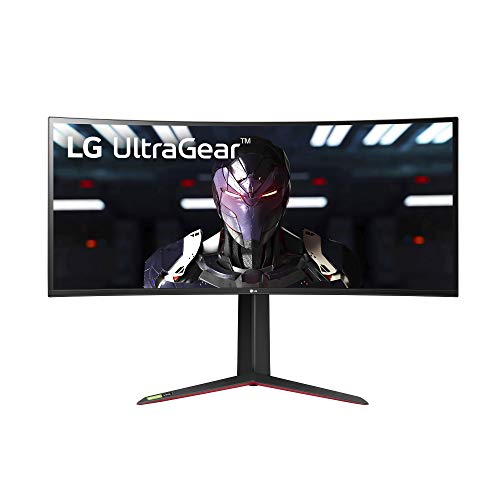
LG UltraGear 34GP83A-B
- Best for: Editors who want the whole timeline visible on one ultrawide screen.
- 34-inch Nano IPS curved panel
- 3440 x 1440 resolution
- 144 Hz refresh rate (160 Hz overclock)
- 1900R curvature
Editors who want the whole timeline visible on one ultrawide screen.
Confirm it is still sold before buying. The HDMI 2.0 ports cap at 85 Hz at full resolution, so use DisplayPort for the full refresh rate.
The 34GP83A-B trades vertical height for timeline width, putting a 3440 x 1440 Nano IPS panel before the editor so long sequences stretch out with less scrolling. Its 98 percent DCI-P3 coverage keeps grades in the same wide-gamut family as the 4K picks, and the Nano IPS panel renders small timeline text sharply. Because it is IPS rather than OLED, static toolbars, bins, and scopes carry no image retention risk over long sessions. The 144 Hz refresh rate with a 160 Hz overclock is a bonus for smooth scrubbing rather than the reason to buy it. Choose it when one wide screen should replace two monitors on the desk.
Watch out for: Confirm it is still sold before buying. The HDMI 2.0 ports cap at 85 Hz at full resolution, so use DisplayPort for the full refresh rate.
Which One Fits Your Situation
You Cut Long-Form Projects on a Desktop
Pick the Dell U3223QE. The 31.5-inch 4K canvas holds a long timeline, preview, and scopes side by side without constant zooming, and the IPS Black contrast keeps shadow detail visible while grading. Its USB-C hub, Ethernet, and KVM also suit a desktop that doubles as the household workstation, so one screen anchors the whole edit bay.
You Grade Color and Deliver to Clients
Pick the ASUS PA279CRV. The 99 percent DCI-P3 coverage, Delta E under 2, and Calman verification give grades a solid basis for client delivery, and the 96W USB-C port keeps a grading laptop charged over a single cable. It is the safest choice in this guide when the finished color is judged by someone else.
You Edit From a Laptop in a Small Space
Pick the LG 27UP850K-W. One USB-C cable carries the picture, data, and up to 90W of charging, so the desk stays clear of docks and adapters. The built-in speakers cover reference audio, and the adjustable stand fits a cramped desk where a larger panel would crowd the keyboard and drives.
You Want One Wide Screen Instead of Two
Pick the LG 34GP83A-B. The 3440-pixel-wide panel stretches the timeline across the desk so long sequences need far less scrolling, and the 98 percent DCI-P3 Nano IPS panel keeps color work honest. It replaces a dual-monitor setup without the bezel gap in the middle of the timeline, and the curved panel keeps the far ends of the timeline within easy view.
Common Mistakes
- Buying on brightness alone: a vivid showroom picture can hide crushed shadows that only show up in the graded export.
- Ignoring the delivery standard: a monitor strong in Adobe RGB may still be weak in Rec.709, which is what most video actually ships in.
- Trusting an HDR label without checking brightness: DisplayHDR 400 suits previewing, not finishing HDR masters.
- Picking a screen too small for the timeline: a compact panel forces constant zooming and scrolling through long sequences.
- Forgetting USB-C wattage: a 65W port may not keep a powerful editing laptop charged under load, even though the picture works fine.
Frequently Asked Questions
Is 4K necessary for film editing?
4K is not strictly required, since many editors cut 1080p timelines on lower-resolution screens. It helps when you judge focus, fine detail, and text sharpness, and when you preview 4K footage at full resolution without scaling. A 27-inch or 32-inch 4K panel gives that sharpness with room for the timeline, bins, and scopes, so it is worth choosing when the desk and the editing machine can support it.
Which color gamut matters most for video editing?
Rec.709 matters most for web and broadcast delivery, since it is the standard those audiences watch in. DCI-P3 matters when the work heads for cinema screens or streaming masters graded in a wider gamut. Look for the listing to state the exact coverage figure for your delivery standard, and treat a vague wide-gamut claim without numbers as a warning sign rather than a feature.
Can one monitor handle both editing and color grading?
Yes, when the panel covers the delivery gamut and holds a low Delta E after factory calibration. The ProArt and BenQ picks in this guide are built for that dual role, pairing 4K resolution with stated gamut figures and calibration claims. A dedicated grading display still wins for final mastering, but a good editing monitor covers cutting and grading for most independent projects.
Does refresh rate matter for film editing?
Refresh rate matters far less for editing than resolution, color coverage, and connectivity. Most footage plays at 24, 25, or 30 frames per second, so a 60 Hz panel shows it without issue. A higher refresh rate makes timeline scrubbing and interface motion feel smoother, which is pleasant but not essential, so do not pay for gaming speed when color accuracy is the real requirement.
Related guides
More from Amazon
Programs that pair well with the guide above. Offers and eligibility are set by Amazon and may change.
A free business account with business pricing and bulk-buying tools for work, shop or home office.
Create a business accountFree shipping on eligible items, Prime Video and more. Eligible new members can start with a free trial.
Start a Prime free trialAudiobooks and podcasts to listen to on the go. Eligible new members can start with a free trial.
Try Audible freeAd-free music streaming. Eligible new subscribers can start with a free trial.
Try Music Unlimited freeAs an Amazon Associate we earn from qualifying purchases.