Our Short List of 3

- Best for: All-day work calls on a tight budget.
- USB-A connection, plug and play
- Noise-cancelling microphone with in-line controls
- Padded headband and ear cushions
- Laser-tuned drivers for clear voice audio

- Best for: Staying aware of your surroundings while you work.
- Mono USB-A headset with 3.5mm jack
- Noise-cancelling microphone
- Dynamic EQ for calls and music
- Lightweight design for long wear
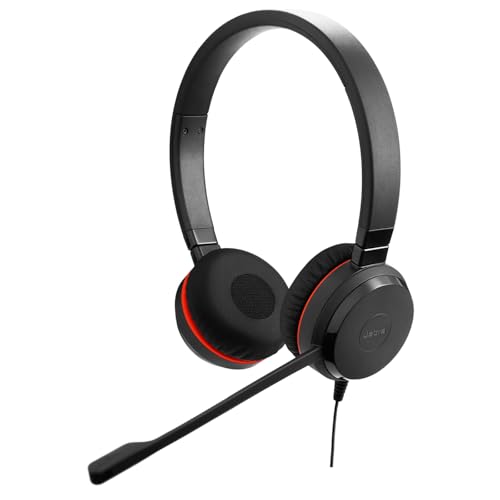
- Best for: Clear calls in a noisy home.
- Dual-ear USB headset with 3.5mm jack
- Noise-cancelling microphone
- In-line call controls for volume, mute and answer
- Certified for major meeting platforms
All 4 Picks at a Glance
| Product | Specs | Action |
|---|---|---|
| Logitech H390 |
| Check price on Amazon |
| Poly Blackwire C3210 |
| Check price on Amazon |
| Jabra Evolve 30 II |
| Check price on Amazon |
 Logitech Zone Wired 2 |
| Check price on Amazon |
A wired headset is the simplest way to sound professional on work calls, and the real decision is how much comfort and call quality you need for a full day of meetings. A cheap headset with a weak microphone makes you repeat yourself on every call, while a well-built office headset keeps your voice clear and your ears comfortable through back-to-back meetings. Wired models also skip the charging and pairing chores that wireless headsets add to a workday.
This guide is for remote workers, customer support staff, and anyone whose job runs on video calls from a home desk. Each pick was chosen from the names and specs on its Amazon page, with microphone design, connection type, weight and platform compatibility checked against the listing. The four picks below cover budget USB headsets and certified office models, so you can match the headset to the number of calls you take each day.
Our Top Picks
Top 3 picks at a glance
Quick Picks
As an Amazon Associate we earn from qualifying purchases
| Product | Best for | Key spec from title |
|---|---|---|
| Logitech H390 | All-day calls on a budget | USB headset with noise-cancelling mic |
| Poly Blackwire C3210 | Staying aware of your surroundings | Mono USB headset with one earcup |
| Jabra Evolve 30 II | Clear calls in a noisy home | Dual-ear USB headset with noise-cancelling mic |
| Logitech Zone Wired 2 | Certified calls on modern laptops | USB-C headset with noise-cancelling mics |
How to Choose
Microphone quality and noise cancelling
Microphone quality decides whether colleagues hear you clearly or ask you to repeat yourself, so it deserves the most attention. A noise-cancelling microphone filters out keyboard clicks, children and household noise, which matters more at home than in an office. A boom microphone that sits close to your mouth picks up your voice far better than a microphone built into an earcup. Check whether the listing mentions a noise-cancelling design and whether the microphone mutes when you flip the boom up, since that gesture saves fumbling for a mute button mid-call. Test the microphone on a real call before the return window closes.
Wearing style and all-day comfort
Wearing style decides how a headset feels after four hours of calls, and the wrong shape becomes a distraction by mid-afternoon. A dual-ear headset blocks household noise and keeps you focused, while a mono headset leaves one ear open so you can hear a doorbell or a colleague in the room. Weight matters more than looks: a headset under 150 grams stays comfortable far longer than a heavy gaming model. Padded ear cushions and an adjustable headband spread the pressure, so check the listed weight before you buy. Check the clamping force too, since a tight headset presses on glasses and causes headaches during long meetings.
Connection type and platform compatibility
Connection type decides whether the headset works with your computer without adapters. A USB-A headset suits a desktop or an older laptop, while a USB-C headset suits a modern laptop with no USB-A ports. Some headsets also include a 3.5mm jack, which adds a phone as a second device. Check the listing for certification with your meeting platform, since a Teams or Zoom certified headset answers calls with its own button and shows your mute status clearly. Cable length matters as well: a short cable forces the computer close to your chair, while a long cable tangles under the desk.
Inline controls and mute reliability
Inline controls are the small details that save a call when something goes wrong, and they deserve a close look. A physical mute button you can find by touch beats an on-screen control when you need to cough or answer a door. Volume controls on the cable let you adjust without opening an app, and a busy light on the earcup warns family that you are on a call. Test the mute switch when the headset arrives, since a switch that is hard to find is a switch you will not use. A call-answer button on the cable lets you join a meeting without reaching for the mouse.
The 4 Best Options
Logitech H390
- Best for: All-day work calls on a tight budget.
- USB-A connection, plug and play
- Noise-cancelling microphone with in-line controls
- Padded headband and ear cushions
- Laser-tuned drivers for clear voice audio
All-day work calls on a tight budget.
The USB-A plug needs an adapter on laptops with USB-C ports only.
This headset suits remote workers who want reliable call quality without spending much. The USB connection works with a desktop or laptop with no drivers to install, and the noise-cancelling microphone keeps your voice clear while filtering out background noise from the room. In-line controls on the cable put volume and mute within easy reach, and the padded headband and ear cushions stay comfortable through a long run of meetings. The sound is tuned for voice rather than music, so calls come through clearly even if the bass is modest. Replacement ear cushions are easy to find when the originals wear out.
Poly Blackwire C3210
- Best for: Staying aware of your surroundings while you work.
- Mono USB-A headset with 3.5mm jack
- Noise-cancelling microphone
- Dynamic EQ for calls and music
- Lightweight design for long wear
Staying aware of your surroundings while you work.
One earcup means less noise isolation in a loud household.
This headset suits workers who need to hear the room as well as the call. The mono design covers one ear and leaves the other open, so a doorbell, a child or a colleague in the room still reaches you. The noise-cancelling microphone keeps your voice clear, and the headset works through USB-A with a 3.5mm jack for a phone as well. It is light enough to wear for hours, and the dynamic EQ adjusts the sound between calls and music automatically. The single earcup also suits people who find dual-ear headsets isolating during a long workday. The mono design suits shared desks, since one ear stays free.
Jabra Evolve 30 II
- Best for: Clear calls in a noisy home.
- Dual-ear USB headset with 3.5mm jack
- Noise-cancelling microphone
- In-line call controls for volume, mute and answer
- Certified for major meeting platforms
Clear calls in a noisy home.
The dual-ear design blocks household sounds you may need to hear.
This headset suits workers in noisy homes who need their voice to cut through the background. The dual-ear design blocks household noise, and the noise-cancelling microphone keeps your voice clear even with a television or children nearby. It connects through USB and a 3.5mm jack, so it works with a computer and a phone, and the in-line call controls handle volume, mute and answering without opening an app. The headset is certified for the major meeting platforms, which means call controls work the way the platform expects. The headset works with softphones as well as meeting apps, which suits support staff who take calls through a browser.
Logitech Zone Wired 2
- Best for: Certified calls on modern laptops.
- USB-C connection
- Dual noise-cancelling microphones with beamforming
- Microsoft Teams and Zoom certified
- Lightweight foldable design
Certified calls on modern laptops.
The USB-C plug needs an adapter on older computers with USB-A ports only.
This headset suits professionals who work from modern laptops and want certified call quality. The USB-C connection fits laptops with no USB-A ports, and the dual noise-cancelling microphones use beamforming to focus on your voice while filtering out room noise. It is certified for Microsoft Teams and Zoom, so the call button and mute status work directly with those platforms. The lightweight frame and soft ear cushions suit long meeting days, and the foldable design packs flat into a bag when you move between rooms or offices. The foldable design suits hybrid workers who move between home and office during the week.
Which One Fits Your Situation
You take calls all day and want the cheapest reliable option
Pick the Logitech H390. Its USB connection works with no setup, the noise-cancelling microphone keeps your voice clear, and the in-line controls put mute within reach. It is the lightest pick on your budget, and its padded design stays comfortable through a full day of meetings without asking much of your wallet. It is the simplest pick here, with no software to install and nothing to charge.
You need to hear the room while you work
Pick the Poly Blackwire C3210. Its mono design leaves one ear open for a doorbell, a child or a colleague, while the noise-cancelling microphone keeps your side of the call clear. The 3.5mm jack adds a phone as a second device, which suits workers who take calls on two devices during the day. Parents and receptionists get the most from the mono design, since one ear always stays open.
Your home is noisy and your calls matter
Pick the Jabra Evolve 30 II. Its dual-ear design blocks household noise, and the noise-cancelling microphone keeps your voice clear even with background sound. The in-line controls handle mute and volume without opening an app, and platform certification means the call button works the way your meeting software expects. The dual-ear seal and noise-cancelling microphone do the heavy lifting, even with children playing nearby.
You work from a modern laptop and want certified quality
Pick the Logitech Zone Wired 2. Its USB-C connection fits current laptops directly, the beamforming microphones focus on your voice, and Teams and Zoom certification means mute status and call controls work properly. The foldable frame also packs away neatly when the workday ends. The USB-C plug fits the laptop directly, with no dongle to lose, and the foldable frame packs away when the day ends.
Common Mistakes
- Buying a gaming headset for work and getting a microphone tuned for game chat rather than calls.
- Ignoring the connector and discovering your headset needs an adapter on your laptop.
- Choosing a heavy headset that hurts after two hours of back-to-back meetings.
- Skipping the mute test and finding the switch too fiddly to use mid-call.
- Picking a dual-ear headset when your job needs you to hear the room.
Frequently Asked Questions
Are wired headsets better than wireless for work calls?
Yes, wired headsets are usually better for work calls because they never run out of battery mid-meeting and never drop a Bluetooth connection at the wrong moment. A wired connection also has no pairing step, so you plug in and join the call. Wireless suits people who pace while they talk, but wired is the more reliable choice for a desk.
Do I need a noise-cancelling microphone?
You need a noise-cancelling microphone if your home has background sound such as children, pets, traffic or a television, since it filters that noise from your voice. In a quiet room a standard microphone is enough, but the noise-cancelling design costs little extra and saves your colleagues from hearing your household. It is worth having even in a quiet home.
What is the difference between mono and stereo headsets?
A mono headset covers one ear and leaves the other open, which suits workers who need to hear their surroundings. A stereo headset covers both ears, which blocks household noise and helps you focus on the call. Mono is better for reception-style work and parents, while stereo is better for noisy homes and long stretches of focused calls.
Will a USB headset work with my meeting software?
Yes, a USB headset works with Zoom, Teams, Google Meet and other meeting software because the computer treats it as a standard audio device. Certified headsets add call buttons and mute status that sync with the software, which is convenient but not required. Check the listing for certification with your platform if you want those extra controls to work.
Related guides
More from Amazon
Programs that pair well with the guide above. Offers and eligibility are set by Amazon and may change.
A free business account with business pricing and bulk-buying tools for work, shop or home office.
Create a business accountFree shipping on eligible items, Prime Video and more. Eligible new members can start with a free trial.
Start a Prime free trialAudiobooks and podcasts to listen to on the go. Eligible new members can start with a free trial.
Try Audible freeAd-free music streaming. Eligible new subscribers can start with a free trial.
Try Music Unlimited freeAs an Amazon Associate we earn from qualifying purchases.