Our Short List of 3
All 4 Picks at a Glance
| Product | Specs | Action |
|---|---|---|
 Jabra Evolve2 30 SE Stereo USB-C — Best Overall for Phone Calls | Check price on Amazon | |
 Jabra Evolve 20 MS Stereo — Best Dual-Connection Pick | Check price on Amazon | |
 Poly Blackwire 3210 — Best Mono Headset for All-Day Calls | Check price on Amazon | |
 Logitech H390 — Best Simple and Affordable Pick | Check price on Amazon |
Finding the best wired headsets for phone calls is mostly about the microphone. A headset can sound wonderful to the wearer and still be a poor choice for calls if the person on the other end hears muffled speech, room noise, and echo. The picks in this guide are all wired headsets with boom microphones built for voice, and each one was chosen because it keeps your voice clear and intelligible through long conversations, whether you are taking work calls, joining conference lines, or talking for hours on a personal call.
Wired headsets have a few plain advantages for phone calls. There is no battery to charge and no wireless connection to drop mid-sentence, the microphone sits at a fixed distance from your mouth so your volume stays consistent, and a wired connection avoids the delay that can make wireless headsets feel slightly out of sync on a call. The trade-off is the cable itself, so the guide below pays attention to cable length, connector type, and how each headset connects to a phone, because a headset that only plugs into a computer is not much use when your calls happen on a mobile.
Our Top Picks
Top 3 picks at a glance
How to Choose
1. Microphone Clarity
Microphone clarity decides whether a headset works for phone calls at all. Look for a boom microphone that sits close to the corner of your mouth, and for noise-cancelling microphone technology that reduces background sound before it reaches the caller. A microphone that picks up every keyboard click, passing car, and humming fan will frustrate the people you talk to, even if you cannot hear the problem yourself. Headsets built for office and call-centre use tend to do this well, because their microphones are designed for speech first and music second.
2. Connector Type
The connector determines which phones the headset works with, so check it before anything else. A 3.5mm jack plugs straight into phones that still have a headphone socket, and into many laptops and tablets. A USB-C headset connects directly to modern Android phones and recent iPhones with a USB-C port, and it carries its own digital audio, which can mean cleaner sound. A USB-A headset is built for computers, and it needs an adapter to connect to a phone at all. Before you buy, look at the port on the phone you actually use for calls and match the headset to it.
3. Mono or Stereo
A mono headset covers one ear and leaves the other open, which suits people who need to hear the room around them, such as receptionists, support agents, and anyone who takes calls while colleagues talk nearby. A stereo headset covers both ears and blocks more outside sound, which helps concentration on long calls and sounds better for music between calls. Neither is better in general; the choice depends on whether you need to stay aware of your surroundings or shut them out.
4. Comfort for Long Calls
A headset for phone calls may sit on your head for hours, so comfort is a working requirement rather than a luxury. Lightweight designs with soft foam or leather-feel ear cushions cause less fatigue than heavy models, and a padded headband spreads the weight across the top of your head. On-ear cushions press directly on the ear and can become uncomfortable after an hour or two, while over-ear cushions distribute pressure around the ear. If you take calls all day, try to choose a headset that weighs as little as possible while still feeling sturdy.
5. Inline Call Controls
Inline controls let you answer and end calls, mute the microphone, and adjust the volume without touching the phone or the computer. A mute button you can find by touch is especially useful, because it lets you cough, confer with someone nearby, or take a sip of water without fumbling for a screen. Check whether the controls work with your phone as well as with a computer, since some headsets only support call control through a USB connection to a computer.
6. Durability and Cable Quality
A wired headset lives or dies by its cable, so look for a cable that feels robust where it meets the earcup and the connector, since those are the points that fail first. A headset built for daily office use is usually reinforced at those stress points, and its headband and hinges are designed to survive being put on and taken off many times a day. A longer cable gives you room to move around your desk while talking, while a cable that is too long can tangle and catch on chair arms and desk edges.
7. Compatibility With Your Calling Apps
Most wired headsets work as a standard audio device with any calling app, but some carry certifications for specific platforms such as Microsoft Teams or Zoom, which means their call controls and mute behaviour have been checked against those apps. If your calls happen mainly in one app, a certified headset removes a layer of guesswork. If you switch between a phone dialler, a softphone, and a video meeting app, a headset that works as a plain wired audio device is the safer choice, because it does not depend on any one platform.
Top Picks
Jabra Evolve2 30 SE Stereo USB-C — Best Overall for Phone Calls
The Jabra Evolve2 30 SE Stereo USB-C is the most phone-friendly headset in this guide, and the reason is simple: its USB-C connector plugs directly into modern Android phones and recent iPhones with a USB-C port, with no adapter in between. It is a wired stereo headset with a boom microphone and two-microphone call technology, which uses a second microphone to separate your voice from background noise. It is certified for Microsoft Teams and works with other calling platforms as well, so the same headset covers work calls on a computer and phone calls on a mobile.
The headset is light, at around four and a half ounces, with soft on-ear cushions and a padded headband that stays comfortable through long conversations. The stereo design covers both ears, which helps you focus on the caller and hear them clearly in a noisy room. An inline control unit on the cable handles answering and ending calls, muting, and volume, so you can manage a call without reaching for the phone.
This headset is for the caller whose phone has a USB-C port and who wants one headset for both mobile calls and computer meetings. Its main caveat is the connector: if your phone uses a different port, or you need a 3.5mm jack for an older device, this version will not connect without an adapter. The on-ear cushions are comfortable but can press on the ears during very long sessions, so listeners who wear a headset all day may prefer a model with larger over-ear cushions.
Jabra Evolve 20 MS Stereo — Best Dual-Connection Pick
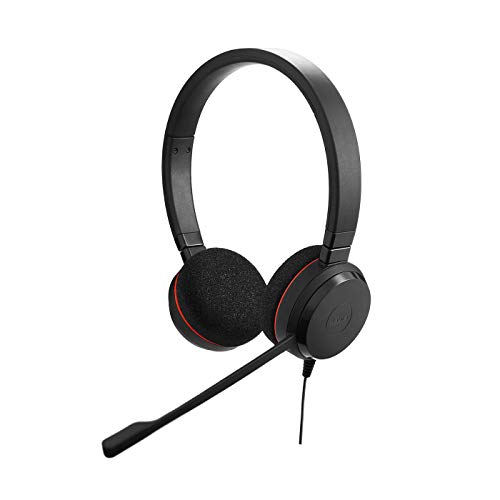
The Jabra Evolve 20 MS Stereo is the flexible pick in this guide because it connects in two ways: through USB to a computer, or through a 3.5mm jack to a phone, tablet, or other personal device. That dual connection makes it the easiest headset here to move between a desk setup and a mobile phone, since the 3.5mm jack plugs straight into any phone that still has a headphone socket. It is a stereo headset with a boom microphone, passive noise cancellation from its cushioned earcups, and an inline call control unit for answering, ending, and muting calls.
The microphone is tuned for voice calls, with a flexible boom that positions it near the mouth, and the headset is certified for Microsoft Teams, which means its call behaviour has been checked against that platform. The ear cushions use a leather-feel material that seals gently around the ear, and the headset is light enough for extended wear. The cable is long enough to reach from a desk to a comfortable seating position without pulling.
This headset is for the caller who switches between a computer and a phone and wants one headset for both without carrying adapters. Its main caveat is the connector situation: the 3.5mm connection works with phones that have a headphone socket, but phones without one need a USB-C to 3.5mm adapter, which is an extra part to keep track of. Some listings also describe this model as USB-only, so confirm the 3.5mm jack is included in the version you order before buying for phone use.
Poly Blackwire 3210 — Best Mono Headset for All-Day Calls
The Poly Blackwire 3210 is a mono headset, which means it covers one ear and leaves the other free, and that single design choice makes it the best pick here for people who take calls all day in a shared space. You can hear the caller clearly in one ear while still hearing a colleague, a doorbell, or a customer in the room with the other, which is exactly what receptionists, support staff, and dispatchers need. It has a noise-cancelling boom microphone that focuses on your voice and cuts down background sound, and an inline control module with buttons for answering and ending calls, muting, and volume.
The headset is light and built for constant use, with a comfortable foam ear cushion and a headband that stays put without pressing hard. It connects through USB-A, which makes it a natural fit for a desktop computer or laptop, and it works with the major calling and meeting platforms. The boom microphone rotates, so the headset can be worn on either side, and the cable is long enough for a normal desk setup.
This headset is for the caller who spends most of the day on the phone and needs to stay aware of the room. Its main caveat is the USB-A connector: it plugs into a computer, not directly into a phone, so using it for mobile calls requires a USB-C adapter, and call control through the inline buttons may not work the same way on a phone as it does on a computer. If your calls happen mainly on a mobile, one of the USB-C or 3.5mm picks in this guide is a better fit.
Logitech H390 — Best Simple and Affordable Pick
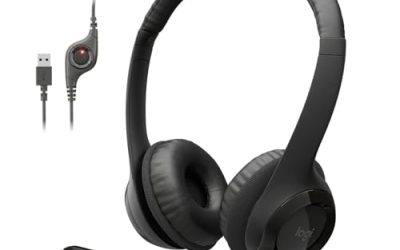
The Logitech H390 is the simplest headset in this guide, and that simplicity is its strength. It is a wired stereo USB-A headset with a noise-cancelling boom microphone, inline volume and mute controls, and a plug-and-play connection that needs no software and no charging. You plug it in, it works, and the rotating boom microphone can be worn on either side. The earcups are padded, the headband is adjustable, and the cable is long enough to reach comfortably from a desktop or laptop.
The microphone is the part that earns this headset its place here. Its noise-cancelling design reduces background hum and room noise, so the caller hears your voice rather than your surroundings, and the microphone rotates out of the way when you are not on a call. The stereo earcups give you clear audio in both ears, which helps on long calls and sounds pleasant for music between calls. It works with the common calling and meeting apps as a standard USB audio device.
This headset is for the caller who wants a dependable wired headset for phone and computer calls without spending much or learning new software. Its main caveat is the same as the Blackwire above: the USB-A connector is built for computers, so connecting it to a phone requires an adapter, and the inline mute and volume controls are designed for computer use. It is also a basic design, with no platform certification and no advanced noise processing, so callers in very noisy rooms may get better results from one of the Jabra or Poly picks.
Comparison Table
| Headset | Ear Coverage | Connector | Microphone | Call Controls |
|---|---|---|---|---|
| Jabra Evolve2 30 SE Stereo USB-C | Stereo, on-ear | USB-C | Boom, two-microphone call technology | Inline answer, end, mute, volume |
| Jabra Evolve 20 MS Stereo | Stereo, on-ear | USB and 3.5mm jack | Boom, voice-tuned | Inline answer, end, mute |
| Poly Blackwire 3210 | Mono, on-ear | USB-A | Boom, noise-cancelling | Inline answer, end, mute, volume |
| Logitech H390 | Stereo, on-ear | USB-A | Boom, noise-cancelling | Inline mute and volume |
Which One Is Right for You?
If your phone has a USB-C port and you want the headset that connects to it most directly, the Jabra Evolve2 30 SE Stereo USB-C is the pick. It plugs straight in, its two-microphone call technology keeps your voice clear, and it doubles as a solid headset for computer meetings.
If you switch between a computer and a phone and want one headset that handles both, the Jabra Evolve 20 MS Stereo is the flexible choice. Its USB connection covers the computer and its 3.5mm jack covers phones with a headphone socket, so you are not tied to one device.
If you take calls all day and need to hear the room around you, the Poly Blackwire 3210 is built for that job. Its mono design, noise-cancelling microphone, and light weight are exactly what long shifts on the phone demand, as long as your calls run through a computer or you have an adapter for your phone.
If you want a straightforward headset that simply works, the Logitech H390 is the sensible buy. It is easy to set up, comfortable for long calls, and its noise-cancelling microphone does the job well, with the same adapter caveat for direct phone use.
Whichever you choose, check the connector on your phone first, and confirm that the headset you order is the exact variant described here, since several of these models come in USB-A, USB-C, mono, and stereo versions that look alike but connect differently.
Frequently Asked Questions
Can I use a USB headset for phone calls on my mobile?
Yes, if the connector matches your phone. A USB-C headset plugs directly into modern Android phones and recent iPhones with a USB-C port, and the phone treats it as a standard audio device. A USB-A headset needs a USB-C adapter to connect to a modern phone, and the inline call controls may not work fully through an adapter, so test the combination before relying on it for important calls. A 3.5mm headset plugs into any phone with a headphone socket, and into other phones through a USB-C to 3.5mm adapter.
Is a mono or stereo headset better for phone calls?
It depends on your environment. A mono headset leaves one ear open, which helps if you need to hear colleagues, customers, or your surroundings while you talk, and it feels lighter over a long day. A stereo headset covers both ears, which blocks more background noise and helps you concentrate on the caller, and it sounds better for music between calls. If you take calls in a quiet room, stereo is usually more pleasant; if you work in a shared or noisy space, mono is often the more practical choice.
Why does my voice sound unclear to callers even though I hear them fine?
The most common cause is microphone position. A boom microphone needs to sit close to the corner of your mouth, not hanging below your chin or pressed against your cheek, and a microphone that has slipped out of position will make your voice sound distant or muffled. Background noise is the other usual cause, so move away from fans, open windows, and keyboards if you can, and use a headset with a noise-cancelling microphone if your room is hard to quiet. If the problem persists with the microphone in the right place, try the headset on another device to rule out a fault in the phone or computer.
Do wired headsets need charging?
No. A wired headset draws its power from the device it is plugged into, so there is nothing to charge and no battery to run flat in the middle of a call. That is one of the main reasons wired headsets remain popular for phone calls: they are always ready, and the connection does not drop the way a wireless link can. The only maintenance a wired headset needs is keeping the cable free of tangles and checking the connector for wear over time.
Disclosure: As an Amazon Associate, we may earn from qualifying purchases.
Related guides
More from Amazon
Programs that pair well with the guide above. Offers and eligibility are set by Amazon and may change.
A free business account with business pricing and bulk-buying tools for work, shop or home office.
Create a business accountFree shipping on eligible items, Prime Video and more. Eligible new members can start with a free trial.
Start a Prime free trialAudiobooks and podcasts to listen to on the go. Eligible new members can start with a free trial.
Try Audible freeAd-free music streaming. Eligible new subscribers can start with a free trial.
Try Music Unlimited freeAs an Amazon Associate we earn from qualifying purchases.