Our Short List of 3

- Best for: First-time builders who want six lit fans, strong intake airflow and no extra fan purchases.
- Brand: Montech
- Model: X3 Mesh
- Form factor: ATX mid-tower
- Included fans: 6 fixed RGB fans, 3 x 140mm and 3 x 120mm

- Best for: Builders who want a panoramic glass showcase with tidy cable routing and angled RGB intake fans.
- Brand: NZXT
- Series: H6 Flow RGB
- Item model number: CC-H61FW-R1
- Form factor: Compact dual-chamber mid-tower

- Best for: Compact builds on a small desk where the widest choice of lighting modes matters most.
- Brand: Apevia
- Series: Prism-WH
- Item model number: Prism-WH
- Form factor: Micro-ATX cube
All 3 Picks at a Glance
| Product | Specs | Action |
|---|---|---|
| Montech X3 Mesh White |
| Check price on Amazon |
| NZXT H6 Flow RGB White |
| Check price on Amazon |
| Apevia Prism-WH |
| Check price on Amazon |
A multi LED color PC case answers one question: how much of the lighting should arrive with the chassis itself. Buying a plain case and adding lit fans later means extra wiring and extra controllers, while a case with lighting built in looks finished on the first boot. The real decision is not whether the case glows, but how the glow is controlled, how many fans come with it, and whether the airflow behind the light keeps a gaming rig cool under load.
These three picks cover the main ways builders buy a lit case. The Montech X3 Mesh suits a first build, with six included fans and a mesh front. The NZXT H6 Flow RGB suits a showcase build, its dual-chamber layout and panoramic glass putting the hardware on display. The Apevia Prism-WH suits a compact desk, packing five addressable fans and hundreds of lighting modes into a small cube. All three come from Amazon listings with real model numbers and included-fan counts stated in the title.
Our Top Picks
Top 3 picks at a glance
Quick Picks
As an Amazon Associate we earn from qualifying purchases
| Product | Best for | Key spec from title |
|---|---|---|
| Montech X3 Mesh White | Six-fan airflow in a first build | 6 fixed RGB fans, 3 x 140mm and 3 x 120mm |
| NZXT H6 Flow RGB White | Panoramic showcase builds | 3 RGB fans with panoramic glass panels |
| Apevia Prism-WH | Compact cube with the most lighting modes | 5 ARGB fans with 366 RGB modes |
How to Choose
How the lighting is controlled
Multi-colour lighting sounds simple until the case is wired up, because the control method decides what the colours can actually do. Some cases switch modes with a button on the top panel, cycling through preset patterns with no software at all. Others connect to a motherboard header and hand control to the board maker lighting utility, which allows custom colours and synced effects across parts. A button-controlled case suits a builder who wants light with no setup, while a motherboard-synced case suits someone who already runs lighting software for a keyboard, mouse or graphics card. Check the listing for the connector type and the button before buying.
Fan count and airflow path
A case that looks bright can still run warm if the air has nowhere to go. Count the included fans and where they sit: front intakes push cool air across the graphics card, while top and rear fans pull warm air out, and a mesh front panel lets the intakes breathe. A case with six included fans covers every mount, while a case with three fans may need extras added later for a hot card. Fixed-colour fans cycle through a set pattern, while addressable fans allow each light to be set on its own. A solid glass front restricts intake far more than mesh, and that trade shapes temperatures in a long gaming session.
Size, motherboard and graphics card fit
A case that cannot hold the parts is useless no matter how good the lighting looks. Match the case to the motherboard first: full-size ATX boards need a mid-tower, while Micro-ATX and Mini-ITX boards also fit a compact cube. Then check graphics card length against the case clearance, because modern triple-fan cards are long, and a cube case has a shorter limit than a mid-tower. CPU cooler height matters as well, since a tall air cooler needs headroom the listing should state. Measure the desk space too, since a wide dual-chamber case takes more room than its height suggests. Check the clearance figures in the listing before ordering, so no part arrives that will not fit.
Glass, cable space and front panel access
A lit build is meant to be seen, so the panels and the space behind them matter as much as the fans. Tempered glass on the side shows the motherboard, graphics card and lighting, while a second glass panel on the front turns the whole case into a display box. Dual-chamber designs hide the power supply and cables behind a partition, which keeps the lit side tidy. Front panel access matters every day after the build: count the USB ports, check for a USB-C port, and confirm the audio jack placement suits the desk layout. A door-open glass side panel also makes cleaning and part swaps easier, since the panel swings away instead of needing screws removed.
The 3 Best Options
Montech X3 Mesh White
- Best for: First-time builders who want six lit fans, strong intake airflow and no extra fan purchases.
- Brand: Montech
- Model: X3 Mesh
- Form factor: ATX mid-tower
- Included fans: 6 fixed RGB fans, 3 x 140mm and 3 x 120mm
First-time builders who want six lit fans, strong intake airflow and no extra fan purchases.
The lighting is fixed RGB controlled by a button, so it cannot sync with motherboard lighting software the way addressable fans can.
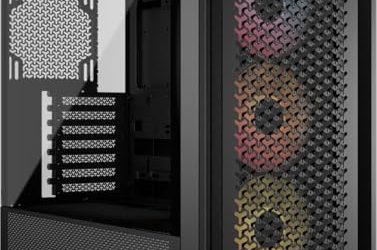
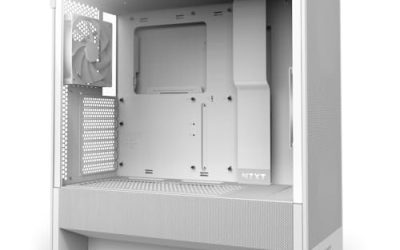
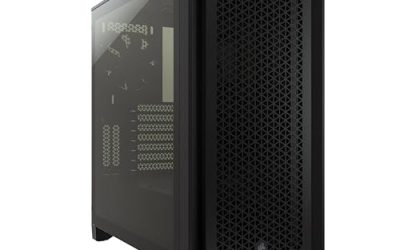
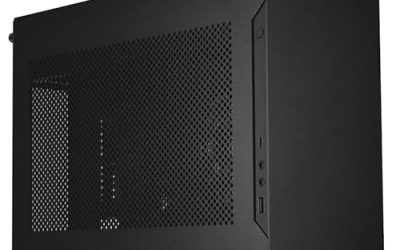
The Montech X3 Mesh White is the practical pick of the three, because it arrives with six lit fans already installed and a mesh front that lets them move air. Three 140mm fans sit at the front and three 120mm fans cover the top and rear, so a builder gets a complete cooling layout without buying a single extra fan. The fixed RGB lighting cycles through colours at the press of a button, which keeps setup simple for a first build. A tempered glass side panel opens like a door, the mesh front keeps intake open, and the white finish suits a light-coloured build on a desk.
Watch out for: The lighting is fixed RGB controlled by a button, so it cannot sync with motherboard lighting software the way addressable fans can.
NZXT H6 Flow RGB White
- Best for: Builders who want a panoramic glass showcase with tidy cable routing and angled RGB intake fans.
- Brand: NZXT
- Series: H6 Flow RGB
- Item model number: CC-H61FW-R1
- Form factor: Compact dual-chamber mid-tower
Builders who want a panoramic glass showcase with tidy cable routing and angled RGB intake fans.
The dual-chamber layout is wider than a standard mid-tower, so measure desk depth before ordering.
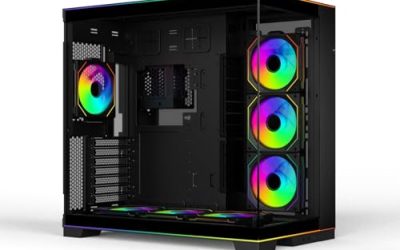
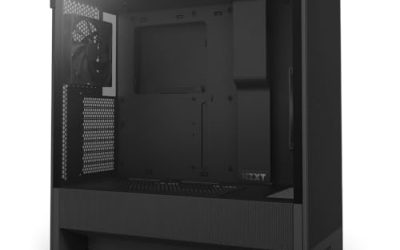
The NZXT H6 Flow RGB White is the showcase pick, built around a compact dual-chamber layout with panoramic glass on the front and side. Three RGB fans sit at an angled intake position, pushing air across the components while the glass panels give an uninterrupted view of the build from two sides. The second chamber hides the power supply and cables, so the lit side stays clean with little routing effort. Cable management channels run behind the motherboard tray, and the case supports ATX, Micro-ATX and Mini-ITX boards, which covers most gaming builds. It is the case to choose when the build itself is part of the room.
Watch out for: The dual-chamber layout is wider than a standard mid-tower, so measure desk depth before ordering.
Apevia Prism-WH
- Best for: Compact builds on a small desk where the widest choice of lighting modes matters most.
- Brand: Apevia
- Series: Prism-WH
- Item model number: Prism-WH
- Form factor: Micro-ATX cube
Compact builds on a small desk where the widest choice of lighting modes matters most.
Micro-ATX and Mini-ITX boards only, so a full-size ATX motherboard will not fit this cube.
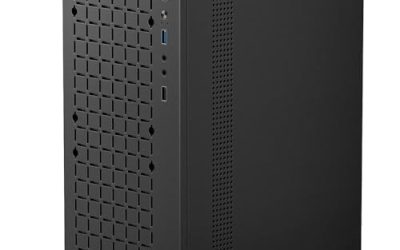
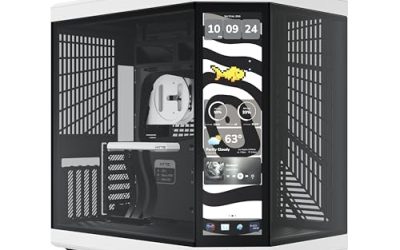
The Apevia Prism-WH is the compact pick, a Micro-ATX cube that puts lighting first with five addressable fans and 366 RGB modes. Two fans sit on the side, two on the top and one at the rear, and the lighting switches between preset modes and motherboard sync with a long press of the LED button on the top panel. Dual tempered glass panels show the build from two angles, while the cube shape fits a small desk far better than a tall tower. Radiator support up to 240mm covers a compact liquid cooler, and the white interior matches the white exterior for a clean look through the glass.
Watch out for: Micro-ATX and Mini-ITX boards only, so a full-size ATX motherboard will not fit this cube.
Which One Fits Your Situation
A first build with no extra fans to buy
Pick the Montech X3 Mesh White. Six included fans cover intake and exhaust from the start, the mesh front keeps air moving, and the button-controlled lighting needs no software setup. A first-time builder gets a finished, lit system with the fewest extra parts to source, and the door-open glass panel makes the first cable routing pass easier than a screwed panel would.
A showcase build that sits on the desk
Pick the NZXT H6 Flow RGB White. Panoramic glass on two sides and a dual-chamber layout put the motherboard, graphics card and lighting on full display, while the hidden chamber keeps cables out of sight. It suits a builder who plans the look of the system as carefully as the parts inside it and wants the case to carry that look.
A small desk or a small room
Pick the Apevia Prism-WH. The cube footprint is short and narrow compared with a mid-tower, yet it still holds five lit fans and a full graphics card. Its 366 lighting modes give the most choice of the three, and the dual glass panels keep the compact build visible from the seat.
An airflow-first gaming rig
Pick the Montech X3 Mesh White again, and run the front fans as intakes with the top and rear as exhaust. Mesh beats glass for intake every time, and six fans move more air than three. The NZXT H6 Flow RGB is the fallback here if the build must have panoramic glass, since its angled intakes and mesh sections still move air well.
Common Mistakes
- Choosing a case for its lighting and ignoring graphics card length, then finding the card will not fit.
- Picking a glass-front case for a hot build, when a mesh front would have kept intake temperatures lower.
- Buying a full-size ATX motherboard for a Micro-ATX cube case that cannot hold it.
- Forgetting to check whether the lighting uses a button, a motherboard header or software, and ending up with effects that cannot be changed.
- Filling every fan mount with lit fans and leaving no thought for which ones pull air in and which ones push it out.
Frequently Asked Questions
Do multi LED color PC cases need extra software?
Not always. Button-controlled cases cycle through preset lighting modes with no software at all, which suits a simple build. Cases that sync with a motherboard header use the board maker lighting utility, and cases with a bundled controller use the fan maker software. Check the listing for the control method before buying, because software-synced lighting needs a compatible motherboard header to work as described.
Can I change the colours without a compatible motherboard?
Yes, on cases with a built-in LED button. Pressing the button cycles through the preset modes, and a long press on some models switches between preset modes and motherboard sync. The Apevia Prism-WH works this way, with hundreds of modes available from the button alone. Cases without a button depend on the motherboard header or a controller, so confirm the control method in the listing first.
Do RGB fans cool as well as plain fans?
Yes, when the fan size, blade design and speed match. Lighting adds LEDs to the fan frame and does not change how the blades move air. What matters is the number of fans, their placement and whether the front panel lets air through. A mesh-front case with six RGB fans cools better than a glass-front case with three plain fans, because airflow depends on the case design, not the lights.
Will a long graphics card fit in these cases?
It depends on the case. Mid-towers like the Montech X3 Mesh and the NZXT H6 Flow RGB accept long triple-fan cards, with the NZXT listing room for cards up to 365mm. The Apevia Prism-WH cube has a shorter limit, so measure the card and compare it with the clearance figure in the listing before ordering. Checking length first avoids the most common fit problem in a lit build.
Related guides
More from Amazon
Programs that pair well with the guide above. Offers and eligibility are set by Amazon and may change.
A free business account with business pricing and bulk-buying tools for work, shop or home office.
Create a business accountFree shipping on eligible items, Prime Video and more. Eligible new members can start with a free trial.
Start a Prime free trialAudiobooks and podcasts to listen to on the go. Eligible new members can start with a free trial.
Try Audible freeAd-free music streaming. Eligible new subscribers can start with a free trial.
Try Music Unlimited freeAs an Amazon Associate we earn from qualifying purchases.