Our Short List of 3

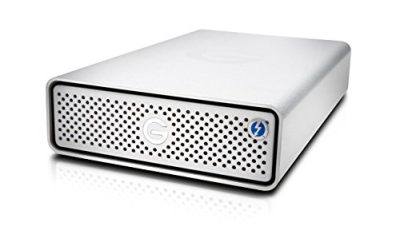
- Best for: People who back up several different devices, including a USB-C laptop and a phone or tablet.
- Digital storage capacity: 4 TB
- Hard disk interface: USB 3.0
- Hardware connectivity: USB Type C
- Hard disk form factor: 2.5-inch
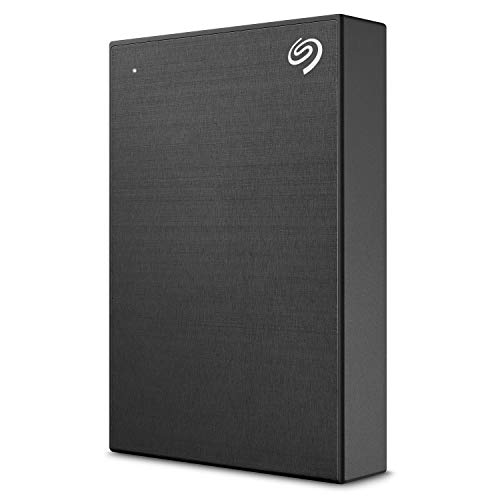
- Best for: Photographers and home users who want backups to run on a schedule with recovery cover behind them.
- Digital storage capacity: 4 TB
- Hard disk interface: USB 2.0/3.0
- Hard disk form factor: 2.5-inch
- Hard disk description: Mechanical Hard Disk

- Best for: First-time backup buyers who want a no-software drive they can use the moment it arrives.
- Digital storage capacity: 4 TB
- Hard disk interface: USB 2.0/3.0
- Hardware connectivity: USB 3.0
- Hard disk form factor: 2.5-inch
All 5 Picks at a Glance
| Product | Specs | Action |
|---|---|---|
| WD My Passport 4TB (USB-C) |
| Check price on Amazon |
| Seagate Backup Plus Portable 4TB |
| Check price on Amazon |
| WD Elements Portable 4TB |
| Check price on Amazon |
 Toshiba Canvio Basics 4TB |
| Check price on Amazon |
 Seagate Portable 4TB |
| Check price on Amazon |
A backup drive fails quietly, and you only discover the problem on the day you need a file back. Choosing a 4TB external hard drive for backup therefore means weighing more than capacity: the USB connection decides how long a full backup takes, the bundled software decides whether backups happen on a schedule or only when you remember, and the warranty decides how much help you get if the drive itself stops working. Every drive below holds 4TB in a portable enclosure that runs on USB power alone.
This guide covers five drives from WD, Seagate and Toshiba, each picked from its Amazon listing title and specification table. It suits anyone protecting a photo library, a game collection, work documents, or a whole system image on a single portable drive. The sections ahead explain how to match a drive to your backup habit, compare the five options side by side, and steer around the mistakes that leave people with a full drive and no usable backup.
Our Top Picks
- Toshiba Canvio Basics 4TB Portable External Hard Drive4TB4.3 x 3.1 x 0.77 inches0.5 poundsCheck on Amazon
Top 3 picks at a glance
Quick Picks
As an Amazon Associate we earn from qualifying purchases
| Product | Best for | Key spec from title |
|---|---|---|
| WD My Passport 4TB (USB-C) | Backing up across PC, Mac and mobile devices | 4TB portable hard drive with USB-C and USB-A |
| Seagate Backup Plus Portable 4TB | Scheduled backups with data recovery cover | 4TB external hard drive with 2-year Rescue Service |
| WD Elements Portable 4TB | Simple plug-and-play backup with no software setup | 4TB portable external hard drive, USB 3.2 Gen 1 |
| Toshiba Canvio Basics 4TB | Drag-and-drop backup on a Windows PC | 4TB portable external hard drive, USB 3.0 |
| Seagate Portable 4TB | Everyday backup for PC, Mac and consoles | 4TB external hard drive with 1-Year Rescue Service |
How to Choose
Start with how you actually back up
A drive that ships with scheduling software earns its place when you want backups to run without thinking about them, while a bare plug-and-play drive suits someone who copies folders by hand and wants nothing installed. Seagate Backup Plus Portable and the WD My Passport models include software that schedules automatic backups, so a weekly routine can run while you work. WD Elements and Toshiba Canvio Basics keep things simpler, relying on drag and drop instead of a backup program. Decide which habit you will genuinely keep, because a scheduled backup you never set up protects nothing, and a manual routine you abandon after a month leaves the same gap.
Check the USB connection on both ends
Every drive here connects over USB, yet the connector on the drive end changes what you need in your bag. The newer WD My Passport works with USB-C and ships with a USB-A to USB-C adapter, so it fits modern laptops and older desktops alike. The other four use a USB-A cable and a Micro-B style port on the drive, which works fine on a desktop but needs an adapter on a laptop that only has USB-C ports. Before buying, look at the ports on the machine you will back up most often. A drive that needs an adapter you do not own will sit unused in a drawer.
Treat capacity as a ceiling, not a target
Four terabytes sounds generous until a photo library, a game install folder and a system image share the same drive. A good rule is to keep the backup drive at most two-thirds full, which leaves room for new files and for the backup software to keep older versions. If your current data already passes three terabytes, this capacity will feel tight within a year, and you should either trim what you store or look at a larger drive. For most single-machine backups, though, 4TB covers a full system image plus years of documents and media with room to spare.
Read the warranty and the recovery cover
A portable hard drive travels in bags, gets knocked off desks, and spins every time it is plugged in, so the safety net matters as much as the hardware. The WD drives in this roundup carry a two or three year limited warranty, Seagate pairs its drives with a two year limited warranty and a Rescue Data Recovery Service plan, and Toshiba backs the Canvio Basics with its own manufacturer warranty. Rescue cover means the maker attempts to recover your files if the drive fails mechanically, which a plain warranty does not promise. Weigh that cover heavily if the drive will hold the only copy of anything irreplaceable.
The 5 Best Options
WD My Passport 4TB (USB-C)
- Best for: People who back up several different devices, including a USB-C laptop and a phone or tablet.
- Digital storage capacity: 4 TB
- Hard disk interface: USB 3.0
- Hardware connectivity: USB Type C
- Hard disk form factor: 2.5-inch
People who back up several different devices, including a USB-C laptop and a phone or tablet.
Confirm it is still sold before buying — the live page check returned a stale listing copy, so verify availability on Amazon before ordering.
This is the most flexible drive in the group, because it connects to Windows PCs, Macs, Chromebooks, gaming consoles, phones and tablets without reformatting, thanks to its exFAT formatting and the included USB-A to USB-C adapter. Backup software and password protection come included, with 256-bit AES hardware encryption guarding the contents if the drive is lost. Its grey polycarbonate enclosure uses more than half post-consumer recycled plastic, and the 2.5-inch body slips into a laptop sleeve without adding noticeable bulk.
Seagate Backup Plus Portable 4TB
- Best for: Photographers and home users who want backups to run on a schedule with recovery cover behind them.
- Digital storage capacity: 4 TB
- Hard disk interface: USB 2.0/3.0
- Hard disk form factor: 2.5-inch
- Hard disk description: Mechanical Hard Disk
Photographers and home users who want backups to run on a schedule with recovery cover behind them.
Confirm it is still sold before buying — the live page check returned a stale listing copy, so verify availability on Amazon before ordering.
Seagate built this drive around the backup habit itself, with software that schedules automatic hourly, daily, weekly or monthly backups and a brushed metal enclosure that survives daily travel better than plain plastic. The listing also bundles a one-year subscription to Mylio Create and two months of Adobe Creative Cloud Photography, which suits photographers who want their edits and their backups in one workflow. A two-year Rescue Data Recovery Service plan sits behind the hardware, so a mechanical failure does not automatically mean lost files.
WD Elements Portable 4TB
- Best for: First-time backup buyers who want a no-software drive they can use the moment it arrives.
- Digital storage capacity: 4 TB
- Hard disk interface: USB 2.0/3.0
- Hardware connectivity: USB 3.0
- Hard disk form factor: 2.5-inch
First-time backup buyers who want a no-software drive they can use the moment it arrives.
Confirm it is still sold before buying — the live page check returned a stale listing copy, so verify availability on Amazon before ordering.
WD Elements strips backup down to its simplest form: plug the drive in, drag files across, and unplug it when done. There is no backup software to install and no password system to configure, which makes it the easiest drive here for someone setting up a first backup or handing a drive to a less technical family member. The SuperSpeed USB-A cable runs at 5Gbps, and the drive works with Windows and Mac after reformatting. Its plain black enclosure and modest weight make it an unobtrusive desk companion.
Toshiba Canvio Basics 4TB
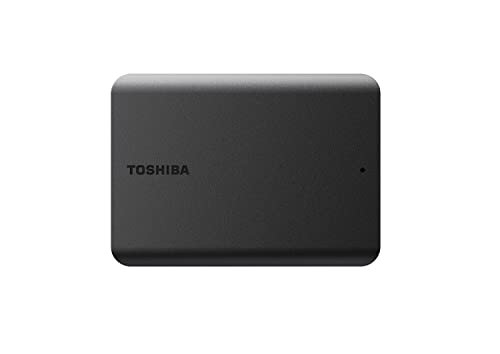
- Best for: Windows users who want a light, quiet drive for straightforward drag-and-drop backups.
- Digital storage capacity: 4 TB
- Hard disk interface: USB 3.0
- Hard disk description: 4 TB Mechanical Hard Disk
- Hard drive rotational speed: 5400 RPM
Windows users who want a light, quiet drive for straightforward drag-and-drop backups.
Confirm it is still sold before buying — the live page check returned a stale listing copy, so verify availability on Amazon before ordering.
Toshiba takes the same minimal approach as WD Elements, with a drive that is ready to use on a Windows PC and needs no software installation at all. Files move by drag and drop, the matte black finish resists smudges, and the 5400 RPM mechanical drive keeps noise and vibration low during long copy sessions. At 7.7 ounces and under an inch thick, it fits a jacket pocket, and the USB 3.0 connection needs no external power adapter. Mac users should note the drive ships formatted NTFS for Windows and needs reformatting for macOS.
Seagate Portable 4TB
- Best for: Anyone who wants a slim, simple backup drive that also works with a game console.
- Digital storage capacity: 4 TB
- Hard disk interface: USB 3.0
- Hard disk form factor: 2.5 Inches
- Hard disk description: Mechanical Hard Disk
Anyone who wants a slim, simple backup drive that also works with a game console.
Confirm it is still sold before buying — the live page check returned a stale listing copy, so verify availability on Amazon before ordering.
The Seagate Portable is the plain workhorse of this roundup, and its popularity shows in how widely it is used for PC, Mac, Xbox and PlayStation storage as well as backup. Setup takes seconds: connect the included 18-inch USB 3.0 cable and the drive appears, with drag-and-drop backup and no software to install. A one-year Rescue Service covers data recovery attempts, and the slim 0.58-inch body is the thinnest drive in this group. Its 2.5-inch mechanical drive runs entirely on USB power, so no wall adapter is ever needed.
Which One Fits Your Situation
You back up more than one kind of device
Pick the WD My Passport with USB-C. Its exFAT formatting and included USB-A to USB-C adapter let the same drive move between a Windows desktop, a Mac, a Chromebook and even a phone, while the bundled backup software and 256-bit AES encryption keep scheduled backups and password protection in one place. No other drive here spans that many device types without reformatting.
You want backups to happen by themselves
Pick the Seagate Backup Plus Portable. Its software schedules automatic backups hourly, daily, weekly or monthly, so a backup routine survives forgetfulness, and the two-year Rescue Service adds a recovery attempt if the drive fails. The bundled photo tools also suit photographers who back up shoots the same day they take them.
You want the simplest possible first backup drive
Pick the WD Elements Portable or the Toshiba Canvio Basics. Both skip software entirely and work by drag and drop, so setup means plugging in a cable and copying folders. Choose Elements if you move between Windows and Mac, and choose Canvio Basics if you work on Windows alone and want the lighter, quieter enclosure.
You want one drive for backup and console storage
Pick the Seagate Portable. Its listing covers PC, Mac, Xbox and PlayStation, so the same 4TB can hold a PC backup and overflow game installs, and the one-year Rescue Service still covers the drive. Its slim profile also makes it the easiest of the five to carry alongside a console or laptop.
Common Mistakes
- Buying a 4TB drive when your data already fills three terabytes, leaving no room for new files or older backup versions.
- Skipping the scheduled backup setup on a drive that includes software, then discovering months later that no backup ever ran.
- Assuming a drive formatted for Windows will work with Time Machine, when macOS backup tools need the drive reformatted first.
- Keeping the backup drive plugged in beside the computer it protects, so a spill, surge or theft takes both copies at once.
- Judging a backup drive by its fastest advertised speed instead of checking the USB connector and cable your own machine actually supports.
Frequently Asked Questions
Is 4TB enough for a full computer backup?
For most single machines, yes. A full system image plus documents, photos and a game library usually fits comfortably within 4TB, with room left for older backup versions. The squeeze comes when video projects or several large game installs share the drive, so measure your current data before buying and keep the drive under two-thirds full for breathing room.
Do I need backup software, or is drag and drop enough?
Drag and drop works when you copy files on a regular routine and remember to do it. Backup software earns its keep by running on a schedule and keeping older versions of changed files, which matters when you overwrite or delete something by accident. If your routine depends on memory alone, choose a drive with scheduling software and set it up on day one.
Can I use one of these drives with both Windows and Mac?
The WD My Passport with USB-C ships formatted exFAT, which both systems read without reformatting. The other drives ship ready for Windows and need reformatting for full Mac use, including Time Machine. Reformatting erases the drive, so do it before copying anything important, and check whether your backup tool accepts the new format.
How should I store a backup drive when it is not in use?
Keep it unplugged, in a cool dry place away from the computer it backs up, ideally in a different room or building for anything irreplaceable. A drive left connected faces the same surge, spill and theft risks as the machine itself. Eject it properly before unplugging, and run a test restore of a few files every few months to confirm the backup actually works.
Related guides
More from Amazon
Programs that pair well with the guide above. Offers and eligibility are set by Amazon and may change.
A free business account with business pricing and bulk-buying tools for work, shop or home office.
Create a business accountFree shipping on eligible items, Prime Video and more. Eligible new members can start with a free trial.
Start a Prime free trialAudiobooks and podcasts to listen to on the go. Eligible new members can start with a free trial.
Try Audible freeAd-free music streaming. Eligible new subscribers can start with a free trial.
Try Music Unlimited freeAs an Amazon Associate we earn from qualifying purchases.