Our Short List of 3

- Best for: Buyers who want the strongest CPU and the full-power GPU in this list. The Ryzen 7 6800HS is the fastest processor here, the 95W RTX 3050 runs at the top of its range, and the MUX switch routes frames directly from the GPU to the display. With 16GB of DDR5 memory and a 512GB SSD, nothing needs an upgrade on day one.
- 15.6-inch FHD display, 144Hz refresh rate; AMD Ryzen 7 6800HS processor; NVIDIA GeForce RTX 3050 Laptop GPU, 95W Max TGP; 16GB DDR5 RAM; 512GB PCIe SSD; Wi-Fi 6E; Windows 11; Eclipse Gray; MUX switch.
- https://www.amazon.com/dp/B0C25TM3JW

- Best for: Newer games that want more video memory. The 6GB version of the RTX 3050 holds larger textures than the 4GB models, and the 13th-gen i5-13420H is the newest CPU in this list. The Gen 4 SSD loads games quickly, and the 144Hz IPS panel is a good match for the GPU at 1080p.
- 15.6-inch FHD IPS display, 144Hz refresh rate; Intel Core i5-13420H processor; NVIDIA GeForce RTX 3050 Laptop GPU, 6GB GDDR6; 8GB DDR5 RAM; 512GB PCIe Gen 4 SSD; Wi-Fi 6; backlit keyboard; part number NH.QN9AA.001.
- https://www.amazon.com/dp/B0CMRQXWK8
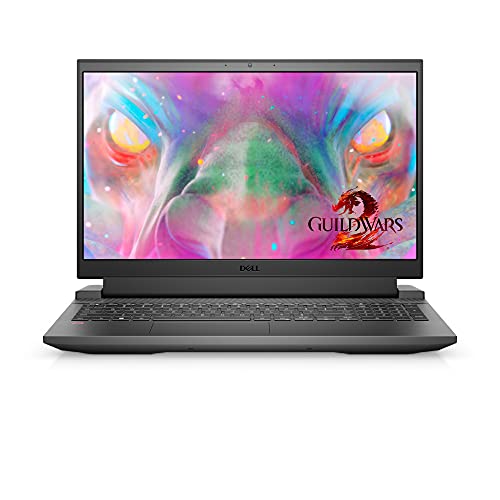
- Best for: A simple entry into PC gaming with a proven chassis. The G15 5511 has an extra M.2 SSD slot for storage expansion, and the 120Hz screen keeps esports titles looking fluid. It is a good fit for players who want a no-frills laptop for 1080p play and everyday tasks.
- 15.6-inch FHD display, 120Hz refresh rate; Intel Core i5-11400H processor; NVIDIA GeForce RTX 3050 Laptop GPU, 4GB GDDR6; 8GB DDR4 RAM; 512GB SSD; Windows 10 Home; Black; model G15-5500BLK-PUS.
- https://www.amazon.com/dp/B0979CMH5R
All 4 Picks at a Glance
| Product | Specs | Action |
|---|---|---|
| 1. ASUS ROG Strix G15 G513RC-ES73 |
| Check price on Amazon |
| 2. Acer Nitro V ANV15-51-532J |
| Check price on Amazon |
| 3. Dell G15 5511 |
| Check price on Amazon |
 4. ASUS TUF Gaming F17 FX707ZC-ES53 |
| Check price on Amazon |
Yes, an RTX 3050 laptop still handles 1080p gaming well in 2026, playing esports titles at high frame rates and older AAA games at medium settings. The GPU is a few generations old, so new demanding games need low settings, and 4GB of video memory on most models limits texture detail. The five laptops below are all RTX 3050 models still listed as new on Amazon US, each a different machine with its own strengths.
Disclosure: As an Amazon Associate, we earn from qualifying purchases.
Top 3 picks at a glance
RTX 3050 Laptops Compared
| Laptop | Display | CPU | GPU | RAM / Storage |
|---|---|---|---|---|
| ASUS ROG Strix G15 | 15.6″ FHD 144Hz | Ryzen 7 6800HS | RTX 3050, 95W | 16GB DDR5 / 512GB SSD |
| Acer Nitro V ANV15-51-532J | 15.6″ FHD IPS 144Hz | Core i5-13420H | RTX 3050 6GB | 8GB DDR5 / 512GB SSD |
| Dell G15 5511 | 15.6″ FHD 120Hz | Core i5-11400H | RTX 3050 4GB | 8GB DDR4 / 512GB SSD |
| ASUS TUF Gaming F17 | 17.3″ FHD 144Hz | Core i5-12500H | RTX 3050 | 16GB DDR4 / 512GB SSD |
| Lenovo LOQ 15 | 15.6″ FHD IPS 144Hz | Core i5-12450HX | RTX 3050 | 32GB DDR5 / 1TB SSD |
How to Choose an RTX 3050 Laptop
Four details decide whether an RTX 3050 laptop is a good buy. First, GPU wattage: the RTX 3050 ships in laptops from 35W to 95W, and the higher-wattage models play noticeably better, so favor 80W and above when the listing states it. Second, video memory: the 6GB version of the GPU holds larger textures than the 4GB version, which matters in newer games. Third, memory and storage: 16GB of RAM is the comfortable amount for gaming plus multitasking, and a 512GB SSD holds a reasonable game library, while 8GB of RAM and a 256GB drive should be treated as upgrade projects. Fourth, the display: a 144Hz panel matches the frame counts this GPU reaches in esports titles, while a 60Hz panel wastes the hardware. Finally, confirm the listing sells a new unit with a full warranty, since these are last-gen models and renewed units circulate under the same model names, and confirm the exact CPU, memory, storage, and screen, because model names like TUF, Nitro, and LOQ cover many variants.
The 5 Best RTX 3050 Laptops
1. ASUS ROG Strix G15 G513RC-ES73
- Best for: Buyers who want the strongest CPU and the full-power GPU in this list. The Ryzen 7 6800HS is the fastest processor here, the 95W RTX 3050 runs at the top of its range, and the MUX switch routes frames directly from the GPU to the display. With 16GB of DDR5 memory and a 512GB SSD, nothing needs an upgrade on day one.
- 15.6-inch FHD display, 144Hz refresh rate; AMD Ryzen 7 6800HS processor; NVIDIA GeForce RTX 3050 Laptop GPU, 95W Max TGP; 16GB DDR5 RAM; 512GB PCIe SSD; Wi-Fi 6E; Windows 11; Eclipse Gray; MUX switch.
- https://www.amazon.com/dp/B0C25TM3JW
Buyers who want the strongest CPU and the full-power GPU in this list. The Ryzen 7 6800HS is the fastest processor here, the 95W RTX 3050 runs at the top of its range, and the MUX switch routes frames directly from the GPU to the display. With 16GB of DDR5 memory and a 512GB SSD, nothing needs an upgrade on day one.
The 2022 Strix G15 is a last-gen model, so confirm the listing sells a new unit and shows the exact model code G513RC-ES73. The 4GB class of video memory on this generation means texture detail stays at medium in newer AAA games.
Watch out for: The 2022 Strix G15 is a last-gen model, so confirm the listing sells a new unit and shows the exact model code G513RC-ES73. The 4GB class of video memory on this generation means texture detail stays at medium in newer AAA games.
2. Acer Nitro V ANV15-51-532J
- Best for: Newer games that want more video memory. The 6GB version of the RTX 3050 holds larger textures than the 4GB models, and the 13th-gen i5-13420H is the newest CPU in this list. The Gen 4 SSD loads games quickly, and the 144Hz IPS panel is a good match for the GPU at 1080p.
- 15.6-inch FHD IPS display, 144Hz refresh rate; Intel Core i5-13420H processor; NVIDIA GeForce RTX 3050 Laptop GPU, 6GB GDDR6; 8GB DDR5 RAM; 512GB PCIe Gen 4 SSD; Wi-Fi 6; backlit keyboard; part number NH.QN9AA.001.
- https://www.amazon.com/dp/B0CMRQXWK8
Newer games that want more video memory. The 6GB version of the RTX 3050 holds larger textures than the 4GB models, and the 13th-gen i5-13420H is the newest CPU in this list. The Gen 4 SSD loads games quickly, and the 144Hz IPS panel is a good match for the GPU at 1080p.
It ships with 8GB of RAM, so multitasking while gaming is limited until you add more memory. Stock of this model moves through third-party sellers, so check the listing before you buy.
Watch out for: It ships with 8GB of RAM, so multitasking while gaming is limited until you add more memory. Stock of this model moves through third-party sellers, so check the listing before you buy.
3. Dell G15 5511
- Best for: A simple entry into PC gaming with a proven chassis. The G15 5511 has an extra M.2 SSD slot for storage expansion, and the 120Hz screen keeps esports titles looking fluid. It is a good fit for players who want a no-frills laptop for 1080p play and everyday tasks.
- 15.6-inch FHD display, 120Hz refresh rate; Intel Core i5-11400H processor; NVIDIA GeForce RTX 3050 Laptop GPU, 4GB GDDR6; 8GB DDR4 RAM; 512GB SSD; Windows 10 Home; Black; model G15-5500BLK-PUS.
- https://www.amazon.com/dp/B0979CMH5R
A simple entry into PC gaming with a proven chassis. The G15 5511 has an extra M.2 SSD slot for storage expansion, and the 120Hz screen keeps esports titles looking fluid. It is a good fit for players who want a no-frills laptop for 1080p play and everyday tasks.
The listing shows Windows 10 Home, so check whether the unit ships with a newer version of Windows or needs an upgrade after setup. The 8GB of RAM and the 4GB of video memory both limit newer games, so treat this as an entry pick with upgrade room rather than a long-term flagship.
Watch out for: The listing shows Windows 10 Home, so check whether the unit ships with a newer version of Windows or needs an upgrade after setup. The 8GB of RAM and the 4GB of video memory both limit newer games, so treat this as an entry pick with upgrade room rather than a long-term flagship.
4. ASUS TUF Gaming F17 FX707ZC-ES53
- Best for: Buyers who want a bigger screen. The 17.3-inch display is the largest in this list, which suits a laptop that mostly stays on a desk. The 16GB of RAM and 512GB of storage cover a healthy game library, and the TUF chassis is built to military durability standards.
- 17.3-inch FHD display, 144Hz refresh rate; Intel Core i5-12500H processor; NVIDIA GeForce RTX 3050 Laptop GPU; 16GB DDR4 RAM; 512GB PCIe SSD; Wi-Fi 6; Windows 11; Mecha Gray.
- https://www.amazon.com/dp/B0BWHLQ5HN
Buyers who want a bigger screen. The 17.3-inch display is the largest in this list, which suits a laptop that mostly stays on a desk. The 16GB of RAM and 512GB of storage cover a healthy game library, and the TUF chassis is built to military durability standards.
A 17.3-inch laptop is heavier and bulkier to carry, so it suits desk use more than travel. Confirm the listing shows the exact model code FX707ZC-ES53, since the TUF F17 name covers many configurations with different GPUs.
Watch out for: A 17.3-inch laptop is heavier and bulkier to carry, so it suits desk use more than travel. Confirm the listing shows the exact model code FX707ZC-ES53, since the TUF F17 name covers many configurations with different GPUs.
5. Lenovo LOQ 15
Specs
- 15.6-inch FHD IPS display, 144Hz refresh rate, anti-glare, G-SYNC support; Intel Core i5-12450HX processor, 8 cores, up to 4.4 GHz; NVIDIA GeForce RTX 3050 Laptop GPU; 32GB DDR5 RAM; 1TB PCIe SSD; Wi-Fi 6; Bluetooth 5; white backlit keyboard; Windows 11 Home; 5.29 lb; 45Wh battery.
Best for: Heavy multitasking and a large game library. The 32GB of DDR5 memory and 1TB of storage are far above the other picks here, so this LOQ handles gaming alongside streaming, editing, and dozens of open tabs. G-SYNC support keeps the picture smooth when frame rates dip.
Watch out for: The 45Wh battery is small for a gaming laptop, so expect short unplugged play and keep the charger nearby. Confirm the listing’s exact configuration, since the LOQ line ships in many memory and storage combinations.
- https://www.amazon.com/dp/B0FH9MVRQ4
FAQ
Is an RTX 3050 laptop good enough for gaming in 2026?
Yes, for 1080p gaming. Esports titles such as Valorant, Fortnite, and Rocket League run at high frame rates, and older AAA games play well at medium settings. New demanding games need low settings, and the 4GB models limit texture detail, so set expectations to 1080p rather than higher resolutions. The GPU also supports DLSS, which lifts frame counts in supported titles, and ray tracing works in older games that use it lightly. If your library is mostly esports and games from a few years ago, an RTX 3050 laptop still delivers a smooth experience.
How much RAM should an RTX 3050 laptop have?
16GB is the comfortable amount for gaming plus everyday multitasking. The 8GB models in this list work for gaming alone, but adding a second memory module improves smoothness when you keep a browser, chat, and a game open at once. The LOQ 15 above ships with 32GB, which covers heavy multitasking without any upgrade.
What is the difference between the 4GB and 6GB RTX 3050?
Both are the same GPU family, but the 6GB version holds more texture data in video memory, which helps newer games that use large textures. The 4GB version plays the same games but needs lower texture settings in demanding titles. If you play newer AAA games, the Acer Nitro V with the 6GB GPU is the safer pick. Wattage matters too: a full-power 95W 4GB model can match or beat a lower-power 6GB model, so check the TGP figure on the listing when it is shown.
Should I buy a new or renewed RTX 3050 laptop?
Buy new when you can. Renewed laptops can be fine, but battery health and wear vary, and the warranty terms differ by seller. Every laptop in this article is listed as new on Amazon US, and you should confirm the condition on the listing page before you buy, since these older models also appear as renewed or used. A new unit also gives you the full manufacturer warranty, which matters for a laptop with a battery and fans that wear over time.
Conclusion
The RTX 3050 remains a sensible way into PC gaming at 1080p, as long as you pick the right configuration. The ROG Strix G15 leads on CPU power and GPU wattage, the Nitro V adds 6GB of video memory, the Dell G15 is the simple entry pick, the TUF Gaming F17 brings the biggest screen, and the LOQ 15 leads on memory and storage. Whichever you choose, confirm the exact CPU, GPU, RAM, and storage on the listing before you buy, since these older models ship in many near-identical configurations.
Related guides
More from Amazon
Programs that pair well with the guide above. Offers and eligibility are set by Amazon and may change.
A free business account with business pricing and bulk-buying tools for work, shop or home office.
Create a business accountFree shipping on eligible items, Prime Video and more. Eligible new members can start with a free trial.
Start a Prime free trialAudiobooks and podcasts to listen to on the go. Eligible new members can start with a free trial.
Try Audible freeAd-free music streaming. Eligible new subscribers can start with a free trial.
Try Music Unlimited freeAs an Amazon Associate we earn from qualifying purchases.


