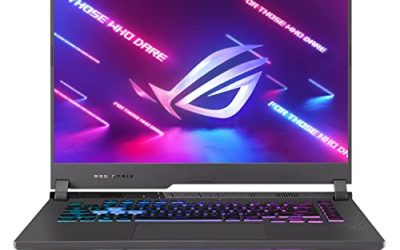
The best 14-inch Windows laptop for most people is a 14-inch ultraportable with a 16:10 display, 16 GB of RAM and a 512 GB SSD, such as the Lenovo ThinkPad T14 or X1 Carbon for work, the ASUS Zenbook 14 OLED for a bright screen on a budget, and the ASUS ROG Zephyrus G14 if you want to game. Fourteen inches is the sweet spot for portability: big enough for a full keyboard and two windows, small enough to weigh around 3 pounds.
This guide compares the main 14-inch PC picks by use case, shows how to estimate battery life and whether the weight matters for your bag, and gives a clear way to pick between them.
Quick comparison of the best 14-inch PC laptops
| Pick | Best for | Key specs | Typical price range |
|---|---|---|---|
| Lenovo ThinkPad X1 Carbon (14-inch) | Best premium business | 14-inch 16:10, around 2.4 lb, carbon-fibre chassis, Thunderbolt 4, strong keyboard | $1,600-$2,300 |
| Lenovo ThinkPad T14 | Best value business | 14-inch, Intel or AMD options, upgradeable RAM on many configs, 3-year warranty options | $900-$1,500 |
| ASUS Zenbook 14 OLED | Best display for the money | 14-inch 2.8K OLED, 16:10, about 2.8-3 lb, Core Ultra or Ryzen | $800-$1,200 |
| ASUS ROG Zephyrus G14 | Best for gaming in 14 inches | 14-inch OLED, up to RTX-class discrete GPU, about 3.3-3.6 lb | $1,500-$2,200 |
| Dell Latitude 7000 14-inch / HP EliteBook 840 | Best for IT-managed fleets | vPro options, strong security, repair-friendly designs | $1,200-$2,000 |
| Acer Swift Go 14 or HP Pavilion Plus 14 | Best budget | 14-inch OLED or IPS, 16 GB RAM, plastic or aluminium chassis | $600-$900 |
Specs are per manufacturer spec sheets and vary by configuration. Prices are general market ranges.
Best premium business: ThinkPad X1 Carbon
The X1 Carbon is the benchmark for a light, durable, business-focused 14-inch laptop. Weight is around 2.4 pounds, the keyboard has deep travel that typists prefer, and the chassis is tested against military-grade durability standards per the manufacturer. Thunderbolt 4, optional 5G or LTE and strong security hardware round out the package.
Main trade-off: price, and RAM is soldered on most configs, so choose 16 GB or 32 GB up front.
Best value business: ThinkPad T14
The T14 gives you most of the ThinkPad experience at a lower price. It has a slightly thicker body, more ports (often including full-size HDMI and USB-A) and, on many configurations, upgradeable storage and memory. It is a safe pick for office workers, students and remote professionals.
Main trade-off: heavier than the X1 (about 3.2 lb) and display options vary; pick a 400-nit or brighter panel if you work near windows.
Best display for the money: ASUS Zenbook 14 OLED
OLED panels offer near-infinite contrast and strong colour. The Zenbook 14 OLED typically ships with a 2.8K 120 Hz panel, 16:10 aspect ratio and a light aluminium body, which suits creators, students and anyone who watches a lot of video. Battery capacity is around 70 Wh on many versions.
Main trade-off: OLED can draw more power with bright content and shows burn-in risk with static elements over years; use dark mode and auto-hide the taskbar for longevity. Integrated graphics also limit heavy gaming.
Best for gaming: ASUS ROG Zephyrus G14
The Zephyrus G14 shows that a 14-inch laptop can be a real gaming machine. It pairs a Ryzen or Core Ultra processor with an RTX-class laptop GPU, a high-refresh OLED display and a roughly 3.3-3.6 lb body. Because of its compact cooling, it runs at lower sustained power than 16 or 18-inch gaming laptops, but it travels far better.
Main trade-off: fan noise under load, 8 GB or 12 GB VRAM limits on some configs, and a battery that drops to around 1.5-2.5 hours while gaming. Expect roughly 1080p-1440p high settings in most current titles; FPS varies widely with the game, settings and patch.
Best for managed fleets: Latitude or EliteBook
If you buy for a team, Dell Latitude 7000 and HP EliteBook 800 series laptops offer Intel vPro or AMD PRO manageability, TPM 2.0, optional smart card readers, and parts availability that IT departments value. They also tend to be easier to repair, with modular batteries and standardised parts.
Main trade-off: they cost more than consumer models with similar specs, and the design is conservative.
Best budget: Acer Swift Go 14 or HP Pavilion Plus 14
For $600-$900, these 14-inch models offer a bright display, 16 GB RAM, a fast SSD and a decent keyboard. They fit students and home users who want a light daily laptop.
Main trade-off: build quality, speakers and webcam are not premium, and warranty is usually one year.
Worked example: battery life and weight in your bag
Battery life in hours equals watt-hours divided by average watts. With a 70 Wh battery:
| Use | Average draw (approx.) | Runtime |
|---|---|---|
| Web, email, documents at medium brightness | 6-8 W | 8.8-11.7 hours |
| Video streaming | 8-10 W | 7-8.8 hours |
| Video calls and browser tabs | 12-15 W | 4.7-5.8 hours |
| Photo editing on integrated graphics | 20-30 W | 2.3-3.5 hours |
| Gaming on a discrete GPU | 60-100 W | 0.7-1.2 hours |
Weight matters across a full day. A laptop of 2.4 lb plus a 0.5 lb charger adds 2.9 lb to your bag. A gaming laptop of 3.5 lb plus a 0.9 lb brick adds 4.4 lb, which is about 50 percent more. Over a 20-minute walk, that difference is noticeable, so decide how much of your use is mobile before choosing.
Quick screen math: a 14-inch 16:10 screen has a diagonal of 14 inches, giving a width of about 11.9 inches and a height of about 7.4 inches, an area of roughly 88 square inches. A 14-inch 16:9 screen is about 12.2 by 6.9 inches, or 84 square inches. That 5 percent extra area is why 16:10 feels more spacious for documents and web pages.
Decision matrix: which 14-inch laptop fits you?
| Your situation | Choose |
|---|---|
| Travel often, want the lightest durable laptop | ThinkPad X1 Carbon |
| Office and remote work, want value and a great keyboard | ThinkPad T14 |
| Creative work and media, care about the screen | ASUS Zenbook 14 OLED |
| Play modern games but want a small laptop | ROG Zephyrus G14 |
| Buying for a company with IT management | Dell Latitude 7000 or HP EliteBook 800 |
| Student on a budget | Acer Swift Go 14 or HP Pavilion Plus 14 |
Specs to check in any 14-inch laptop
- RAM: 16 GB is the baseline in 2026. Soldered RAM cannot be upgraded, so buy enough at purchase.
- Storage: 512 GB NVMe SSD minimum; 1 TB if you keep large files locally.
- Display: 16:10 aspect, 300 nits or more, 100 percent sRGB for general use; OLED for contrast and colour.
- Ports: at least two USB-C or Thunderbolt ports, one of which supports charging and external displays; HDMI is a bonus.
- Keyboard and trackpad: key travel of 1.3 mm or more suits long typing sessions.
- Wi-Fi: Wi-Fi 6E or Wi-Fi 7 for newer routers.
- Charging: a 65 W USB-C charger is common and allows travel with one charger for phone and laptop.
Frequently Asked Questions
Is a 14-inch laptop big enough for work?
Yes. A 14-inch 16:10 display fits two windows side by side comfortably at 1920 x 1200 or higher. For all-day desk work, pair it with an external monitor.
How much RAM do I need in a 14-inch laptop?
16 GB handles most users, including browser-heavy multitasking. Choose 32 GB if you run virtual machines, design software or code compilers. Check whether the RAM is soldered before you buy.
Are OLED laptops worth it?
For media and creative work, yes: they offer deep blacks and wide colour. The trade-offs are slightly higher power draw and a long-term burn-in risk, which you can reduce with dark mode and auto-hiding static interface elements.
Can a 14-inch laptop run modern games?
Models with a dedicated GPU, such as the ROG Zephyrus G14, run current titles at 1080p to 1440p. Frame rates vary with the game, settings and patch. Integrated-graphics ultrabooks handle lighter or older games at low settings.
What is the best 14-inch laptop under $1,000?
Look for a 14-inch model with a Ryzen 5 or Core Ultra 5 class processor, 16 GB RAM, a 512 GB SSD and a 16:10 screen. The Zenbook 14 OLED and Acer Swift Go 14 often fit near this price during sales.
Related guides
More from Amazon
Programs that pair well with the guide above. Offers and eligibility are set by Amazon and may change.
A free business account with business pricing and bulk-buying tools for work, shop or home office.
Create a business accountFree shipping on eligible items, Prime Video and more. Eligible new members can start with a free trial.
Start a Prime free trialAudiobooks and podcasts to listen to on the go. Eligible new members can start with a free trial.
Try Audible freeAd-free music streaming. Eligible new subscribers can start with a free trial.
Try Music Unlimited freeAs an Amazon Associate we earn from qualifying purchases.