As an Amazon Associate we earn from qualifying purchases.
An all-glass PC case is a display decision before it is a cooling decision. You are choosing how much of your build stays visible, how much heat the glass panels trap, and how much desk space a wide dual-chamber box will take. Three sides of tempered glass make a build look spectacular, but the same glass changes airflow, adds weight, and shows every fingerprint and cable. The real question is whether that showcase effect is worth the trade-offs for the parts you own or plan to buy.
This guide is written for first-time builders who want a clean showcase rig, for upgraders moving a powerful graphics card into a more visible chassis, and for living-room builders who want the PC to look like part of the furniture rather than a black box under a desk. The cases named here are identified from their Amazon listing names and published specifications, so you can match each model against your motherboard size, graphics card length, and cooler height before spending anything.
What Makes a Case Truly All-Glass
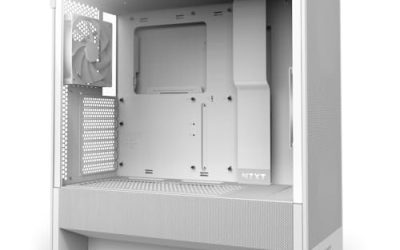
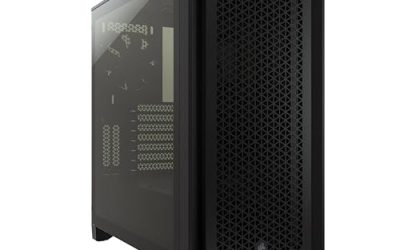
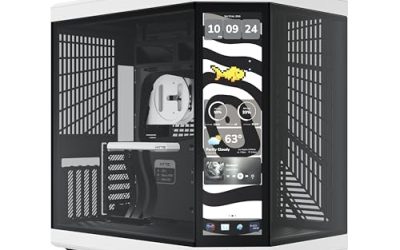
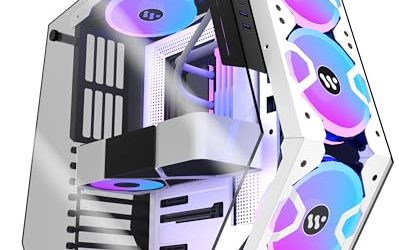
Not every case sold as a glass case deserves the name. A standard mid-tower with a single tempered-glass side panel is not an all-glass case, even if the product photos are dramatic. A true all-glass design wraps the front, the side, and often part of the top in tempered glass, so the motherboard, graphics card, and cooling are visible from several angles at once. The best-known examples of this style are the LIAN LI O11 Vision, with three-sided tempered glass and no corner pillar, the HYTE Y60 and Y70 with their panoramic glass fronts, and the MONTECH King 95 Pro with its curved glass panel.
The missing corner pillar is the detail that separates a panoramic case from an ordinary one. In a conventional chassis, a metal post joins the front and side panels and cuts straight through the view of the graphics card. Pillarless designs replace that post with a magnetic corner joint, so the two glass panels meet in a clean seam and the interior reads as one open display. That seam is worth inspecting in photos before you buy, because a wide or uneven joint spoils the effect that justifies the whole purchase.
Most all-glass cases also use a dual-chamber layout, which is easy to overlook and hard to live without once you have tried it. The main chamber holds the motherboard, graphics card, and fans behind the glass, while a second chamber behind the motherboard tray hides the power supply, storage drives, and cable runs. That split is what keeps the visible side tidy, and it explains why these cases are wider than a normal mid-tower. The top panel deserves the same scrutiny: some all-glass models keep a glass top, while others use a ventilated mesh top that lets a radiator breathe, and that single choice has a real effect on temperatures.
Glass also changes the physical reality of owning the case. Tempered panels in this class are commonly three to four millimetres thick, and a full set of them adds noticeable weight, so moving a finished build to a LAN event or across the room is a two-hand job. Fingerprints show on every panel, dust is visible through the glass within days, and a dropped side panel can shatter into small pieces. None of that is a reason to avoid the style, but it is the reason to check the panel mounting, the included dust filters, and the weight in the listing before the case arrives.
How to Choose
Glass Coverage and the Corner Pillar
Count the glass panels and check how they meet. A case with glass on the front and side but a solid steel top still looks like a showcase build, while glass on three sides gives the panoramic effect that defines this category. The corner where the panels join matters most: a pillarless design, such as the corner joint on the LIAN LI O11 Vision, leaves an uninterrupted view of the graphics card, whereas a metal post breaks the sightline at the worst spot. Curved glass, as used on the MONTECH King 95 Pro, removes the seam but costs more and can distort reflections. Check listing photos from the side, and confirm whether the top panel is glass or ventilated mesh.
Airflow Through a Glass Box
Glass does not breathe, so an all-glass case cools through the gaps left behind. Look for fan mounts on the side and bottom of the main chamber, because those intakes feed air to the graphics card, and check whether the top can exhaust heat through mesh or a radiator mount. The LIAN LI O11 Vision supports up to two 360mm radiators, which shows how much cooling a glass design needs with hot parts. Count the fans the case ships with rather than the fans it can hold, since many showcase chassis arrive with few or none. If your graphics card runs warm in a mesh case, it will run warmer behind glass unless the intake layout is open.
Size, GPU Clearance and Motherboard Support
Measure twice, because an all-glass case punishes guessing more than a normal tower. Compare your graphics card length against stated clearance: the LIAN LI O11 Vision allows cards up to 455mm, the O11 Vision Compact allows up to 408mm, and the HYTE Y60 is listed with clearance up to 410mm, so most current cards fit but the longest flagship models need checking. Confirm the motherboard sizes the tray accepts, since many of these cases support E-ATX, ATX, Micro-ATX, and Mini-ITX, while a few are built around one size only. Check CPU cooler height, with the O11 Vision allowing up to 167mm, and measure your desk depth, because dual-chamber cases are wider than they look and can overhang a shallow desktop.
Cable Routing, Dust and Daily Living With Glass
A showcase case is judged by how tidy it looks, so the unglamorous details decide whether you still like it later. A dual-chamber layout hides the power supply and cable runs behind the motherboard tray, which keeps the glass side clean, but only if the rear chamber has room for your cable slack and drive cages. Look for dust filters on every intake, since glass makes a dusty interior easy to see, and check that the filters slide out without removing panels. Think about where the case will sit: side intakes need clearance from a wall, glass panels need a safe place to rest during cleaning, and a case on the floor collects dust faster than one on a desk.
Which One Fits Your Situation
A First Showcase Build With a Mid-Range Graphics Card
If this is your first build and your graphics card is a mid-range model, pick a case that forgives mistakes. A compact panoramic model such as the LIAN LI O11 Vision Compact gives you the three-sided glass look with clearance up to 408mm, which covers most mid-range cards, and its smaller footprint suits a first desk setup. Spend the money you save on extra intake fans and tidy cables, because a clean interior matters more than a larger chassis.
A High-End Build With a Long Graphics Card and a Large Radiator
A flagship build needs the biggest glass case you can fit on your desk. The full-size LIAN LI O11 Vision, with clearance for cards up to 455mm and room for two 360mm radiators, suits this kind of system, since it swallows long graphics cards and thick radiators without compromise. Plan the fan layout before you order parts, put the radiator where it can exhaust through the top, and leave space behind the motherboard tray for the extra power supply cables.
A Living-Room PC That Has to Look Tidy
A PC that sits in a living room is furniture first and hardware second, so choose the case for how it looks off as well as on. A panoramic model with a clean white or black finish, such as the HYTE Y60 in Snow White, looks like a display piece beside a television stand, and its dual-chamber layout keeps cables out of sight. Keep lighting subtle and fans modest, since a living-room machine should stay quiet during a film.
A Compact Desk With Limited Depth
A shallow desk rules out the widest dual-chamber cases, so measure the depth before falling for a panoramic design. A compact glass model such as the O11 Vision Compact fits where a full-size showcase case would overhang, and it still delivers the pillarless glass front that defines the style. Mount the monitor on an arm to free surface space, keep the case intakes clear of the wall, and accept a smaller radiator instead of forcing in a large one.
Common Mistakes
- Buying for the photos without measuring the graphics card. A panoramic case looks generous in product images, but a flagship card can still be a few millimetres too long, and that mistake only becomes obvious when the side panel will not close. Measure the card, compare it with the stated clearance, and leave a small margin for the power connectors.
- Forgetting that the motherboard tray has a size limit. Some glass cases are built around ATX and smaller boards, while others accept E-ATX, and a board that is wider than the tray allows will block cable routing holes or sit against the glass. Check the supported sizes in the listing before ordering the board.
- Skipping intake fans because the case looks clean empty. An all-glass chassis with no side or bottom fans is a display cabinet, not a computer case, and the graphics card will heat the trapped air quickly. Budget for the full fan set the case is designed around, not just the fans it ships with.
- Pushing the case against a wall and blocking the side intake. Panoramic cases draw much of their air through the side and bottom, so a case parked tight against a wall or on thick carpet starves the graphics card. Leave a clear gap on the intake side and raise the case off carpeted floors.
- Cleaning the glass with the wrong cloth or overtightening the panels. Paper towels and abrasive cloths leave fine scratches that catch the light, and forcing a tempered panel back onto its mounts can chip an edge. Use a soft microfibre cloth, support the panel with both hands, and let the magnetic mounts or thumbscrews do the holding.
Frequently Asked Questions
Do all-glass PC cases run hotter than mesh cases?
Usually yes, by a small margin, because glass panels block the direct airflow a mesh front provides. The gap stays manageable when the case has generous side and bottom intakes, a ventilated top, and a full set of fans, so temperatures depend more on the fan layout than on the glass itself. If you run a hot graphics card, choose a model with radiator support and fill every intake mount.
Is tempered glass safe in a PC case?
Tempered glass is made to be stronger than ordinary glass, and case panels are three to four millimetres thick with protected edges. It can still shatter if dropped on a hard corner or struck sharply, and it breaks into small blunt pieces rather than long shards. Handle panels with both hands, set them on a soft surface, and never force a panel that does not sit flat on its mounts.
Can I fit any graphics card in an all-glass case?
Most current graphics cards fit, but not every card fits every glass case, so the clearance figure in the listing is the number to trust. The LIAN LI O11 Vision allows cards up to 455mm, the O11 Vision Compact up to 408mm, and the HYTE Y60 up to 410mm, which covers most models. Measure your card including its power connectors, and check thickness as well as length.
How do I keep the glass clean and scratch-free?
Wipe the outside of the panels with a dry microfibre cloth for dust and a lightly dampened one for fingerprints, then dry the glass so no streaks remain. Avoid paper towels, household glass sprays with ammonia, and any abrasive pad, since all of them can mark the surface over time. Remove the panels before cleaning the interior, and keep them away from tools and metal edges while they are off.
Related guides
More from Amazon
Programs that pair well with the guide above. Offers and eligibility are set by Amazon and may change.
A free business account with business pricing and bulk-buying tools for work, shop or home office.
Create a business accountFree shipping on eligible items, Prime Video and more. Eligible new members can start with a free trial.
Start a Prime free trialAudiobooks and podcasts to listen to on the go. Eligible new members can start with a free trial.
Try Audible freeAd-free music streaming. Eligible new subscribers can start with a free trial.
Try Music Unlimited freeAs an Amazon Associate we earn from qualifying purchases.