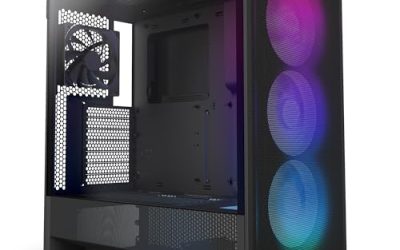
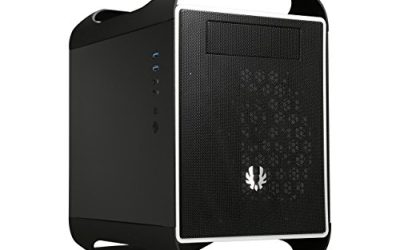
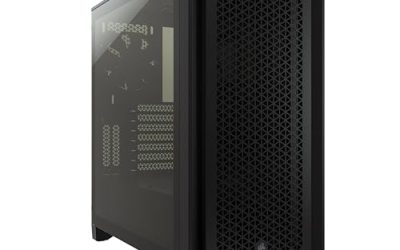
Buying a case that comes with fans is really a decision about how much of the cooling you want finished on day one. A case with a full fan set fitted lets you build, cable up and play; a case with a single rear fan is a starting point that still needs a shopping list. The listings below were admitted only where the maker’s own page states fans are included or pre-installed, and the count printed for each case is the count that page states.
These five suit first-time builders, upgraders moving an existing system into fresh glass, and anyone who wants ARGB lighting working without a separate fan order. Every pick was chosen from the names and specifications on its Amazon product page, and where a listing separates fan capacity from fans actually included, this guide follows the included figure only.
Quick Picks
As an Amazon Associate we earn from qualifying purchases.
| Product | Best for | Key spec from title |
|---|---|---|
| Vetroo AL900 ATX PC Case (Pink) | A showcase build in pink where the glass comes first and you plan to add your own fans over time. | 270-degree tempered glass, pre-installed ARGB PWM fan |
| NZXT H510 (Matte White) | A clean, quiet-looking mainstream build that needs competent stock airflow and painless cable routing. | 2 Aer F120mm fans included, tempered glass side panel |
| CORSAIR iCUE Link 3500X RGB (Black) | A back-connector motherboard build that wants the cabling hidden and a matched RGB fan set already fitted. | 3 iCUE Link RX120 RGB fans included, panoramic glass |
| CORSAIR Frame 4500X RS Reverse Fan ARGB (Black) | A large build with a long graphics card that needs generous clearances and a three-fan ARGB start. | 3 pre-installed RS120R ARGB fans, panoramic glass |
| DIYPC ARGB-N3-BK | A lighting-led build that wants four synced ARGB fans and a hub working from the first power-on. | 4 ARGB PWM fans pre-installed, 3 tempered glass panels |
How to Choose
Included fans and fan capacity are different numbers
Case titles love a big capacity figure: supports ten fans, mounts everywhere. What cools your build on day one is the smaller number, the fans physically in the box. In this set the included counts run from one to four, and the listings state them in box contents or fan fields rather than headlines. Always find the included count first, then treat every extra mount as a future purchase you may or may not make, and price the build accordingly.
Fan position matters as much as fan count
A rear exhaust fan moves hot air out; side and front intakes feed cool air across the board. Two cases here arrive with three side-mounted fans and no rear fan fitted, which changes how the air flows compared with a classic front-to-back layout. Look at where the included fans sit in the listing’s layout diagram, and picture your graphics card’s exhaust path. A balanced pair of intake and exhaust beats four fans all pushing the same direction.
Glass showcases ask more of your cable work
Panoramic and 270-degree glass designs display the build from several angles, which also displays every stray cable. Reverse-connection boards and routing channels exist precisely for these cases, and two listings here are built around them. If your board is a standard model, expect to spend the saved fan money on patience and ties instead. Choose the glass level that matches how much tidying you honestly enjoy doing. That discipline extends to your existing parts list: write the card and cooler figures beside the case figures and let the two columns agree before any money moves.
Clearances decide which coolers and cards fit
Every case here states maximum graphics card length and CPU cooler height, and the spread is wide: cooler clearance runs from 155mm to 185mm across the set. Measure your existing cooler and card, or the ones in your cart, against the case listing’s figures before ordering either. Radiator support follows the same logic: a stated 360mm mount only helps if the case also clears your card with the radiator and its fans fitted.
The 5 Best Options
Vetroo AL900 ATX PC Case (Pink)
The AL900 is the honest single-fan entry in this set, and its listing is clear about it: exactly one ARGB and PWM FDB fan is pre-installed at the rear. Around that fan sits a 270-degree full-view tempered glass design, support for a 360mm radiator and room for graphics cards up to 410mm long. The front panel carries a USB Type-C port, and magnetic dust filters sit top and bottom. Read it as a showcase shell whose cooling you will extend yourself, not a finished airflow package.
Specs
- Fans included: 1 x ARGB & PWM FDB fan (rear), per the listing’s box contents
- View: 270-degree full-view tempered glass per listing title
- Motherboard support: E-ATX, ATX, M-ATX, ITX per product information
- Radiator support: up to 360mm; fan capacity up to 10 fans (capacity, not inclusion)
- Clearance: graphics cards up to 410mm; power supply up to 200mm
- Front I/O: USB Type-C (10Gbps) and 1 x USB 3.0 per listing
- Extras: magnetic dust filters top and bottom; 7 expansion slots
Best for: A showcase build in pink where the glass comes first and you plan to add your own fans over time.
Watch out for: Only one fan is in the box despite the 10-fan capacity in the title, so budget for additional fans if your graphics card runs hot.
NZXT H510 (Matte White)
The H510 is the established compact option, and its listing states two Aer F120mm fans included, one at the front and one at the rear, for internal airflow out of the box. The case pairs an SGCC steel frame with a tempered glass side panel fitted with a single screw, and NZXT’s patented cable routing kit runs channels and straps behind the board. Front connectivity includes a USB Type-C port. For a tidy mainstream build that needs no lighting decisions, the stated kit covers the basics completely.
Specs
- Fans included: 2 x Aer F120mm fans (front and rear) per listing
- Materials: SGCC steel and tempered glass per product information
- Motherboard support: Mini-ITX, MicroATX, ATX per listing
- Dimensions: 210 x 460 x 428mm (W x H x D, with feet) per listing
- Drive bays: 2.5-inch x 2+1 and 3.5-inch x 2+1 per listing
- Radiator support: front 2 x 140 or 2 x 120mm; rear 1 x 120mm per listing
- Cable management: patented routing kit with pre-installed channels and straps
Best for: A clean, quiet-looking mainstream build that needs competent stock airflow and painless cable routing.
Watch out for: This is the older H510 generation listing, not the newer H5 Flow, so check the model name on the live page before ordering.
CORSAIR iCUE Link 3500X RGB (Black)
The 3500X is the reverse-connection pick: its listing states compatibility with ASUS BTF and MSI Project Zero boards, whose connectors hide behind the motherboard tray, and three CORSAIR iCUE Link RX120 RGB fans are included and pre-installed. Panoramic tempered glass wraps the front and side, so the build reads as one continuous display. The case supports multiple radiators up to 360mm for buyers planning liquid cooling later. If your board is a back-connector model, this is the case in the set designed around it.
Specs
- Fans included: 3 x CORSAIR iCUE Link RX120 RGB fans, pre-installed per listing
- Glass: panoramic tempered glass per listing title
- Motherboard support: ATX per product information; reverse-connection boards (ASUS BTF, MSI Project Zero) per listing
- Radiator support: multiple radiators up to 360mm per listing
- Power supply mounting: bottom mount per product information
- Expansion slots: 7 per product information
- Special features per listing: built-in fan, dust filter, RGB lighting
Best for: A back-connector motherboard build that wants the cabling hidden and a matched RGB fan set already fitted.
Watch out for: The included fans belong to the iCUE Link ecosystem, so future fan additions should match that system rather than mixing connector standards.
CORSAIR Frame 4500X RS Reverse Fan ARGB (Black)

The Frame 4500X is the spacious option, with three RS120R ARGB fans pre-installed at the side mount and an InfiniRail mounting system for repositioning them. Clearances are the headline: graphics cards up to 460mm, CPU coolers up to 185mm and power supplies up to 250mm, with support running to E-ATX boards. A GPU anti-sag arm is included in the box, and radiator options span the top, side and rear. Builders whose next graphics card is a long flagship will feel the difference these numbers make.
Specs
- Fans included: 3 x RS120R ARGB fans (side mount) per listing tech specs and box contents
- Dimensions: 499 x 256 x 471mm per listing
- Motherboard support: Mini-ITX, Micro-ATX, ATX, E-ATX per listing
- Clearances: GPU 460mm; CPU cooler 185mm; PSU 250mm per listing
- Radiator compatibility: top and side 360/280/240mm; rear 120/140mm per listing
- Front I/O: 2 x USB 3.2 Gen1 Type-A, 1 x USB 3.2 Gen2 Type-C, audio per listing
- Included: GPU anti-sag arm; dust filters bottom and right side
Best for: A large build with a long graphics card that needs generous clearances and a three-fan ARGB start.
Watch out for: At 499mm deep before cables, measure your desk or floor space first; the side-mounted intake layout also wants clearance beside the case.
DIYPC ARGB-N3-BK
The ARGB-N3-BK ships the most fans in this set: four ARGB PWM fans pre-installed, three reverse-blade units at the motherboard side and one at the rear, wired through an included PWM ARGB fan hub. Three tempered glass panels wrap the chassis, and the listing states support for BTF back-plug motherboards. Radiators up to 360mm fit at the top or motherboard side, graphics cards up to 420mm are supported, and lighting runs from a top-panel LED button or a motherboard ARGB header. It is the fullest lighting kit here.
Specs
- Fans included: 4 x ARGB PWM fans pre-installed (3 side reverse-blade, 1 rear) per listing
- Hub: PWM ARGB fan hub included per listing
- Panels: 3 tempered glass panels per listing title
- Motherboard support: Extended ATX, ATX, Micro ATX, Mini ITX; BTF back-plug boards per listing
- Clearances: GPU up to 420mm; CPU cooler up to 155mm; PSU up to 200mm per listing
- Radiator support: 360mm at top or motherboard side per listing
- Top I/O: 2 x USB 3.0, 1 x Type-C; LED button or motherboard ARGB sync control
Best for: A lighting-led build that wants four synced ARGB fans and a hub working from the first power-on.
Watch out for: CPU cooler clearance is 155mm per the listing, slimmer than the Corsair Frame case above, so measure a tall air cooler before pairing them.
Which One Fits Your Situation
A first build that should work the same evening
Take the NZXT H510 or the DIYPC ARGB-N3-BK: both arrive with a workable fan arrangement fitted, the DIYPC adding a hub and lighting control for a brighter first build. Either way the first evening ends with a working machine rather than a second order, because the airflow the listing promises is already spinning when the side panel goes on.
A back-connector motherboard going into glass
Take the CORSAIR 3500X, whose listing names ASUS BTF and MSI Project Zero compatibility, with three matched iCUE Link fans already installed. The matched fans also arrive pre-wired into the maker’s own lighting approach, so the finished build looks deliberate from the first photograph you take of it.
A flagship graphics card in a big case
Take the CORSAIR Frame 4500X for its 460mm graphics card clearance, 185mm cooler clearance and included anti-sag arm. A long flagship card is exactly where included fans stop being a bonus and become the cooling plan, and this case leaves physical room for that plan to grow.
A pink showcase build on a staged budget
Take the Vetroo AL900 for the glass and colour now, knowing its single included fan is a starting point you will extend as the build grows. Add fans one or two at a time as the budget allows; the glass, the colour and the layout are the parts that cannot be upgraded later, and they are already right.
Common Mistakes
- Reading a fan capacity figure in a title as the number of fans in the box, then building a hot system around fans that were never included.
- Ordering a tall air cooler without checking the case listing’s cooler clearance, when the figures in this set alone span 155mm to 185mm.
- Mixing fan ecosystems when adding to an included set, since hub and connector standards differ between brands and even between a brand’s own lines.
- Blocking side-intake fans by pushing a glass case flush against a wall or desk side, starving the layout the included fans were arranged for.
- Assuming every tempered glass case hides cables well, when panoramic designs expose the rear and top runs that a plain side panel would cover.
Frequently Asked Questions
How many fans should a case include to be enough?
Two well-placed fans, one intake and one exhaust, cool a mainstream build adequately, and one listing here ships exactly that. Three or four included fans add headroom for hotter graphics cards. A single included fan, as on the Vetroo AL900, is a starting point rather than a finished setup.
Does a higher fan capacity figure mean better cooling?
No. Capacity counts empty mounts. Cooling on day one comes from the fans actually included and where they sit. The Vetroo listing supports ten fans but includes one, while the DIYPC includes four of its mounts already populated, which is the figure that matters first.
Can I add more fans to these cases later?
Yes. Every listing here states spare mounts or radiator positions beyond the included fans. Match the connector and control standard of the included set where a hub is fitted, so the additions sync instead of needing separate control. That is also why this guide prints included counts in every entry and treats capacity as a separate, clearly labelled line.
Are the included fans in these listings RGB?
Four of the five sets include ARGB or RGB fans per their listings; the NZXT H510’s included Aer F fans are a plain airflow pairing with no lighting claim in its listing. Check each entry’s spec list, since lighting control differs by ecosystem.
Related guides
More from Amazon
Programs that pair well with the guide above. Offers and eligibility are set by Amazon and may change.
A free business account with business pricing and bulk-buying tools for work, shop or home office.
Create a business accountFree shipping on eligible items, Prime Video and more. Eligible new members can start with a free trial.
Start a Prime free trialAudiobooks and podcasts to listen to on the go. Eligible new members can start with a free trial.
Try Audible freeAd-free music streaming. Eligible new subscribers can start with a free trial.
Try Music Unlimited freeAs an Amazon Associate we earn from qualifying purchases.