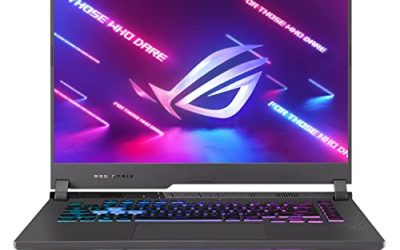
At about $200, the best touch screen laptop is usually a 2-in-1 or 11- to 14-inch Chromebook with a touchscreen, such as the Lenovo IdeaPad Flex 3 Chromebook or Lenovo Chromebook Duet class, or a refurbished Windows 2-in-1 from the last few years. New Windows touchscreen laptops rarely hit this price with usable specs, so Chromebooks and certified refurbished units are where the value is. This guide explains what you can realistically get for roughly $200–$300, what to avoid, and how to pick by use case.
Quick comparison of the best touch screen laptops near $200
| Pick | Best for | Key specs | Typical price range |
|---|---|---|---|
| Best overall: 12- to 14-inch touchscreen Chromebook (Lenovo IdeaPad Flex 3 Chromebook class) | Students, web work, streaming | Intel or MediaTek chip, 4–8GB RAM, 64–128GB eMMC, 10–12 hr battery | $180–$300 |
| Best detachable: Lenovo Chromebook Duet class | Reading, light notes, travel | 10.1-inch, tablet plus keyboard, about 2 lb total, Android apps | $200–$300 |
| Best for Windows: refurbished 2-in-1 (Surface Go, HP x360, Lenovo Yoga class) | Needing Windows software | Core i3/i5 or Pentium chip, 4–8GB RAM, 128GB SSD | $200–$350 refurbished |
| Best budget new Windows: 11.6-inch touch convertible | Basic documents and email | Intel N-series, 4GB RAM, 64GB eMMC | $200–$280 |
| Best for kids: ruggedized 11.6-inch Chromebook with touch | School and classroom use | Spill-resistant keyboard, drop-tested chassis | $200–$320 |
Stock and prices change quickly in this segment, so verify the exact configuration on the manufacturer’s spec sheet; the same model name can ship with very different RAM and storage.
What $200 actually buys in a touch laptop
A touch panel, a hinge that folds back and a metal-feeling chassis all cost money, so manufacturers cut elsewhere at this price. Expect four trade-offs: a 1366×768 or 1920×1080 TN or basic IPS display, 4GB of RAM, slow eMMC storage instead of an SSD, and a plastic body with a flexy keyboard. None of these makes a laptop useless, but they define what it can do.
Here is how the memory and storage limit translate into real use:
| Spec | Real-world effect | Verdict at $200 |
|---|---|---|
| 4GB RAM (Chrome OS) | Around 8–12 light tabs before slowdowns | Acceptable for basics |
| 4GB RAM (Windows) | Windows itself uses roughly 2–2.5 GB, so apps struggle | Avoid if possible |
| 8GB RAM | Comfortable multitasking | Good target if found |
| 64GB eMMC | About 40–45 GB free on Windows, 50+ GB on Chrome OS | Use cloud storage |
| 128GB eMMC or SSD | Room for apps and offline files | Worth a small premium |
| 1366×768 display | Soft text, small workspace | Prefer 1920×1080 if the budget allows |
Best overall: touchscreen Chromebook, 12 to 14 inches
Chromebooks use Chrome OS, which is light enough that a modest processor feels responsive. Lenovo’s IdeaPad Flex 3 Chromebook line, Acer Chromebook Spin models and ASUS Chromebook Flip models are the usual touchscreen convertible choices, and many Chromebook models list up to 10 or more hours of battery on the manufacturer’s spec sheet. Android apps and Linux apps are supported on recent models, which adds some flexibility.
Trade-off: you cannot run Windows or macOS desktop programs. If your needs are web apps, Google Workspace, streaming and video calls, this is the best $200 choice. Check the Google Auto Update Expiration date for the specific model, because older Chromebooks stop receiving updates after a set number of years.
Best detachable: Lenovo Chromebook Duet class
The Duet-style tablet with a detachable keyboard cover is the cheapest way to get an excellent touchscreen. At about 10 inches it is great for reading, streaming and light note-taking, and it weighs far less than a clamshell. Trade-off: the small keyboard and screen are cramped for long writing sessions, and storage is commonly 64–128GB.
Best for Windows: refurbished 2-in-1
If you must have Windows, a certified refurbished business-class convertible usually beats a new $200 Windows laptop. Models in the Surface Go, HP Elite x360 and Lenovo Yoga families with a Core i3 or i5, 8GB of RAM and a real SSD often appear at $200–$350. Look for a seller offering at least a 90-day warranty and a battery health statement. Trade-off: older batteries, scuffs and no manufacturer warranty on some listings.
Best budget new Windows: 11.6-inch touch convertible
New Intel N-series Windows convertibles at around $200–$280 do exist. They handle email, documents and video with some patience. Trade-off: 4GB of RAM and eMMC storage make Windows slow when updates run or when you open many tabs, and storage fills fast. Choose this only if you need a very cheap Windows touch device.
Best for kids: ruggedized touch Chromebook
Education-oriented Chromebooks from Lenovo, Acer and Dell often feature reinforced corners, spill-resistant keyboards and 360-degree hinges at around $200–$320. They are meant to survive backpacks. Trade-off: they are heavier and thicker than consumer models.
How to choose: a step-by-step decision guide
- Decide on the operating system first. If every task you do runs in a browser, take Chrome OS. If you need a specific Windows program, plan for refurbished hardware.
- Insist on at least 4GB RAM, prefer 8GB. Memory is the main cause of slowdowns and cannot be upgraded on most laptops this thin.
- Check storage type. A real SSD is faster than eMMC, but at this price either is acceptable on Chrome OS.
- Look for a full HD display. 1920×1080 text is noticeably crisper than 1366×768.
- Test the touch panel and hinge. Make sure the touch response is smooth, there are no dead zones, and the hinge holds its position.
- Verify the update policy. For Chromebooks, confirm the auto update expiration date; for Windows, confirm it supports Windows 11.
- Check the return policy. Budget laptops vary in quality, so buy from a seller with an easy return window.
Worked example: runtime on a $200 laptop
A budget Chromebook often has a 42 Wh battery. A light workload of web browsing at moderate brightness draws about 5 watts on Chrome OS, so the estimated runtime is 42 / 5 = 8.4 hours. Raise brightness and add a video call and the draw rises to roughly 8 watts, giving about 5.25 hours. Manufacturer figures of 10 hours or more usually assume low brightness and light tasks. A Windows laptop with the same battery tends to run 1–2 hours less because of background activity.
What to avoid
- Windows laptops with 2GB of RAM or 32GB of storage, which struggle with updates.
- Listings with vague specifications and no model number.
- Very old Chromebooks near or past their update expiration.
- Used units with no battery or return policy.
Frequently Asked Questions
Can you really get a good touch screen laptop for $200?
You can get a usable one, usually a Chromebook or a refurbished convertible. It will have modest memory, storage and display quality, but handles web browsing, schoolwork and streaming. Do not expect gaming or heavy editing.
Is a touchscreen Chromebook better than a cheap Windows laptop?
For web-based tasks, usually yes: Chrome OS is lighter, boots faster and gets longer battery life on the same hardware. A Windows laptop is better only if you need Windows-only software.
Does touchscreen reduce battery life?
Slightly. A touch layer adds a small power draw and a bit of weight, but the effect is much smaller than screen brightness. Lowering brightness gives the biggest battery gain.
Is a refurbished touchscreen laptop a good idea?
It can be, if the seller is reputable and provides a warranty of at least 90 days. Ask about battery health and cosmetic grade. A refurbished business laptop often outperforms a new budget one.
Can I play games on a $200 touchscreen laptop?
Only light games. Chromebooks can run Android games and cloud gaming services if the internet connection is fast. Demanding PC titles need a dedicated graphics card, which no laptop at this price offers.
Related guides
More from Amazon
Programs that pair well with the guide above. Offers and eligibility are set by Amazon and may change.
A free business account with business pricing and bulk-buying tools for work, shop or home office.
Create a business accountFree shipping on eligible items, Prime Video and more. Eligible new members can start with a free trial.
Start a Prime free trialAudiobooks and podcasts to listen to on the go. Eligible new members can start with a free trial.
Try Audible freeAd-free music streaming. Eligible new subscribers can start with a free trial.
Try Music Unlimited freeAs an Amazon Associate we earn from qualifying purchases.