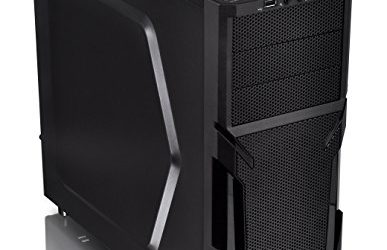
The best PC case under $120 is a mid-tower with a mesh front panel, at least two included fans and room for a 330 mm or longer graphics card, and the Lian Li Lancool 216, Fractal Design Pop Air, NZXT H5 Flow and Corsair 4000D Airflow are the strongest all-round choices. For a small build, the Cooler Master NR200P is the best compact pick. Airflow and clearance matter far more than looks at this price.
Quick comparison of PC cases up to $120
| Pick | Best for | Key specs | Price range |
|---|---|---|---|
| Lian Li Lancool 216 | Best overall airflow | ATX mid-tower, 2 × 160 mm front fans, 1 × 140 mm rear, GPU up to about 392 mm | Usually $90–$120 |
| Fractal Design Pop Air | Value and clean looks | ATX mid-tower, mesh front, 3 fans, GPU up to about 405 mm | Usually $80–$110 |
| NZXT H5 Flow | Simple, tidy builds | ATX mid-tower, perforated front, 2 × 120 mm fans, tempered glass | Usually $80–$110 |
| Corsair 4000D Airflow | Easy cable routing and cooling | ATX mid-tower, mesh front, 2 × 120 mm fans, GPU up to about 360 mm | Usually $90–$120 |
| Cooler Master NR200P | Compact Mini-ITX builds | Mini-ITX, vented panels, supports 280 mm radiators, GPU up to about 330 mm | Usually $90–$120 |
| Montech Air 903 Max class | Cheapest well-ventilated option | ATX mid-tower, 4 fans included, mesh front | Usually $60–$85 |
What “under $120” should get you
At this budget you should expect a mesh or perforated front panel, a tempered glass side, a front I/O with USB 3.0 and a Type-C port, and several fans in the box. The distinction that matters is how the front panel breathes. A solid glass front looks sleek but starves a hot graphics card of air, which is why mesh cases stay several degrees cooler under load in published reviews. A case also needs to match your parts: GPU length, CPU cooler height and power supply length.
Best overall: Lian Li Lancool 216
The Lancool 216 combines two large 160 mm front fans, a mesh front and generous GPU clearance. Large fans move air at lower rotation speed, so it stays quiet under load. It supports a 360 mm radiator at the top and a long graphics card. The trade-off is a plain interior with fewer cable-management tricks than premium cases and a slightly higher price than the Pop Air.
Best value: Fractal Design Pop Air
The Pop Air includes three fans and a mesh front with a colored accent option. It handles tall air coolers and long graphics cards, and builders often find it easy to work in. It has a relatively basic front I/O, and the side panel ships with a glass option that adds weight.
Best simple and clean: NZXT H5 Flow
The H5 Flow has a compact mid-tower body, a perforated front, a built-in fan bracket for the GPU area in some versions and a tidy cable bar. Its trade-off is a smaller radiator support compared with the Lancool, and the two stock fans are adequate but not powerful.
Best for easy building: Corsair 4000D Airflow
Corsair’s design is known for helpful cable routing channels and a straightforward layout. It supports a 360 mm front radiator and tall coolers. Its trade-off is a GPU clearance of about 360 mm, which is fine for most cards but tight for the largest 3-fan models.
Best compact: Cooler Master NR200P
If you want a small Mini-ITX system, this case is a staple. It is flexible enough for air or liquid cooling and fits a surprisingly large GPU. Building in it is harder, with limited cable space and power supply compatibility, so plan the SFX power supply and cable lengths before buying.
Worked example: does your parts list fit?
Clearance mistakes are the most common reason cases get returned. Check these numbers before you buy.
- GPU length: a typical triple-fan RTX 5070 Ti or Radeon RX 9070 XT board partner card runs 300–345 mm. Add at least 25 mm for the front fan or radiator space. A 345 mm card needs a case rated for 370 mm or more with a front radiator, or 345 mm plus a small margin without one.
- CPU cooler height: a 160 mm air cooler such as a large dual-tower model needs a side panel clearance of at least 165 mm. Many compact cases limit coolers to 155–160 mm.
- Radiator support: a 240 mm radiator needs about 275 mm of width, and a 360 mm radiator about 395 mm of length. Verify that the front or top mounts can fit your radiator plus fans and the memory.
- Power supply length: ATX supplies range from 140 to 180 mm. A 180 mm unit with modular cables needs another 30 mm of space for connectors if the drive cage is in the way.
Decision matrix
| Your situation | Choose | Why |
|---|---|---|
| Hot GPU and quiet fans | Lancool 216 | Two 160 mm intake fans |
| Lowest total cost | Pop Air or Air 903 Max class | 3–4 fans included |
| First build and easy wiring | Corsair 4000D Airflow | Clear cable channels |
| Minimalist look | NZXT H5 Flow | Clean panels and tidy interior |
| Small desk or LAN party | NR200P | Compact Mini-ITX with big GPU support |
| 360 mm liquid cooler | Lancool 216 or 4000D | Front and top radiator mounts |
How to choose with numbers
- Pick the form factor first. ATX or micro-ATX boards fit a mid-tower; Mini-ITX opens the compact class.
- Count intake and exhaust. Aim for at least two intake fans and one exhaust. More intake than exhaust gives positive pressure, which keeps dust down when you use filters.
- Look for dust filters on the front, bottom and top. They cut cleaning time significantly.
- Verify GPU length with a 20–30 mm margin.
- Budget for extra fans. A basic 120 mm fan costs about $8–$15, so a case with no included fans can be a false saving.
Airflow versus looks
Tempered glass fronts and fully enclosed designs look clean, but they restrict intake. For a GPU at 250–320 W, the temperature difference between a mesh and a solid front can be several degrees, which affects boost clocks and fan noise. Quiet-focused cases with foam panels trade some cooling for lower noise. If your parts run cool (a 65 W CPU and a mid-range GPU), the quieter case is a fair choice; if you run a high-end card, choose mesh.
Frequently Asked Questions
How much should I spend on a PC case?
Most good cases cost $70 to $120. Spending more mostly buys materials, extra fans or specialty layouts, not better cooling for a typical build.
Do I need a case with a lot of included fans?
Not necessarily, but fans are a real cost. A case with three stock fans can save $25 or more over one that ships with none, so count them in the total price.
Is tempered glass worth it?
It is mostly about looks. It adds weight and breaks if dropped, but it does not harm cooling if the front panel is mesh. A solid steel side panel is quieter and cheaper.
Will my graphics card fit?
Check the maximum GPU length listed by the case maker and compare it with your card’s length, leaving 20 to 30 mm for fans or a radiator. Also confirm the card’s thickness, as some 3.5-slot designs collide with side-mounted drive trays.
Is a Mini-ITX case a good idea for a first build?
It is possible but harder. Space is tight, cable routing is fiddly and parts such as SFX power supplies cost more. A mid-tower is easier and cools better.
Related guides
More from Amazon
Programs that pair well with the guide above. Offers and eligibility are set by Amazon and may change.
A free business account with business pricing and bulk-buying tools for work, shop or home office.
Create a business accountFree shipping on eligible items, Prime Video and more. Eligible new members can start with a free trial.
Start a Prime free trialAudiobooks and podcasts to listen to on the go. Eligible new members can start with a free trial.
Try Audible freeAd-free music streaming. Eligible new subscribers can start with a free trial.
Try Music Unlimited freeAs an Amazon Associate we earn from qualifying purchases.