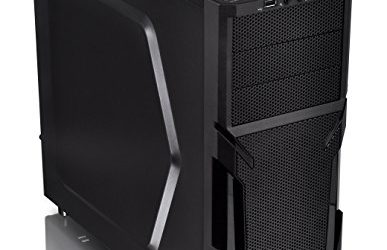
The best mid tower case for most gaming builds in 2026 is one with a mesh front panel, room for a 360 mm radiator or three 120 mm fans up front, and at least 380 mm of GPU clearance. Models such as the Lian Li Lancool 216, Corsair 4000D Airflow and Fractal Design North cover that brief at different price points and styles. The right pick depends on how big your graphics card is, how many drives you need and whether you value silence or maximum airflow.
A mid tower is the sweet spot of PC cases because it fits standard ATX boards, takes today’s three-slot graphics cards and still sits comfortably on a desk. Most are roughly 40 to 50 cm deep and 18 to 23 cm wide. Below, the picks are grouped by what they do best, followed by a way to check fit with numbers before you buy.
Quick comparison of the picks
| Pick | Best for | Key specs | Typical price |
|---|---|---|---|
| Lian Li Lancool 216 | Best overall airflow | ATX, 2x 160 mm front fans, up to 392 mm GPU, 360 mm radiator front | Usually $90-$120 |
| Corsair 4000D Airflow | Best budget all-rounder | ATX, mesh front, up to 360 mm GPU, 360 mm radiator front, 2 fans included | Usually $90-$110 |
| Fractal Design North | Best looking and quiet | ATX, wood or metal front, mesh option, about 355 mm GPU, 360 mm radiator | Usually $130-$150 |
| NZXT H5 Flow | Best simple build experience | ATX, perforated front, about 365 mm GPU, 2 fans included | Usually $90-$100 |
| be quiet! Pure Base 500DX | Best for low noise | ATX, foam-lined panels, 3 ARGB fans, about 369 mm GPU | Usually $100-$130 |
| Phanteks Eclipse G360A | Best budget airflow value | ATX, mesh front, 3 ARGB fans included, about 400 mm GPU | Usually $80-$100 |
Prices are general market ranges and shift with sales; dimensions come from each manufacturer’s spec sheet and can differ slightly by revision.
Best overall: Lian Li Lancool 216
The Lancool 216 is built around two large 160 mm front intake fans and a 140 mm exhaust, which move a lot of air at low RPM. Per the manufacturer’s spec sheet it accepts graphics cards up to roughly 392 mm and tower coolers up to about 180 mm tall, which covers nearly every current flagship card and large air cooler. The mesh front and mesh top give hot components a clear path out.
The trade-off is bulk. At around 48 cm deep it is on the long side for a mid tower, and the tinted glass panel gets fingerprints easily. If you want a cooler-running machine with fewer compromises, this is the safe choice.
Best budget all-rounder: Corsair 4000D Airflow
The 4000D Airflow has been a default recommendation for years for a reason: tidy cable routing, a removable front filter and a front panel that does not choke the fans. It ships with two 120 mm fans and supports a 360 mm radiator at the front.
The trade-off is GPU length. Around 360 mm of clearance means the longest triple-fan cards need a check before purchase, and the included fans are only adequate. Budget for an extra fan or two if you run a hot CPU and GPU combination.
Best for looks and quiet: Fractal Design North
The North takes a living-room friendly approach, with a wood-slat or solid-metal front option and a mesh variant for better cooling. It supports a 360 mm radiator and a range of top and front configurations. Fractal’s design language is clean, and the dust filters are easy to remove.
The trade-off is price and a front panel that restricts airflow slightly more than pure mesh cases. Choose the mesh version if you run a high-wattage graphics card, and the wood version only when thermals are modest.
Best for a simple build: NZXT H5 Flow
The H5 Flow is a compact mid tower with a perforated front panel and a clean interior. It is easy to build in, with a dedicated GPU-side fan mount that can help cool the graphics card directly. The case is a good fit for first-time builders who want clear space and uncomplicated cable management.
The trade-off is limited drive capacity, so if you want many 3.5-inch hard drives, look elsewhere.
Best for low noise: be quiet! Pure Base 500DX
This case uses a partially mesh front with sound-dampening elements and comes with three ARGB fans. It balances airflow and noise better than fully open cases, which matters if your PC sits near your desk. Check the manufacturer’s current specs, as be quiet! has refreshed this line over the years.
The trade-off is that mesh-fronted rivals usually run a few degrees cooler under sustained load.
Best budget airflow value: Phanteks Eclipse G360A
With three pre-installed ARGB fans, a full mesh front and generous GPU clearance, the G360A delivers a lot for the money. It is a great pick for people who want a good-looking, cool-running case without paying premium prices.
The trade-off is a thinner steel panel feel and fewer storage mounts than larger cases.
How to check fit with numbers
Most “it didn’t fit” problems come from three measurements. Run these before you order:
- GPU length plus 20 mm. If your card is 336 mm long, you want a case rated for at least 356 mm so front fans or a radiator do not collide with it.
- Cooler height plus 5 mm. A 165 mm air cooler needs a case rated for at least 170 mm side-panel clearance, or the glass panel will not close.
- Radiator thickness. A 360 mm radiator is typically 27 mm thick, and with fans it adds about 52 mm. That has to fit between the front panel and your motherboard or RAM, so check the case’s stated radiator-plus-fan clearance.
Worked example
Say you plan a build with a 345 mm triple-fan graphics card, a 160 mm tall tower cooler and a 360 mm AIO planned for later. A case with 360 mm GPU clearance leaves 15 mm to spare, which is tight but workable, though front radiator mounting will force the card closer to the fans. A case rated at 392 mm leaves 47 mm, which is comfortable and allows an AIO at the front. That is why the Lancool 216 and the G360A suit larger graphics cards better than the 4000D Airflow.
Airflow versus noise: a decision matrix
| Your situation | Choose | Why |
|---|---|---|
| High-wattage GPU (300 W or more) and a hot CPU | Lancool 216 or G360A | Full mesh front and large fans keep temperatures lower |
| Quiet office or bedroom PC | Pure Base 500DX or Fractal North | Dampened or solid panels reduce fan noise |
| First build, midrange parts | NZXT H5 Flow or 4000D Airflow | Easy to build in and well documented |
| Long graphics card (over 360 mm) | Lancool 216 or G360A | More length clearance |
| Many storage drives | Lancool 216 or Pure Base 500DX | More drive mounts |
How to choose a mid tower
- Front panel. Mesh gives the best cooling. Solid or glass fronts look sleek but can raise GPU temperatures by several degrees under sustained load, varying with fan curves and ambient temperature.
- Included fans. A case shipping with three fans saves roughly $20 to $30 versus buying them later.
- Power supply placement. Most modern cases have a shroud and room for ATX power supplies up to 160-180 mm long. Check this if you plan on a long modular PSU.
- Front I/O. A USB-C port on the front panel is worth having, and many current cases include one. Confirm your motherboard has a matching internal header.
- Dust filters. Removable filters on the front, top and bottom make long-term upkeep much easier.
Common mistakes to avoid
Buying on looks alone is the biggest one. A case with a solid front and tempered glass looks great in a photo but may leave a hot graphics card throttling. The second mistake is ignoring the motherboard size: while mid towers handle ATX, E-ATX boards often need a full tower. Third, skipping a spare fan header check, since some boards only offer three or four chassis fan connectors, and a case with many fans may need a hub.
Frequently Asked Questions
What is a mid tower case?
A mid tower is a standard-size PC case that fits ATX, micro-ATX and mini-ITX motherboards. It usually offers seven expansion slots and room for large graphics cards and 360 mm radiators. It is the most common size for gaming builds.
Is a mid tower big enough for an RTX-class high-end graphics card?
Usually yes, but check length and thickness. Many flagship cards are 300 to 360 mm long and occupy three slots, so choose a case with at least 20 mm of spare length clearance beyond the card’s stated size.
Do I need a mesh front panel?
You do not strictly need one, but it helps cooling. If you run a power-hungry GPU or an overclocked CPU, mesh is worth it. For moderate hardware and a quiet-first approach, a dampened case can be a better trade.
How many fans should a mid tower have?
Three intake fans in the front and one exhaust at the rear is a strong starting point. Adding top exhaust fans helps if you run a radiator or a hot CPU. Fan quality and curve settings matter as much as count.
Can I fit an AIO liquid cooler in a mid tower?
Yes. Most modern mid towers support a 240 mm or 360 mm radiator at the front or top. Verify clearance over your RAM and the motherboard’s VRM heatsink before ordering.
Is a more expensive case always better?
No. Price often buys materials, tool-less panels and design rather than temperatures. A well-ventilated $90 case can match a $150 one for cooling, so spend more only for features you will actually use.
Related guides
More from Amazon
Programs that pair well with the guide above. Offers and eligibility are set by Amazon and may change.
A free business account with business pricing and bulk-buying tools for work, shop or home office.
Create a business accountFree shipping on eligible items, Prime Video and more. Eligible new members can start with a free trial.
Start a Prime free trialAudiobooks and podcasts to listen to on the go. Eligible new members can start with a free trial.
Try Audible freeAd-free music streaming. Eligible new subscribers can start with a free trial.
Try Music Unlimited freeAs an Amazon Associate we earn from qualifying purchases.