The best graphics card for most gamers in 2026 is a 16GB card in the RTX 5070 Ti or Radeon RX 9070 XT class, which handles 1440p at high settings and entry-level 4K. Budget buyers should look at the RTX 5060 Ti 16GB, Radeon RX 9060 XT 16GB or Intel Arc B580, and enthusiasts at 4K should look at the RTX 5080 or RTX 5090. The manufacturer’s spec sheet tells you which one fits your monitor and power supply, and this guide shows how to read it.
As an Amazon Associate we earn from qualifying purchases at no extra cost to you.


Our Top Picks
 ASUS TUF Gaming GeForce RTX 5070 Ti 16GBRTX5070Ti|OC|Black|Standard13 x 5.5 x 2.5 inches3.6 poundsCheck on Amazon

Top 3 picks at a glance
Quick comparison of the best graphics cards
Memory and power figures below come from the manufacturers’ published spec pages. Board partner models vary in clocks and power limits, and prices change often, so the price column uses general tiers only.
| Pick | Best for | VRAM / bus | Board power | Price tier |
|---|---|---|---|---|
| GeForce RTX 5070 Ti | Best overall, 1440p to 4K | 16GB GDDR7 / 256-bit | 300W | Upper mid-range |
| Radeon RX 9070 XT | Best value at high performance | 16GB GDDR6 / 256-bit | about 304W | Upper mid-range |
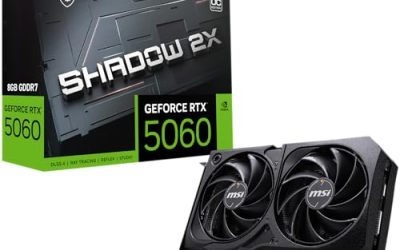
| GeForce RTX 5060 Ti 16GB | Best 1080p/1440p mid-range | 16GB GDDR7 / 128-bit | 180W | Mid-range |
| Radeon RX 9060 XT 16GB | Best AMD mid-range | 16GB GDDR6 / 128-bit | about 160W | Mid-range |
| Intel Arc B580 | Best budget 1080p/1440p | 12GB GDDR6 / 192-bit | 190W | Budget |
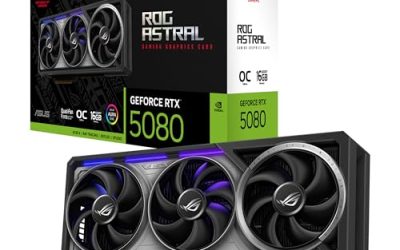
| GeForce RTX 5080 | Best for 4K without the flagship | 16GB GDDR7 / 256-bit | 360W | Premium |
| GeForce RTX 5090 | Best no-compromise 4K and creator work | 32GB GDDR7 / 512-bit | 575W | Flagship |
Best overall: GeForce RTX 5070 Ti
The RTX 5070 Ti pairs 16GB of GDDR7 with a 256-bit bus at a 300W board power. That is enough memory for current high-resolution texture packs and enough bandwidth for 4K with upscaling. It suits players with a 1440p high-refresh monitor who also want to try 4K. Its main trade-off is cost. The step down to a 5060 Ti saves a lot of money, and the step up to an RTX 5080 adds more performance than most 1440p players can use.
Best value: Radeon RX 9070 XT
The RX 9070 XT has 16GB of GDDR6 on a 256-bit bus and draws roughly 300W. It is the usual pick for strong rasterization performance per unit of money. It suits buyers who play mostly traditional rendered games and care less about path-traced titles. Its trade-off is that heavy ray tracing and some proprietary NVIDIA features can favor GeForce cards, so check how your own games use them. The non-XT RX 9070 uses the same 16GB and 256-bit layout at a lower power target of about 220W, which suits smaller cases and weaker power supplies.
Best mid-range: RTX 5060 Ti 16GB or RX 9060 XT 16GB
Both cards use a 128-bit bus and come in 8GB and 16GB versions. Buy the 16GB version. At 8GB, texture-heavy games at 1440p can force settings down or cause stutter. These cards suit 1080p high-refresh and 1440p medium-to-high play, and both draw modest power, so most 550W to 650W supplies work. The trade-off is the narrow bus. It limits 4K, so do not choose one for a 4K monitor.
Best budget: Intel Arc B580
The Arc B580 offers 12GB of VRAM on a 192-bit bus at about 190W. That is more memory than many cards in its class. It suits budget 1080p and light 1440p builds. The trade-offs are higher CPU overhead in some games and occasional driver quirks in older titles. Pair it with a reasonably modern CPU and a motherboard with Resizable BAR support, which Intel recommends in its documentation.
Best for 4K: RTX 5080 and RTX 5090
The RTX 5080 has 16GB on a 256-bit bus at 360W. It is the sensible 4K card for people who will not pay flagship money. The RTX 5090 has 32GB on a 512-bit bus at 575W. It is aimed at 4K at maximum settings, high-refresh 4K and VRAM-hungry creator work such as large AI models and 3D rendering. Its trade-offs are cost, size and power. It needs the 12V-2×6 connector, a high-wattage supply and a large case with clearance for a thick cooler.
How to read the spec sheet
Three lines on a manufacturer’s page decide most purchases: VRAM, memory bandwidth and board power. Core counts and boost clocks matter less across different architectures, because a count from one vendor does not compare cleanly with the other’s.
Memory bandwidth: a worked calculation
Bandwidth in GB/s is the bus width in bits divided by 8, multiplied by the memory speed in Gbps per pin. Using the manufacturers’ published memory speeds:
| Card | Bus width | Memory speed | Calculation | Bandwidth |
|---|---|---|---|---|
| RTX 5060 Ti | 128-bit | 28 Gbps | 128 / 8 × 28 | 448 GB/s |
| RTX 5070 | 192-bit | 28 Gbps | 192 / 8 × 28 | 672 GB/s |
| RTX 5070 Ti | 256-bit | 28 Gbps | 256 / 8 × 28 | 896 GB/s |
| RX 9070 XT | 256-bit | 20 Gbps | 256 / 8 × 20 | 640 GB/s |
| RTX 5090 | 512-bit | 28 Gbps | 512 / 8 × 28 | 1,792 GB/s |
The RTX 5060 Ti has half the 5070 Ti’s bus, so it has half the raw bandwidth, which is why it fades at 4K. Bandwidth is not the only factor. Large on-chip caches, especially on AMD’s cards, reduce how much a card depends on raw bandwidth. Use these figures to compare cards within a tier, not to predict frame rates.
VRAM by resolution
The frame buffer itself is small. One 3840×2160 buffer at 32 bits per pixel is about 33MB. What fills VRAM is textures, geometry, ray tracing structures and frame generation buffers. As a planning rule based on how recent games behave:
- 1080p: 8GB works for many games but leaves little margin. 12GB is comfortable.
- 1440p: 12GB is workable, and 16GB gives headroom for high texture settings and ray tracing.
- 4K: 16GB is the practical floor for high settings. 24GB or more helps with heavy mods and path tracing.
Exact usage varies by game, patch and settings, so check a recent review of your main titles.
Power budget: a worked example
Add the GPU board power, the CPU’s peak power and about 75W for the motherboard, drives, RAM and fans. Then add 25% to 30% headroom for transient spikes. For an RTX 5070 Ti (300W) with a CPU peaking at 125W:
- 300W + 125W + 75W = 500W sustained
- 500W × 1.3 = 650W minimum
- NVIDIA’s spec page recommends a 750W supply for this card, so go with 750W.
When the vendor’s recommendation is higher than your own sum, follow the vendor. They account for lower-quality supplies and spikes.
Decision matrix: match your setup to a card
| Your situation | Choose | Why |
|---|---|---|
| 1080p, 144Hz, tight budget | Arc B580 or 16GB 60-class card | 12GB or more avoids texture stutter |
| 1440p, 144Hz to 165Hz | RTX 5060 Ti 16GB, RX 9060 XT 16GB or RX 9070 | Good balance of price and power draw |
| 1440p high-refresh with ray tracing | RTX 5070 Ti | More bandwidth and mature RT and upscaling |
| 4K at 60Hz to 120Hz | RX 9070 XT, RTX 5070 Ti or RTX 5080 | 256-bit buses and 16GB |
| 4K max settings or creator and AI work | RTX 5090 | 32GB and 1,792 GB/s |
| Small case or 550W to 650W supply | RTX 5060 Ti, RX 9060 XT or RX 9070 | Lower power targets |
Compatibility checks before you buy
- Card length and thickness: Check the partner model’s listed dimensions against your case’s maximum GPU length and slot count. Many high-end cards occupy three slots or more.
- Power connectors: Count the 8-pin PCIe and 12V-2×6 connectors on your supply. Adapters work, but a native cable is cleaner. Seat 12V-2×6 plugs fully.
- PCIe slot: Cards run in older slots, but 8GB cards can lose noticeable performance when limited to PCIe 3.0 or fewer lanes, because they spill into system memory more often.
- CPU balance: A fast card with an old CPU can bottleneck at 1080p. At 1440p and 4K the GPU limits performance more.
- Monitor ports: Confirm DisplayPort and HDMI versions on the card if you run 4K at high refresh rates.
Frequently Asked Questions
What is the best graphics card for 1440p in 2026?
The RTX 5070 Ti and RX 9070 XT are the strongest all-round choices for 1440p, with 16GB of VRAM and 256-bit buses. If you want to spend less, the RTX 5060 Ti 16GB, RX 9060 XT 16GB and RX 9070 are good options at 1440p with some settings tuned.
Is 8GB of VRAM enough in 2026?
It is enough for 1080p in many games, but it is a risk for new releases at high texture settings and for 1440p. If you plan to keep the card for several years, choose 12GB at minimum and ideally 16GB.
How much power supply do I need for a new graphics card?
Add the card’s board power, your CPU’s peak power and about 75W for everything else, then multiply by 1.3 for headroom. Then compare the result with the GPU vendor’s recommended wattage and use the higher number. For an RTX 5070 Ti, that points to 750W.
Should I buy NVIDIA, AMD or Intel?
NVIDIA offers the strongest ray tracing and the broadest feature support. AMD tends to offer more rasterization performance per unit of money, and Intel offers the most VRAM at the budget end. Choose based on the games you play and which upscaling and frame generation features you will use.
Do I need a flagship card like the RTX 5090?
Almost no gamer does. It makes sense for 4K at maximum settings, very high refresh rates and workloads that need 32GB of VRAM. For most 1440p and 4K gaming, a 16GB card from the 5070 Ti, 9070 XT or 5080 class is the better use of money.
Related guides
More from Amazon
Programs that pair well with the guide above. Offers and eligibility are set by Amazon and may change.
A free business account with business pricing and bulk-buying tools for work, shop or home office.
Create a business accountFree shipping on eligible items, Prime Video and more. Eligible new members can start with a free trial.
Start a Prime free trialAudiobooks and podcasts to listen to on the go. Eligible new members can start with a free trial.
Try Audible freeAd-free music streaming. Eligible new subscribers can start with a free trial.
Try Music Unlimited freeAs an Amazon Associate we earn from qualifying purchases.