The best general purpose sound card for most PC owners in 2026 is the Creative Sound Blaster AE-7 for a desktop with demanding headphones, or the ASUS Xonar SE if you want a simple, low-cost upgrade over onboard audio. If you need to switch between a PC, a laptop and a console, a USB unit such as the Sound Blaster G6 is the more flexible choice. Before buying, check whether your headphones actually need more amplifier power, because that decides whether a card helps at all.
As an Amazon Associate we earn from qualifying purchases at no extra cost to you.


Our Top Picks
Top 3 picks at a glance
Quick comparison of the picks
| Pick | Best for | Key specs (per manufacturer) | Price range |
|---|---|---|---|
| Creative Sound Blaster AE-7 | Best overall | PCIe x1, 32-bit/384 kHz, about 127 dB DNR, amp for up to 600 ohm headphones, external control module | Premium |
| ASUS Xonar SE | Best budget PCIe | PCIe x1, 24-bit/192 kHz, about 116 dB SNR, 5.1 analog output, amp for up to 150 ohm | Budget to mid-range |
| Creative Sound Blaster AE-5 Plus | Best for 5.1 speakers and RGB builds | PCIe x1, 32-bit/384 kHz, about 122 dB DNR, 600 ohm headphone support, RGB, desktop control module | Mid-range |
| Creative Sound Blaster Audigy FX V2 | Best cheap upgrade | PCIe x1, 5.1 output, 24-bit/192 kHz-class, 600 ohm headphone support | Budget |
| Creative Sound Blaster G6 | Best USB option for PC and console | External USB DAC/amp, 32-bit/384 kHz, optical in/out, works with PC, PlayStation and Xbox | Mid-range |
| Creative Sound Blaster AE-9 | Best for high-end headphones | PCIe x1 plus extra power connector, 32-bit/384 kHz, about 127 dB DNR, high-power headphone amp | Premium |
Specs above come from the manufacturers’ published sheets and can differ slightly between hardware revisions. Check the exact box before ordering.
Do you need a sound card at all?
Many modern motherboards already have a decent codec with a decent DAC. A card makes a real difference in three cases: your headphones are hard to drive, you hear electrical noise (hiss, GPU whine) from the front or rear jacks, or you need outputs your board lacks, such as 5.1 analog or optical. If none of these applies, a card will not noticeably improve a gaming headset or typical desktop speakers.
Best overall: Creative Sound Blaster AE-7
The AE-7 suits people who want a single card that handles stereo headphones, speakers and light gaming surround without fuss. Its headphone amp is rated for headphones up to 600 ohm, so it covers nearly every popular open-back or studio model. It has a desktop control module for volume and input switching, and it also supports a microphone input with its own gain control.
Trade-off: it costs more than a basic card, needs a free PCIe slot and a power connection, and the Creative software suite is more cluttered than a driver-only approach. You can run it largely as a plain DAC if you don’t want the effects.
Best budget PCIe: ASUS Xonar SE
The Xonar SE is the sensible pick if your goal is cleaner output than a noisy board, not maximum amplifier power. It offers a stated 116 dB signal-to-noise ratio, 5.1 analog output and a headphone amp suited to headphones up to around 150 ohm. It draws power from the slot alone, which simplifies installation in small cases.
Trade-off: no optical output and a weaker amp than Creative’s higher tiers, so very hard-to-drive headphones may sound quiet or undernourished.
Best for 5.1 speakers and RGB builds: Sound Blaster AE-5 Plus
The AE-5 Plus gives you a higher-grade DAC than entry cards, 600 ohm headphone support and an RGB-lit design that fits showcase builds. It also comes with a small desktop control module. Choose it when you run a 5.1 speaker set or want a card that looks part of the build.
Trade-off: the audible gain over an AE-7 is small, and the AE-7 offers more flexible output handling for some setups.
Best cheap upgrade: Sound Blaster Audigy FX V2
If your onboard audio is noisy or lacks 5.1 outputs, the Audigy FX V2 is a low-cost fix. It adds a headphone amp rated for up to 600 ohm and basic 5.1 analog output in a compact half-height-friendly format.
Trade-off: its DAC and noise figures are a step below the AE series, so it is a convenience upgrade rather than an audiophile one.
Best USB option: Sound Blaster G6
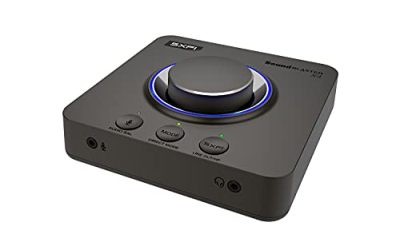
The G6 is an external USB DAC and headphone amp. It works with a desktop PC, a laptop, a PlayStation or an Xbox (via USB or optical, per Creative’s documentation), so it moves between devices. It has a front-panel headphone jack and mic input, plus optical in/out. It is the practical choice for laptop owners and small form factor PCs with no spare PCIe slot.
Trade-off: it adds another box and cable on your desk, and some features, like full control software, only work fully on Windows.
Best for high-end headphones: Sound Blaster AE-9
The AE-9 is Creative’s flagship PCIe card, with a high-power headphone amp, a separate external DAC/amp module and a higher-grade DAC. It suits owners of planar magnetic or high-impedance headphones.
Trade-off: it is large, demands an extra power cable from the PSU, and costs significantly more than the other cards. A dedicated desktop DAC/amp can offer comparable performance with less case fuss.
How to choose: the headphone power calculation
Amplifier power matters more than the signal-to-noise number. Two quick calculations show why.
Example 1: easy headphones. A 32 ohm headset with 100 dB/mW sensitivity needs about 10 mW to hit 110 dB peaks (10 dB above 1 mW). Voltage required: √(0.010 W × 32 ohm) ≈ 0.57 V RMS. Practically any onboard output or card handles that, so a card brings little benefit.
Example 2: demanding headphones. A 250 ohm pair with 96 dB/mW sensitivity needs 14 dB above 1 mW, about 25 mW, to hit 110 dB peaks. Voltage required: √(0.025 W × 250 ohm) ≈ 2.5 V RMS. Many onboard outputs struggle there, producing low volume or flattened dynamics. This is where a card or DAC/amp with a 600 ohm-rated amp helps.
The noise figures are less decisive. A 16-bit recording has a theoretical range of about 96 dB, and 24-bit about 144 dB. The difference between a 116 dB and a 127 dB card sits well below the noise floor of a normal room, so don’t pay extra just for that number.
Decision matrix: match your situation to a pick
| Your situation | Choose | Reason |
|---|---|---|
| Gaming headset, 32–64 ohm, clean onboard audio | No card needed | Power need under about 1 V; little audible gain |
| Noisy onboard audio, stereo speakers or headset | Xonar SE or Audigy FX V2 | Isolated PCIe card removes much of the board noise |
| Headphones of 150–300 ohm | AE-7 or AE-5 Plus | Amp rated to 600 ohm covers the roughly 2.5 V need |
| Planar or 300+ ohm headphones | AE-9 or a separate DAC/amp | Higher output voltage and current headroom |
| 5.1 analog speaker system | AE-5 Plus, Xonar SE, Audigy FX V2 | Provides multichannel analog outputs |
| Laptop, mini PC or console | Sound Blaster G6 (USB) | No PCIe slot required; multi-device support |
Installation and compatibility checks
- Slot: every PCIe card here uses a x1 slot, but a long GPU can cover the slot beneath it. Check clearance before buying.
- Power: higher-end Creative cards need an extra power cable from the PSU. Confirm you have a spare connector.
- Drivers: disable the onboard audio device in Windows Sound settings and avoid running two sets of enhancement effects at once.
- Sample rate: set the default format to 24-bit, 48 kHz for gaming and video. Higher rates help only with high-resolution music files.
- Case noise: keep the card away from the GPU where possible to reduce electrical interference.
Frequently Asked Questions
Is a sound card worth it in 2026?
It is worth it if you use hard-to-drive headphones, hear noise from your onboard jack, or need outputs your motherboard lacks. For a typical USB gaming headset, it adds nothing because the headset has its own DAC. A card is a fix for specific problems, not a universal upgrade.
Is a USB DAC better than an internal sound card?
Neither is inherently better. An external USB unit avoids electrical noise inside the case and moves between devices, while a PCIe card saves desk space and often costs less for similar features. Choose by connectivity needs, not by audio quality claims.
Will a sound card improve game FPS?
No meaningful change should be expected on a modern CPU. Some cards offload a small amount of audio processing, but the effect on frame rates is negligible. Choose a card for sound quality and features, not performance.
Do I need a sound card for a gaming headset?
Usually not. USB headsets contain their own DAC and amp, and 3.5 mm headsets with low impedance run fine from onboard audio. A card helps mainly if the headset is 3.5 mm and the motherboard jack is noisy or weak.
What impedance headphones need a dedicated amp?
As a rough guide, headphones above about 100 ohm or with low sensitivity (under about 95 dB/mW) benefit most. Use the power calculation above: if the required voltage is well beyond the 1–2 V that many onboard outputs deliver, a card with a stronger amp is justified.
Can I use a sound card and keep my onboard audio?
Yes. Both devices appear in Windows, and you can pick which one is the default. Many people keep onboard audio for HDMI or monitor speakers and use the card for headphones, but disable unused enhancements to avoid conflicts.
Related guides
More from Amazon
Programs that pair well with the guide above. Offers and eligibility are set by Amazon and may change.
A free business account with business pricing and bulk-buying tools for work, shop or home office.
Create a business accountFree shipping on eligible items, Prime Video and more. Eligible new members can start with a free trial.
Start a Prime free trialAudiobooks and podcasts to listen to on the go. Eligible new members can start with a free trial.
Try Audible freeAd-free music streaming. Eligible new subscribers can start with a free trial.
Try Music Unlimited freeAs an Amazon Associate we earn from qualifying purchases.