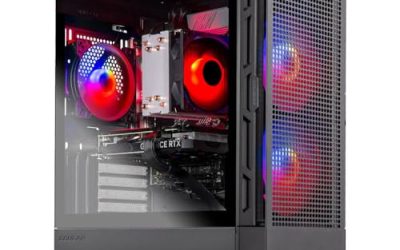
The best gaming PC for most people in 2026 is a 1440p system built around a 16GB graphics card in the GeForce RTX 5070 Ti or Radeon RX 9070 XT class, paired with a modern 6- to 8-core CPU, 32GB of DDR5 and a 750W to 850W power supply. Spend on the GPU first, because it sets your resolution and frame-rate ceiling. Drop to an RTX 5060 Ti or RX 9060 XT class card for 1080p, and step up to an RTX 5080 or RTX 5090 class card only if you game at 4K.
Quick comparison of the best gaming PC classes
These are spec classes rather than single prebuilt SKUs, because prebuilt configurations change constantly. Any prebuilt or parts list that matches a row below is a sensible buy.
| Pick | Best for | Key specs | Budget tier |
|---|---|---|---|
| Best overall: RTX 5070 Ti / RX 9070 XT class | 1440p high refresh, light 4K | 16GB VRAM, 256-bit bus, about 300W GPU power; 8-core CPU; 32GB DDR5; 750-850W PSU | Upper mid-range |
| Best value: RTX 5070 / RX 9070 class | 1440p at 60-120 fps | RTX 5070: 12GB, 192-bit, 250W; RX 9070: 16GB, 220W class; 650-750W PSU | Mid-range |
| Best budget: RTX 5060 Ti 16GB / RX 9060 XT 16GB class | 1080p high refresh, entry 1440p | 16GB VRAM, 128-bit bus, 160-180W; 6-core CPU; 16-32GB DDR5; 550-650W PSU | Budget to lower mid-range |
| Best for 4K: RTX 5080 class | 4K with upscaling, 1440p ultrawide | 16GB GDDR7, 256-bit, 360W; 8-core X3D-style CPU; 850W PSU | Premium |
| Best no-compromise: RTX 5090 class | 4K at high refresh, path tracing | 32GB GDDR7, 512-bit, 575W; 1000W+ PSU with a 12V-2×6 cable | Enthusiast |
Best overall: the 16GB 1440p all-rounder
An RTX 5070 Ti or RX 9070 XT class machine is the safest buy because it avoids the two usual failure points: too little VRAM and too little CPU. With 16GB on a 256-bit bus, it handles high-resolution texture packs at 1440p and can run 4K with upscaling. Published reviews generally put cards in this class at roughly 100-160 fps in many modern 1440p titles at high settings, and well below that with ray tracing or path tracing. Results vary with the game, settings, CPU and driver patch.
Who it suits: anyone with a 1440p 144-165Hz monitor who wants to keep the PC for four to five years. Trade-off: it costs noticeably more than the next tier down, and the gain over a 12GB card is mostly about longevity rather than today’s frame rates.
Best value: the mid-range 1440p card
An RTX 5070 or RX 9070 class system is where price-to-performance usually peaks. The RTX 5070 has 12GB of GDDR7 on a 192-bit bus and a 250W rating, per Nvidia’s spec sheet. The RX 9070 carries 16GB, which is a point in AMD’s favor for texture-heavy games. Either holds around 60-100 fps at 1440p high settings in most current games, again depending on the title and CPU.
Who it suits: players who want 1440p without paying for the top tier. Trade-off: 12GB of VRAM is adequate today, but it is the first thing you may hit at 1440p with maxed textures and ray tracing in a few years.
Best budget: the 1080p high-refresh machine
For a 1080p 144-240Hz monitor, a Radeon RX 9060 XT 16GB or GeForce RTX 5060 Ti 16GB class PC is enough, paired with a Ryzen 5 or Core Ultra 5 class CPU. Both are 128-bit cards with modest power draw, so they work with a quality 550-650W supply and need no exotic cooling. The key detail is VRAM. Both families also exist as 8GB models, and 8GB is where modern games start to force lower texture settings even at 1080p. If a listing does not state the VRAM, assume it is the 8GB version and check before buying.
Who it suits: first builds, esports players and anyone on a 1080p panel. Trade-off: 1440p with ray tracing is a stretch without upscaling or frame generation.
Best for 4K: the RTX 5080 class
An RTX 5080 class PC is the practical 4K choice. It has 16GB of GDDR7 on a 256-bit bus and a 360W rating, per the manufacturer’s spec sheet. At native 4K with high settings, expect roughly 60-90 fps in many demanding games, and substantially more with DLSS upscaling or frame generation. Treat the figures as approximate, since they shift by title and settings. Pair it with an X3D-style gaming CPU and a 850W supply.
Who it suits: 4K monitor or TV owners and ultrawide players. Trade-off: it is premium-priced, and frame generation adds latency that competitive players may not want.
Best no-compromise: the RTX 5090 class
The RTX 5090 has 32GB of GDDR7 on a 512-bit bus and a 575W rating. It is the only consumer card that targets 4K at high refresh rates with heavy ray tracing, and the extra VRAM also helps with AI and creator workloads. Trade-off: it needs a 1000W or larger supply with a proper 12V-2×6 connector, a large case with strong airflow, and a budget well beyond everything else here. For pure gaming, the RTX 5080 class is the better value.
How to choose: a decision matrix
| Your situation | Choose | Why |
|---|---|---|
| 1080p, 144-240Hz, esports titles | 16GB 5060 Ti / 9060 XT class, fast 6-core CPU | Frame rate in these games is mostly CPU-bound, so a bigger GPU adds little |
| 1440p, 144-165Hz, mixed games | 5070 Ti / 9070 XT class | 16GB covers high textures and gives headroom for upscaling |
| 1440p, tight budget | 5070 / 9070 class | Best frame rate per unit of spend |
| 4K TV at 60-120Hz | 5080 class, HDMI 2.1 output | Needs the shader power and bandwidth for native or upscaled 4K |
| Sim, strategy or heavy CPU games | X3D-style CPU over a bigger GPU | Large cache lifts minimum frame rates in CPU-limited games |
| Streaming and gaming on one PC | 8-core or better CPU, 32GB RAM | Encoding and background apps need spare cores and memory |
Worked example: sizing the power supply
Take a 1440p build with an RTX 5070 Ti class card and a high-end gaming CPU. Use the manufacturers’ rated figures and add a margin for spikes.
- GPU: about 300W (rated board power)
- CPU: about 120W rated, and up to roughly 160W under heavy load
- Motherboard, RAM, SSDs, fans and USB devices: about 75W
- Estimated peak: 300 + 160 + 75 = about 535W
Power supplies run most efficiently and quietly at around 50-65% load, and modern GPUs produce short transient spikes above their rated power. Dividing 535W by 0.65 gives about 820W, so an 750W unit is the practical minimum and 850W is comfortable. Apply the same method to an RTX 5090 class build: 575 + 160 + 75 = 810W peak, and 810 / 0.65 is about 1250W, which is why 1000W is the floor and 1200W is the safer choice. Look for an ATX 3.x supply with a native 12V-2×6 cable, and avoid adapters where you can.
VRAM and resolution: what to expect
| Resolution | Pixels per frame | Practical VRAM |
|---|---|---|
| 1920 x 1080 | 2.07 million | 8GB works, 12GB is safer for new releases |
| 2560 x 1440 | 3.69 million (1.78x 1080p) | 12GB minimum, 16GB preferred |
| 3840 x 2160 | 8.29 million (4x 1080p) | 16GB minimum, 24-32GB for heavy ray tracing and mods |
Pixel counts are exact, but VRAM needs depend on the game and texture settings. These are rules of thumb drawn from typical developer recommendations and review commentary.
Prebuilt or custom build?
A prebuilt is the better choice if you value a warranty, a single support contact and time saved. Check four things before ordering: the exact GPU model and its VRAM, whether the power supply is a named brand with a stated wattage, whether the RAM runs as two matched modules in dual channel, and whether the SSD is NVMe with a stated capacity. Weak spots in budget prebuilts are usually the PSU and a single stick of RAM. Building your own typically gets better parts for the money, but you handle compatibility and troubleshooting yourself.
Other components deserve a quick check too. Aim for at least 32GB of DDR5 in anything above entry level, a 1TB NVMe SSD at minimum (2TB if you install many large games), and a case with a mesh front panel. Make sure the monitor can use what the PC delivers, since a 1440p 165Hz panel is a better pairing for most of these builds than a 60Hz 4K display.
Frequently Asked Questions
How much VRAM does a gaming PC need in 2026?
Aim for 16GB if you play at 1440p or higher, and treat 12GB as the minimum for new releases at high texture settings. 8GB can still run 1080p, but it increasingly forces compromises. If you plan to keep the PC for several years, 16GB is the safer choice.
Is an Nvidia or AMD graphics card better for gaming?
Neither wins across the board. Nvidia generally leads in ray tracing, upscaling and frame generation support, while AMD’s Radeon RX 9000 series often offers more VRAM for the money. Compare the specific cards at your budget in current reviews rather than choosing by brand.
Is a prebuilt gaming PC worth it?
Yes, when it lists every component clearly and uses a reputable power supply, dual-channel RAM and an NVMe SSD. It saves assembly time and comes with a single warranty. Avoid listings that hide the GPU VRAM, PSU brand or RAM configuration.
How much power supply do I need?
Add the GPU and CPU rated power plus about 75W for everything else, then divide by 0.65 to leave headroom. A mid-range 1440p build typically lands at 750W, an RTX 5080 class build at 850W, and an RTX 5090 class build at 1000W or more. Choose a supply that meets the ATX 3.x standard if your card uses the 12V-2×6 connector.
Do I need an 8-core CPU for gaming?
Not always. A modern 6-core CPU is enough for 1080p and most 1440p gaming with a mid-range card. Move to 8 cores or an X3D-style cache CPU if you stream, play simulation or strategy games, or pair the CPU with a high-end GPU.
Should I buy for 4K or stay at 1440p?
For most buyers, 1440p at a high refresh rate is the better balance of image quality, smoothness and cost. 4K needs a significantly more expensive GPU and usually relies on upscaling to stay above 60 fps in demanding games. Choose 4K mainly if you play on a TV or care most about visual detail.
Related guides
More from Amazon
Programs that pair well with the guide above. Offers and eligibility are set by Amazon and may change.
A free business account with business pricing and bulk-buying tools for work, shop or home office.
Create a business accountFree shipping on eligible items, Prime Video and more. Eligible new members can start with a free trial.
Start a Prime free trialAudiobooks and podcasts to listen to on the go. Eligible new members can start with a free trial.
Try Audible freeAd-free music streaming. Eligible new subscribers can start with a free trial.
Try Music Unlimited freeAs an Amazon Associate we earn from qualifying purchases.