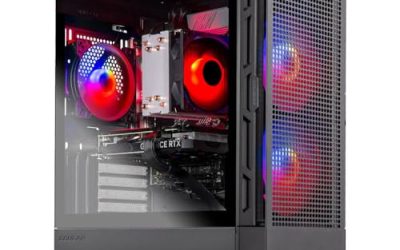
For Final Fantasy XI Ambuscade runs, the best hardware is a fast-single-core CPU, 32 GB of RAM and a mid-range 8 GB graphics card, especially if you run several clients at once. Many people searching for the best Ambuscade armor sets want a gear ranking. Those rankings change by job, role and game update, so check the official patch notes and community databases such as BG-Wiki before you commit to a set. This guide covers what a gaming hardware site can answer: the PC that runs the content smoothly.
Quick comparison of PC setups for Ambuscade
FFXI’s client is old: 32-bit, DirectX 9-based, and heavily dependent on single-thread CPU speed. It is not demanding for one window, but it scales poorly when you add multiple clients, HD texture packs, addons and a 4K display. The specs below are spec classes, not benchmark claims.
| Pick | Best for | Key specs | Budget level |
|---|---|---|---|
| Best budget: APU mini build | One or two clients at 1080p | Ryzen 5 8600G-class APU, 16 GB DDR5, NVMe SSD | Budget |
| Best overall: 6-core + 8 GB GPU | Up to 3-4 clients, 1440p | Modern 6-8 core CPU with high boost clock, 32 GB RAM, RTX 5060-class card | Mid-range |
| Best for multiboxing | 5-6 clients, addons, streaming | Ryzen 7 9800X3D-class CPU, 32-64 GB RAM, 12-16 GB GPU | Premium |
| Best laptop option | Playing away from home | Recent 8-core mobile CPU, 16-32 GB RAM, 6-8 GB laptop GPU | Mid-range to premium |
Best budget: an APU mini build
A Ryzen 5 8600G-class APU runs a single FFXI client at 1080p without a separate graphics card. It suits players who run one character, or a main plus a support character, for Ambuscade runs. Pair it with 16 GB of DDR5 and an NVMe SSD, since the game’s many small files load faster from fast storage.
Trade-off: integrated graphics share system memory, so HD texture mods and a 4K UI can cause stutter. There is also no headroom for a heavy third-party addon load plus streaming.
Best overall: a 6-core CPU with an 8 GB GPU
This is the sweet spot for most players. Choose a CPU with strong single-thread performance, such as a recent Ryzen 5 or Core i5-class chip, because each FFXI client leans mainly on one core. An RTX 5060-class card (8 GB) or an equivalent AMD card handles 1440p with HD textures and a few simultaneous clients. Get 32 GB of RAM so the game, Windower or Ashita, Discord and a browser with a wiki open all fit comfortably.
Trade-off: this tier is more than a single client needs. If you will never run more than one window, the money is better spent on a fast SSD and a good monitor.
Best for multiboxing: high-cache CPU and extra RAM
If you run five or six characters for Ambuscade, the bottleneck is CPU scheduling and memory, not raw graphics power. A high-cache CPU like the Ryzen 7 9800X3D handles many instances and addon processing well. Pair it with 32 GB at minimum, and 64 GB if you also stream or record. A 12-16 GB graphics card leaves VRAM headroom when every client loads its own textures.
Trade-off: this is the most expensive route, and the 32-bit client still caps each instance’s memory regardless of your hardware.
Best laptop option
A recent gaming laptop with an 8-core mobile CPU and 16-32 GB of RAM handles one to three clients well. Pick one with a vapor-chamber or dual-fan cooling design. Ambuscade runs can last a while, and thin laptops throttle when several clients sit at high load. Keep it plugged in, since battery mode lowers CPU boost clocks and makes the game feel sluggish.
Worked example: how much RAM and VRAM for 6 clients?
These numbers are planning estimates. Actual use varies with texture mods, addons and resolution, so measure your own setup in Task Manager. Assume each client uses about 1.5 GB of system RAM and about 1 GB of VRAM with HD textures.
- Six clients: 6 × 1.5 GB = 9 GB of RAM for the game alone.
- Windows and background services: about 4 GB.
- Browser with a wiki, Discord and a launcher: about 3 GB.
- Total: about 16 GB, which leaves almost no safety margin. 32 GB is the practical target.
- VRAM: 6 × 1 GB = 6 GB, plus desktop and browser overhead. An 8 GB card works, and 12 GB gives a comfortable buffer.
| Clients | Estimated game RAM | Recommended system RAM | Recommended VRAM |
|---|---|---|---|
| 1 | ~1.5 GB | 16 GB | Integrated or 4 GB+ |
| 2 | ~3 GB | 16 GB | 4-6 GB |
| 4 | ~6 GB | 32 GB | 8 GB |
| 6 | ~9 GB | 32 GB (64 GB if streaming) | 8-12 GB |
Decision matrix: match your situation to a build
| Your situation | Choose | Why |
|---|---|---|
| One character, 1080p, tight budget | APU mini build | The client is light, so no discrete GPU is needed |
| 2-3 characters, 1440p, HD textures | 6-core CPU + 8 GB GPU, 32 GB RAM | Balanced single-thread speed and VRAM |
| 5-6 characters plus streaming | High-cache CPU, 32-64 GB RAM, 12 GB+ GPU | CPU scheduling and memory dominate |
| Travel or dorm use | Gaming laptop with strong cooling | Sustained load matters more than peak clocks |
| 4K monitor, one client | Mid-range GPU, 16 GB RAM | The UI scales, but the game itself stays light |
How to choose: the criteria that matter
Single-thread CPU speed first
Because the client is old, a CPU with a high boost clock beats one with many slow cores. Extra cores only help when you run multiple clients, with roughly one core per client plus two for the system and addons.
RAM and the 32-bit limit
Each 32-bit client can only address a limited amount of memory, so heavy HD texture packs can crash a single instance even on a 64 GB machine. More RAM helps with multiple instances, not with a single client’s ceiling.
Storage
Use an NVMe SSD for the install. Zone loads and the many small data files benefit from fast random reads, so a 1 TB drive is plenty.
Display
1440p at 144 Hz is a good target. FFXI’s frame rate is often capped by the client rather than the GPU, so a high-refresh monitor matters less than a sharp, large panel for reading the UI.
What about the actual Ambuscade armor sets?
The best armor for Ambuscade depends on your job, the content tier and the current game version. Which set is best changes with updates, and this site does not publish gear rankings. Before you farm, check the official patch notes and a community wiki to confirm which pieces still apply to your job and whether a newer set has replaced them. Good hardware will not make a weaker set stronger, but it will make long farming sessions with several characters far less frustrating.
Frequently Asked Questions
Do I need a powerful graphics card to run FFXI Ambuscade?
No. A single client runs on integrated graphics at 1080p. A discrete 8 GB card only becomes worthwhile when you run several clients, use HD texture packs, or play at 1440p or 4K.
How much RAM do I need for multiboxing in FFXI?
Plan on about 1.5 GB per client plus about 7 GB for Windows and background apps. That means 16 GB covers two or three clients, and 32 GB is the safer choice for four to six. Treat these as planning estimates and check your own usage.
Is the CPU or the GPU more important for FFXI?
The CPU matters more, specifically single-thread speed. The client is old and CPU-bound, so a high boost clock helps more than a bigger graphics card.
Can a laptop handle Ambuscade runs with several characters?
Yes, if it has a strong 8-core mobile CPU, 16-32 GB of RAM and good cooling. Keep it plugged in and on a hard surface, because sustained multi-client load can cause thermal throttling in thin models.
Where can I find the best Ambuscade armor sets?
Use the game’s official patch notes and community databases such as BG-Wiki for the current gear lists by job. Sets and recommendations change with updates, so verify against recent sources before you spend time farming.
Related guides
More from Amazon
Programs that pair well with the guide above. Offers and eligibility are set by Amazon and may change.
A free business account with business pricing and bulk-buying tools for work, shop or home office.
Create a business accountFree shipping on eligible items, Prime Video and more. Eligible new members can start with a free trial.
Start a Prime free trialAudiobooks and podcasts to listen to on the go. Eligible new members can start with a free trial.
Try Audible freeAd-free music streaming. Eligible new subscribers can start with a free trial.
Try Music Unlimited freeAs an Amazon Associate we earn from qualifying purchases.