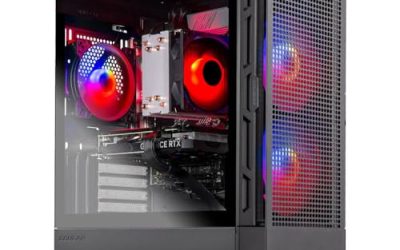
The best gaming PC in 2026 for most players is a mid-range build with a 16GB graphics card such as the GeForce RTX 5070 Ti or Radeon RX 9070 XT, a Ryzen 7 9800X3D or similar gaming-focused CPU, 32GB of DDR5 and a 1TB NVMe SSD. It handles 1440p at high refresh rates and entry-level 4K. The right pick still depends on your monitor: the GPU should be matched to your resolution and refresh rate, and everything else follows from that.
Quick comparison: five spec classes worth buying
| Pick | Best for | Key specs | Price range |
|---|---|---|---|
| Best overall | 1440p high refresh, light 4K | RTX 5070 Ti or RX 9070 XT (16GB, 256-bit); Ryzen 7 9800X3D or 7800X3D; 32GB DDR5; 850W PSU | Upper mid-range |
| Best value | 1440p at 100-144Hz | RTX 5070 (12GB) or RX 9070 (16GB); Ryzen 5 9600X; 32GB DDR5; 750W PSU | Mid-range |
| Best budget | 1080p at 144-240Hz | RTX 5060 or RX 9060 XT; Ryzen 5 7500F or similar; 16GB DDR5; 650W PSU | Budget |
| Best for 4K | 4K at 60-120Hz with high settings | RTX 5080 (16GB) or RTX 5090 (32GB); X3D CPU; 32GB DDR5; 1000W+ PSU | Premium to enthusiast |
| Best for esports | 1080p/1440p at 240Hz+ | RTX 5060 Ti or RX 9060 XT 16GB; fast X3D or Core Ultra CPU; 16-32GB DDR5 | Budget to mid-range |
Specs above reflect manufacturer listings. Street prices move with supply, so compare current market prices rather than launch figures.
Best overall: 16GB GPU plus an X3D CPU
The RTX 5070 Ti (16GB GDDR7, 256-bit bus, about 300W board power per Nvidia’s spec sheet) and the RX 9070 XT (16GB GDDR6, 256-bit, about 304W per AMD) are the sweet spot. Both usually land in a typical range of roughly 80-140 FPS at 1440p in recent demanding games at high settings. Results vary widely with settings, upscaling, CPU and patch. Pairing either with a Ryzen 7 9800X3D (120W rated TDP) gives you the strongest gaming-focused CPU cache setup for the money.
Trade-off: this class costs noticeably more than a mid-range build, and the gap over the next tier down is often smaller than the price jump suggests if you only play at 1080p.
Best value: the mid-range 1440p build
An RTX 5070 (12GB, 192-bit, about 250W) or RX 9070 (16GB, about 220W) with a Ryzen 5 9600X (65W) is the efficient choice for 1440p at 100-144Hz. It runs cooler and quieter, and a good 750W PSU is enough.
Trade-off: the RTX 5070’s 12GB can become the limit in the heaviest games with ray tracing and texture packs at 1440p, and it is tight for 4K. If VRAM headroom matters more than Nvidia features, the 16GB RX 9070 is the safer long-term bet.
Best budget: 1080p without cutting the wrong corners
An RTX 5060 (8GB, 128-bit, about 145W) or RX 9060 XT (offered in 8GB and 16GB versions, 128-bit) is enough for 1080p at high settings. If a choice exists, take the 16GB RX 9060 XT or the 16GB RTX 5060 Ti over 8GB variants, because 8GB cards are the first to stutter as new games arrive. Spend savings on a decent PSU and 32GB of RAM only if you multitask; 16GB is acceptable for a pure gaming box.
Trade-off: a narrow 128-bit bus and 8GB of VRAM mean you will lower texture quality sooner than on a 16GB card.
Best for 4K: RTX 5080 or RTX 5090
The RTX 5080 (16GB, 256-bit, about 360W) is the practical 4K card, usually delivering playable 60-100+ FPS in demanding games with upscaling and frame generation. The RTX 5090 (32GB, 512-bit, about 575W) is for 4K at 120Hz plus heavy ray tracing, but it needs a high-quality PSU and a case with strong airflow.
Trade-off: power draw, heat and cost. Without a 4K monitor, this tier is largely wasted.
Best for esports: frame rate over graphics
Competitive shooters are limited by the CPU and by your refresh rate. A mid-tier GPU is enough, so put money into a fast CPU, a 240Hz+ monitor and low-latency peripherals instead. An RTX 5060 Ti or RX 9060 XT 16GB handles most esports titles at 1080p or 1440p well above 200 FPS, depending on the game.
How to choose: the numbers that matter
1. Match the GPU to resolution and refresh rate
Pixel throughput is resolution multiplied by refresh rate. It shows how much work the GPU must do if you want to fill your monitor.
- 1920×1080 = 2.07 million pixels. At 240Hz: about 498 million pixels per second.
- 2560×1440 = 3.69 million pixels. At 165Hz: about 608 million pixels per second.
- 3840×2160 = 8.29 million pixels. At 120Hz: about 995 million pixels per second.
A 4K/120Hz target needs roughly twice the throughput of 1440p/165Hz and about four times that of 1080p/60Hz (124 million). That is why a monitor upgrade can force a GPU upgrade, and why a 4K monitor on a budget card means heavy upscaling.
2. Decision matrix: your screen to your build
| Your monitor | Recommended GPU class | VRAM target | PSU (quality unit) |
|---|---|---|---|
| 1080p, 60-144Hz | RTX 5060 / RX 9060 XT | 8GB minimum, 16GB safer | 550-650W |
| 1080p, 240Hz+ | RTX 5060 Ti / RX 9060 XT 16GB, strong CPU | 16GB preferred | 650W |
| 1440p, 100-165Hz | RTX 5070 / RX 9070 | 12-16GB | 750W |
| 1440p, 240Hz or ultrawide | RTX 5070 Ti / RX 9070 XT | 16GB | 750-850W |
| 4K, 60-120Hz | RTX 5080 / RTX 5090 | 16-32GB | 850-1000W+ |
3. Worked power budget
Take an overall-pick build: RTX 5070 Ti (about 300W) + Ryzen 7 9800X3D (rated 120W, peaks closer to 140-160W under heavy load) + motherboard, RAM, SSD and fans (about 60W).
- Component load: 300 + 150 + 60 = roughly 510W.
- PSUs run most efficiently and quietly at about 50-65% load, so 510 ÷ 0.6 = about 850W.
- A 750W unit would run at around 68% load, workable but with less margin for transient GPU spikes.
For a budget build: RTX 5060 (about 145W) + CPU (about 90W peak) + 50W = roughly 285W. A quality 550-650W PSU is plenty. Always check the GPU maker’s recommended PSU wattage, and use a power supply with the correct 12V-2×6 or PCIe connectors for your card.
4. VRAM by resolution
As a rule of thumb from published reviews, 8GB is workable at 1080p but increasingly limiting with high textures. At 1440p, 12GB is acceptable and 16GB is comfortable. At 4K with ray tracing, 16GB is the floor and 24GB+ gives headroom. Memory bus width matters too: a 128-bit card moves less data per second than a 256-bit card with the same memory type.
5. Prebuilt or build it yourself?
- Prebuilt: best if you want one warranty and no assembly. Check the PSU brand and wattage, whether RAM runs in dual channel, and whether the SSD is a proper NVMe drive. Manufacturers sometimes hide weak PSUs and slow memory.
- Self-build: gives better parts for the money and easier upgrades. Choose an AM5 motherboard so you can upgrade the CPU later.
6. The parts people overlook
- RAM: 32GB DDR5 is the 2026 sweet spot for mid-range and up; 16GB suits budget builds.
- Storage: a 1TB NVMe SSD fills quickly with modern games. 2TB is more practical.
- Cooling and case: a mesh-front case with at least two intake fans keeps GPUs boosting without noise.
- Monitor: a gaming PC is only as good as the screen. Refresh rate and resolution should match the GPU you buy.
Frequently Asked Questions
How much should I spend on a gaming PC in 2026?
Spend according to your monitor. A budget build is enough for 1080p, a mid-range build covers 1440p, and only a premium build is worth it for 4K. Put the largest share of the budget into the GPU, then the CPU.
Is 16GB of RAM enough for gaming?
Yes for most games, particularly at 1080p. However, 32GB is a better choice for mid-range and high-end builds because it gives headroom for streaming, browsers, and heavily modded or large open-world games, and the price difference is usually modest.
Should I choose Nvidia or AMD?
Nvidia generally leads in ray tracing and in features such as DLSS and frame generation. AMD often offers more VRAM per unit of price, as seen with the 16GB RX 9070 and RX 9070 XT. Check which upscaling technology the games you play support, then compare current prices.
Is a prebuilt gaming PC worth it?
It can be, especially when you value support and warranty or when deals are good. Verify the PSU model and wattage, RAM configuration and storage type before buying, because those are the parts most often cut in prebuilts.
Do I need an X3D processor?
Not for everyone. X3D chips such as the Ryzen 7 9800X3D give the highest frame rates in CPU-limited games, particularly esports and simulation titles. For GPU-bound 4K play, a cheaper CPU like the Ryzen 5 9600X will deliver similar results and let you spend more on the graphics card.
How long will a gaming PC last before it needs upgrading?
A well-balanced build typically stays comfortable for four to six years at its target resolution, with the GPU the first part to age. Choosing a 16GB card, an AM5 motherboard and a quality PSU makes later upgrades simpler.
Related guides
More from Amazon
Programs that pair well with the guide above. Offers and eligibility are set by Amazon and may change.
A free business account with business pricing and bulk-buying tools for work, shop or home office.
Create a business accountFree shipping on eligible items, Prime Video and more. Eligible new members can start with a free trial.
Start a Prime free trialAudiobooks and podcasts to listen to on the go. Eligible new members can start with a free trial.
Try Audible freeAd-free music streaming. Eligible new subscribers can start with a free trial.
Try Music Unlimited freeAs an Amazon Associate we earn from qualifying purchases.