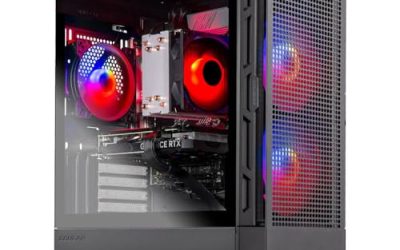
The best hardware for an FFXI alchemy session is a low-power Ryzen 7-class mini PC with 32GB of RAM and integrated Radeon 780M-class graphics. It runs several game clients, a market-price window and a wiki tab without a loud, power-hungry tower. This guide covers the machine, not the in-game gear: for the actual alchemy equipment pieces, check item descriptions in the game and the current patch notes. Gear lists change, and this article does not try to rank them.
FFXI’s client is old and light on the GPU, so crafting rigs are limited by RAM, CPU single-thread speed, idle power draw and how many windows you keep open. That is why the picks below are spec classes with a decision matrix and a power-cost calculation, not a list of expensive graphics cards.
Quick comparison of the picks
| Pick | Best for | Key specs | Price range |
|---|---|---|---|
| Ryzen 7 8845HS-class mini PC | Best overall | 8 cores / 16 threads, Radeon 780M, 32GB DDR5, configurable 35–54W | Mid-range |
| Intel N100-class mini PC | Best budget | 4 cores, about 6W rated TDP, 16GB RAM, integrated graphics | Budget |
| Ryzen 5 5600 or Core i5-12400 desktop | Best for multi-boxing (4–6 clients) | 6 cores, 32GB RAM, optional Radeon RX 6600 (8GB, 128-bit) | Mid-range |
| Thin-and-light Ryzen 7 8840U-class laptop | Best for travel or dorm | 8 cores, 16–32GB LPDDR5, 15–28W, integrated graphics | Mid-range to premium |
| 27-inch 1440p IPS monitor | Best for readable UI and crafting macros | 2560×1440, 60–144Hz, sRGB-class panel | Budget to mid-range |
Best overall: Ryzen 7 8845HS-class mini PC
This class of mini PC suits most crafters. Eight Zen 4 cores handle three or four clients plus Windower or Ashita add-ons, a browser and Discord without stutter. The Radeon 780M is far more graphics than FFXI needs, even with higher-resolution background settings. Choose a model with two SODIMM slots and fit 32GB, because RAM is the first thing a multi-client setup runs out of.
Trade-off: It costs more than an entry-level mini PC, and small chassis can get loud if the fan curve is aggressive. Set the power limit in the BIOS or vendor utility to about 35W. FFXI will not notice the difference, and the fan stays quiet.
Best budget: Intel N100-class mini PC
An N100 box is enough for one client, or two if you keep the window size and add-ons modest. It idles around single-digit watts per typical mini PC reviews, so it is cheap to leave running through long synthesis chains. Buy 16GB if the listing allows it. Many budget units ship with 8GB, which leaves little room once a second client and a browser are open.
Trade-off: Four slow cores mean load screens, zone changes and heavy add-on use feel sluggish. It is a one- or two-client machine, not a multi-box rig.
Best for multi-boxing: six-core desktop with 32GB
If you run four to six clients, such as one crafter, a few mules and a selling character, a desktop pays off. A Ryzen 5 5600 (65W) or Core i5-12400 (65W base) has the thread count and the upgrade room. Integrated graphics on the i5 can handle several light clients. If you want everything at high resolution on a big monitor, a Radeon RX 6600 (8GB, 128-bit bus, around 132W total board power per AMD’s spec) is a sensible, quiet choice.
Trade-off: Idle and load power draw is several times higher than a mini PC’s, and it takes more desk space.
Best for travel: thin-and-light Ryzen 7 8840U-class laptop
A U-series laptop handles one or two clients at sensible settings and doubles as a work machine. Look for 16GB minimum, preferably 32GB of LPDDR5. Because LPDDR5 is soldered, buy the amount you need up front.
Trade-off: Sustained multi-client loads will throttle in thin chassis. Keep it on a stand, plugged in, with a balanced power profile.
Best display for crafting: 27-inch 1440p IPS
FFXI’s UI is small at high resolutions. A 27-inch 1440p panel gives enough pixel density to read item names and synthesis results while leaving room for a second window. A 60Hz panel is fine because the game is not twitch-driven. A second 24-inch 1080p monitor works well for a market or recipe page.
Trade-off: Higher resolution makes the client’s smallest text smaller. Use the in-game UI scaling option and your OS scaling carefully, and do not go 4K without a reason.
Worked example: RAM and power for a crafting session
These are planning assumptions, not measurements. Add-ons, texture settings and OS overhead vary, so treat the numbers as a starting point.
- RAM per client: assume 1–1.5GB per FFXI client with add-ons.
- Four clients: 4 × 1.5GB = 6GB.
- OS and background: about 4GB for Windows plus launcher.
- Browser, wiki, Discord: about 3GB.
- Total: about 13GB. A 16GB machine would be nearly full, so 32GB gives headroom.
For power, assume a 12-hour synthesis run each day for 30 days (360 hours) and typical average draws for each class:
| Setup | Assumed average draw | Energy over 360 hours |
|---|---|---|
| N100 mini PC, 1–2 clients | 12W | 4.3 kWh |
| Ryzen 7 mini PC, 3–4 clients | 35W | 12.6 kWh |
| Six-core desktop with RX 6600, 4–6 clients | 120W | 43.2 kWh |
Multiply the kWh by your local electricity rate to get the monthly cost. The desktop uses roughly three times the energy of the mini PC and ten times that of the N100 for the same hours, which is the main reason mini PCs suit long crafting runs.
How to choose: a decision matrix
| Your situation | Choose | RAM |
|---|---|---|
| One crafter, light add-ons, tight budget | N100-class mini PC | 16GB |
| 2–4 clients, quiet room, left on all day | Ryzen 7 mini PC at a 35W limit | 32GB |
| 4–6 clients, large monitor, lots of add-ons | Six-core desktop | 32GB |
| Move between locations or share the PC | U-series laptop on a stand | 16–32GB |
| Already own a PC with 8GB RAM | Upgrade RAM first | Up to 16–32GB |
Settings that matter for long crafting runs
- Cap the frame rate in the client config. Crafting does not need high frame rates, and a cap cuts CPU and GPU load and heat.
- Run clients in windowed mode. This makes switching and tiling windows easier and avoids exclusive-fullscreen issues with several clients.
- Set the Windows power plan to Balanced. This lets the CPU drop to idle clocks between actions.
- Disable the monitor sleep timer but let the display turn off. The PC stays awake and the screen does not burn energy.
- Check the server rules before running multiple clients or add-ons. Square Enix and individual servers have their own policies, so read the current user agreement.
Frequently Asked Questions
Does this article list the best alchemy gear sets in FFXI?
No. It covers the PC hardware for crafting sessions. Alchemy gear changes with patches, so check item descriptions in the game and the official patch notes for the current options.
How much RAM do I need to run multiple FFXI clients?
Plan on about 1–1.5GB per client with add-ons, plus 4GB or more for Windows and a few GB for a browser. Four clients fit in 16GB but with little headroom, so 32GB is the comfortable choice for multi-boxing.
Do I need a dedicated graphics card for FFXI?
Usually not. Modern integrated graphics such as the Radeon 780M handle the game easily. A card like the Radeon RX 6600 only makes sense if you run many clients at high resolution on a large monitor.
Can an N100 mini PC run FFXI?
Yes, for one client and often two. Expect slower zoning and trouble with heavy add-ons or many windows. Choose 16GB of RAM if you can.
Is a laptop good for long synthesis runs?
It can be, if it stays plugged in on a stand with a balanced power profile. Thin chassis throttle under sustained multi-client load, so a laptop is best for one or two clients.
What monitor is best for FFXI crafting?
A 27-inch 1440p IPS panel gives the best balance of readable UI and spare room for a second window. Refresh rate matters little for crafting, so 60Hz is enough.
Related guides
More from Amazon
Programs that pair well with the guide above. Offers and eligibility are set by Amazon and may change.
A free business account with business pricing and bulk-buying tools for work, shop or home office.
Create a business accountFree shipping on eligible items, Prime Video and more. Eligible new members can start with a free trial.
Start a Prime free trialAudiobooks and podcasts to listen to on the go. Eligible new members can start with a free trial.
Try Audible freeAd-free music streaming. Eligible new subscribers can start with a free trial.
Try Music Unlimited freeAs an Amazon Associate we earn from qualifying purchases.