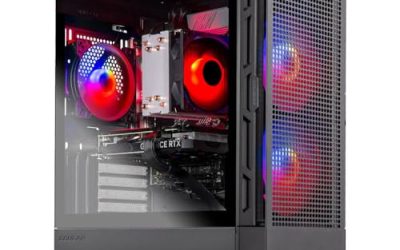
The best custom gaming PC company depends on what you are paying a builder for. Falcon Northwest and Maingear suit buyers who want a premium hand-built system with strong support, CyberPowerPC and iBuyPower suit buyers who want the most configurable value, and Puget Systems suits buyers who put quiet operation and reliability first. Judge any builder on the same criteria: transparent parts lists, a standard PSU and motherboard, validation testing and warranty terms, not the case or the marketing.
Product lines, warranty terms and parts availability change often, so treat the notes below as general positioning and confirm current terms on the builder’s own site before ordering.
Quick comparison of the best custom PC builders
| Pick | Best for | Typical strengths | Price tier |
|---|---|---|---|
| Falcon Northwest | Premium, hand-built showpieces | US-based assembly, compact Tiki and FragBox designs, custom paint, direct support | Premium |
| Maingear | Premium builds with a design focus | Wide configurator, custom cooling and finish options, flagship GPU availability | Premium |
| Puget Systems | Quiet, reliable, creator-and-gamer hybrids | Conservative parts choices, thorough testing, detailed public documentation | Premium |
| CyberPowerPC | Configurable mid-range value | Huge parts menu, frequent promotions, broad retail presence | Budget to mid-range |
| iBuyPower | Value builds and ready-to-ship options | Many pre-configured SKUs, aggressive pricing, quick turnaround | Budget to mid-range |
| NZXT (Player series / custom builds) | Clean look and simple ordering | Tidy cable management, in-house cases, a simple configurator | Mid-range |
Best overall premium builder: Falcon Northwest
Falcon Northwest has been building high-end gaming PCs in the US for decades, and its small-form-factor Tiki and FragBox designs are its best-known work. It suits buyers who want one point of contact, a carefully assembled machine and a chassis that looks nothing like a mass-market tower. Main trade-off: you pay a clear premium over the same parts in a mainstream prebuilt, and compact chassis limit cooler and GPU choices.
Best for custom looks and flagship builds: Maingear
Maingear is a long-running boutique builder with a deep configurator covering cases, custom cooling, cable finishes and top-tier GPUs. It fits buyers who want a visually distinctive build without sourcing and assembling parts themselves. Main trade-off: the premium tier is priced for presentation as well as performance, so mid-range gamers rarely get the best return.
Best for quiet reliability: Puget Systems
Puget Systems leans toward conservative, well-validated parts rather than flashy ones, and it documents its testing and failure-rate data publicly. That makes it a good fit if your PC doubles as a work machine for video editing, 3D or development. Main trade-off: the styling is restrained, and you may get fewer RGB-heavy or novelty case options than at design-driven boutiques.
Best budget and value: CyberPowerPC and iBuyPower
Both companies offer large configurators and many ready-to-ship models, and they regularly undercut boutique builders for similar GPU and CPU tiers. They are the practical choice for first-time buyers who want a competent RTX- or Radeon-class system at a sensible budget. Main trade-off: value builds often cut corners you cannot see in a spec headline, such as a generic PSU, a basic motherboard with weak VRM cooling, single-channel or slow RAM, or a small SSD. Check those items line by line.
Best for clean design and simple ordering: NZXT
NZXT designs its own cases, coolers and software and sells configured systems built around them, which gives a consistent look and an easy ordering process. It suits buyers who prefer a tidy, minimal build over deep parts-level customization. Main trade-off: configurations are narrower than a full boutique menu, and some components may be less standard than a retail part you could swap yourself.
What a custom builder should actually give you
Many buyers choose a builder because they do not want to assemble parts themselves. That is a fair reason, but you should be able to verify what the extra cost buys. Use this checklist before you order:
- A named parts list. The exact PSU model, motherboard model and RAM kit should be listed, not just “750W power supply” or “DDR5 memory.”
- Standard parts. An ATX PSU and a standard motherboard form factor mean any future repair or upgrade is easy, with no proprietary connectors.
- RAM configured correctly. It should be two matched modules in dual channel with EXPO or XMP enabled. A 6000 MT/s kit running at a default 4800 MT/s wastes performance on both Intel and AMD platforms.
- Burn-in and validation. Ask what stress testing happens before shipping and how long it runs.
- Warranty structure. Check whether parts and labor are covered, for how long, who pays shipping for repairs, and whether manufacturer warranties still apply to individual parts.
- Support access. A US phone line or live chat with technicians matters more than a ticket queue when a PC will not boot.
- Clean OS and BIOS. The BIOS should be up to date, and the Windows install should have no bundled trial software.
Worked example: sizing the power supply on a custom build
The PSU is the most common place for a builder to economize, so it is worth checking the maths yourself. Here is a high-end gaming build using published manufacturer figures: a GeForce RTX 5080 (total graphics power 360 W per Nvidia’s spec sheet) with a Ryzen 7 9800X3D (120 W TDP, with a package power limit of about 162 W per AMD).
| Component | Estimated peak draw |
|---|---|
| GPU (RTX 5080 class) | 360 W |
| CPU (9800X3D, at package limit) | 162 W |
| Motherboard, RAM, SSDs | about 50 W |
| Fans, pump, RGB, USB devices | about 25 W |
| Sustained total | about 597 W |
| Headroom for transient spikes (×1.3) | about 776 W |
That lands between 750 W and 850 W. An 850 W unit is the sensible choice, and it matches Nvidia’s recommended system power for this GPU class. A 750 W unit may run, but it leaves little margin as the PSU ages, and a high-end card’s brief power spikes can trigger shutdowns on a marginal unit. For an RTX 5090-class card (575 W TGP per Nvidia), the same arithmetic points to 1000 W or more. If a builder pairs a flagship GPU with a PSU below that size, ask why, or move on.
Decision matrix: match your situation to a builder
| Your situation | Best fit | Why |
|---|---|---|
| First gaming PC, mid-range budget | CyberPowerPC or iBuyPower | Best price-to-performance, but verify PSU and RAM |
| Flagship GPU, want it to look special | Maingear or Falcon Northwest | Custom finishes, premium cooling, closer support |
| Small-form-factor high-end build | Falcon Northwest | Compact designs are its specialty |
| Gaming plus video editing or 3D work | Puget Systems | Validated configurations and low noise |
| Want a clean look and easy ordering | NZXT | Simple configurator and in-house hardware |
| You can build a PC but lack the time | A mid-range builder with standard parts | You mainly need assembly and a warranty, not a showpiece |
| Competitive esports at high refresh rates | Any builder; prioritize CPU and RAM | Frame rates here depend more on the CPU and memory than on the case or brand |
How much builder premium is reasonable?
Expect a custom builder’s total to run roughly 10 to 25 percent above the sum of the retail parts. That premium covers assembly, testing, support and warranty handling. Anything at the low end of that range is easy to justify, and a premium well above it should come with something tangible, such as hand-built cable work, custom coolant loops, a long support commitment or a unique chassis.
A common mistake is comparing two quotes on headline specs alone. Two builders can list the same CPU and GPU and still differ by a lot in PSU quality, motherboard tier, SSD speed and warranty. Compare the full parts list side by side, then compare support terms.
Where the money should go at each budget level
- Budget: put money into the GPU first, then confirm the PSU is from a reputable brand with an 80 Plus Gold or Bronze rating. Avoid being upsold on RGB and case extras.
- Mid-range: ensure 32 GB of DDR5 in two modules, a 1 TB or larger NVMe SSD and a mainstream motherboard with decent VRM cooling.
- Premium: spend on the warranty, a quality PSU with headroom, strong cooling and a case with good airflow, in addition to the CPU and GPU.
Red flags when ordering
- The parts list says only “gaming motherboard” or “750W PSU” with no brand or model.
- Single-channel memory, such as one 16 GB stick, in a system sold for high-end gaming.
- Proprietary power supplies or motherboards that block later upgrades.
- A very small warranty window, or unclear terms on who pays for shipping.
- Heavy discounting on a flagship GPU, which may mean parts are downgraded elsewhere in the build.
Frequently Asked Questions
Is a custom gaming PC company worth it compared with building my own?
It is worth it if you value time, a single warranty contact and pre-shipping testing over saving the premium. Building yourself is usually cheaper by roughly the 10 to 25 percent builder markup, but you take on assembly, troubleshooting and part-by-part warranty claims. Choose a builder if you want a finished, validated system.
Which custom PC company is best for a first-time buyer?
CyberPowerPC and iBuyPower are common first choices because of their wide range of mid-range configurations and competitive pricing. Review the parts list carefully for PSU brand, RAM configuration and SSD size before checking out. NZXT is a good alternative if you prefer a simpler, tidier build.
Are boutique builders like Falcon Northwest and Maingear overpriced?
They cost more than mass-market prebuilts with similar CPU and GPU tiers, and that premium pays for hand assembly, custom finishes, tighter quality control and direct support. Whether it is overpriced depends on how much you value those things. If you only want frame rates for the money, a value builder will usually deliver more performance per unit spent.
How long should the warranty be on a custom gaming PC?
Look for at least a one-year parts and labor warranty, with longer coverage on premium builds. Also check whether shipping for repairs is covered and whether component-maker warranties still apply separately. Terms vary by builder and change over time, so read the current policy page before buying.
What PSU wattage should a custom PC have for an RTX 5080-class build?
About 850 W from a reputable brand is the practical target, based on roughly 600 W of sustained draw plus 30 percent headroom for transient spikes. Nvidia’s recommended system power for this GPU class is in the same range. An RTX 5090-class system should use 1000 W or more.
Does the builder affect gaming performance?
Only indirectly. FPS depends mainly on the GPU, CPU, RAM configuration and cooling, and results vary with game, resolution and settings. A good builder makes sure those parts are configured correctly, with XMP or EXPO enabled, adequate airflow and no thermal throttling, so you get the performance you paid for.
Related guides
More from Amazon
Programs that pair well with the guide above. Offers and eligibility are set by Amazon and may change.
A free business account with business pricing and bulk-buying tools for work, shop or home office.
Create a business accountFree shipping on eligible items, Prime Video and more. Eligible new members can start with a free trial.
Start a Prime free trialAudiobooks and podcasts to listen to on the go. Eligible new members can start with a free trial.
Try Audible freeAd-free music streaming. Eligible new subscribers can start with a free trial.
Try Music Unlimited freeAs an Amazon Associate we earn from qualifying purchases.