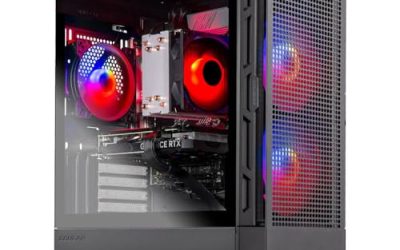
The best gaming PC in this upper mid-range budget pairs a 16GB graphics card (GeForce RTX 5070 Ti or Radeon RX 9070 XT) with a Ryzen 7 7800X3D or 9800X3D-class CPU, 32GB of DDR5, a 1TB to 2TB NVMe SSD and a quality 750W power supply. That combination runs modern games at 1440p with high or ultra settings and can handle 4K with upscaling. If your budget is tighter, an RTX 5070 or RX 9070 build gives up little at 1440p. Spend the money on the GPU first, because it decides your frame rate more than any other part.
As an Amazon Associate we earn from qualifying purchases at no extra cost to you.



Our Top Picks
 iBUYPOWER Element Gaming PC Desktop Computer AMD Ryzen20 x 9.1 x 17.4 inches36 poundsCheck on Amazon

Top 3 picks at a glance
Quick comparison of the best configurations
These are spec classes built around real, current parts. Retail prices move week to week, so the price column uses relative tiers rather than figures.
| Pick | Best for | Key specs | Price tier |
|---|---|---|---|
| Best overall: RTX 5070 Ti + Ryzen 7 7800X3D | 1440p ultra, 4K with upscaling | 16GB GDDR7, 256-bit, 300W GPU; 8 cores; 32GB DDR5; 750W PSU | Top of this budget |
| Best AMD value: RX 9070 XT + Ryzen 7 7800X3D | Raster-heavy 1440p and high-refresh play | 16GB GDDR6, 256-bit, about 304W GPU; 32GB DDR5; 750W PSU | Upper mid-range |
| Best for saving money: RX 9070 or RTX 5070 + Ryzen 5 9600X | 1440p high settings on a tighter budget | RX 9070: 16GB, about 220W. RTX 5070: 12GB, 250W. 6-core CPU; 32GB DDR5 | Mid-range |
| Best for esports: RTX 5060 Ti 16GB + Ryzen 5 class | 1080p/1440p at 144Hz+ | 16GB GDDR7, 128-bit, about 180W; 650W PSU is plenty | Mid-range |
| Best for gaming plus creating: RTX 5070 Ti + Ryzen 7 9700X or Core Ultra 7 265K | Streaming, editing, rendering | 16GB VRAM; 8 to 20 cores; 32GB+ DDR5; 2TB NVMe | Top of this budget |
Best overall: RTX 5070 Ti with a Ryzen 7 7800X3D
This is the configuration to aim for if the budget allows. The RTX 5070 Ti has 16GB of GDDR7 on a 256-bit bus, per Nvidia’s spec sheet. That is enough VRAM for ultra textures at 1440p and for most 4K games with DLSS upscaling. The 7800X3D’s large L3 cache keeps minimum frame rates steady in CPU-heavy games, and it runs cool and efficiently, so a mid-range air cooler is enough.
Trade-off: This pairing eats most of the budget. To fit it, you may need to accept a 1TB SSD, a simpler case and a B650 board. Those are the right places to compromise.
Best AMD value: RX 9070 XT
The Radeon RX 9070 XT also has 16GB on a 256-bit bus (GDDR6), and AMD positions it against the RTX 5070 Ti. It is a strong choice for players who mostly run native 1440p without ray tracing, and it often costs less than the Nvidia card. Reviews generally show it close to the RTX 5070 Ti in raster performance but behind in heavy ray tracing and path-traced titles.
Trade-off: Nvidia still leads in ray-tracing performance, DLSS support breadth, and some creator and streaming tools. AMD’s FSR 4 upscaling has improved a lot on the RX 9000 series, but game support still varies.
Best for saving money: RX 9070 or RTX 5070
If a 5070 Ti build is out of reach, step down one tier and keep the rest of the system balanced. The RX 9070 carries 16GB of VRAM at about 220W. The RTX 5070 has 12GB at 250W and leans on DLSS and Nvidia’s feature set. Pair either with a Ryzen 5 9600X or similar 6-core CPU and put the savings into 32GB of RAM and a better PSU.
Trade-off: The RTX 5070’s 12GB can run tight in the heaviest 1440p ray-traced games with maximum textures. You may need to drop texture quality one notch in a few titles.
Best for esports and 1080p to 1440p high refresh: RTX 5060 Ti 16GB
For competitive shooters and 144Hz to 240Hz monitors, the GPU matters less than the CPU and your settings. An RTX 5060 Ti 16GB (128-bit bus, about 180W) with a fast 6-core to 8-core CPU is enough, and the savings can go into a better monitor. Trade-off: the narrow memory bus (448 GB/s) means it is not the card for 4K.
Best for gaming plus creating
If you edit video, stream with heavy encoding or render 3D, more cores and more RAM matter. A Ryzen 7 9700X or Intel Core Ultra 7 265K with 32GB to 64GB of DDR5 and a 2TB drive covers it. Gaming frame rates will be close to a 7800X3D build in GPU-limited scenes, though X3D chips usually lead in CPU-limited games. Trade-off: you give up some peak gaming performance and spend more on RAM and storage.
Worked example: sizing the power supply
Take the best-overall build and add up peak draw using the manufacturer’s board and CPU power figures:
- RTX 5070 Ti: 300W total board power
- Ryzen 7 7800X3D: about 120W rated, so budget up to 130W in sustained loads
- Motherboard, 32GB DDR5, NVMe, fans and USB devices: about 60W
- Estimated peak: 300 + 130 + 60 = about 490W
PSUs run most efficiently and quietly at 50% to 70% load, and the GPU can spike briefly above its rated power. Dividing 490W by 0.65 gives about 750W. So a 750W unit from a reputable brand with an ATX 3.x or 3.1 rating and a native 12V-2×6 connector is the right size. A 650W unit is enough for the RTX 5070, RX 9070 and RTX 5060 Ti builds. Going above 850W adds cost without benefit here.
How the budget should be split
Use percentages of your total rather than chasing a brand. These ranges are a starting point that works for most gaming builds:
| Component | Share of budget | Why |
|---|---|---|
| Graphics card | 38% to 45% | Sets frame rate and resolution ceiling |
| CPU | 14% to 18% | Sets minimum fps; 6 to 8 fast cores is enough |
| Motherboard | 8% to 10% | B650 or B850 is plenty; skip X-series boards |
| RAM (32GB DDR5) | 8% to 12% | 16GB is limiting in newer games; 32GB is the sweet spot |
| SSD (1TB to 2TB NVMe) | 6% to 9% | Large game installs fill 1TB quickly |
| PSU | 6% to 8% | Protects every other part |
| Case and cooler | 7% to 10% | Airflow affects noise and clock stability |
DRAM and SSD prices have been volatile in recent months, so the RAM and storage shares can swing. If they are high when you buy, take a 1TB drive now and add a second one later. Do not drop to 16GB of RAM, since you cannot easily fix that later without replacing kits.
Which card fits which monitor
Memory bandwidth is bus width (bits) times memory speed (Gbps) divided by 8. For the RTX 5070 Ti, 256 × 28 / 8 = 896 GB/s. For the RTX 5070, 192 × 28 / 8 = 672 GB/s. For the RTX 5060 Ti, 128 × 28 / 8 = 448 GB/s. Higher bandwidth and more VRAM matter more as resolution and texture quality rise. Use this matrix to match your situation to a pick:
| Your monitor | Typical VRAM need (max textures) | Good GPU choice | Expected experience* |
|---|---|---|---|
| 1080p, 144Hz to 240Hz | 8GB to 10GB | RTX 5060 Ti 16GB | High fps in esports titles; strong AAA at high settings |
| 1440p, 144Hz | 10GB to 12GB | RX 9070, RTX 5070 | High to ultra in most games, roughly 70 to 120 fps |
| 1440p, 165Hz+ with ray tracing | 12GB to 16GB | RTX 5070 Ti | Ultra with RT on, using DLSS where needed |
| 4K, 60Hz to 120Hz | 12GB to 16GB | RTX 5070 Ti, RX 9070 XT | High settings with upscaling, often 60 to 90 fps |
*Ranges are approximate and in line with what published reviews generally report. Actual results vary with the game, settings, resolution, CPU and driver or patch version.
Prebuilt or DIY?
Building yourself usually gives better parts for the same money, particularly the PSU, cooler and RAM. A prebuilt is worth considering when it has a good GPU at a sale price and you want a warranty and no assembly. If you go prebuilt, check these items before buying:
- RAM: two sticks (2×16GB) in dual-channel, not a single 32GB stick.
- PSU: a named model with 80 Plus Gold or Bronze rating and wattage that matches the table above. Avoid listings that say only “750W PSU”.
- Motherboard: a B650 or B850 (AMD) or B760/Z790 class board with room for a second M.2 drive.
- Cooler: a tower air cooler or a 240mm+ AIO. A tiny stock cooler on a high-power CPU is a red flag.
- Case: a mesh or vented front panel and at least two included fans.
- Upgrade path: standard-size parts, not proprietary power supplies or motherboards.
How to choose: a short checklist
- Pick your monitor resolution and refresh rate first, then match the GPU using the matrix above.
- Choose 16GB of VRAM if you play at 1440p or above and keep cards for several years.
- Pick a 6-core to 8-core CPU. An X3D chip is the best choice for games, but a Ryzen 5 9600X is fine if you play at 4K or are GPU-limited.
- Take 32GB of DDR5 over a faster 16GB kit.
- Spend on the PSU. A 750W quality unit costs little compared to the parts it protects.
Frequently Asked Questions
Can this budget get me a true 4K gaming PC?
Yes, with limits. An RTX 5070 Ti or RX 9070 XT can run most games at 4K with high settings when you use DLSS or FSR upscaling, often in the 60 to 90 fps range depending on the game. Maxed-out ray tracing at native 4K is still demanding and may need lower settings.
Is 12GB of VRAM enough in 2026?
For 1440p, 12GB is usually enough, but a few new games with maximum textures and ray tracing can exceed it. If you want to keep the card for several years, 16GB models such as the RTX 5070 Ti, RX 9070 and RX 9070 XT give more headroom.
Is Intel or AMD better for this budget?
For pure gaming, AMD’s X3D processors such as the Ryzen 7 7800X3D and 9800X3D are generally the preferred choice because of their cache and efficiency. Intel’s Core Ultra chips are competitive for mixed work and gaming and can suit creators who need more cores.
How much RAM and storage do I need?
32GB of DDR5 is the practical target, and a 1TB NVMe SSD is the minimum. Many current games are 100GB or more, so a 2TB drive saves you from constantly uninstalling titles. If prices are high, start with 1TB and add a second M.2 drive later.
Should I buy a prebuilt or build my own?
Building is usually better value and gives you control over the PSU, cooler and RAM. A prebuilt makes sense if the GPU is a good model at a competitive price and the listing names the PSU, motherboard and RAM configuration.
Will a 750W power supply be enough for upgrades?
For the RTX 5070 Ti or RX 9070 XT with a single-CPU gaming build, yes. The worked estimate above peaks around 490W, which leaves comfortable headroom. If you expect to move to a card above roughly 350W later, a 850W unit is the safer purchase now.
Related guides
More from Amazon
Programs that pair well with the guide above. Offers and eligibility are set by Amazon and may change.
A free business account with business pricing and bulk-buying tools for work, shop or home office.
Create a business accountFree shipping on eligible items, Prime Video and more. Eligible new members can start with a free trial.
Start a Prime free trialAudiobooks and podcasts to listen to on the go. Eligible new members can start with a free trial.
Try Audible freeAd-free music streaming. Eligible new subscribers can start with a free trial.
Try Music Unlimited freeAs an Amazon Associate we earn from qualifying purchases.