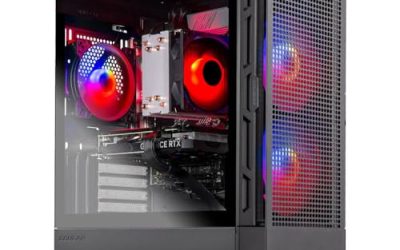
The best prebuilt desktop PC for most gamers in 2026 is a mid-range configuration: a six- to eight-core Ryzen or Core CPU, a 12GB-class GPU such as the GeForce RTX 5070, 32GB of dual-channel DDR5, a 1TB NVMe SSD and a standard ATX power supply of 750W or more. It handles 1440p at high settings, costs less than the jump to a flagship, and avoids the cut corners that sink cheaper listings. If your budget is tighter, an RTX 5060 Ti 16GB or Radeon RX 9060 XT 16GB system is the safer floor than an 8GB card.
Quick comparison: five prebuilt classes worth buying
These are spec classes rather than single SKUs, because retailers and system integrators rotate configurations constantly. Lines such as Alienware Aurora, HP Omen, Lenovo Legion Tower, MSI Aegis, Corsair Vengeance, NZXT Player series and many boutique builders sell systems in each class. Prices are general market ranges and shift with GPU and memory pricing.
| Pick | Best for | Key specs | Typical price |
|---|---|---|---|
| Best overall | 1440p, mixed gaming | Ryzen 5/7 or Core i5/Ultra 5, RTX 5070 (12GB), 32GB DDR5, 1TB NVMe, 750W | $1,500–$1,900 |
| Best budget | 1080p, esports | Ryzen 5 or Core i5, RTX 5060 Ti 16GB or RX 9060 XT 16GB, 16–32GB DDR5, 1TB NVMe, 650W | $1,000–$1,300 |
| Best for 1440p high refresh | 165–240Hz monitors | Ryzen 7 X3D-class CPU, RTX 5070 Ti or RX 9070 XT (16GB), 32GB DDR5, 2TB NVMe, 850W | $2,000–$2,700 |
| Best for 4K | 4K ultra, heavy ray tracing | Ryzen 7 9800X3D-class CPU, RTX 5080 (16GB) or RTX 5090 (32GB), 32GB+ DDR5, 2TB NVMe, 1000W+ | $3,000–$5,500+ |
| Best compact | Small desks, living room | Small-form-factor case, RTX 5060 Ti to 5070-class GPU, 32GB DDR5, 1TB NVMe, SFX or compact PSU | $1,400–$2,200 |
Best overall: RTX 5070-class 1440p system
This is the sweet spot for someone buying one machine for the next four to five years. The RTX 5070 has 12GB of VRAM and a 250W total board power, according to NVIDIA’s spec sheet. That is enough for 1440p at high settings in most current games, and DLSS upscaling and frame generation stretch it further. Pair it with a Ryzen 5 7600-class or better CPU and you avoid CPU bottlenecks at 1440p.
Trade-off: 12GB of VRAM is adequate now but is the first thing to feel tight in a few years at 4K or with heavy texture mods. If you plan to move to a 4K monitor, skip to the 16GB tier.
Best budget: 16GB 1080p system
Choose the 16GB version of an RTX 5060 Ti or Radeon RX 9060 XT over a cheaper 8GB card. Several recent games already exceed 8GB at 1080p with high textures, and a prebuilt’s GPU cannot be upgraded without effort. A 1080p 144Hz–180Hz monitor is the right match, and competitive titles will usually run far above 144 fps on this class, though results vary with settings, CPU and patch.
Trade-off: budget prebuilts are where corner-cutting concentrates: single stick of RAM, tiny PSUs, and slow SSDs. Use the checklist below.
Best for 1440p high refresh: RTX 5070 Ti or RX 9070 XT
Both cards carry 16GB of VRAM. Per the manufacturers’ specs, the RTX 5070 Ti is rated at 300W and the RX 9070 XT at roughly 304W. These suit 165–240Hz 1440p monitors and can handle 4K at medium-high settings with upscaling. If you mainly play CPU-bound esports or simulation titles, an X3D-class Ryzen such as the 7800X3D or 9800X3D is worth the premium, as published reviews consistently show its advantage at lower resolutions.
Trade-off: boutique builders charge noticeably more for this tier than the parts cost. Compare against a parts list (see the calculation below).
Best for 4K: RTX 5080 or RTX 5090 flagship
The RTX 5080 has 16GB of VRAM at a 360W rating, while the RTX 5090 carries 32GB at 575W per NVIDIA. The 5090 only makes sense for 4K at very high refresh rates, heavy path tracing or AI and creative work. For pure gaming at 4K 60–120Hz, the 5080 is usually the more rational purchase.
Trade-off: power and heat. A 5090 system needs a quality 1000W+ ATX 3.1 supply with a native 12V-2×6 cable and a case with real airflow.
Best compact: small-form-factor build
A small case suits a desk or media-center setup, and mid-range GPUs fit comfortably. The catch is that compact systems often use SFX power supplies and proprietary layouts, so upgrades are narrower and coolers are louder under load. Pick this only if size is a real constraint.
How to choose: match the system to your monitor
| Your display | Minimum GPU class | VRAM to look for | CPU guidance |
|---|---|---|---|
| 1080p, 144–180Hz | RTX 5060 / RX 9060 XT | 8GB workable, 16GB safer | 6-core, current generation |
| 1440p, 144–165Hz | RTX 5070 / RX 9070 | 12–16GB | 6–8 cores |
| 1440p, 240Hz+ | RTX 5070 Ti / RX 9070 XT | 16GB | 8-core X3D-class preferred |
| 4K, 60–120Hz | RTX 5080 / RX 9070 XT with upscaling | 16GB | 8-core, gaming-focused |
| 4K, 144Hz+ or path tracing | RTX 5090 | 32GB | Top-tier gaming CPU |
Worked example: is the power supply big enough?
Add up the main draws, then leave headroom for transient spikes and aging. Take an RTX 5070 Ti system with a Ryzen 7 CPU:
- GPU: 300W rated board power
- CPU: roughly 120W under gaming/boost load
- Motherboard, RAM, SSD, fans, USB: about 80–100W
- Estimated sustained peak: about 500–520W
Common guidance is to size the PSU so that peak load sits near 50–65% of its rating, where efficiency is best and spikes are absorbed. 520W divided by 0.65 gives 800W, so an 750–850W unit is right. The same math for an RTX 5060 Ti (about 180W) with a 65W CPU gives roughly 330W, so a quality 650W unit is plenty. If a listing pairs a 16GB GPU with a vague “500W” supply with no brand or 80 Plus rating, treat that as a warning.
Worked example: is the price fair?
Price the parts yourself: CPU, GPU, motherboard, RAM, SSD, PSU, case and cooler. Say they total $1,450 for a hypothetical configuration. A prebuilt at $1,650 carries a premium of about 14%, which often covers assembly, Windows, a warranty and support, and is reasonable. At $2,000 the premium is about 38%, which you should justify with extras such as better components, a longer warranty or a bundled monitor. Sales and bundles can flip this calculation, so check current prices rather than relying on a general rule.
Prebuilt red flags to check before you buy
- RAM in single-channel: one 16GB stick instead of 2×8GB or 2×16GB can cost noticeable performance, especially with integrated-graphics-style bandwidth demands and CPU-bound games. Look for two modules.
- Unnamed power supply: the listing should state brand, wattage and efficiency rating. Proprietary PSUs limit future GPU upgrades.
- Slow or tiny SSD: 500GB fills quickly with modern games, which can exceed 100GB each. 1TB is the practical minimum, and a PCIe 4.0 NVMe drive is plenty.
- Old platform: an AM4 or older Intel socket limits CPU upgrades. AM5 gives you a longer upgrade path.
- Weak cooling: a stock cooler on a high-wattage CPU or a case with a solid front panel will throttle. Look for mesh-front airflow or a named tower cooler or AIO.
- Warranty and support: check whether the warranty is parts-and-labor, how long it lasts, and whether opening the case voids it. Standard ATX parts are much easier to service.
- GPU naming: confirm the exact memory size (8GB versus 16GB variants share names) and not just “RTX 5060 Ti”.
Frequently Asked Questions
Is a prebuilt gaming PC worth it compared with building one?
It can be, particularly when GPU supply is tight or a retailer discounts a system below parts cost. You pay a premium for assembly, but you also get a single warranty and no troubleshooting. If the premium is under roughly 15% and the parts are standard, it is usually fair value.
How much should I spend on a prebuilt desktop for gaming?
Plan on about $1,000–$1,300 for solid 1080p, $1,500–$1,900 for strong 1440p, and $2,000 or more for high-refresh 1440p or 4K. Prices vary with GPU and memory market conditions, so treat these as general ranges.
Is 16GB of RAM enough in a prebuilt?
16GB runs most games, but 32GB is the better target for a 2026 system, since it costs little extra and helps when you multitask with a browser, Discord and streaming software. Make sure the RAM runs as two modules in dual-channel mode.
Can I upgrade a prebuilt PC later?
Usually yes, if it uses a standard ATX or micro-ATX motherboard, a standard PSU and common case. Proprietary power supplies, odd motherboard shapes and cramped compact cases limit upgrades, so check this before buying from a major OEM’s lower-end lines.
Should I choose NVIDIA or AMD in a prebuilt?
NVIDIA offers stronger ray tracing and broader DLSS support, while AMD’s Radeon RX 9000 series often competes well on rasterization value and VRAM per dollar. Pick the one that is priced better at your target tier, then confirm the VRAM size and PSU rating.
Is an Intel or AMD CPU better for a gaming prebuilt?
AMD’s X3D chips, such as the Ryzen 7 7800X3D and 9800X3D, lead many published gaming benchmarks, and AM5 offers a longer upgrade path. Intel Core Ultra and recent Core i5 or i7 systems also game well and can be better value in some bundles. At 1440p and above, the GPU matters more than the CPU brand.
Related guides
More from Amazon
Programs that pair well with the guide above. Offers and eligibility are set by Amazon and may change.
A free business account with business pricing and bulk-buying tools for work, shop or home office.
Create a business accountFree shipping on eligible items, Prime Video and more. Eligible new members can start with a free trial.
Start a Prime free trialAudiobooks and podcasts to listen to on the go. Eligible new members can start with a free trial.
Try Audible freeAd-free music streaming. Eligible new subscribers can start with a free trial.
Try Music Unlimited freeAs an Amazon Associate we earn from qualifying purchases.