
Going from an RTX 3070 to an RTX 3080 12GB gets you about 25-35% more performance at 1440p and 30-40% at 4K, plus 50% more VRAM. That’s a real tier jump, and it pays off most for 1440p high-refresh and 4K players running into the 3070’s 8 GB limit. It also means a 350 W card, a bigger power supply, and no new DLSS features, so 1080p players and anyone with a 650 W PSU will usually find better value in a current-generation card.
As an Amazon Associate we earn from qualifying purchases at no extra cost to you.


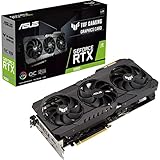
Top 3 picks at a glance
The Short Version of What Changes
- Performance class: From upper-mid-range (roughly RTX 2080 Ti level) to high-end Ampere, about 5% faster than the original 10 GB RTX 3080.
- VRAM: From 8 GB GDDR6 on a 256-bit bus to 12 GB GDDR6X on a 384-bit bus, which roughly doubles bandwidth.
- Features: No change. Both are Ampere cards with the same DLSS, Ray Reconstruction, NVENC and ray-tracing generation.
- Power: Rated TDP goes from 220 W to 350 W, so PSU and cooling needs rise significantly.
Spec Table
| Specification | RTX 3070 | RTX 3080 12GB |
|---|---|---|
| Architecture / process | Ampere, 8 nm | Ampere, 8 nm |
| Release date | 1 September 2020 | 11 January 2022 |
| Launch MSRP | $499 | $799 |
| CUDA cores | 5,888 | 8,960 |
| Boost clock | 1,725 MHz | 1,710 MHz |
| Memory | 8 GB GDDR6 | 12 GB GDDR6X |
| Bus / bandwidth | 256-bit / 448.0 GB/s | 384-bit / 912.4 GB/s |
| L2 cache | 4 MB | 6 MB |
| TDP | 220 W | 350 W |
| Power connector (spec listing) | 1x 12-pin | 1x 12-pin |
| Length / slots (reference) | 242 mm / 2-slot | 285 mm / 2-slot |
| Outputs | 1x HDMI, 3x DisplayPort | 1x HDMI 2.1, 3x DisplayPort 1.4a |
The 12-pin listing reflects NVIDIA’s Founders Edition-style connector. Most retail partner cards use standard 8-pin plugs instead: usually two for an RTX 3070, and two or three for an RTX 3080 12GB.
Performance Gains by Resolution
1080p
At 1080p the upgrade is the least convincing. Reviews that put the 3080 10GB about 10-15% ahead of the 3070 at this resolution show the 12 GB model only a few points higher, because both cards often hit CPU limits. Unless you’re chasing 240 Hz in demanding shooters, a 1080p setup won’t make full use of a 3080 12GB.
1440p
This is where the upgrade starts to pay off. Tom’s Hardware’s and TechPowerUp’s launch data placed the original RTX 3080 roughly 20-25% ahead of the 3070 at 1440p, and the 12 GB version adds about another 3-5%. Newer games widen the gap further. Aggregated results from recent titles show the 3080 12GB commonly 30-40% ahead at 1440p ultra. In games where 8 GB runs out, such as some recent open-world releases with high texture settings, the gap can exceed 60% because the 3070 starts stuttering or swapping textures.
4K
At 4K the extra bandwidth and cores show most clearly. The 3080 12GB generally leads by 30-40%, often enough to move a game from the 40s into the 50s or low 60s fps at high settings. As always, these ranges depend on the game, CPU and patch. With DLSS Quality enabled, the 3080 12GB is a capable 4K card. The 3070 usually needs DLSS Performance mode and reduced texture settings.
Why the 8 GB Ceiling Is the Real Story
Back in 2020 the 3070 was rarely held back by VRAM. By 2026 many new games recommend more than 8 GB for high textures at 1440p, and ray tracing plus frame generation adds memory overhead. When an 8 GB card runs out, average fps may only drop modestly, but 1% lows collapse and textures can load late or look blurry. The 3080 12GB’s extra 4 GB fixes most of these cases at 1440p and many at 4K. That’s arguably more valuable than the raw 25-35% speed gain.
A rough VRAM guide for 2026 releases at high textures: 1080p needs about 8 GB, 1440p about 10-12 GB, and 4K about 12-16 GB. The 3070 sits at the edge of the first tier. The 3080 12GB covers the second and the lower end of the third.
Features: Identical, and That Matters
Because both cards use Ampere, the upgrade adds no new capabilities. Both support DLSS Super Resolution including the transformer model, DLSS Ray Reconstruction, NVIDIA Reflex and the same NVENC encoder. Neither supports DLSS Frame Generation, which requires RTX 40 or RTX 50 hardware. Both can use FSR 3 frame generation in games that offer it. Anyone who wants DLSS multi-frame generation, AV1 encoding or better RT efficiency needs to move to a current RTX 50 card instead.
Power, PSU and Case Fit
PSU calculation
- RTX 3070: 220 W + 125 W CPU + 150 W = 495 W, so a quality 550-650 W unit.
- RTX 3080 12GB: 350 W + 125 W + 150 W = 625 W, so 750 W is the practical minimum and 850 W is better with a high-power CPU, because Ampere GA102 cards have sharp transient spikes.
Many RTX 3070 owners run 650 W units. Moving to a 3080 12GB often means buying a new PSU too, which adds real cost to the upgrade.
Size and airflow
The 3080 12GB adds about 130 W of heat to your case. Partner cards are commonly 300-330 mm long and 2.5-3 slots thick, noticeably bigger than many compact 3070 models. Measure GPU clearance and make sure the case has decent front intake before buying.
Does the Upgrade Pay Off? Cost Math
At launch MSRP, with the 3070 at 100 on a 1440p index and the 3080 12GB at about 130, the 3070 cost $4.99 per point ($499 / 100) and the 3080 12GB $6.15 per point ($799 / 130). The bigger card was less efficient value then. Used prices narrow that. A used RTX 3070 typically sells for about $200-$260 and a used RTX 3080 12GB for about $320-$400. Selling a 3070 and buying a 3080 12GB typically costs a net $100-$180 before any PSU upgrade. For that money you get roughly a third more performance and 4 GB more memory, which is reasonable, but it competes with new RTX 5060 Ti 16GB and RX 9060 XT 16GB cards that add warranty and modern features.
Ray Tracing After the Upgrade
Ray tracing scales roughly in line with the raster gain, and sometimes better, because the 3080 12GB has more RT cores and the bandwidth to feed them. In ray-traced games at 1440p, reviews commonly show the larger card 30-40% ahead. The difference in feel is bigger than that figure suggests. A 3070 that holds about 45-55 fps with RT and DLSS Quality at 1440p tends to dip into uncomfortable territory in heavy scenes, while the 3080 12GB usually stays above 60 fps with the same settings. Path-traced modes remain demanding on both. They need DLSS Performance mode and still don’t approach the smoothness of RTX 40 or RTX 50 cards using frame generation.
Creative and streaming workloads
For video editing, 3D rendering and local AI tools, the extra 4 GB matters more than in games. Blender scenes and AI image models that fail or slow down sharply on 8 GB often fit in 12 GB. The NVENC encoder is the same generation on both cards, so stream quality doesn’t change. Encodes simply have more headroom when the GPU is also rendering a game.
Who Should Upgrade
| Current setup | Verdict |
|---|---|
| 1080p monitor, 650 W PSU | Stay on the 3070 or adjust settings. The gain is small here. |
| 1440p 144 Hz, frequent VRAM stutter | Upgrade is worthwhile. Fixes VRAM and adds about 30% fps. |
| 4K with DLSS | Upgrade is worthwhile if a 750-850 W PSU is in place. |
| Wants frame generation or AV1 | Skip the 3080 12GB. Look at RTX 50 series cards. |
| Small form factor case | Usually skip. Heat and size are hard to manage. |
Frequently Asked Questions
How much faster is the RTX 3080 12GB than the RTX 3070?
Expect about 25-35% at 1440p and 30-40% at 4K on average, based on published review data and recent-game aggregates. In games that exceed 8 GB of VRAM the gap can be much larger. At 1080p it’s often only 10-15%.
Is the RTX 3080 12GB much better than the 10GB version?
It’s only about 3-6% faster in most games, though the extra 2 GB helps in a few memory-heavy titles at 4K. The bigger gain over a 3070 comes from the jump to GA102-class hardware in general.
Will my 650 W PSU run an RTX 3080 12GB?
It may boot and game, but it leaves little headroom for transient spikes, especially with a high-power CPU. A quality 750 W unit is the practical minimum, and 850 W is safer.
Do I gain DLSS 4 features by upgrading?
No. Both are Ampere cards with the same DLSS feature set, including the transformer upscaling model but not DLSS Frame Generation. Frame generation requires an RTX 40 or 50 series GPU.
What power connectors do retail RTX 3080 12GB cards use?
Most partner cards use two or three standard 8-pin PCIe connectors rather than a 12-pin plug. Check the specific model’s requirements and confirm your PSU has enough separate PCIe cables.

