
For 1440p gaming, the minimum sensible GPU is not the same for every game or refresh rate. A graphics card that handles older esports titles at 1440p and 165Hz may struggle with a new open-world game at 60fps. Ray tracing, texture quality, upscaling and the card’s VRAM matter as much as the resolution itself.
For most new purchases, start with a current-generation or recent mid-range card with at least 12GB of VRAM. A 10GB model can still be usable, particularly if it is heavily discounted, but it gives you less room for demanding games over the next few years.
Our Top Picks

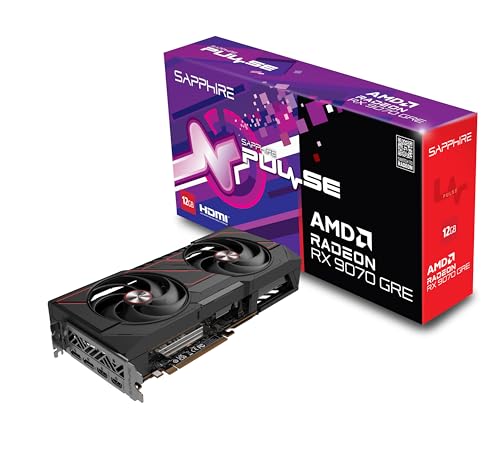
The short answer
The practical minimum for 1440p today is a modern mid-range GPU such as an AMD Radeon RX 7700 XT-class graphics card, an equivalent NVIDIA card, or a strong Intel Arc option where game compatibility has been tested.
That level of hardware is suitable for roughly 60fps at high settings in many games, with adjustments sometimes needed in the most demanding releases. If you want high-refresh-rate gaming, heavy ray tracing or a card that will remain comfortable for longer, move up one tier.
The cheapest card I would call a 1440p card is not necessarily the cheapest card that can display a 1440p image. Almost any recent GPU can output that resolution. The question is whether it can render modern games without constantly reducing image quality or relying on aggressive upscaling.
What performance should you expect?
| 1440p target | Recommended GPU level | Typical settings approach | Best suited to |
|---|---|---|---|
| 60fps | Recent mid-range, 12GB or more preferred | High settings; use upscaling in demanding games | Single-player games and general gaming |
| 100–144fps | Upper mid-range | High settings, selective ray tracing | Fast monitors and mixed game libraries |
| 165fps or more | High-end GPU | Medium-to-high settings depending on the game | Competitive gaming and high-refresh displays |
| 1440p ray tracing | Upper mid-range or better | Upscaling and frame generation often required | Players who prioritize lighting effects |
These are buying targets rather than guarantees. A competitive shooter may run at hundreds of frames per second on a modest GPU, while a graphically intensive role-playing game can challenge a much faster card. Your monitor’s refresh rate should influence the purchase: there is little value in paying for a card built for 165fps if you use a 75Hz display.
The best budget choice for 1440p
A recent mid-range AMD card is often the clearest value choice for conventional rasterized gaming. Cards in this class usually offer enough memory for high-resolution textures and strong performance without the premium attached to flagship features. Search for an 12GB AMD Radeon graphics card when price matters more than ray tracing.
The trade-off is ray tracing. AMD’s performance can fall more sharply than NVIDIA’s when demanding lighting effects are enabled, and its upscaling ecosystem may not be as consistently clean in every game. If you mainly play rasterized games, this is often a reasonable compromise. If ray tracing is central to your library, do not choose solely by traditional benchmark averages.
An NVIDIA mid-range card can be the better fit for someone who values ray tracing, mature upscaling support and useful creator or streaming features. However, NVIDIA cards sometimes offer less VRAM at a similar price. That can become a problem when ultra textures, large game worlds or mods push memory usage higher. A cheaper NVIDIA card is fine if you play esports titles or are comfortable using high rather than ultra textures; it is less attractive as a long-term 1440p purchase if it has only 8GB.
Where Intel and entry-level cards fit
Intel Arc cards can be compelling when discounted, especially when they provide a large memory pool for the money. Driver support has improved substantially, but performance can still vary more between games than with AMD or NVIDIA. Older DirectX 9, DirectX 11 and poorly optimized games deserve particular attention before buying. Check benchmarks for the games you actually play, not just a single average chart.
An entry-level card can make sense for a 1440p monitor if your priority is strategy games, older releases, indie titles or competitive shooters. It is a poor choice if you expect every new blockbuster to run at high settings for several years. You may get acceptable frame rates by lowering settings, but the experience can be spoiled by stutter, texture pop-in or insufficient VRAM rather than by average fps alone.
When spending more is worthwhile
Move to an upper mid-range 16GB 1440p gaming graphics card if you have a 144Hz or 165Hz monitor and want to use it, play demanding new releases, or plan to keep the card for four or five years. More GPU headroom also means fewer compromises when a game has poor optimization.
Additional spending is less useful if your CPU is old or your power supply is marginal. At high frame rates, a weak processor can become the limit, producing low GPU utilization and inconsistent frame pacing. Before upgrading, check that your power supply has the required wattage and connectors, and that the card fits your case. A fast GPU that causes power-limit shutdowns or runs into thermal throttling is not a successful 1440p upgrade.
Settings that change the answer
Ray tracing is the biggest reason the minimum GPU changes. Reflections, global illumination and path tracing can cut performance dramatically. Upscaling can restore frame rate, but the result depends on the game and quality mode. At 1440p, balanced or performance modes may introduce shimmering and softness, especially on foliage, wires and distant detail.
Frame generation can make motion appear smoother, but it does not remove the underlying input latency of a low base frame rate. Treat it as an enhancement for a game already running reasonably well, not as a substitute for GPU performance. For a stable 60fps experience, aim for a real base frame rate near 60 before enabling it.
1440p GPU buying checklist
- Prefer 12GB of VRAM for a new mid-range purchase; 16GB is more comfortable for long-term use.
- Compare performance in your actual games, including ray tracing if you use it.
- Check card length, thickness, power connectors and recommended power supply capacity.
- Do not pay for high-refresh performance if your monitor cannot display it.
- Consider used high-end cards only if the warranty, condition and power requirements are acceptable.
If your budget is tight, buying a discounted previous-generation mid-range card can be sensible. The cheaper option is fine when it has enough VRAM, meets your frame-rate target and comes from a reliable seller. Avoid saving money on a card that already requires low settings in the games you care about.
FAQ
Is 8GB VRAM enough for 1440p?
It can be enough for competitive games and many older titles, especially at high rather than ultra settings. For a new 1440p purchase, 12GB is a safer minimum because some modern games can stutter or force texture compromises with 8GB.
Is a 1440p GPU worth buying for a 1080p monitor?
Yes, if you plan to upgrade the monitor or want very high frame rates. Otherwise, spend less on the GPU and put the money toward a better display, CPU or storage.
Should I choose AMD, Intel or NVIDIA?
AMD usually offers strong rasterized value, NVIDIA is often preferable for ray tracing and software features, and Intel can offer attractive memory and pricing. Compare the specific card and the games you play rather than choosing only by brand.
Can a laptop GPU be judged by its desktop name?
No. Laptop versions can use different power limits and perform much slower than desktop cards with similar names. Check laptop-specific benchmarks before buying.



