Our Top Picks
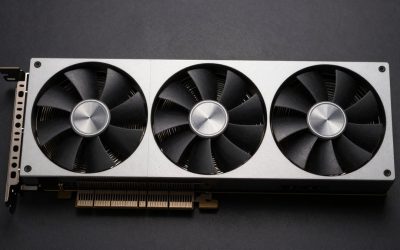
 ASUS Dual NVIDIA GeForce RTX 5060 8GB GDDR7RTX5060|8GB|OC9 x 4.8 x 2 inches1.4 poundsCheck on Amazon


Top 3 picks at a glance
What the i5-10400 can actually handle
The Core i5-10400 is still a solid 6-core / 12-thread gaming CPU, but it has two limits you need to build around. First, it boosts to around 4.0-4.3 GHz and has relatively modest single-core speed by 2024-2026 standards. In CPU-heavy games like Warzone, Battlefield 2042, MS Flight Simulator, Starfield, and large Cities: Skylines 2 saves, it will cap out around 90-120 fps no matter what GPU you install. Second, it only supports PCIe 3.0 because it sits on B460 / H410 / H470 / B365 boards, and most 10400 systems shipped with a 400-500W PSU and basic cooling.
Practically, that makes it a great 1080p high-settings CPU and a capable 1440p 60-75 fps CPU. It pairs cleanly up to about an RTX 3060 Ti / RTX 4060 Ti / RX 6700 XT level. Above that you are paying for performance the CPU cannot consistently feed, especially at 1080p. If you own a 144Hz 1080p monitor or a 75-165Hz 1440p monitor, that mid-range bracket is where you should shop.
Quick picks for the i5-10400
| GPU | Best for | VRAM | Typical PSU needed | Trade-off |
|---|---|---|---|---|
| RX 6600 / RX 6650 XT | 1080p budget, esports + AAA at medium-high | 8GB | 450-550W | Loses ~3-5% on PCIe 3.0, weaker ray tracing |
| RTX 3060 12GB | 1080p ultra, modded games, NVENC streaming | 12GB | 500-550W | Slower raw fps than 3060 Ti, but more VRAM headroom |
| RTX 4060 / RX 7600 | 1080p 120Hz+, low power draw | 8GB | 450-550W | Only 8GB VRAM, x8 lane hurts slightly on PCIe 3.0 |
| RTX 3060 Ti / RX 6700 XT | 1440p 60-100 fps, max sensible pairing | 8GB / 12GB | 550-650W | Needs better PSU, CPU bottleneck in some 1080p titles |
If you want a no-regrets all-rounder for this CPU, the RTX 3060 12GB remains the safest used or new buy because the 12GB buffer covers texture-heavy games that now stutter on 8GB cards. For pure frames-per-dollar at 1080p, AMD usually wins.
Best budget option: RX 6600 and RX 6650 XT
For most i5-10400 systems that still have the stock 450W Dell / HP / Lenovo PSU or a basic 500W Bronze unit, an RX 6600 or RX 6650 XT is the honest sweet spot. They pull only 130-175W, run cool in dual-fan models, and will do 1080p high at 75-120 fps in Apex Legends, Fortnite, GTA V, Elden Ring, and Cyberpunk with FSR on.
Failure modes to know: both cards use only 8 PCIe lanes, so on your PCIe 3.0 board you lose a few percent versus reviews done on PCIe 4.0 test benches. It is not a dealbreaker, but do not pair them with a slow SATA SSD system and expect perfect 1% lows. Also, ray tracing is effectively unusable and the 8GB VRAM already forces you to drop textures from Ultra to High in Hogwarts Legacy, Alan Wake 2, and Diablo 4 at times. If the price gap is under $30, get the 6650 XT for the higher clocks. If you stream, NVIDIA is still better.
Best balanced pick: RTX 3060 12GB and RTX 4060
The 12GB RTX 3060 fits the 10400 unusually well. It is not the fastest — an RTX 4060 or RX 7600 will beat it by 15-20% at 1080p — but the extra 4GB of VRAM means fewer hitches in modded Skyrim / Fallout, Blender viewport work, Stable Diffusion experimentation, and 1440p with high textures. Power draw is a manageable 170W, and most models run fine on a quality 550W PSU with a single 8-pin.
The RTX 4060 dual fan is the better choice if you play competitive shooters and want 120-144 fps at low power. It only pulls 115W, stays quiet in small cases, and DLSS 3 Frame Generation can double perceived smoothness in supported single-player games. The catch: 8GB VRAM and an x8 interface. On PCIe 3.0 you lose another 4-7% in a few games like Doom Eternal and Spider-Man when VRAM spills over. Who it suits: 1080p 144Hz owners with a weak PSU who do not mod heavily. Who should skip it: anyone planning to keep the card for 4+ years at 1440p — buy more VRAM instead.
Max sensible for 1440p: RTX 3060 Ti and RX 6700 XT
This is the ceiling I would put on an i5-10400 without upgrading the CPU. An RTX 3060 Ti or RX 6700 XT 12GB will drive a 1440p 75Hz or 165Hz monitor at high settings in most AAA titles at 60-90 fps, often with upscaling. The 6700 XT is usually the better value here because 12GB handles 1440p textures far better than the 3060 Ti’s 8GB, and it avoids the stutter I have seen in The Last of Us Part I and Star Wars Jedi: Survivor on 8GB cards.
Trade-offs are real. Both need a real 550-650W PSU with proper 6+2 pin cables — no SATA adapters in an old office prebuilt. You will also see CPU bottlenecks at 1080p: in CS2, Valorant, and Warzone your 10400 will sit at 100% while the GPU sits at 60-70%. That is normal and not broken, but it means you should cap frames or move up to 1440p to shift load to the GPU. Do not buy an RTX 3070 Ti, RX 6800, or anything faster for this CPU unless you plan a platform upgrade within a year; you will leave 25-35% of the GPU idle in many titles.
Power supply, case fit, and Intel Arc warning
Before you buy, check three things. One, open the side panel and read the PSU wattage and 12V amperage sticker — many 10400 prebuilts have proprietary 12-pin motherboards or only one PCIe power cable, which rules out 200W+ cards without an adapter and PSU swap. Two, measure GPU clearance; a lot of Lenovo Legion / Dell XPS cases max out at 240-270mm, so short dual-fan models fit while triple-fan 6700 XT models do not. Three, enable Resizable BAR / Above 4G Decoding in BIOS if you consider Intel Arc.
Intel Arc A580 and A750 look tempting on price and have 8GB of VRAM, plus solid AV1 encoding. On a 10400 they can work, but Arc depends heavily on ReBAR for smooth frame times. Many H410 and B460 boards got ReBAR via a late BIOS update — many OEM boards did not. Without ReBAR, Arc stutters badly and I would avoid it. Also skip single-fan ITX cards for hot cases and avoid used mining cards with no return window; repasted 3060s are fine, but blower-style or ex-mining 6700 XTs often have dried pads and noisy fans.
Newer Cards the Original Picks Predate
The main guide above was built around Ampere and RDNA 2 era cards, plus the first RTX 40 series models. Two newer generations have since landed in exactly the performance window the i5-10400 can feed, and they change the buying advice in three ways. First, frame generation is now available well below the old flagship tiers, which helps smooth out the frame dips this CPU produces in busy scenes. Second, sixteen gigabyte cards have moved down into the segment this processor pairs with, so the old eight gigabyte compromise is no longer forced. Third, Intel’s second Arc generation fixed many of the launch-era driver problems that made the first generation a cautious recommendation. The sections below add those cards, the checks that decide whether they suit your specific system, and the setup steps the original guide did not cover.
Spec Comparison: The Four Additions at a Glance
| Card | VRAM | Memory bus | Board power | Power connector | Recommended PSU | Length | Interface |
|---|---|---|---|---|---|---|---|
| ASUS Dual GeForce RTX 5060 OC Edition | 8GB GDDR7 | 128-bit | 145W | 1 x 8-pin | 550W | 228 mm | PCIe x8 |
| GIGABYTE Radeon RX 7600 XT Gaming OC 16G | 16GB GDDR6 | 128-bit | 190W | 1 x 8-pin | 600W | 281 mm | PCIe x8 |
| Sparkle Intel Arc B580 Titan OC | 12GB GDDR6 | 192-bit | 190W | 1 x 8-pin | 600W | About 242 mm | PCIe x8 |
| ASUS Dual GeForce RTX 5060 Ti 16GB OC Edition | 16GB GDDR7 | 128-bit | 180W | 1 x 8-pin | 550W | 229 mm | PCIe x8 |
Read the table with your own system in mind. Every card here uses an eight-lane interface, so on a PCIe 3.0 board each one runs at half its rated link bandwidth. In practice the loss is small while VRAM is not full, and grows when a game spills past the memory buffer, which is why the sixteen gigabyte rows age better on this platform than the eight gigabyte row.
Compatibility Checklist Before You Order
Work through this list before choosing any card in this add-on:
- Measure the clearance from the rear bracket to the drive cage or front fan. Several office prebuilts allow under 250 mm, which rules out the triple-fan RX 7600 XT Gaming OC even though its power draw is modest.
- Count the expansion slots you can give up. The two ASUS Dual cards are two and a half slots thick, so a Wi-Fi card or capture card sitting directly below the graphics slot may need to move.
- Confirm your power supply has a native eight-pin PCIe cable. All four cards need exactly one. A supply that only offers SATA or Molex plugs is not a candidate for an adapter workaround on cards of this wattage.
- Check whether the motherboard is a proprietary OEM design. Some Dell, HP and Lenovo boards pair a non-standard power supply with limited wattage headroom, and in those systems the RTX 5060, with the lowest draw of the four, is the only sensible pick here.
- For the Arc B580, confirm your board has a BIOS with Resizable BAR support and that the option is visible in setup. B560 boards generally include it, later B460 BIOS releases often do, and many H410 boards never received it.
- Confirm you run two matched memory sticks. A single stick feeding a six-core processor costs more frames in CPU-limited games than any difference between the cards in the table above.
More Picks Worth Considering
ASUS Dual GeForce RTX 5060 OC Edition
This is the natural successor to the RTX 4060 pick in the main guide, built on the Blackwell architecture with 3,840 CUDA cores, 8GB of GDDR7 memory and an OC mode boost clock of 2,565 MHz. It suits i5-10400 owners who game at 1080p on a high-refresh monitor, because DLSS 4 with Multi Frame Generation smooths exactly the CPU-bound dips this processor produces, while the 145W draw and single eight-pin connector keep it friendly to modest power supplies. The compact 228 mm dual-fan body with a zero-decibel idle mode also fits the short OEM cases that rule out longer cards. It does not suit buyers planning to keep the card for years at 1440p: the 8GB buffer is the same long-term limit flagged for the RTX 4060, and texture-heavy recent releases will push you down from ultra settings sooner than the sixteen gigabyte options below.
ASRock Radeon RX 9060 XT Challenger 16GB OC

AMD’s RDNA 4 generation is the newer route to a large memory buffer for this platform. This Challenger card pairs 16GB of GDDR6 on a 128-bit bus with a boost clock rated up to 3,300 MHz, and its full-width PCIe 5.0 interface drops into the i5-10400’s PCIe 3.0 slot without the lane limits that narrow-bus cards carry. It suits 1080p players who want high textures with headroom to spare, plus entry-level 1440p play with FSR 4 upscaling and frame generation smoothing CPU-bound dips. Cooling is a compact dual-fan design with a metal backplate, a zero-decibel mode that stops the fans under light loads, and a single eight-pin power connector, so it fits shorter cases and modest power supplies that the longer triple-fan cards rule out.
Sparkle Intel Arc B570 Guardian OC

One step below the B580, this Guardian OC card still answers the caution the main guide raised about the earlier Arc generation. It pairs 18 Xe cores with 10GB of GDDR6 on a 160-bit bus, a boost clock up to 2,660 MHz, dual axial fans and a metal backplate, in a body about 242 mm long. It suits value-focused 1080p players who want more than 8GB of memory, AV1 encoding for streaming, and XeSS 2 upscaling, while its 150W board power and single eight-pin connector are gentler on ageing power supplies than the bigger cards here. The standing Arc condition applies: Resizable BAR must be enabled, or frame pacing suffers badly, so owners of boards without that BIOS option should look elsewhere, and players of much older DirectX 9 era titles will find driver support less polished than on AMD or NVIDIA cards.
ASUS Dual GeForce RTX 5060 Ti 16GB OC Edition

Treat this as the new ceiling for the platform rather than a mainstream pick. With 4,608 CUDA cores, 16GB of GDDR7 and a 2,632 MHz OC mode boost clock, it outruns every card in the main guide, yet at 1440p the i5-10400 can still feed it usefully in most GPU-heavy titles, and DLSS 4 frame generation covers many remaining CPU-bound scenes. It suits buyers who run a 1440p monitor today and expect to carry the card into a future platform upgrade. The short 229 mm body, single eight-pin connector and 550W supply rating keep fitting simple. Skip it for pure 1080p esports play, where this processor caps frame rates long before the card is busy.
How to Tell Whether the CPU Is Really the Limit
Before spending on any card above, confirm the processor is actually your bottleneck, because the fix differs. Load a monitoring overlay and play your most demanding game uncapped for a few minutes. If GPU utilization sits below roughly ninety percent while one or two CPU threads stay pinned near full load, the processor is feeding frames too slowly and a faster card will change little at your current settings. Two quick tests confirm it. Raise the resolution or the render scale: if frame rates barely move, the CPU is the limit, because the graphics workload grew and output did not. Then cap the frame rate a little below your average: if frame pacing becomes visibly smoother, you were watching CPU-bound spikes. Memory matters here too. An i5-10400 on a B460 board runs memory at 2666 MHz, and a single-stick configuration can cost more performance in CPU-limited scenes than the gap between adjacent card tiers.
Install and Setup Checklist
- Remove the old graphics driver fully before the swap, using a driver cleanup utility in safe mode if you are changing brands, so leftover components do not fight the new install.
- Power the system down, switch the supply off at the rear, and unplug it. Press the case power button once to drain residual charge.
- Release the PCIe slot latch, seat the new card until the latch clicks, and refit the bracket screws before connecting the eight-pin power cable until its clip engages.
- Move your display cable to the new card. Plugging into the motherboard output leaves you on integrated graphics and is the single most common cause of a seemingly failed upgrade.
- Boot, install the current driver package for your card, then reboot once more before benchmarking anything.
- Enter the BIOS and enable Above 4G Decoding and Resizable BAR where available. This is optional polish for AMD and NVIDIA cards and a hard requirement for the Arc B580.
- Set a frame rate cap a few frames below your monitor’s refresh rate in competitive titles. On a CPU-limited system this trades a small amount of peak output for noticeably steadier frame pacing.
For care afterwards, clear dust from the card’s heatsink and case intakes every few months, since the small cases these systems use recycle warm air quickly, and keep drivers current, as all three vendors continue to ship game-specific fixes for cards of this class.
Common Mistakes With This Upgrade
- Buying on core counts alone. On this platform the practical ceiling is set by the processor, so a card two tiers up often delivers the same frame rate at 1080p as the tier below it.
- Feeding a 190W card from SATA power adapters. The four cards here need a native eight-pin cable; adapters on an ageing supply are a reliability risk, not a saving.
- Choosing a long triple-fan model for a short prebuilt case. Measure first, including the space the power cable needs to bend at the card’s edge.
- Leaving the old eight gigabyte mindset in place. Several recent releases stutter at 1440p on 8GB even when average frame rates look fine, because the problem is memory capacity, not raw speed.
- Ignoring the platform exit question. If you also need a power supply and more memory to support a card, price the combined spend honestly against moving to a newer platform and keeping a mid-range card.
Who Should Skip These Cards
Skip this whole group if your board cannot supply a native eight-pin PCIe cable and you are not replacing the power supply, because none of the four is a slot-powered design. Skip the Arc B580 specifically if your motherboard lacks Resizable BAR support in its final BIOS, and skip the RX 7600 XT if your case cannot accept a card near 281 mm long. Finally, skip every card here and save toward a platform upgrade if your main games are simulation and large-scale strategy titles that already pin the i5-10400 at modest frame rates; in that situation no graphics card in this class changes the experience, and the money works harder on the processor side.
More Buyer Questions
Does the eight-lane link hurt these cards on a PCIe 3.0 board?
Only slightly in most games. The link halves in bandwidth compared with a PCIe 4.0 slot, yet measured differences stay in the low single digits as a share of frame rate while the memory buffer is not full. The penalty grows in titles that stream assets heavily across the bus or overshoot VRAM, which is another reason the sixteen gigabyte cards suit this platform well.
Is sixteen gigabytes of VRAM wasted when the CPU caps frame rates?
No. Frame rate ceilings and memory capacity are separate limits. The processor decides how many frames per second you get; the memory decides which texture settings you can hold without stutter. A CPU-capped game at 1440p with high textures still needs the buffer, so the larger cards keep their advantage even when their extra shading power goes unused.
Will these cards work on a B460 motherboard?
Yes, with two caveats. The slot itself is compatible, and every card here runs in PCIe 3.0 mode without issue. The caveats are Resizable BAR support, which varies by board and BIOS revision and matters most for the Arc card, and memory speed, since B460 boards cap this processor at 2666 MHz regardless of the kit you install.
Should I replace a 450W power supply for the B580 or RX 7600 XT?
Plan on it. Both cards carry a 600W recommendation from their makers, and a 450W unit in a system of this age rarely offers the native eight-pin cable and headroom they expect. The two ASUS cards, rated for 550W supplies, are the lower-effort route if your existing unit is a quality model with the right connector.
FAQ
Will an RTX 4060 be bottlenecked by an i5-10400?
Slightly at 1080p in CPU-heavy esports titles, usually 10-15%. At 1080p ultra or 1440p, the GPU is the limit in most AAA games, so the pairing is balanced. Do not worry unless you target 200+ fps.
Is 8GB VRAM still enough with an i5-10400?
Yes for 1080p medium-high, but you will need to lower textures in 2023-2025 AAA ports. If you play at 1440p or keep cards for years, 12GB models like the RTX 3060 12GB or RX 6700 XT age much better.
Can I run these GPUs on a 450W PSU?
RX 6600, RTX 3050 6-pin-less, and RTX 4060 often work on a good quality 450W unit. RTX 3060 Ti and RX 6700 XT need 550W or more from a reputable brand. Cheap OEM 450W units with no PCIe cable should not be pushed.
Should I buy used or new for this old CPU?
Used RTX 3060 12GB or RX 6600 for $150-$220 is usually the best value and matches the platform cost. Buy new only if you want warranty, lower power draw, and DLSS 3 — then get an RTX 4060 or RX 7600 on sale.
Related guides
More from Amazon
Programs that pair well with the guide above. Offers and eligibility are set by Amazon and may change.
A free business account with business pricing and bulk-buying tools for work, shop or home office.
Create a business accountFree shipping on eligible items, Prime Video and more. Eligible new members can start with a free trial.
Start a Prime free trialAudiobooks and podcasts to listen to on the go. Eligible new members can start with a free trial.
Try Audible freeAd-free music streaming. Eligible new subscribers can start with a free trial.
Try Music Unlimited freeAs an Amazon Associate we earn from qualifying purchases.