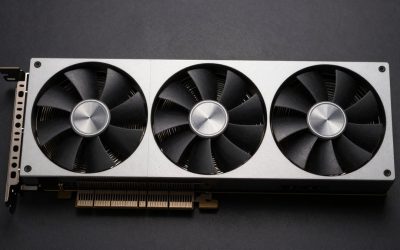
A 6GB graphics card can still make sense for esports, older games, and budget upgrades—but it is a tight limit for many current games. The right choice depends on whether you are buying new or used, what resolution you play at, and whether your power supply can handle the card. If you have room in the budget, a 8GB or 12GB GPU is usually a safer long-term buy.
As an Amazon Associate we earn from qualifying purchases at no extra cost to you.


Our Top Picks
- GIGABYTE GeForce RTX 3050 WINDFORCE OC V2 6GStandard7.5 x 4.4 x 0.1 inches0.88 poundsCheck on Amazon
 msi Gaming RTX 3050 Ventus 2X 6G OC1.7" x 4.3" x 7.4"7.4 x 4.3 x 0.1 inches1.3 poundsCheck on Amazon

Top 3 picks at a glance
What a 6GB GPU can handle
At 1080p, 6GB is enough for many competitive games and older releases, especially with medium settings. It can also run newer games, but you may need to lower texture quality, disable ray tracing, or use upscaling. High-resolution textures are a common failure point: when a game needs more video memory than the card has, you can see stuttering, texture pop-in, or sudden drops in smoothness even if average frame rates look acceptable.
It is also worth separating graphics memory from overall performance. A fast 6GB card may beat a slower 8GB card in games that fit within its memory, but the smaller buffer can become a hard limit in demanding titles. Neither more memory nor a newer name guarantees a good deal; compare current prices, condition, and measured performance for the games you play.
Best 6GB GPU options by buyer
Best for a new, low-power PC: a 6GB entry-level card. This category suits compact systems and modest power supplies when you want modern driver support and a warranty. Check the exact card’s power requirements and outputs before buying. The trade-off is limited headroom: demanding games may require low settings, and the price can be difficult to justify if an 8GB alternative costs only a little more. Browse 6GB graphics cards.
Best value if you already own a capable PC: a used 6GB midrange card. Older midrange models can offer more gaming performance per dollar than new entry-level cards. This can be a good fit for 1080p gaming when the price is low and the card is in good condition. The risks are no manufacturer warranty, possible wear, and higher power use. Ask for a stress-test result or proof that the card works under load; avoid listings with unclear photos, missing model details, or unusually low prices.
Best for older systems: an older 6GB card with modest power needs. This can be a sensible upgrade if your current card is much slower and you do not want to replace the power supply. Check the card’s connector requirements, length, and recommended power supply against your case and system. An older card may lack newer features or receive less driver attention over time, so it is a poor choice if you expect to keep it for many years.
Quick comparison
| Option | Best fit | Main advantage | Main drawback |
|---|---|---|---|
| New entry-level 6GB card | Small or low-power PC | Warranty and current support | Limited performance and memory headroom |
| Used 6GB midrange card | Budget 1080p gaming | Potentially stronger performance for the money | Condition, warranty, and power-use risks |
| Older low-power 6GB card | Basic upgrade to an existing system | May fit a system with a modest PSU | Older features and shorter upgrade runway |
| 8GB or larger alternative | Newer, demanding games | More room for textures and future titles | May cost more upfront |
Check these details before buying
Price against 8GB cards. A 6GB card is only compelling when it is meaningfully cheaper than a similar 8GB option. If the gap is small, the extra memory is useful insurance for modern games. Compare cards at the same retailer and include shipping, taxes, and any used-card risk in the total.
Power and fit. Look up the exact model, not just the GPU family. Board partners may use different cooler sizes and power connectors. Confirm the card fits your case and that your power supply has the required connectors and capacity. A cheap card that needs a new PSU may stop being a bargain.
Your games and settings. Competitive games, older releases, and lighter indie games are generally friendlier to 6GB than visually demanding new releases. At 1080p, start with medium textures and adjust from there. Avoid assuming that lowering resolution alone will solve a memory shortage; texture settings often matter more.
Used-card condition. Ask whether the card has been repaired, whether its fans make noise, and whether the seller accepts returns. If possible, test it in a game or benchmark and check for artifacts, crashes, or unusually high temperatures. Mining history alone does not prove a card is bad, but poor cooling or a seller who will not demonstrate operation is reason to walk away.
Who should buy a 6GB card?
Choose one if you have a strict budget, play at 1080p, and are willing to reduce settings in demanding games. It is also reasonable for a temporary upgrade or a PC dedicated to lighter titles. A used card can be the better buy when its price reflects the age and risk.
Skip 6GB if you want high textures in current games, plan to play at higher resolutions, or expect to keep the card through several future game releases. In those cases, compare 8GB graphics cards and, if your budget allows, larger-memory options. Paying a little more now can avoid settings compromises sooner.
The 6GB Families Side by Side: Specs That Actually Decide the Purchase
The original picks above are all built around one modern chip, but the 6GB label covers several very different families, and the differences matter more than the shared memory size. A wider memory bus feeds textures faster, a lower power draw decides whether an older power supply survives the upgrade, and the feature set decides whether upscaling and modern encoders are available at all. Use this comparison to place any 6GB card, new or used, before comparing individual models.
| GPU family | Memory type and bus | Typical power draw | Power connector | Upscaling and extras |
|---|---|---|---|---|
| GeForce RTX 3050 6GB | GDDR6, narrow bus | Very low, slot-friendly | Usually none | DLSS, ray tracing cores, modern NVENC encoder |
| GeForce GTX 1660 Super | GDDR6, wider bus | Moderate | Usually one 8-pin | No DLSS, no ray tracing cores, older NVENC encoder |
| GeForce GTX 1660 Ti | GDDR6, wider bus | Moderate | Usually one 8-pin | No DLSS, slightly stronger core than the Super |
| GeForce RTX 2060 6GB | GDDR6, wider bus | Higher | One 8-pin | DLSS, first-generation ray tracing, strong encoder |
| Intel Arc A380 6GB | GDDR6, narrow bus | Very low | Varies by model | XeSS, hardware AV1 encoding, needs Resizable BAR |
| GeForce GTX 1060 6GB | GDDR5, wider bus | Moderate | Usually one 6-pin | No modern upscaling, aging driver focus |
Two patterns stand out. First, raw speed and memory size are separate axes: several older families move data over a wider bus and can outpace a newer entry card in older games, while the newer card answers with upscaling that recovers frames when settings climb. Second, power separates the drop-in upgrades from the rebuilds. Slot-powered and low-draw models suit prebuilt desktops with basic power supplies, while the faster used families assume a proper 8-pin cable and headroom to spare.
A VRAM Reality Check by Game Type
Saying 6GB is enough for 1080p is only half the answer, because memory demand follows the game and the texture setting far more than the resolution alone. Work through the groups below against the library you actually play.
- Comfortable fit: Esports and competitive titles, older single-player games, indie releases, and remasters. These generally run well at high settings at 1080p, and many stay smooth at 1440p with modest adjustments.
- Workable with tuning: Recent open-world and action games at 1080p. Expect medium textures, ray tracing off, and upscaling enabled where the card supports it. Dropping texture quality one step is usually the single most effective change when stutter appears.
- Tight or over the limit: The newest texture-heavy releases at high or ultra textures, heavily modded games with replacement texture packs, and any attempt at native 1440p or higher in demanding titles. Here the card can show acceptable average frame rates while still hitching as textures stream in and out.
- A different workload entirely: Video editing timelines, streaming, and home-theater use lean on the encoder and media engine more than on gaming throughput. A newer low-draw card with a current encoder can be the better tool even when an older gaming card posts higher frame rates.
If most of your library sits in the first two groups, a 6GB card remains a rational buy. If the third group is where you spend your time, treat 6GB as a compromise you are choosing knowingly, not as a future-proof purchase.
Power, Connector, and Case-Fit Checklist
More 6GB upgrades fail on fit and power than on performance. Confirm each item against the exact model number, because board partners change coolers and connectors between variants of the same chip.
- Connector first: Check whether the specific card needs no cable, a 6-pin, or an 8-pin connector, and confirm your power supply actually has that cable free. Adapters are a poor substitute on a supply that was never built for the load.
- Supply capacity: Match the card maker’s recommended system wattage, and leave margin for an older supply that no longer delivers its label rating cleanly.
- Length and slot width: Measure from the rear bracket to the first obstruction, and check neighboring slots. Compact and low-profile variants exist in this class precisely because full-height cards do not fit slim prebuilt cases.
- Bracket height: Low-profile cards often ship with both brackets in the box, but not always. A slim case needs the short bracket included or available.
- Platform features: Intel Arc cards expect Resizable BAR to be enabled in the motherboard firmware for proper performance, and older motherboards may need a firmware update before the option appears. Very old systems can also need UEFI mode rather than legacy boot for newer cards to display at all.
- Outputs: Count the HDMI and DisplayPort sockets against your monitors. Some compact cards trade a full-size port for a mini connector, which changes the cable you need.
Setup and Care for a New or Used 6GB Card
A clean install avoids most problems blamed on the hardware later. Power down, seat the card until the slot latch clicks, connect the power cable if the model needs one, and attach the display cable to the card rather than the motherboard. Remove the previous graphics driver before the first boot, then install the current driver for the new family, since leftover software from a different brand is a common source of crashes.
For a used card, add three checks in the first session. Watch fan behavior under a game load, since worn fans often stay quiet at idle and rattle only when they spin up. Watch temperatures through a longer session rather than a short benchmark, because dried thermal paste shows itself slowly. Finally, confirm the card reports its full memory size and correct name in the driver panel, which rules out mislabeled listings.
Ongoing care is simple: keep the heatsink fins free of dust, leave the fans room to breathe, and update drivers when a game you play receives a specific fix rather than on a fixed schedule.
Common Mistakes When Buying a 6GB Card
- Comparing memory size alone: A slower 8GB card and a faster 6GB card trade places depending on the game. Memory decides the ceiling on textures; the core and bus decide the frame rate below that ceiling.
- Confusing the two RTX 3050 versions: The 6GB and 8GB models differ in far more than memory, including power draw and connector needs. Listings shorten names, so verify the exact variant before ordering.
- Assuming every variant is slot-powered: The same chip appears in models with and without an external connector. The chip name does not guarantee the cable situation.
- Paying new-card money for an old family: When a used-era design is listed close to a current card, the warranty, encoder, and driver runway of the newer card usually win.
- Skipping the return window on used listings: A card that artifacts only after twenty minutes of play will pass a quick boot test. Buy used only where a return is genuinely possible, and test under load on the first day.
More Picks Worth Considering
MSI GeForce GTX 1660 Super Ventus XS OC 6GB

This is the pick for a buyer who wants the strongest traditional 1080p performance in this memory class without relying on upscaling. Its GDDR6 memory runs over a wider bus than the newer entry cards, which suits older and esports titles that reward raw throughput, and the dual-fan Ventus cooler is a mainstream size that fits most mid-tower cases. It also carries a mature, well-understood driver story for older games. It does not suit anyone counting on DLSS, ray tracing, or a modern streaming encoder, and it needs an 8-pin power cable, so it is not a drop-in card for a basic prebuilt power supply. Buy it when the system already has the power headroom and the game library is built around established titles rather than the newest releases.
ASRock Intel Arc A380 Challenger ITX 6GB OC

The Challenger ITX suits compact builds and media-focused systems that the original picks do not address. The short single-fan card fits mini-ITX cases, supports four displays, and includes hardware AV1 encoding, which is rare in this class and valuable for recording, streaming experiments, and home-theater transcoding. XeSS upscaling gives it a path to smoother frames in supported games at 1080p. It does not suit a plug-and-forget buyer: Arc performance depends on enabling Resizable BAR in the motherboard firmware, and older games built on legacy graphics APIs remain its weakest area, even though driver updates have steadily improved that picture. Choose it when the encoder, the small footprint, or the display count is the deciding factor and the host system is recent enough to support it properly.
EVGA GeForce RTX 2060 SC Gaming 6GB
The RTX 2060 SC is the used-market step up for a buyer who wants first-generation ray tracing and DLSS alongside stronger raw performance than the entry cards above, while staying at 6GB. The single-fan SC cooler keeps the card short for its class, and the encoder remains capable for streaming older titles. It suits a capable existing PC with an 8-pin connector and real power headroom, bought at a used price that reflects its age. It does not suit a low-power prebuilt, a buyer who needs a factory warranty, or anyone expecting high textures in current releases, because the same 6GB ceiling applies. Verify fan condition and temperatures under load before the return window closes.
FAQ
Is 6GB VRAM enough for 1080p gaming?
For esports, older games, and moderate settings, often yes. Newer demanding games can exceed it, especially with high textures, so expect to adjust settings.
Should I buy a used 6GB graphics card?
It can be good value if the price is low, the card passes a load test, and you can return it if faulty. Factor in the lack of warranty and possible power-supply requirements.
Is an 8GB card worth paying more for?
Usually, if the price difference is modest and you play newer games. The extra memory does not guarantee higher performance, but it reduces the chance of texture-related limits.
Can a 6GB card run games at 1440p?
Some lighter or older games can, but demanding titles may require reduced settings and can stutter from limited memory. For regular 1440p gaming, a card with more VRAM is the safer choice.
Related guides
More from Amazon
Programs that pair well with the guide above. Offers and eligibility are set by Amazon and may change.
A free business account with business pricing and bulk-buying tools for work, shop or home office.
Create a business accountFree shipping on eligible items, Prime Video and more. Eligible new members can start with a free trial.
Start a Prime free trialAudiobooks and podcasts to listen to on the go. Eligible new members can start with a free trial.
Try Audible freeAd-free music streaming. Eligible new subscribers can start with a free trial.
Try Music Unlimited freeAs an Amazon Associate we earn from qualifying purchases.