
A failing power supply can damage every other component in a PC before you realize something is wrong. Knowing how to test power supply output before connecting it to a new motherboard or a repaired system saves time, money, and potentially dozens of other parts. Dedicated PSU testers let you verify each voltage rail, check the power good signal, and confirm continuity without needing a full system build — and the right tool for the job depends heavily on which connectors your hardware uses and how much detail you need from the readout.
The market in 2026 ranges from single-digit-dollar basic testers that confirm whether a PSU turns on to professional-grade diagnostic units with color displays and multi-rail voltage readouts. What separates a genuinely useful tester from a frustrating one is connector coverage, display legibility, and whether the device applies a real load to the supply under test. Owner feedback consistently highlights these factors over any other consideration when recommending or avoiding a specific model.
As an Amazon Associate we earn from qualifying purchases at no extra cost to you.







Our Top Picks
 Thermaltake Dr. Power III Pro; ATX Power SupplyIII Pro5.5 x 3 x 0.75 inches0.3 PoundsCheck on Amazon


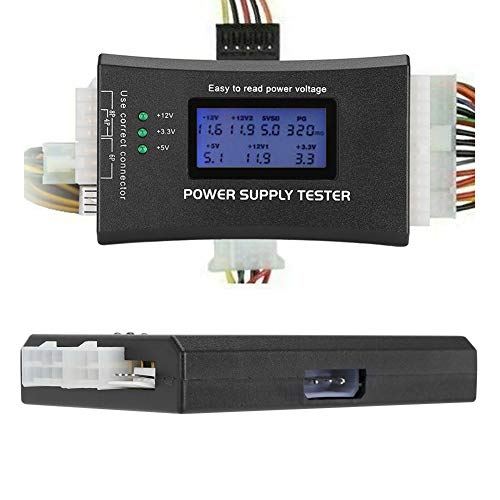


Top 3 picks at a glance
Quick Picks
| Product | Best for | Price |
|---|---|---|
| Fuhengli PC Power Supply Tester | Basic diagnostics on older builds | Check on Amazon |
| Thermaltake Dr. Power III Pro | Comprehensive multi-rail verification | Check on Amazon |
| Kingwin Digital Tester | Aluminum build with broad standard support | Check on Amazon |
| ATX 20/24 Pin Tester | Budget all-rounder with buzzer alarm | Check on Amazon |
| Comidox LCD Tester | Ultra-low-cost initial screening | Check on Amazon |
| Computer ATX PSU Tester | Compact 20/24 pin verification | Check on Amazon |
| Byi Plug Diagnostic Tester | The cheapest functional option available | Check on Amazon |
| NICE-POWER DC Bench Supply | Repair bench and component-level work | Check on Amazon |
How We Compared
We narrowed this list by comparing published specifications, connector compatibility, display type and legibility, and recurring themes in owner feedback across each price tier. A tester that cannot interface with your specific motherboard or GPU connector is useless regardless of how well it performs otherwise. Display quality matters because analog meters and poorly segmented LCDs lead to misreadings under shop lighting. Build material and buzzer or alarm features add practical value for users who test many units per session.
The 8 Best How To Test Power Supply in 2026
Fuhengli Computer PC Power Supply Tester
For hobbyists maintaining older ATX systems, the Fuhengli covers the basics without cluttering your bench with features you will never use. Owner reports confirm it handles standard 24-pin and 4+4 pin connectors reliably, making it a practical screening tool before powering up a suspect supply.
- Pros: Adequate connector coverage for legacy ATX builds; compact enough to store in a drawer without taking up bench space.
- Con: Lacks a dedicated voltage readout, so you only get a pass/fail indication rather than specific rail values.
Skip this if you work on modern hardware with 12V-2X6 connectors or need per-rail voltage confirmation for troubleshooting unstable systems.
Thermaltake Dr. Power III Pro
The Dr. Power III Pro is the most capable unit on this list, targeting technicians who need to verify supplies against the ATX12V v3.1 spec. Its color display presents voltage, continuity, and power good status simultaneously, reducing ambiguity during diagnosis sessions.
- Pros: Native support for 24-pin main, 12V-2X6, 4+4 EPS, 6+2 PCIe, SATA, and Molex connectors; color display makes reading multiple values at once straightforward.
- Con: Priced roughly three times higher than mid-range alternatives, which is hard to justify for occasional home use.
If you only test one or two consumer PSUs per year, a $15 unit will serve you adequately without this premium.
Kingwin Digital Power Supply Tester
Kingwin targets users who want a durable physical package alongside multi-standard compatibility. The aluminum housing distinguishes it from the plastic-cased options below and above, and owner feedback notes it withstands frequent handling on a repair bench better than lighter alternatives.
- Pros: Aluminum casing provides noticeable structural rigidity; covers ATX, ITX, IDE, HDD, SATA, and BTX standards in one unit.
- Con: The LCD screen is small, and some owners mention it is difficult to read from a distance or in low light.
Consider a larger-display option if you need to read values while keeping the PSU out of arm’s reach on a crowded workbench.
ATX Power Supply Tester with Buzzer and LCD Display
At around $12, this generic-branded tester packs an LCD readout and a buzzer alarm into a footprint smaller than most competing units. It supports 20/24-pin, 4/6/8-pin connectors, and covers ATX, ITX, BTX, PCI-E, SATA, and HDD form factors.
- Pros: Buzzer provides audible confirmation of failure, useful when you cannot watch the display during a test; broad connector support for the price tier.
- Con: No brand name or warranty documentation is included, which may concern users who want support if the unit itself fails.
Skip if you require a documented warranty or plan to use this commercially where traceability matters.
Comidox 1Pcs 20/24 Pin LCD Tester
The Comidox is essentially a minimum viable PSU tester with an automatic alarm buzzer. For around $11, it handles ATX, BTX, ITX, TFX, and SATA connectors, covering the vast majority of consumer desktop configurations without any single rail reading precision.
- Pros: Lowest entry point for LCD-equipped testers; TFX support makes it one of the few budget units suitable for small-form-factor systems.
- Con: Single connector set only — no dedicated 4+4 EPS or 6+2 PCIe ports, so testing those cables requires the PSU to remain connected to the motherboard.
If your builds use separate CPU and GPU power cables, a tester with dedicated EPS and PCIe ports will save time.
Computer PC Power Supply Tester (ATX Host Inspection Tool)
This unit shares its spec profile closely with the Comidox and the Fuhengli, positioned at around $14 as a middle-ground option for 20/24-pin systems. Owner reports describe consistent pass/fail detection across ATX, BTX, ITX, and TFX form factors.
- Pros: Covers TFX alongside ATX, making it a rare budget pick for SFF and HTPC builds; straightforward operation with no settings to configure.
- Con: Display font size is small enough that users with vision difficulties report needing magnification to read values confidently.
Pick the Thermaltake above if your priority is legible, detailed readouts rather than basic functionality.
Byi Plug PC Power Supply Diagnostic Tester
At around $9, the Byi Plug is the cheapest tester on this list that still provides an LCD with multi-connector support including SATA, IDE, HDD, and 4/6/8-pin headers. For anyone who needs to confirm whether a PSU turns on before spending time on a full build, it is functionally sufficient.
- Pros: Lowest price among testers with a dedicated LCD; supports 20/24-pin plus secondary connectors, giving more coverage than many competitors at this price.
- Con: Plastic housing and minimal build quality mean it should not be expected to survive years of frequent handling without the display or connector sockets degrading.
If you test PSUs weekly in a professional setting, invest in the Kingwin or Thermaltake for durability.
NICE-POWER DC Variable Bench Power Supply
The NICE-POWER is not a PSU tester in the traditional sense — it is a 0~30V, 0~10A variable DC bench supply with a three-digit LED display and an encoder dial for precise adjustment. Listed here because repair technicians use it to inject known voltages into boards and components when diagnosing shorts or verifying regulator output, which is a different but essential workflow when learning how to test power supply behavior under controlled load conditions.
- Pros: Adjustable output up to 150W with encoder-controlled precision; fixed 15V 10A and 30V 5A modes simplify common repair scenarios like electroplating or board-level injection.
- Con: Does not interface with ATX connectors at all — it cannot substitute for a dedicated PSU tester when you need to verify a computer power supply.
Buy this as a complement to a PSU tester, not as a replacement for one.
Buying Guide
Connector Coverage Determines Usability
The single most important specification is whether the tester physically connects to the cables on your PSU. Older systems use 20-pin ATX, while modern boards require 24-pin. CPU power has shifted from 4-pin Molex-adjacent connectors to 4+4 pin EPS, and GPUs use 6+2 pin PCIe or the newer 12V-2X6 standard. A tester that lacks a dedicated port for a specific connector cannot verify that rail independently, forcing you to test it in-circuit or skip it entirely.
Display Type Affects Diagnostic Depth
LCD readouts showing per-rail voltage values let you confirm that the 12V rail is actually delivering 11.9 to 12.2 volts rather than merely registering as “present.” Color displays, like the Thermaltake’s, present multiple values simultaneously without ambiguity. Units that only show a green LED or a buzzer pass/fail tell you less and can mask a marginal rail that operates just barely within spec but is degrading.
Load Simulation and Power Good Signal
Some testers apply only a minimal resistive load, which means a failing PSU that cannot hold voltage under real system demand may still pass. The power good signal, often abbreviated PG, is a digital handshake between the PSU and motherboard — a supply with a weak or absent PG signal can cause boot failures that are invisible to basic testers. Verify whether a model checks PG status before purchasing if you troubleshoot intermittent no-boot issues.
Our Verdict
For anyone working on current-generation hardware, the Thermaltake Dr. Power III Pro is the clear top pick due to its ATX12V v3.1 compliance, color display, and 12V-2X6 support that most competitors lack. The budget pick goes to the Byi Plug at around $9 for anyone who simply needs to know whether a PSU powers on with acceptable voltage across common connectors. However, the NICE-POWER bench supply wins outright if your actual task is component-level repair rather than PSU verification — it solves a different problem, and buying the wrong tool for the job wastes both.
FAQ
Can I test a power supply without a motherboard?
Yes. A dedicated PSU tester connects directly to the 24-pin ATX and secondary connectors, allowing you to verify rail outputs and signal status without installing the supply in a system. This is the primary reason these tools exist.
What is the paperclip test and should I use it?
The paperclip test involves shorting the green PS_ON wire to a ground pin to force an ATX supply to start. While it confirms the fan spins, it provides no voltage readings and risks damaging the supply or your fingers. A $10 tester is strictly better.
How do I know if a voltage reading is acceptable?
ATX12V specifications permit a five percent tolerance on each rail. A reading of 11.4 to 12.6 volts on the 12V rail is technically within range, but any value below 11.8 or above 12.2 suggests the supply is aging and should be replaced soon.
Do PSU testers verify output under real load?
No consumer-grade tester can replicate the full load of a modern GPU and CPU drawing several hundred watts simultaneously. Testers apply small internal resistive loads sufficient to energize each rail and measure output. A supply that passes a bench test may still fail under full system load.









