Choosing a computer processor can often feel like deciphering a foreign language. With countless generational leaps, confusing naming schemes, and staggering core counts, it is exceptionally easy to get bogged down in dense technical spec sheets. Yet, the central processing unit remains the absolute beating heart of your custom desktop build. It dictates how smoothly your operating system responds, how fast your media exports finish, and how stable your frame rates stay during intense, unpredictable gaming sessions.
Navigating this complex market successfully requires a fundamental shift in perspective. Instead of chasing raw marketing numbers or buying into inflated hype, you need to focus heavily on real-world utility that aligns with your daily routine. As we evaluate the hardware landscape in 2026, the overarching goal is matching your exact computing needs rather than simply purchasing the most expensive silicon on the shelf. This comprehensive decision guide cuts through the corporate noise to help you evaluate what truly matters when selecting your next computer processor.
As an Amazon Associate we earn from qualifying purchases at no extra cost to you.

Understanding Core Counts and Thread Counts
One of the most heavily marketed metrics for modern processors is the sheer number of cores packed onto a single piece of silicon. Historically, desktop chips featured a single processing core, but modern designs leverage multiple cores to handle several complex instructions simultaneously. Physical cores are independent processing units, while logical threads use simultaneous multithreading technologies to divide those physical units and handle minor background tasks more efficiently. However, more is not always better for every single user. Everyday productivity tasks like word processing, web browsing, and streaming media rarely utilize more than a few cores effectively. If your primary focus is general desktop multitasking or light gaming, a mid-range processor with a balanced core architecture will deliver exceptional performance without wasting your hard-earned money on idle hardware capacity.
Prioritizing Single-Core Speed Versus Multi-Core Power
When analyzing performance metrics, you must weigh single-core speed against multi-core power based heavily on your primary applications. Single-core speed, measured in gigahertz, dictates how fast an individual instruction can be processed. This metric remains the single most critical factor for high frame-rate gaming and snappy, responsive desktop navigation, because many game engines rely heavily on a primary thread to manage game logic. Conversely, multi-core power shines when you venture into heavy professional workloads such as video editing, 3D rendering, virtual machine hosting, and complex software compilation. These applications can distribute processing loads evenly across all available cores, cutting export times down significantly. Assess how you spend your time at the desk to determine which metric deserves priority in your build budget.
Navigating Motherboard Sockets and Platform Longevity
A high-performance processor is entirely useless without a compatible motherboard to house it. Component compatibility starts with the processor socket, which must physically and electrically match the layout of the motherboard chipset. Manufacturers periodically change these sockets to accommodate new power delivery standards and architectural designs, which means older motherboards rarely support brand-new processor generations. When selecting your parts, look closely at platform longevity. Choosing a socket that is relatively fresh in its lifecycle ensures you have an upgrade path a few years down the line, allowing you to swap out just the processor for a faster model rather than buying an entirely new motherboard and memory kit all over again.
Factoring in Thermal Design Power and Cooling Costs
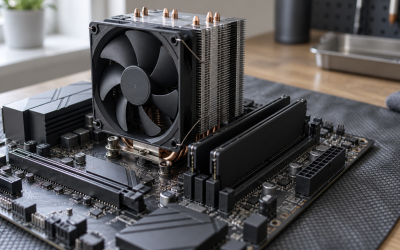
Enthusiast-grade processors are capable of incredible computational feats, but that performance demands massive amounts of electrical power and generates substantial heat loads. Every processor comes with a thermal design power rating that gives you a general baseline of how much heat energy the cooling solution must dissipate. If you pair a power-hungry flagship processor with a budget air cooler, the chip will quickly reach its maximum thermal threshold and aggressively throttle its clock speeds to prevent physical damage, effectively rendering your expensive hardware slower than expected. Always budget appropriately for a robust aftermarket air cooler or a reliable liquid cooling setup to ensure your processor can sustain its maximum boost frequencies during prolonged heavy workloads.
Avoiding Unnecessary Upselling Traps
Hardware retailers and system integrators love pushing top-tier flagship processors to everyday users who simply do not need them. It is easy to fall into the trap of thinking that you must buy the absolute best tier of silicon to future-proof your system against obsolescence. In reality, enthusiast-grade chips often carry an extreme financial premium for marginal performance gains that the average user will never notice in daily use. If your daily computer usage consists of browsing the web, managing spreadsheets, and playing casual esports titles at moderate resolutions, spending your money on an ultra-expensive processor is a poor allocation of funds. You will achieve a much better daily experience by redirecting that excess budget toward a faster solid-state drive or a superior graphics card.
Matching the Processor to Your GPU and Monitor
Building a balanced personal computer means avoiding severe performance bottlenecks between your major components. If you pair an entry-level graphics card with an ultra-powerful workstation processor, your gaming performance will remain severely limited by the graphics hardware, rendering your expensive CPU purchase largely pointless. Conversely, pairing a top-tier graphics card with an obsolete or low-end processor will starve the GPU of data, resulting in stuttering frame rates and poor visual fidelity. Take a holistic approach to your system build, ensuring that your processor tier aligns neatly with your graphics card capability and your monitor resolution to guarantee every single component pulls its appropriate weight.
Related Guides
If you are ready to compare specific models currently dominating the market, be sure to read our curated Best Computer Processors roundup for hand-tested recommendations across every budget category.
FAQ
Do I need an integrated graphics processor?
An integrated graphics processor provides basic display output without needing a separate graphics card. This feature is ideal for office computers, budget builds, or troubleshooting system issues, though dedicated gamers and professionals will still require a separate discrete graphics card.
How many cores are enough for modern gaming?
Most modern games run exceptionally well on processors featuring six to eight physical cores. While higher core counts are useful for heavy background multitasking or streaming while you play, they offer minimal direct benefit to gaming frame rates.
Is overclocking still worth doing on modern CPUs?
Modern processors are pushed close to their absolute performance limits right out of the box via sophisticated automatic boost algorithms. Manual overclocking yields very slim performance gains for most users while significantly increasing power consumption and thermal output.
Should I upgrade my RAM when I buy a new CPU?
New processor generations frequently require a transition to newer memory standards to achieve optimal data transfer speeds. Upgrading your processor usually means investing in a compatible memory kit to prevent system bottlenecks and ensure peak stability.