As an Amazon Associate we earn from qualifying purchases.
Choosing a wireless headset for Xbox One is less about sound quality alone and more about connection. The console does not accept standard Bluetooth audio, so a headset has to speak Xbox Wireless, ship with a compatible USB transmitter, or plug into the controller. Pick the wrong connection and the headset will pair with a phone but stay silent on the console. Battery life, chat clarity, and comfort then decide whether the headset survives long sessions or ends up back in its box.
This guide is written for competitive players who need clear footsteps and chat, casual players who want a simple pick-up-and-play headset, late-night players who need to keep the room quiet, and owners who share one headset between Xbox One and a PC. The headsets below were shortlisted from the names and specifications shown on their Amazon product pages, with connection type checked first so every pick can actually work with the console.
How Wireless Audio Works on Xbox One
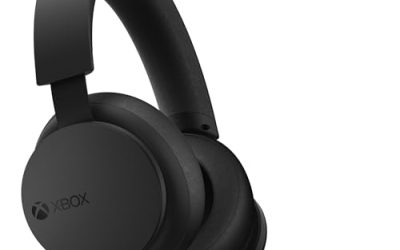
Xbox One handles wireless audio differently from a phone or a PC, and that difference causes most buying mistakes. The console has its own wireless protocol, Xbox Wireless, which is the same radio system the controllers use. A headset built for Xbox Wireless pairs directly with the console, just like a controller: press the pairing button on the console and on the headset, wait for the lights to settle, and game audio and chat come through with no dongle and no cable. The first-party Xbox Wireless Headset works this way, and so do licensed models such as the SteelSeries Arctis 9X and the Razer Kaira Pro for Xbox.
Bluetooth is the source of the confusion. Many wireless headsets carry Bluetooth, but Xbox One does not use Bluetooth for game audio, so a Bluetooth-only headset cannot send game sound to the console. On Xbox headsets, Bluetooth is a second connection for a phone or tablet, useful for taking a call or listening to music while playing, and it runs alongside the Xbox Wireless link rather than replacing it. If a listing mentions Bluetooth without Xbox Wireless or a USB transmitter, treat it as a headset for another device.
The third route is a USB transmitter. Some headsets, including several Turtle Beach Stealth models, ship with a small USB dongle that plugs into the console and carries the wireless signal. This works well, but it occupies a USB port and adds a small part that can be lost, so check whether the dongle is included in the box and whether the model is the Xbox version rather than the PlayStation version, which may use a different transmitter. A wired fallback also matters: most wireless Xbox headsets include a 3.5mm cable or port, so the headset still works through the controller if the battery runs out mid-session.
Sound processing is handled in software. Xbox One supports Windows Sonic spatial sound at no extra cost, and Dolby Atmos is available through its app, so a headset does not need built-in surround hardware to deliver directional audio. What the headset itself controls is driver size, tuning, microphone quality, and the chat mixer that balances game sound against voice chat. Firmware updates for first-party and many licensed headsets arrive through the Xbox Accessories app, which is worth running after unboxing because pairing and audio fixes often ship that way.
How to Choose
Connection Type: Xbox Wireless, Dongle, or Bluetooth
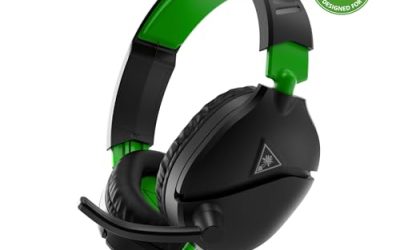
Start with the connection, because it decides whether the headset works at all. Xbox Wireless headsets pair directly with the console and keep the setup simple, with no dongle to lose and no cable to the controller. Dongle-based headsets work just as well once the transmitter is plugged in, but confirm the dongle is the Xbox version and that a USB port is free. Bluetooth alone is not enough for game audio on Xbox One, so a headset that only lists Bluetooth will not carry game sound. The safest shortlist names Xbox One or Xbox Wireless on its product page, such as the Xbox Wireless Headset, the Arctis 9X, or the Turtle Beach Stealth 700 Gen 2 MAX.
Battery Life and Charging
Battery life decides how often the headset interrupts a session. Long sessions, tournaments, and weekend marathons favour headsets that last through an evening of play without a mid-game recharge, while a headset used for an hour after work can get away with a shorter runtime. Check how the headset charges as well as how long it lasts: USB-C charging is convenient because the same cable often charges a controller or phone, and a headset that can play while charging is useful when the battery runs low. Treat any quoted battery figure as an estimate that varies with volume and chat use.
Chat Clarity and Game-Chat Balance
A headset is a communication tool as much as a listening device, so the microphone deserves the same attention as the drivers. Look for a microphone that can be flipped up to mute, detached when it is not needed, or muted with a clear button press, because fumbling for a mute control during a match is a common frustration. A chat mixer, whether a dial on the earcup or a control in the Xbox guide, lets the wearer raise voices over game audio or drop the game volume to hear callouts. Noise reduction helps teammates hear commands instead of room noise, and sidetone, which plays a little of the wearer’s own voice back, stops people from shouting without realising it.
Comfort, Fit, and Build
Comfort decides whether a headset gets used every day or abandoned after a week. Over-ear cups with soft padding suit long sessions better than on-ear designs, and a padded, adjustable headband spreads the weight so the headset does not press on one spot. Weight matters more than it looks on a product page: a heavy headset can feel fine for an hour and tiring after three, so lighter models suit marathon players. Glasses wearers should look for soft ear cushions that seal without pressing the frames into the head, and anyone who shares a headset should check that the fit adjusts widely enough for different head sizes. Build quality shows in the hinges and headband, which take the most stress.
Which One Fits Your Situation
Competitive Multiplayer Players
Competitive players should start with the SteelSeries Arctis 9X or the Turtle Beach Stealth 700 Gen 2 MAX. Both connect over Xbox Wireless, so there is no dongle to manage, and both carry the chat controls and microphone quality that team play depends on. The Arctis 9X adds Bluetooth for a phone alongside the console link, which suits players who take calls between matches. Prioritise clear directional audio and a reliable mute control over extra features.
Casual Couch and Family Gamers
Casual players usually want the simplest headset that works every time, and the first-party Xbox Wireless Headset is the natural fit. It pairs like a controller, its earcup dials adjust game and chat volume without opening a menu, and it works with Xbox One, newer Xbox consoles, and Windows PCs. There is no dongle to lose and no extra app to learn, which matters in a household where several people share one headset.
Late-Night Players in Shared Rooms
Late-night players need a headset that keeps game sound in the earcups and out of the room, with a battery that lasts the evening. A closed-back over-ear design with a good seal, such as the Turtle Beach Stealth 700 Gen 2 MAX or the Stealth 600 Gen 2 for Xbox, keeps sound in and blocks some room noise. A flip-to-mute microphone helps when a housemate walks in, and a wired backup through the controller covers a dead battery after midnight.
Players Who Switch Between Xbox One and PC
Players who split time between console and PC should pick a headset with two connections. The Arctis 9X and the Razer Kaira Pro for Xbox both pair with the console over Xbox Wireless and with a phone or PC over Bluetooth. The Xbox Wireless Headset also works on Windows PCs over Xbox Wireless or Bluetooth. Check that the PC connection carries both game audio and microphone input, since some Bluetooth links only carry one.
Common Mistakes
- Buying a Bluetooth-only headset for game audio: Xbox One does not carry game audio over standard Bluetooth, so a headset that only lists Bluetooth will pair with a phone but stay silent on the console. Always confirm Xbox Wireless support or a compatible USB transmitter on the product page before buying, and be wary of listings that mention Bluetooth prominently while saying nothing about Xbox compatibility.
- Choosing the wrong platform version: Many headsets come in separate Xbox and PlayStation versions that look identical but use different wireless hardware. The PlayStation version may not pair with Xbox One at all, or may lose chat features, so check that the listing names Xbox One explicitly and that the model number matches the Xbox version rather than assuming any version of a familiar name will work.
- Ignoring the microphone until the first team game: Sound quality gets the attention, but a weak microphone ruins team play. A headset without a clear mute control, a flip-to-mute boom, or noise reduction leaves teammates hearing room noise, breathing, or background chatter, so test the microphone in a party chat early and learn where the mute control sits before joining a competitive match.
- Forgetting battery and charging habits: A headset with a short battery life turns into a wired headset halfway through long sessions, which defeats the reason for buying wireless. Check the listed battery life, keep a charging cable near the gaming spot, and prefer a model that can play while charging so a low battery never ends a session early.
- Judging comfort from photos instead of fit: A headset that looks light can still press on glasses, pinch after an hour, or slide during movement. Weight, clamping force, and ear cushion depth matter more than appearance, so check the fit during the return window with a long session, and pay attention to whether the headband distributes weight evenly or concentrates it on one spot.
Frequently Asked Questions
Do all wireless headsets work with Xbox One?
No. A wireless headset only works with Xbox One if it supports Xbox Wireless, ships with a compatible USB transmitter, or connects through the controller with a cable. Standard Bluetooth headsets do not carry game audio to the console, so check the product page for Xbox One compatibility first. Headsets built for PlayStation may also fail to pair, even when the model name looks familiar.
Can I use Bluetooth headphones with Xbox One?
Not for game audio. Xbox One does not support Bluetooth audio output, so Bluetooth headphones cannot send game sound to the console directly. Some Xbox headsets include Bluetooth as a second connection for a phone, which is useful for calls or music alongside play, but the game audio itself travels over Xbox Wireless or a USB transmitter instead.
How do I pair an Xbox Wireless headset?
Press the pairing button on the front of the Xbox One console, then press and hold the pairing button on the headset until its light flashes and then turns solid. The headset pairs like a controller and should reconnect automatically next time it is switched on. If pairing fails, move the headset closer, restart both devices, and check for a firmware update in the Xbox Accessories app.
Do wireless headsets for Xbox One work with Xbox Series X|S?
Most do. Headsets that use Xbox Wireless, including the first-party Xbox Wireless Headset and licensed models such as the Arctis 9X and Turtle Beach Stealth series, pair with Xbox Series X|S the same way they pair with Xbox One. Dongle-based headsets also carry over, although a model that uses an older USB transmitter may need a firmware update, so check the manufacturer’s compatibility page first.
Related guides
More from Amazon
Programs that pair well with the guide above. Offers and eligibility are set by Amazon and may change.
A free business account with business pricing and bulk-buying tools for work, shop or home office.
Create a business accountFree shipping on eligible items, Prime Video and more. Eligible new members can start with a free trial.
Start a Prime free trialAudiobooks and podcasts to listen to on the go. Eligible new members can start with a free trial.
Try Audible freeAd-free music streaming. Eligible new subscribers can start with a free trial.
Try Music Unlimited freeAs an Amazon Associate we earn from qualifying purchases.