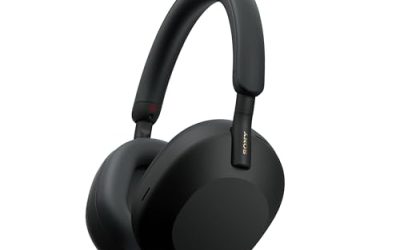
The best USB headset for most PC gamers in 2026 is one with a built-in USB sound card and a detachable or boom mic. The HyperX Cloud II is the classic all-rounder, and the Corsair HS80 RGB USB is a step up in comfort and mic quality. If you mostly take calls and play casually, the Logitech H390 or Jabra Evolve2 40 SE is a simpler, cheaper fit. A USB headset bypasses your motherboard’s audio chip, so its sound depends on the headset’s own DAC and amplifier, which is why it often beats a 3.5 mm plug on a noisy board.
Quick comparison of the picks
| Pick | Best for | Key specs (per manufacturer) | Price range |
|---|---|---|---|
| Corsair HS80 RGB USB | Best overall | USB-A, 50 mm drivers, Dolby Atmos support, detachable broadcast-style mic, memory-foam pads | Mid-range to upper mid-range |
| HyperX Cloud II | Best value for gaming | USB sound card with 7.1 virtual surround, 53 mm drivers, detachable mic, aluminum frame | Mid-range |
| Logitech H390 | Best budget | USB-A, inline volume and mute, rotating noise-cancelling mic, lightweight | Budget |
| SteelSeries Arctis Nova Pro Wired | Best for audio tuning | External GameDAC-style USB amp, wide frequency response, parametric EQ in Sonar software | Premium |
| Jabra Evolve2 40 SE | Best for work and calls | USB-A or USB-C versions, certified for major conferencing apps, passive isolation, busy-light | Mid-range |
Models are sold in several variants and revisions, so check the exact connector and software support before ordering.
Best overall: Corsair HS80 RGB USB
This is the pick for someone who wants one headset for long gaming sessions, Discord and music. It plugs into a USB-A port and does the digital-to-analog conversion inside the headset. Corsair’s iCUE software adds EQ and mic controls, and the memory-foam pads and light build suit sessions of several hours. The trade-off is that the best features, such as EQ presets and spatial audio, depend on iCUE running in the background. Corsair also makes wireless HS80 variants, so make sure you are buying the USB wired one if cable reliability is the goal.
Best for value: HyperX Cloud II
The Cloud II has been a staple for years because the combination is hard to beat: a durable frame, large drivers, a detachable mic and a bundled USB sound card with inline controls. The sound card is what delivers 7.1 virtual surround, and it also gives you a hardware volume dial and mic mute independent of Windows. The trade-offs are an older design with a slightly bass-forward tuning and a bulkier control box. The pads can also run warm in summer.
Best budget: Logitech H390
The H390 is a plain USB-A headset with a rotating mic and inline controls. It makes sense if you want something that works on any PC, Mac or Chromebook without drivers. It does not offer surround sound, deep bass or any serious customization, and the mic is clear enough for voice chat but not for streaming. For a kid’s PC, a spare headset or office use, it is a sound choice.
Best for audio tuning: SteelSeries Arctis Nova Pro Wired
Here the USB part is an external amp/DAC base station that connects to your PC and feeds the headset over a cable. That gives you a physical volume dial, quick switching between inputs and EQ controlled through SteelSeries Sonar. It is the pick for people who play competitive shooters and want footstep clarity, or who also listen to music. The cost is the price tier and the extra box on your desk. Check the console-compatibility details for your specific variant.
Best for work and calls: Jabra Evolve2 40 SE
If your headset spends more time in Teams, Zoom or Meet than in games, a business-class model makes more sense than a gaming one. Jabra sells this model in USB-A and USB-C versions, with call-control buttons, a busy-light and a mic tuned for speech. The trade-off is flatter, less exciting sound for games, with no virtual surround. Make sure to choose between the UC and MS (Microsoft Teams) versions that match your workplace software.
How to choose: decision matrix
| Your situation | Choose | Why |
|---|---|---|
| Desktop with poor onboard audio or front-panel hiss | Any USB headset with its own DAC | Skips the motherboard codec and its electrical noise |
| Laptop with a single USB-C port | USB-C version, or USB-A plus a short adapter | Avoids dongle chains and hubs that add noise |
| Streaming or recording voice | Detachable boom mic (HS80, Cloud II) | Better pickup than a slim built-in mic |
| 8+ hours a day of calls | Business-class model (Jabra) | Light clamp force, call controls and certified compatibility |
| You also game on PS5 | Check console support for your exact model | Many USB headsets work on PlayStation but not Xbox |
| Fussy about software | Logitech H390 or a driverless class-compliant model | Works plug and play on any OS |
Worked example: does USB have enough bandwidth?
USB headsets stream uncompressed digital audio, and the numbers are tiny compared with what a USB port can carry. Stereo audio at 48 kHz and 16-bit is 48,000 × 16 × 2 = 1.536 Mbps. A mono mic at the same format adds 0.768 Mbps. A 7.1 virtual-surround stream sent as eight channels would be 48,000 × 16 × 8 = 6.144 Mbps, still below the 12 Mbps of USB full speed. A high-resolution 24-bit/96 kHz stereo stream is 4.608 Mbps. So bandwidth is never the bottleneck, and a USB 2.0 port is all you need. What matters is power: a plain USB 2.0 port supplies up to 500 mA at 5 V (2.5 W), and a headset with RGB, an amp and a mic draws a fraction of that. An unpowered hub shared with a webcam and a drive can still cause crackling.
Specs that matter and specs that do not
- Mic quality over driver size. A 50 mm driver is not inherently better than 40 mm. Tuning and the DAC decide sound quality, while teammates only hear your mic.
- Detachable mic. It lets you use the headset in public and replace a broken boom.
- Clamp force and weight. Under about 350 g with soft pads is more comfortable for long sessions, especially with glasses.
- Software dependence. Check whether EQ and mic settings are stored on the headset or require an app to be running.
- Virtual surround. Useful in some games, but it is a processing effect and not a substitute for good stereo imaging.
Settings to apply after plugging in
- Set the default format to 48 kHz, 16-bit in Windows Sound settings. Most game and voice-chat audio runs at 48 kHz, so this avoids resampling that can add subtle artifacts.
- Set mic input level to about 70–80%. Going to 100% boosts noise along with your voice and often clips on loud moments.
- Turn off Windows audio enhancements if you use headset software, because stacking two processing chains causes echo and muffled mics.
- Use only one surround effect. If you enable the headset’s 7.1, disable Windows Sonic or Dolby in the OS, since double virtualization smears positioning.
- Enable sidetone at a low level if available, so you can hear your voice and avoid shouting.
- Plug directly into a rear motherboard port rather than a hub when troubleshooting crackling or dropouts.
Frequently Asked Questions
Are USB headsets better than 3.5 mm headsets?
Not automatically, but they remove your motherboard’s audio hardware from the equation. The headset’s own DAC and amp do the conversion, which usually means less hiss and a more consistent mic. A good analog headset on a good DAC can sound equally good, though.
Do USB headsets work on PS5, Xbox and Switch?
PlayStation supports many USB headsets, and Switch accepts some in docked mode, but Xbox generally requires headsets licensed for the platform. Always check the manufacturer’s compatibility list for your exact model, as variants differ.
Why does my USB headset crackle or cut out?
The usual causes are an overloaded unpowered hub, a loose front-panel port, or software conflicts from several audio apps running at once. Plug into a rear port, close competing audio software and match the sample rate to 48 kHz.
Do I need a USB-C headset for a modern laptop?
If the laptop has only USB-C ports, a native USB-C model is cleaner than an adapter. USB-A headsets still work through a short adapter, but this adds a connection that can loosen. Check your port layout before buying.
Is 7.1 surround sound worth paying for?
It is a virtual effect built from stereo drivers, so it varies by game. It can help with directional cues in some shooters, but many players prefer plain stereo with a good EQ. Treat it as a bonus, not the reason to buy.
Which USB headset is best for a good microphone?
Headsets with a detachable boom mic, such as the Corsair HS80 RGB USB and HyperX Cloud II, usually capture voice more clearly than slim built-in mics. For office calls, business-class models like the Jabra Evolve2 40 SE are tuned specifically for speech clarity and certified for conferencing apps.
Related guides
More from Amazon
Programs that pair well with the guide above. Offers and eligibility are set by Amazon and may change.
A free business account with business pricing and bulk-buying tools for work, shop or home office.
Create a business accountFree shipping on eligible items, Prime Video and more. Eligible new members can start with a free trial.
Start a Prime free trialAudiobooks and podcasts to listen to on the go. Eligible new members can start with a free trial.
Try Audible freeAd-free music streaming. Eligible new subscribers can start with a free trial.
Try Music Unlimited freeAs an Amazon Associate we earn from qualifying purchases.