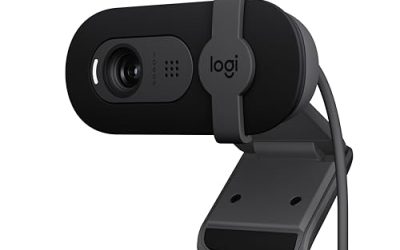
The best tripod for a webcam depends on where the camera needs to sit, but for most desks a small, adjustable tabletop tripod with a standard 1/4-inch-20 mount is the right answer. Check that your webcam has a threaded socket on its base or clip. If it does, a compact tripod such as the Manfrotto PIXI or Joby GorillaPod works at desk level, while a boom arm or full-size tripod is better when the webcam must sit above or in front of your monitor. If your webcam has no thread, you need an adapter clip.
Quick comparison of webcam tripod options
| Pick | Best for | Key specs | Typical price range |
|---|---|---|---|
| Manfrotto PIXI mini tripod | Best compact desk tripod | Folding legs, ball head, small footprint | $20-$35 |
| Joby GorillaPod (small class) | Best flexible mount | Bendable legs, grips onto objects, light camera loads | $15-$40 |
| Elgato Master Mount (class) | Best for streamers using arms | Mounts to a desk arm, 1/4-inch thread, cable routing | $30-$60 |
| Extendable floor tripod (class) | Best for height and framing | Extends to 1.2-1.7 m, with phone/camera head | $25-$70 |
| Desk clamp boom arm (class) | Best for top-down or overhead | Clamps to desk, swing arm, 1/4-inch screw | $25-$60 |
| Monitor-top webcam clip with thread (class) | Best for tight desks | Clip plus 1/4-inch thread, adjustable angle | $10-$25 |
Prices are general market ranges. Weight limits and thread sizes come from each manufacturer’s spec sheet.
Step one: check the thread and the weight
Before comparing tripods, confirm two facts about your webcam.
- Thread: Look at the bottom of the webcam or its clip for a small threaded hole. A 1/4-inch-20 thread is the photography standard, and most webcams from major brands that include one use it. If there is no thread, buy a clip adapter or a tripod head that grips the webcam body.
- Weight: Most webcams weigh 70-200 g. A 4K webcam with a heavier body may weigh 150-250 g. Any tabletop tripod rated for several hundred grams can handle this, but flexible tripods lose grip at their rated limit, so choose one with a rating at least twice your webcam’s weight.
Best compact desk tripod: Manfrotto PIXI class
A mini tripod with a ball head is the simplest solution: put it on the desk, screw the webcam on, tilt as needed. A ball head lets you adjust pitch and angle in a few seconds. The trade-off is height. A mini tripod puts the lens at desk level, which looks up at your chin on video calls unless you place it on a stack of books or a riser. For a top-down or elevated view, it is not enough.
Best flexible mount: GorillaPod class
Bendable-leg tripods can wrap around a monitor edge, a shelf or a pole. That is a strong answer when your desk is cramped. They work best with light webcams. The trade-off is stability: heavy cables pull the camera off-axis, and the legs may creep over time. Route the USB cable with a clip to take tension off the legs.
Best for streamers: arm-mounted options
If you stream or record content, a clamp-on boom arm with a 1/4-inch thread lets you place the camera above the desk, off to one side, or aimed at your hands. It frees desk space and gets the lens to eye level. Pick an arm with a clamp that fits your desk thickness (many handle roughly 10-60 mm) and check the arm’s load rating against the webcam plus any light.
Best for height and framing: extendable floor tripods
A full-size tripod with an extendable column places the camera at eye level from a distance. This helps for standing desks, wide shots of a room or demo videos. A tripod that extends to 1.2-1.5 m is enough for most seated setups. The drawback is footprint: legs spread out, so it needs floor room behind or beside the desk.
Best for tight desks: monitor clip with thread
A clip with a 1/4-inch screw lets you mount the webcam to the top of a monitor or a laptop lid. It is cheap and easy. It does not work well on curved monitors or very thin bezels, and it limits the framing to the monitor’s position.
Worked example: pick a height and distance for good framing
Good framing for a video call usually means the lens sits near eye level and about 50-80 cm (roughly 20-30 inches) from your face. Here is how to pick the right tripod height.
- Measure your seated eye height from the desk surface. A typical adult sitting at a 74 cm desk has eyes about 60-65 cm above the desk top.
- A tabletop tripod of 15-25 cm only puts the lens at about 15-25 cm above the desk, which is 35-50 cm below your eyes. That angle looks up your nose.
- To fix this, raise the lens with a riser or choose a tripod or boom arm that reaches at least 45-60 cm above the desk.
- For a monitor-top mount, the lens sits at about the top edge of a 27-inch monitor, usually 45-55 cm above the desk. That is close to ideal.
This is why a tiny tripod alone often disappoints, and a monitor clip or an arm gives better framing.
Decision matrix
| Your situation | Choose | Why |
|---|---|---|
| Small desk, one monitor | Monitor clip or flexible tripod | No extra desk footprint |
| Streamer, overhead camera | Boom arm with thread | Free positioning, eye-level |
| Standing desk | Extendable floor tripod | Height adjustable independent of desk |
| Travel, laptop calls | Mini tripod or GorillaPod | Packs flat, light |
| Heavy 4K webcam or added light | Boom arm or full tripod | Higher load rating |
| Webcam with no thread | Clip-style mount or adapter | Provides a 1/4-inch socket |
Setup tips that matter more than the tripod
- Lens at eye level: aim the camera slightly down only a few degrees. A camera set too low looks unflattering.
- Light in front: place a window or lamp in front of you, not behind. A tripod does not fix backlighting.
- Stabilize the cable: USB cables are stiff and tug on the tripod. Tape or clip them to the leg.
- Check the software: after mounting, reopen your webcam app and set resolution and field of view. Many webcams default to a wide angle that makes the room look large.
- Lock the ball head: tighten the head fully so the camera does not droop during a call.
What to avoid
Avoid tripods with a plastic screw that strips easily, because repeated mounting wears it down. Avoid very lightweight bendable tripods if you add a ring light or microphone to the same mount. And avoid assuming a monitor clip works on a curved ultrawide, as the top edge may be too thin or too slanted.
Frequently Asked Questions
Do all webcams fit on a standard tripod?
Many do, but not all. Check the base for a 1/4-inch-20 threaded socket. If there is none, use a clip adapter or a tripod with a gripping head. Always check the product listing for thread type before buying.
What height should a webcam tripod be?
The lens should sit at or slightly above eye level. For most seated users that is 45-65 cm above the desk surface, so a mini tripod needs a riser or you need a boom arm or monitor mount.
Is a flexible tripod stable enough for a webcam?
For a light webcam, yes. Flexible legs hold 100-200 g reliably, but they can sag if the USB cable pulls on them. Use a cable clip, and avoid adding extra gear to the same mount.
Should I get a boom arm instead of a tripod?
If you stream, record content, or need the camera above the desk, a boom arm is more flexible and takes less desk space. For casual video calls a monitor clip or mini tripod is simpler and cheaper.
Can I use a phone tripod for a webcam?
Yes, if the tripod head has a standard 1/4-inch screw and you can remove the phone clamp. Many phone tripods use a spring clamp, which does not hold a webcam, so check that the screw mount is exposed.
Related guides
More from Amazon
Programs that pair well with the guide above. Offers and eligibility are set by Amazon and may change.
A free business account with business pricing and bulk-buying tools for work, shop or home office.
Create a business accountFree shipping on eligible items, Prime Video and more. Eligible new members can start with a free trial.
Start a Prime free trialAudiobooks and podcasts to listen to on the go. Eligible new members can start with a free trial.
Try Audible freeAd-free music streaming. Eligible new subscribers can start with a free trial.
Try Music Unlimited freeAs an Amazon Associate we earn from qualifying purchases.