The best SD card for 4K video on a Panasonic GH4 is a UHS-I card rated U3 / V30 in a 64GB or 128GB size from a reputable brand such as SanDisk Extreme Pro, Lexar Professional or Samsung Pro line. The GH4’s highest 4K setting records at about 100 Mbps, which is roughly 12.5 MB/s, so almost any current U3 card clears the speed requirement. What really separates good cards from bad ones is sustained write speed, heat behavior and the risk of counterfeits.
As an Amazon Associate we earn from qualifying purchases at no extra cost to you.
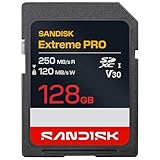
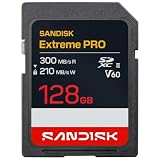


Top 3 picks at a glance
What the GH4 Actually Demands From a Card
According to Panasonic’s specifications, the GH4 records 4K (4096×2160 and 3840×2160) in MOV and MP4 at up to 100 Mbps, and its SD slot is built around UHS-I with a UHS Speed Class 3 requirement for 4K recording. The camera will refuse to start 4K recording or stop mid-clip with a “card too slow” warning if the card cannot keep up. That is why the old advice for this camera is simply “buy a U3 card”, and it still holds in 2026.
The important detail is that the GH4 has a UHS-I interface. A newer UHS-II card will work in the slot, but the extra pins go unused and the card falls back to UHS-I speeds, so paying extra for UHS-II mainly helps when you offload footage on a UHS-II reader.
Worked Calculation: How Much Card Do You Need?
Data rate is the quickest way to size a card. Divide the bitrate in megabits per second by 8 to get megabytes per second, then multiply by 3,600 for one hour.
- 4K at 100 Mbps: 100 / 8 = 12.5 MB/s, so about 45 GB per hour.
- 4K at 72 Mbps (the lower 4K option): 72 / 8 = 9 MB/s, so about 32 GB per hour.
- Full HD at 200 Mbps All-Intra: 200 / 8 = 25 MB/s, so about 90 GB per hour.
- Full HD at 50 Mbps: 6.25 MB/s, so about 22 GB per hour.
Add audio and metadata and the real number is slightly higher, so treat these as estimates. The table below converts them into recording time per card capacity at the top 4K setting.
| Card size | Usable space (approx.) | 4K at 100 Mbps | 4K at 72 Mbps | Full HD at 50 Mbps |
|---|---|---|---|---|
| 32GB | about 29.5 GB | about 39 minutes | about 55 minutes | about 1 hr 20 min |
| 64GB | about 59 GB | about 1 hr 18 min | about 1 hr 50 min | about 2 hr 40 min |
| 128GB | about 119 GB | about 2 hr 38 min | about 3 hr 40 min | about 5 hr 20 min |
| 256GB | about 238 GB | about 5 hr 15 min | about 7 hr 20 min | about 10 hr 40 min |
The GH4 also splits long clips because of the FAT32 file-size limit on SDHC cards and the camera’s own recording rules, so a single long take may be saved as several files that you join in editing. SDXC cards of 64GB and above use exFAT, which the camera handles for continuous recording.
Quick Comparison of Picks
| Pick | Best for | Key specs | Typical price range |
|---|---|---|---|
| SanDisk Extreme Pro SDXC UHS-I | Best overall | U3, V30, read up to about 170 MB/s, write up to about 90 MB/s | $20-$45 for 64GB-128GB |
| Lexar Professional 1066x or 2000x class | Best for fast offloading | U3, V30; UHS-I or UHS-II depending on model | $18-$50 for 64GB-128GB |
| Samsung Pro Plus / Pro Ultimate SDXC | Best for durability | U3, V30; waterproof, magnet-proof, X-ray-proof per the maker | $15-$40 for 64GB-128GB |
| Generic 64GB U3 / V30 from a known brand | Best budget | U3, V30, write about 60-90 MB/s | $10-$20 |
| 256GB UHS-I U3 SDXC | Best for long events | U3, V30; about 5 hours of top-bitrate 4K | $30-$60 |
Best Overall: SanDisk Extreme Pro 64GB or 128GB
The Extreme Pro line has been the default choice for mirrorless shooters for years because it pairs a U3 / V30 rating with strong sustained writes and wide retailer support. For the GH4 you do not need the maximum read speed, but fast reads shorten the time you spend copying clips to your editing computer. The main trade-off is price versus equivalent cards from rivals, which is usually small.
Best for Fast Offloading: Lexar Professional
Lexar’s Professional range includes both UHS-I and UHS-II versions. If you already own a UHS-II card reader, a UHS-II card copies footage noticeably faster than a UHS-I card because of the second row of pins, while still working in the GH4’s UHS-I slot. The trade-off is that you pay extra for a speed the camera cannot use during recording.
Best for Durability: Samsung Pro Plus
Samsung’s Pro cards are marketed as waterproof, temperature-proof, X-ray-proof and magnet-proof. For outdoor and travel video that is a practical benefit, since the GH4 is a weather-sealed body that often ends up in rain and dust. The trade-off is that availability and sizes vary by region, so check that the exact card is a V30 or higher before buying.
Best Budget: A Branded 64GB U3 / V30 Card
You do not need a flagship card for 100 Mbps video. A branded 64GB U3 / V30 card gives you roughly 78 minutes at the top bitrate, which suffices for interviews, travel clips and short films. The trade-off is slower reads and sometimes slower burst writes for stills, so photographers who shoot long RAW bursts may want a faster card.
How to Choose: Decision Criteria
- Check the speed marking. Look for U3 (30 MB/s minimum sustained write) or V30. Both exceed the 12.5 MB/s that the GH4 needs, which leaves headroom for card aging and fragmentation.
- Pick capacity from your longest shoot. Use the table above and add 25 percent spare. A wedding ceremony of 90 minutes at 100 Mbps needs about 68 GB, so a single 128GB card or two 64GB cards covers it.
- Prefer two smaller cards over one huge card. The GH4 has a single card slot, and a corrupted card loses everything on it. Swapping 64GB cards at natural breaks limits the damage.
- Match the reader. Pair UHS-II cards with a UHS-II reader or you waste the money.
- Avoid unknown brands and suspiciously cheap listings. Counterfeit cards often show a fake capacity and fail once real data exceeds the true size.
Card Care and Camera Settings
Format every card in the camera, not on a computer, before a shoot. The camera writes the folder structure it expects, and in-camera formatting avoids many “card error” messages. Back up the footage to two locations before you reformat. If the camera warns about card speed, check that the recording format is not set to a bitrate your card cannot sustain, and switch to a different card to confirm whether the card or the camera is at fault.
It also helps to run a full-capacity test on a new card. Fill it with video, copy everything off and compare file sizes. A counterfeit card with an inflated size will fail this test long before it ruins an important shoot.
Frequently Asked Questions
What SD card speed do I need for 4K on the Panasonic GH4?
You need a UHS Speed Class 3 (U3) card, which guarantees at least 30 MB/s sustained writing. The camera’s top 4K bitrate of about 100 Mbps equals roughly 12.5 MB/s, so a U3 or V30 card has more than enough headroom.
Does the GH4 support UHS-II cards?
The GH4’s slot is a UHS-I interface. UHS-II cards are backward compatible and will work, but they run at UHS-I speeds in the camera. The extra speed is only used in a UHS-II card reader.
Is 64GB enough for GH4 4K video?
For about 78 minutes of continuous recording at the highest 4K bitrate, yes. If you shoot events, interviews or travel days that run longer, carry several 64GB cards or one 128GB card with a backup plan.
Can I use a microSD card with an adapter?
It works in many cases, but adapters add another point of failure and reliability is lower than with a full-size card. For 4K video, a native full-size SD card is the safer choice.
Why does my GH4 stop recording 4K with a card error?
The most common causes are a card that is not U3 rated, a card formatted on a computer, a counterfeit card, or a worn card whose write speed has dropped. Format the card in the camera, try a known-good U3 card and replace any card that repeatedly fails.
Related guides
More from Amazon
Programs that pair well with the guide above. Offers and eligibility are set by Amazon and may change.
A free business account with business pricing and bulk-buying tools for work, shop or home office.
Create a business accountFree shipping on eligible items, Prime Video and more. Eligible new members can start with a free trial.
Start a Prime free trialAudiobooks and podcasts to listen to on the go. Eligible new members can start with a free trial.
Try Audible freeAd-free music streaming. Eligible new subscribers can start with a free trial.
Try Music Unlimited freeAs an Amazon Associate we earn from qualifying purchases.