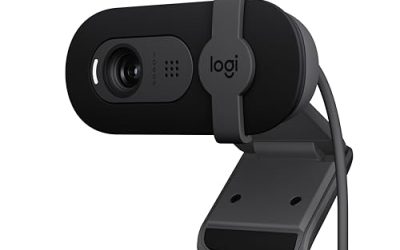
The best webcam for train watching is a weatherproof outdoor IP camera with a 4K sensor and an optical or wide-angle lens, such as the Reolink RLC-810A for fixed trackside views or a PTZ camera if you want to follow trains. A normal USB webcam like the Logitech Brio or C920 works well from a window, but it cannot handle rain, dust or the long distances that a trackside spot needs. Match the camera to where it will sit, how fast the trains move and how you plan to stream.
Quick comparison of the best train watching cameras
| Pick | Best for | Key specs | Price range |
|---|---|---|---|
| Reolink RLC-810A | Best overall outdoor fixed camera | 4K (8MP), PoE, IP66, smart detection, microSD | Usually $60-$100 |
| Amcrest IP8M or similar 4K PoE bullet | Best for 24/7 streaming to a network recorder | 4K, PoE, IP67, RTSP support | Usually $70-$120 |
| Logitech Brio 4K | Best indoor window webcam | 4K at 30fps, HDR, autofocus, USB | Usually $130-$200 |
| Logitech C920 HD Pro | Best budget window webcam | 1080p at 30fps, autofocus, USB | Usually $50-$80 |
| Insta360 Link | Best for tracking and framing | 4K, gimbal, AI tracking, USB | Usually $250-$300 |
| Reolink or Amcrest PTZ model | Best for following trains over distance | Optical zoom, pan and tilt, IP66 | Usually $150-$350 |
Webcam or IP camera: which does train watching need?
A webcam connects directly to a computer by USB and is designed for short distances, such as a desk. An IP camera connects over Ethernet or Wi-Fi and streams video over your network, which makes it better for outdoor placement and long cable runs. If you are watching trains from a window or balcony and a PC is nearby, a USB webcam is fine. If the camera must sit outside near the tracks or in a garden, choose a weatherproof IP camera.
Always check local rules. Railway property is restricted in many places, so keep your camera on your own property or a legal public location and respect privacy limits.
Best overall: Reolink RLC-810A
This is a fixed 4K PoE camera with an IP66 weather rating according to the manufacturer’s spec sheet. Power over Ethernet means one cable provides power and data, which is a big advantage for outdoor mounts. Smart detection can flag vehicles, which is a handy trigger for clips when a train passes. The trade-off is that it has a fixed field of view, so you choose the angle in advance and cannot zoom in on distant trains optically.
Best for 24/7 streaming: a 4K PoE bullet camera with RTSP
Many hobbyists stream live from a trackside view. An IP camera with RTSP support can feed a network video recorder or streaming software. Choose one that supports H.265 to save bandwidth and has a metal body for the weather. The trade-off is that you need a PoE switch or injector and some network setup knowledge.
Best indoor option: Logitech Brio 4K
From a window or enclosed balcony, the Brio provides a sharp 4K image with HDR that helps when the sky is bright and the train is in shadow. It is plug-and-play. The trade-off is that glass reflections are a problem, and the camera is designed for faces, not distant moving subjects. Put the lens close to the glass and use a dark cloth or lens hood to cut reflections.
Best budget: Logitech C920 HD Pro
A 1080p webcam is enough for a casual live feed or to record passing trains from a window. It has reliable autofocus and works with most streaming software. The trade-off is limited low-light performance and detail at long range.
Best for tracking: Insta360 Link
The Insta360 Link is a gimbal webcam with AI tracking. It can follow a moving subject in frame, which is helpful for trains that cross your view. It is still a desk device with no weatherproofing, so treat it as an indoor option.
Best for following trains over distance: a PTZ camera
PTZ stands for pan, tilt and zoom. A PTZ camera with 4x to 25x optical zoom can read a train number from several hundred feet away. Optical zoom keeps detail, unlike digital zoom, which only crops the picture. The trade-off is cost and a more complex setup, plus moving parts that need weather protection.
Worked example: how much resolution do you need?
Resolution decides how much detail you keep when you zoom in on a train in the frame. Here is a simple calculation.
- Camera: 4K, which is 3840 pixels wide, with a 90-degree horizontal field of view.
- Distance to the track: 100 feet.
- Width of the scene at that distance: 2 x 100 x tan(45 degrees), which equals 200 feet.
- Pixels per foot: 3840 divided by 200, which is about 19 pixels per foot.
With 1080p (1920 pixels wide), the same scene gives about 10 pixels per foot. A train car is about 50 to 85 feet long, which is 500 to 800 pixels at 1080p and double that at 4K. Reading a number painted on the side, about 6 inches tall, needs roughly 10 to 15 pixels per character height, or 20 to 30 pixels per foot. That means a 4K camera with a narrower lens, around 60 degrees, or a zoomed PTZ camera is the better choice for reading numbers.
Frame rate and shutter speed for moving trains
| Train speed | Suggested frame rate | Shutter speed | Note |
|---|---|---|---|
| Under 30 mph (slow freight) | 30 fps | 1/250 s | Fine for most cameras |
| 30-60 mph | 30 to 60 fps | 1/500 s | Reduces blur on side shots |
| Over 60 mph (passenger and high-speed) | 60 fps | 1/1000 s or faster | Needs good daylight |
Faster shutter speeds need more light, so a camera with a larger sensor or good night mode gives cleaner results at dawn and dusk. Many IP cameras let you set exposure limits in the settings.
How to choose a train watching camera
- Choose the location first. Window, balcony, garden or pole mount determines whether you need weatherproofing.
- Decide how you will stream. USB webcams suit streaming software on a PC. IP cameras suit network recorders and platforms that accept RTSP.
- Pick resolution by distance. Under 50 feet, 1080p is fine. Beyond that, move to 4K or optical zoom.
- Plan power and cabling. PoE keeps outdoor installs clean. Wi-Fi cameras are easier but can drop video when trains pass and the signal weakens.
- Think about night. Infrared night vision shows trains as grayscale and can blur motion. A camera with color night vision or an external light helps.
Setup tips for a clean live feed
- Angle the camera slightly down, and keep the sun behind or beside it, not in front.
- Lock exposure and white balance if the picture flickers as trains pass.
- Set a bitrate of about 8 to 12 Mbps for 4K at 30 fps, or 4 to 6 Mbps for 1080p.
- Use a wired connection for the streaming computer if you can, so upload quality stays stable.
- Check that your internet upload speed is at least double the stream bitrate.
Frequently Asked Questions
Can I use a regular webcam to watch trains?
Yes, from indoors and at modest distances. A USB webcam like the Logitech C920 or Brio is fine behind a window. It will not cope with weather and gives less detail at long range.
Do I need 4K for train watching?
It helps if the tracks are more than about 50 feet away or you want to read numbers or crop in later. For close views, 1080p is enough. Remember that bitrate and lighting affect quality as much as resolution.
What is the best camera for a 24/7 live stream?
A weatherproof PoE IP camera with RTSP support is the usual choice because it is built to run constantly and can feed streaming software or a recorder. Choose one with H.265 to save bandwidth.
How do I avoid blur on fast trains?
Use a faster shutter speed, such as 1/500 s or quicker, and make sure there is enough light. Cameras with larger sensors handle the extra light demand better.
Is it legal to put a camera near railway tracks?
Rules differ by country and by location. Keep cameras on your own property or on a spot where filming is allowed, never on railway property, and follow local privacy and safety regulations.
Related guides
More from Amazon
Programs that pair well with the guide above. Offers and eligibility are set by Amazon and may change.
A free business account with business pricing and bulk-buying tools for work, shop or home office.
Create a business accountFree shipping on eligible items, Prime Video and more. Eligible new members can start with a free trial.
Start a Prime free trialAudiobooks and podcasts to listen to on the go. Eligible new members can start with a free trial.
Try Audible freeAd-free music streaming. Eligible new subscribers can start with a free trial.
Try Music Unlimited freeAs an Amazon Associate we earn from qualifying purchases.