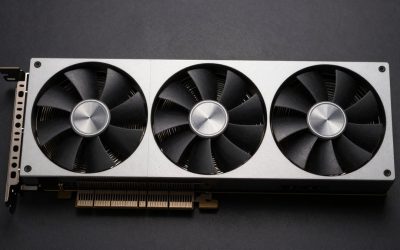
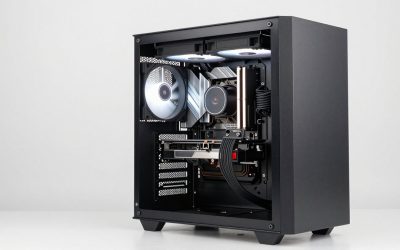
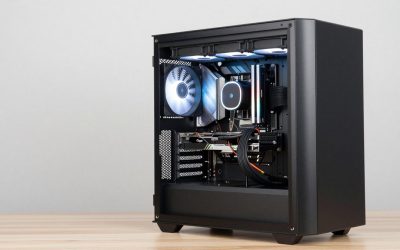
A silent graphics card is not necessarily a passively cooled graphics card. For most gaming PCs, the best choice is a normal card with a large heatsink, quiet fans, and a zero-RPM mode. The fans stop on the desktop and only spin when the GPU gets hot.
Fully passive cards make no fan noise at all, but they are usually limited to entry-level performance. They also depend heavily on case airflow. A badly ventilated case can turn a “silent” passive GPU into a hot, throttling GPU.
As an Amazon Associate we earn from qualifying purchases at no extra cost to you.
As an Amazon Associate we earn from qualifying purchases at no extra cost to you.


Our Top Picks
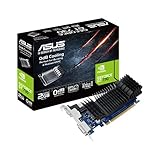
 ASUS GeForce GT 730 2GB GDDR5 Graphics Card1.5"x2.7"x6.5"6.5 x 2.7 x 0.1 inches1 poundsCheck on Amazon


Top 3 picks at a glance
Quick picks
| Best for | What to buy | Main trade-off |
|---|---|---|
| 1080p gaming with very low noise | A large dual- or triple-fan GPU with zero-RPM mode | Fans eventually run during games |
| Small, quiet office or media PC | A genuinely passively cooled entry-level GPU | Limited gaming performance and case requirements |
| Quiet 1440p gaming | A premium, oversized cooler on a mid-range GPU | Higher price and more space inside the case |
| Older or compact system upgrade | A short, low-power card with a quiet fan profile | Less performance than full-size cards |
Best overall: a large zero-RPM graphics card
For a gaming PC, this is the option I would choose. Search for a quiet zero-RPM graphics card with a substantial heatsink and two or three fans. At idle, the card should be silent. In a game, the fans will turn on, but a good model can keep the noise low without constantly ramping up and down.
There is no single GPU chip that guarantees silence. The cooler and the card manufacturer’s fan curve matter just as much. A lower-power GPU with a thick heatsink can be quieter than a faster GPU using a small, aggressive cooler.
For 1080p, current entry-level and mainstream Radeon, GeForce, and Arc cards are usually easier to silence than high-end models. They produce less heat, need less fan speed, and are less likely to overwhelm a compact case. If you want 1440p performance, look for a card with a cooler rated well above its actual power draw rather than buying the smallest version available.
Best for absolute silence: a passive GPU
A passive graphics card has no fan. It is the only option that remains silent while gaming, but the category has serious limits. Passive designs are generally low-power cards intended for desktop use, video playback, light creative work, or older and less demanding games.
Some passively cooled cards based on entry-level GeForce or Radeon hardware are available, though stock varies. Search for passively cooled graphics cards, then check the exact model’s power rating and dimensions before buying.
Do not assume “no fan” means “no cooling requirements.” Passive cards need a steady stream of air from the case’s intake and exhaust fans. In a sealed mini-PC case, the GPU may become too hot, reduce its clock speed, or shut down under sustained load. Coil whine is another possible failure mode: removing the fan does not remove electrical noise from the card.
A passive card suits someone building a near-silent home-theater PC or office computer. It is a poor fit if your priority is modern AAA gaming at high settings.
Best quiet gaming options by budget
Budget 1080p gaming
A low-power card with a two-fan cooler is usually the sensible buy. Look for a model with zero-RPM operation, a backplate or solid heatsink, and a published boost clock that does not depend on an extreme factory overclock. These cards are often quiet because they simply do not generate much heat.
The cheaper option is fine here. Paying extra for a premium triple-fan cooler rarely transforms entry-level gaming into a silent experience; it may only reduce the noise by a small amount. Spend the difference on a better case with mesh intake and slower, larger case fans.
Mid-range 1440p gaming
This is where cooler quality becomes more valuable. A Radeon RX 9060 XT, GeForce RTX 5060 Ti, or Intel Arc B-series card can be quiet in a well-designed variant, but temperatures and noise vary between board partners. Check independent reviews for measured gaming noise rather than relying on a “silent” label.
A thick two-and-a-half-slot heatsink is often a good compromise. Three fans are not automatically quieter: a poorly tuned triple-fan card can produce more motor noise than a well-built dual-fan design. Also verify that the card fits your case, leaves room for adjacent expansion slots, and does not block a front radiator.
High-end gaming
High-end GPUs are difficult to make silent because they consume much more power. Premium versions of GeForce RTX 5070-class and faster cards, and comparable Radeon cards, can be surprisingly quiet at stock settings, but the fans will run during demanding games.
Undervolting is often more effective than paying for a luxury cooler. Reducing voltage and setting a sensible power limit can cut heat and noise with a modest performance loss. The exact result varies by chip, so treat undervolting as an optional tuning step, not a promised feature.
What to check before buying
Zero-RPM behavior: Confirm that the fans stop at idle and that the mode can be disabled or adjusted. Some cards restart their fans frequently when a monitor or browser video raises the temperature slightly.
Cooler size: Bigger is usually better for noise, but measure your case. Check maximum GPU length, thickness, and height, including the space needed for the power cable. A card that fits on paper may press against the side panel.
Power supply: Use the manufacturer’s recommended PSU rating and check the required connectors. An overloaded or poor-quality power supply can add its own fan noise and may cause crashes under load.
Coil whine: Coil whine is a high-pitched electrical sound that can occur at high frame rates. It is not reliably predicted by the GPU brand or price. Capping frame rates, enabling a frame synchronisation mode, or returning the card are the usual remedies.
Case airflow: A quiet GPU needs cool air. Two large, slow case fans are often preferable to several small fans running quickly. Keep dust filters clean and avoid placing the computer in a closed cabinet.
Reviews: Noise measurements are only useful when taken at the same distance and workload. Pay attention to the review’s gaming noise, hotspot temperature, fan speed, and whether the test card had a quiet BIOS mode.
Which silent GPU should you buy?
Choose a passive card only if absolute silence matters more than modern gaming performance and your case has dependable airflow. Choose a large zero-RPM card if you want the best balance: silent at the desktop, quiet enough for most games, and capable of much higher frame rates.
If you are upgrading an older PC, a compact low-power card may be the safest choice even if it is not the fastest. It reduces PSU and cooling problems. For a new gaming build, do not overpay for a premium cooler on a low-power GPU, but do pay attention to airflow, dimensions, and independent noise testing.
How Zero-RPM Idle Fan Curves Actually Work
Most “silent” graphics cards sold today are not fanless; they use a zero-RPM fan curve that keeps the fans completely stopped until the GPU crosses a set temperature threshold, then ramps up only as needed. At idle, a modern card commonly sits anywhere from 30°C to 50°C depending on ambient room temperature and case airflow, well under the point where the fans are told to start. The exact trigger point varies by cooler brand rather than by GPU chip: some triple-fan coolers hold off until roughly 60°C, some mid-range dual-fan designs start closer to 55°C, and other designs sit around 52°C. None of these numbers indicate a faulty card; they reflect different engineering choices about how much passive heatsink mass is built in before active cooling is considered necessary.
A card that stays silent on the desktop can still start cycling its fans on and off if idle temperature hovers right at the brand’s trigger point. This pulsing is normal rather than a defect, and it is commonly caused by a second monitor, a video call, or a background GPU task nudging power draw just enough to cross the threshold and then drop back below it.
NVIDIA vs. AMD for Silent Cooling: What Actually Differs
The chip vendor itself does not determine how quiet a card runs; the cooler attached to it does. What differs between NVIDIA and AMD options at a given price point is usually rated board power, since a card with a lower TDP has less heat for any given cooler to dissipate and can justify a smaller, quieter fan curve. A current-generation 8GB entry card from NVIDIA typically carries a lower board power rating than a 16GB mid-range AMD card at a similar price, while high-end AMD cards built for 1440p and 4K carry a noticeably higher board power rating and real-world draw that can run well above their quoted figure under sustained load. Neither brand has an inherent noise advantage; a well-cooled higher-power card can run quieter than a poorly-cooled lower-power one, because fan curve tuning and heatsink size matter as much as the chip underneath.
What does change between the two ecosystems is how often reviewers and buyers report genuinely fanless options at a given performance tier. Fully passive cards cluster almost entirely at the lower end of the performance range on both sides, since passive cooling only works within a fairly tight power budget before clock speeds have to be cut back to stay within thermal limits. Above that entry tier, the conversation shifts from “fanless or not” to “how late does the fan curve start and how gradually does it ramp,” which is a cooler engineering decision made separately for nearly every individual card model rather than a brand-wide policy.
Case Airflow Requirements for Passive and Semi-Passive Cards
A fully passive card has no fan of its own, so it depends entirely on case airflow to move heat away from its heatsink fins. Without at least one intake and one exhaust fan creating a steady path of air across the card, heat simply pools around it until the GPU throttles. Semi-passive, zero-RPM cards are more forgiving because their own fans can spin up as a backstop, but they still benefit from the same basic airflow path: cool air in low, warm air out high, with the card itself not boxed in against a solid panel. A tightly packed small-form-factor case is the hardest environment for either type, since there is less room for a clean intake-to-exhaust path and less physical space for a large passive heatsink in the first place.
Signs a Case Cannot Support a Passive Card
- Only one case fan total, or fans that both pull air in the same direction without a clear exhaust path.
- Dust filters that have not been cleaned, which quietly cut airflow long before a user notices higher temperatures.
- A GPU mounted vertically in a sealed compartment, which can cut off the natural air path the heatsink was designed around.
A Worked Example: Checking If a Case Can Cool a Passive Card
Assume a mid-tower case with two intake fans at the front and one exhaust fan at the rear, which is generally treated as a reasonable minimum for directional airflow rather than a generous setup. Under that baseline, warm air pulled off a passive heatsink has a clear path out the back instead of recirculating inside the case. Now assume the same case with its front intake swapped for a solid, unventilated front panel for aesthetics; even with the same two fans still installed, the intake path is choked and heat has far less fresh air to exchange with before it reaches the passive card. The fans and heatsink did not change in this comparison, but the airflow path did, which is the detail a spec sheet never shows and a buyer has to check on their own case.
Which Silent Build Fits Your Target?
The table below uses the same budget tiers already covered in this guide and matches each to a realistic cooling expectation rather than a specific noise rating.
| If you… | Choose… |
|---|---|
| Need budget 1080p gaming and near-silent idle on the desktop | A dual-fan zero-RPM card with a lower board power rating, in a case with at least basic intake/exhaust airflow |
| Want mid-range 1440p gaming without constant fan noise | A larger triple-fan zero-RPM card, since more heatsink mass pushes the fan-start threshold later into a session |
| Are building a high-end gaming rig and still want low idle noise | Accept that fans will run under load; focus on a card whose zero-RPM threshold and fan curve ramp gradually rather than snapping on and off |
| Want absolute silence over raw performance | A fully passive card paired with strong case airflow, understanding it is limited to lighter, less demanding games |
Common Mistakes When Buying a “Silent” GPU
Marketing language around noise is one of the least standardized areas of GPU shopping, since there is no single industry test every brand follows before printing “silent” or “quiet” on a box. The mistakes below cover the gaps that marketing language tends to leave out.
- Assuming “silent” on a product page means fully fanless. Most silent-marketed cards are zero-RPM designs that still spin up under load; only a small subset of models are truly passive.
- Buying a passive card for a case with poor airflow. Without a clear intake-to-exhaust path, a passive heatsink has nowhere to send the heat it absorbs.
- Ignoring board power when comparing two “quiet” cards. A lower-power card generally has an easier time staying quiet than a higher-power one wearing the same marketing language.
- Disabling zero-RPM mode without understanding why it exists. Forcing fans to spin at idle trades a small, usually unnecessary noise increase for a negligible temperature benefit on a healthy system.
- Overlooking dust buildup as a cause of rising fan noise over time. A card that was quiet on day one can start running its fans more often simply because its heatsink fins are clogged.
- Expecting a passive card to match a cooled card’s sustained performance. Passive designs intentionally cap clock speeds lower to stay within their thermal limits without active airflow.
Undervolting: The Free Noise Reduction Most Buyers Skip
Every modern GPU ships with more voltage than its silicon strictly needs at a given clock speed, and that extra voltage becomes extra heat the fans have to move. Lowering the voltage curve a notch in the card’s vendor software — or a tool like MSI Afterburner — typically holds the same clock speeds while cutting power draw by a meaningful margin, which lets the fan curve stay flatter and quieter for longer before it has to ramp up. This costs nothing and voids no warranty, since it is a software setting rather than a hardware modification. The trade-off is a short trial-and-error period: push the voltage too low and the card becomes unstable under load rather than simply slower.
Blower vs Axial Coolers: Noise Trade-offs in Small Cases
A blower-style cooler pulls air in and pushes it straight out the back of the case, which keeps hot air away from other components but concentrates the noise into a single rushing-air tone that many people find more fatiguing than the broader whoosh of open-air axial fans. Axial coolers — the dual- or triple-fan design on most current cards — spread heat into the case instead of exhausting it, which is quieter at idle and moderate load but relies on the case having enough intake and exhaust airflow to move that heat back out. In a small or poorly ventilated case, an axial cooler can end up louder than a blower simply because the case fans have to work harder to compensate.
Vibration and GPU Sag Noise: A Separate Problem From Fan Noise
A card that measures quiet on a fan-noise chart can still produce an audible buzz or rattle that has nothing to do with the fans. A heavy cooler sagging at an angle can let the shroud rest against a case fan grille or power cable, and the vibration from the fans transfers into a tapping or buzzing sound through whatever it touches. A support bracket under the card, a half-millimeter of foam tape where the shroud nears a cable, or reseating the card so it sits level usually clears this up. It is worth isolating before assuming a “quiet” card is defective.
Dust Buildup Over Time: Why a Quiet Card Gets Louder After a Year
Dust packed into a heatsink’s fins acts as insulation, and a card that ran near-silent on day one often needs higher fan speeds to hit the same temperatures a year later purely because airflow through the fins has dropped. This is especially noticeable on passive and semi-passive cards, where there is no fan to compensate and temperatures simply climb. A can of compressed air through the fins every few months, with the fans held still to avoid over-spinning them as makeshift generators, keeps a quiet card quiet rather than slowly loud.
Liquid Cooling and Hybrid GPUs: Does Water Actually Mean Silent?
A factory hybrid card with a small radiator and pump trades the GPU’s own fans for a closed loop, which removes the loudest heat source but adds a pump that runs continuously and a radiator fan that still spins under load. Pump noise is usually a faint whine rather than the broader whoosh of air coolers, which some people find more noticeable in a quiet room even at a lower decibel reading. A hybrid setup is genuinely quieter under sustained heavy load than a similarly powerful air-cooled card, but it is not fan-free, and the radiator still needs case space and airflow.
FAQ
Are silent graphics cards completely fanless?
Not usually. Most “silent” gaming cards stop their fans when idle but use fans while gaming. A fanless passive card is a separate, lower-performance category.
Can a passive GPU run modern games?
It can run some older, competitive, or lightweight games, but passive cards are generally unsuitable for demanding modern games at high settings. Sustained workloads can also cause heat-related throttling.
Is a triple-fan GPU quieter than a dual-fan GPU?
Not automatically. A larger cooler can reduce fan speed, but motor quality and fan tuning matter. Compare measured noise levels for the exact card model.
What is the quietest practical GPU setup?
Use a low- or mid-power GPU with zero-RPM fans, a well-ventilated case, large slow case fans, and a frame-rate cap. This is usually quieter and more capable than relying on passive GPU cooling alone.
Related guides
More from Amazon
Programs that pair well with the guide above. Offers and eligibility are set by Amazon and may change.
A free business account with business pricing and bulk-buying tools for work, shop or home office.
Create a business accountFree shipping on eligible items, Prime Video and more. Eligible new members can start with a free trial.
Start a Prime free trialAudiobooks and podcasts to listen to on the go. Eligible new members can start with a free trial.
Try Audible freeAd-free music streaming. Eligible new subscribers can start with a free trial.
Try Music Unlimited freeAs an Amazon Associate we earn from qualifying purchases.