Our Short List of 3
All 3 Picks at a Glance
| Product | Specs | Action |
|---|---|---|
 Skytech Chronos Mini — Best Compact Mid-Range Config | Check price on Amazon | |
 CyberPowerPC Gamer Master GMA2900A3 — Best AMD Mid-Range Config | Check price on Amazon | |
 MSI Codex R2 D14NVP5-613US — Best 1440p Config | Check price on Amazon |
The best pc config is not the machine with the most expensive part in every slot. It is the configuration where the graphics card, processor, memory, storage, power supply and cooling all pull in the same direction, so no single component holds the rest back. A lopsided build with a flagship graphics card and too little memory will stutter in exactly the games you bought it for, while a balanced mid-range build will run those same games smoothly for years.
This guide explains how to judge a configuration, then compares five complete prebuilt PCs that are sold as whole systems on Amazon. Each one is a different answer to the same question: entry level for 1080p play, a compact mid-range build, an AMD mid-range build, a 1440p build, and a high-end build. Every pick below is a full configuration, not a single part, so you can compare them like for like and choose the tier that matches your monitor and your games.
Our Top Picks
Top 3 picks at a glance
How to Choose
A PC configuration is a set of trade-offs. The seven criteria below are the ones that decide whether a build feels fast and stays useful, or feels compromised from the first week.
1. Match the graphics card to your monitor
The graphics card does most of the work in games, so it should be chosen against the monitor it will drive. An RTX 3050 class card suits 1080p play at high settings. An RTX 5060 or RTX 5060 Ti suits 1080p at maximum settings and 1440p at high settings. An RTX 5070 with 12GB of video memory suits 1440p at high to ultra settings and light 4K. Buying a card far above your monitor wastes money, and buying one below it forces you to turn settings down on day one.
2. Balance the processor with the graphics card
The processor feeds the graphics card, so a weak processor can cap frame rates even when the graphics card has headroom. For gaming in 2026, look for a current-generation processor with six to eight cores, such as a Ryzen 5 or Ryzen 7, a Core i5, or a Core Ultra 7. A configuration that pairs a strong graphics card with a much older or much weaker processor is a warning sign, even if the headline specification looks impressive.
3. Get the memory right
Memory is the most common place where prebuilt configurations cut corners. 16GB is the minimum for a gaming PC in 2026, and it is enough for most games played on their own. 32GB is the safer target if you also stream, keep a browser full of tabs open, or run creative software beside your games. DDR5 is the current standard on new platforms, and two matched modules in dual channel perform better than a single module of the same total size.
4. Insist on a 1TB NVMe drive, at minimum
Modern games are large, and a 512GB drive fills up after a handful of installs. A 1TB NVMe solid state drive is the minimum sensible size for a gaming configuration, and 2TB is better for a large library. NVMe drives load games and levels noticeably faster than older SATA drives, and they need no cables or mounting brackets inside the case.
5. Check the power supply
The power supply is the component most often left unnamed in prebuilt listings, and it is the one you most want named. Look for a wattage with headroom above the graphics card’s requirement, an 80 Plus Gold efficiency rating, and a known brand. A 650W Gold unit suits the mid-range configurations in this guide. If a listing does not name the power supply at all, treat that as a gap to check before ordering, not as a detail that does not matter.
6. Look at cooling and airflow
A configuration that runs hot will slow itself down to protect its parts. A case with a mesh front panel, several fans, and a clear path for air through the chassis keeps temperatures down. Liquid cooling with a 240mm or 360mm radiator suits compact cases and high-end processors, while a good air cooler is fine for mid-range builds. Either way, check that the case has room for the graphics card and that the fans are not blocked by a solid glass front.
7. Keep an upgrade path open
A good configuration is one you can improve later. Standard parts matter here: a standard motherboard, a standard power supply, spare memory slots, and a spare M.2 slot for a second drive. Some compact and proprietary designs use custom power supplies or motherboards that limit what you can swap later. If you plan to add memory or storage in a year or two, confirm the spare slots before you buy.
Top Picks
HP Victus 15L Gaming Desktop TG02 — Best Entry Config
HP Victus 15L Gaming Desktop TG02 on Amazon
The Victus 15L is the entry-level configuration in this guide, built around an Intel Core i5-14400F processor and an NVIDIA GeForce RTX 3050 with 6GB of video memory. It ships with 32GB of memory and a 1TB NVMe drive, which is generous for this tier and means the memory and storage will not need attention soon. Windows 11 Home is preinstalled, and the tower is a compact desktop that fits a smaller desk.
This configuration is for a first gaming PC, or for a household where the machine also handles schoolwork and everyday computing. The RTX 3050 handles 1080p gaming at high settings in popular competitive and story-driven titles, and the six-core i5 keeps everyday multitasking smooth. The 32GB of memory is the standout detail at this tier, since most entry-level prebuilts still ship with 16GB.
The caveats are worth knowing. The RTX 3050 is a 1080p-class card, so this is not a 1440p configuration, and the 6GB of video memory limits how far you can push texture settings in newer titles. The listing is a third-party upgraded configuration with 32GB of memory and a 1TB drive, so confirm the exact memory and storage on the listing before ordering, and check that the warranty terms match the seller. If your monitor is 1440p, step up to one of the RTX 5060 configurations below instead.
Skytech Chronos Mini — Best Compact Mid-Range Config
Skytech Chronos Mini on Amazon
The Skytech Chronos Mini packs a surprisingly strong configuration into a small case. It pairs an Intel Core Ultra 7 270K processor with an NVIDIA GeForce RTX 5060, 32GB of DDR5 memory, and a 1TB NVMe drive. Cooling comes from a 360mm liquid cooler with ARGB fans, the power supply is a 650W Gold unit, and Wi-Fi 6 and Windows 11 Home are included.
This configuration is for a gamer with a small desk who still wants a current-generation build. The Ultra 7 processor is stronger than most mid-range builds offer, which makes the machine useful for streaming, editing, and creative work beside gaming. The RTX 5060 handles 1080p at maximum settings and 1440p at high settings, and the 32GB of DDR5 memory leaves room for heavy multitasking.
The caveats follow from the compact case. A small chassis limits the size of graphics card you can fit later, so a future upgrade to a much larger card may not fit without changing the case. The processor is also stronger than the graphics card, which is fine for productivity but means some of the CPU budget could have gone toward a higher-tier graphics card if gaming were the only goal. Check the case dimensions against your desk and your monitor before ordering.
CyberPowerPC Gamer Master GMA2900A3 — Best AMD Mid-Range Config
CyberPowerPC Gamer Master GMA2900A3 on Amazon
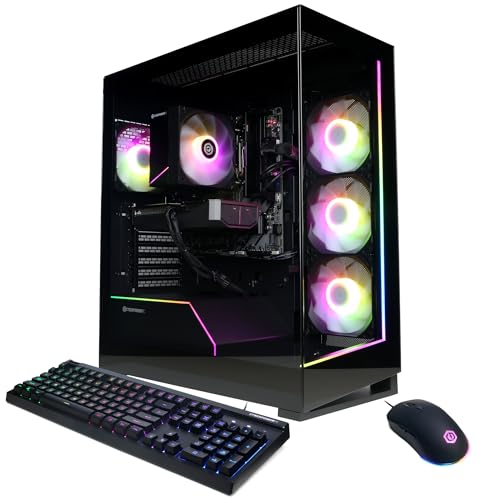
The Gamer Master GMA2900A3 is the AMD configuration in this guide. It pairs an AMD Ryzen 7 8700F processor with an NVIDIA GeForce RTX 5060 Ti, 16GB of DDR5 memory, and a 1TB PCIe 4.0 NVMe drive. Windows 11 Home is preinstalled, Wi-Fi is included, and the case uses a tempered-glass side panel with RGB lighting.
This configuration is for a gamer who wants the AMD platform, whether for the AM5 upgrade path or for the Ryzen 7 processor’s strong multi-core performance. The RTX 5060 Ti is a step above the standard RTX 5060, which shows up in demanding titles at 1440p, and the Ryzen 7 8700F keeps frame times steady when background applications are running. CyberPowerPC is a long-running prebuilt maker, so support channels and documentation are easy to find.
The caveats are the memory and the listing detail. 16GB of DDR5 is the minimum for this tier, and it is the first upgrade to plan if you stream or multitask heavily while gaming. The RTX 5060 Ti in this configuration carries 8GB of video memory, so check texture settings in the most demanding titles rather than assuming the Ti badge means unlimited headroom. The listing does not name the power supply or motherboard model, so confirm those details on the listing or with the seller before ordering.
MSI Codex R2 D14NVP5-613US — Best 1440p Config
MSI Codex R2 D14NVP5-613US on Amazon
The MSI Codex R2 is the 1440p configuration in this guide. It pairs an Intel Core i5-14400F processor with an NVIDIA GeForce RTX 5070 with 12GB of video memory, 32GB of DDR5 memory, and a 1TB NVMe drive. The power supply is an 80 Plus Gold unit, cooling is air-based with four fans, and Wi-Fi 6E and Windows 11 Home are included.
This configuration is for a gamer with a 1440p monitor who wants high to ultra settings without stepping up to a flagship budget. The RTX 5070 is the key part: its 12GB of video memory handles high-resolution textures comfortably, and its Blackwell features support ray tracing and DLSS 4 Multi-Frame Generation. The 32GB of memory means you will not need a memory upgrade for a long time, and the mesh front panel keeps airflow moving through the case.
The caveats are about the platform rather than the performance. The i5-14400F is a 14th-generation Intel processor on the LGA1700 socket, which is an older platform than the Core Ultra series, so a future processor upgrade has a shorter path than on a newer socket. Air cooling is adequate for this configuration, but the machine will run warmer under sustained load than a liquid-cooled build. Confirm the exact SKU on the listing, since MSI sells several Codex R2 variants with different processors and graphics cards.
HP OMEN MAX 45L GT24-0060 — Best High-End Config
HP OMEN MAX 45L GT24-0060 on Amazon
The OMEN MAX 45L is the high-end configuration in this guide. It pairs an Intel Core Ultra 7 processor with an NVIDIA GeForce RTX 5070, 32GB of memory, and a 1TB NVMe drive, cooled by a 360mm liquid cooler inside HP’s large 45L chassis. The case is built for airflow and for large components, with room for future upgrades, and Windows 11 Home is preinstalled.
This configuration is for a gamer who wants a flagship-tier machine that also handles heavy multitasking and creative work. The Core Ultra 7 processor and 32GB of memory keep demanding applications smooth beside games, and the large chassis with liquid cooling gives the components room to breathe under sustained load. The 45L case uses standard parts in several places, which makes later upgrades simpler than in more compact proprietary designs.
The caveats are size and specificity. The 45L chassis is large and heavy, so measure your desk space and check the case dimensions before ordering. HP sells several OMEN 45L variants, and the model number matters: confirm that the listing is the GT24-0060 configuration with the Core Ultra 7 processor and RTX 5070, since other 45L listings ship with different processors, graphics cards, and memory amounts. If you do not need the large chassis or the liquid cooling, the Codex R2 above gives you the same graphics card in a smaller tower.
Comparison Table
| Configuration | Best for | CPU | GPU | Memory | Storage | Cooling |
|---|---|---|---|---|---|---|
| HP Victus 15L TG02 | Entry-level 1080p gaming | Core i5-14400F | RTX 3050 6GB | 32GB | 1TB NVMe | Air |
| Skytech Chronos Mini | Compact mid-range build | Core Ultra 7 270K | RTX 5060 8GB | 32GB DDR5 | 1TB NVMe | 360mm liquid |
| CyberPowerPC Gamer Master GMA2900A3 | AMD mid-range build | Ryzen 7 8700F | RTX 5060 Ti 8GB | 16GB DDR5 | 1TB PCIe 4.0 NVMe | Air |
| MSI Codex R2 D14NVP5-613US | 1440p gaming | Core i5-14400F | RTX 5070 12GB | 32GB DDR5 | 1TB NVMe | Air, four fans |
| HP OMEN MAX 45L GT24-0060 | High-end gaming and multitasking | Core Ultra 7 | RTX 5070 12GB | 32GB | 1TB NVMe | 360mm liquid |
Which One Is Right for You?
Start with your monitor, because it decides the graphics card, and the graphics card decides the tier. If you play at 1080p and this is your first gaming PC, the Victus 15L is the sensible entry point: its 32GB of memory and 1TB drive are generous for the tier, and the RTX 3050 handles 1080p at high settings. If your desk is small but you want a stronger machine, the Skytech Chronos Mini gives you a current-generation processor and an RTX 5060 in a compact case, with liquid cooling included.
If you prefer the AMD platform, or you want the AM5 upgrade path, the CyberPowerPC Gamer Master is the pick, with the Ryzen 7 8700F and RTX 5060 Ti. Plan a memory upgrade to 32GB down the line if you stream or multitask heavily. If you already own a 1440p monitor, the MSI Codex R2 is the clearest match in this guide: the RTX 5070 with 12GB of video memory is the part that makes 1440p at high to ultra settings comfortable, and the 32GB of memory means nothing needs upgrading soon.
If you want the most capable machine here and you have the desk space for it, the HP OMEN MAX 45L is the high-end choice. Its large chassis, liquid cooling, and Core Ultra 7 processor suit gaming beside heavy multitasking and creative work. Whichever configuration you choose, check the exact SKU, memory amount, and storage size on the listing before ordering, since prebuilt makers sell several variants under the same family name.
Frequently Asked Questions
What is the best pc config for gaming in 2026?
The best pc config for gaming in 2026 is a balanced one: a current-generation six- to eight-core processor, a graphics card matched to your monitor, 32GB of DDR5 memory, a 1TB NVMe drive, and a named 80 Plus Gold power supply. For most gamers that means an RTX 5060 or RTX 5070 class configuration, like the Skytech Chronos Mini or the MSI Codex R2 in this guide. The most expensive parts are not the goal; the balance between them is.
Is 16GB of RAM enough for a gaming PC config?
16GB is enough for most games played on their own, and it is the minimum to accept in a new gaming configuration in 2026. It becomes tight if you also stream, run a browser with many tabs, or use creative software while gaming. 32GB is the safer target, and it is what four of the five configurations in this guide ship with. If you buy a 16GB configuration like the CyberPowerPC Gamer Master, adding a second matched memory module later is the simplest upgrade you can make.
Does a gaming PC config need an RTX 5070, or is an RTX 5060 enough?
It depends on your monitor. An RTX 5060 is enough for 1080p at maximum settings and for 1440p at high settings in most titles. An RTX 5070 is worth it if you play at 1440p with high to ultra settings, use ray tracing heavily, or want more headroom from its 12GB of video memory. For 1080p play only, the extra graphics power of the RTX 5070 will mostly sit unused, so the money is better spent on memory, storage, or a better monitor.
Should I buy a prebuilt config or build my own?
A prebuilt config is the simpler path: the parts are assembled, Windows is installed, and the whole machine carries one warranty. Building your own gives you control over every part, including the power supply and motherboard, and it is usually the better route if you enjoy the process or want a specific component that prebuilts rarely offer. Either way, judge the result by the same criteria in this guide: balanced parts, enough memory and storage, a named power supply, and room to upgrade later.
Disclosure: As an Amazon Associate, we may earn from qualifying purchases.
Related guides
More from Amazon
Programs that pair well with the guide above. Offers and eligibility are set by Amazon and may change.
A free business account with business pricing and bulk-buying tools for work, shop or home office.
Create a business accountFree shipping on eligible items, Prime Video and more. Eligible new members can start with a free trial.
Start a Prime free trialAudiobooks and podcasts to listen to on the go. Eligible new members can start with a free trial.
Try Audible freeAd-free music streaming. Eligible new subscribers can start with a free trial.
Try Music Unlimited freeAs an Amazon Associate we earn from qualifying purchases.