Case fans are the least glamorous hardware in a gaming tower and one of the easiest places to make a costly mistake. A cheap set can whine at idle, rattle once the bearing wears, or move so little air that the graphics card runs hot behind a closed panel. A good set disappears into the background: the room stays quiet, the components stay cooler, and nobody thinks about the fans at all.
This guide looks at seven 120mm fan options, from multi-pack bundles with addressable lighting to a plain single fan from a brand known for low noise. It is written for people replacing worn fans, filling empty mounts on a new case, or adding intake and exhaust to a tower that runs warm. Everything below comes from the listing titles, which state size, speed, connector type and bearing style, and each pick explains what that information means in practice. In 2026 the real decision is less about raw speed and more about noise, pack size and whether you want lighting at all. Two listings were left out as near-duplicates of the first Thermalright pack, differing only in pack count.
Our Top Picks

Top 3 picks at a glance
Quick Picks
As an Amazon Associate we earn from qualifying purchases at no extra cost to you.





| Product | Best for | Key spec from the title |
|---|---|---|
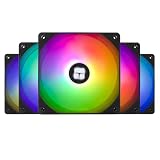
| Thermalright TL-C12C-S 5 Pack | Filling a whole case with lit fans | 120mm ARGB, 4-pin PWM, S-FDB bearing, up to 1550RPM |
| Thermalright TL-C12C X3 | Plain fans without lighting | 120mm, 4-pin PWM, S-FDB bearing, 3 fans |
| ARCTIC P12 5 Pack | Pressure-focused cooling across filters and radiators | 120mm, pressure-optimised, 1800 RPM |
| Noctua NF-P12 redux-1700 PWM | Quiet, proven single fan | 120mm, 25mm thick, 1700rpm, 4-pin PWM |
| CORSAIR RS120 ARGB Triple Pack | Easy daisy-chained lighting | PWM, daisy-chain connection, magnetic dome bearing |
| UTLGAMENG 7 Pack | Large builds that want many lit fans | 4 forward and 3 reverse, PWM, 1550 RPM, 28 ARGB LED |
| DARKROCK F120 3in1 | Mirror-style lighting effects | Infinite mirror design, 24 LED, PWM, hydraulic HDB bearing |
The 7 Best Options
Thermalright TL-C12C-S 5 Pack (ARGB)
This is the bulk-buy pick for a builder who wants every mount filled with matching fans. The title lists a 5-pack of 120mm ARGB fans with 4-pin PWM control, an S-FDB bearing and a top speed of up to 1550RPM, described as silent. Although the product name uses the words CPU fan, the listing also calls it a case cooler fan, which means it fits wherever a 120mm mount exists. Five identical fans cover a typical tower with front intake, a rear exhaust and a few extra spots. Matching fans also look consistent through a glass side panel, and a single product page makes it easy to confirm that every unit shares the same connector and lighting behavior. For a first full refit, that consistency saves a lot of second-guessing.
- A pack of five usually costs less per fan than buying singles, which suits a full case refit.
- 4-pin PWM lets the motherboard adjust speed to match temperature.
- An S-FDB bearing is a design associated with a long life and quiet running.
- ARGB lighting needs a compatible header or controller, which adds wiring work.
- A top speed of 1550RPM is lower than some competitors, which trades peak airflow for quieter running.
Skip it if your motherboard lacks an addressable lighting header or you dislike colored fans. Compared with the TL-C12C X3 next, the main difference is lighting and pack size: this one adds lights and two more fans, while the X3 keeps things plain. If you already own a lighting controller, the lit pack is the better value of the two; if you do not, the plain pack avoids buying one.
Thermalright TL-C12C X3 (3 Pack)
The same maker, without the “S” and without any mention of lighting in the title. It lists a 120mm fan with 4-pin PWM, an S-FDB bearing and up to 1550RPM, sold as three fans. For a quiet, dark tower, this is the simpler path: fewer cables, no controller, and a standard fan header does the job. It suits a builder who wants airflow and nothing else, such as a work PC that also plays games on weekends. Because the listing says nothing about lighting, treat it as a plain black fan until the full page proves otherwise, and look at the product photos before assuming the frame color matches your case.
- No lighting means fewer cables to hide inside the case.
- PWM control and an S-FDB bearing carry over from the lit version.
- A three-pack fits a front intake of three fans or a mix of intake and exhaust.
- The title does not describe lighting, so anyone wanting a glowing case should look elsewhere.
- Three fans may not be enough for a large tower with many mounts.
Skip it if you want visual effects or need five or more fans from one purchase. Against the ARCTIC P12 that follows, the Thermalright pack is the quieter-leaning option on paper, with a lower stated top speed, while the ARCTIC focuses on pressure. Both packs list a fan at 120mm, so mounting is the same; the real difference is the blade design and the way each maker describes its intended use.
ARCTIC P12 5 Pack
The ARCTIC P12 is the pressure-focused choice. The title lists a 120mm case fan, pressure-optimised design, a quiet motor and a fan speed of 1800 RPM, in black, sold as a five-pack. Pressure-optimised blades are meant to push air through resistance such as dust filters, mesh panels and radiators, which is often more useful than raw airflow in a modern tower. Many current cases use fine mesh or tight filters on the front, and in those layouts a fan that holds its performance against resistance is the sensible match. A five-pack also means the intake, exhaust and top mounts can all use the same model, which keeps noise at a single consistent pitch. It suits a no-frills build where the goal is to get air moving without paying for lighting.
- A five-pack covers a whole tower in one purchase.
- The pressure-optimised design suits restrictive front panels and filters.
- The stated 1800 RPM is the highest top speed among the multi-packs here.
- The title does not mention PWM, so check the connector type on the full page.
- No lighting is listed, so it will look plain through a glass panel.
Skip it if you need a speed control you can confirm from the title alone, or if you want lighting. Compared with the Noctua next, the ARCTIC gives five fans and a higher top speed, while the Noctua is a single fan with a stronger reputation for low noise. If you are fitting a new case, the five-pack gives you more mounts filled; if you are replacing one noisy fan, the single Noctua is the more targeted purchase.
Noctua NF-P12 redux-1700 PWM
Noctua is the quiet-first brand in this lineup, and this model is its streamlined, simpler packaging. The title lists a 120mm fan, 1700rpm, 4-pin PWM, a 25mm thickness and wording about high airflow and low noise for PC and electronics cooling. It is sold as a single fan, so it suits a buyer replacing one bothersome fan or upgrading a CPU cooler rather than refitting a whole case. The wording about 25mm thickness is also useful: it tells you the fan is the standard depth, so it should clear most radiators, grills and heatsink fins without special clearance checks.
- The listing states 4-pin PWM, so speed control is confirmed.
- A standard 25mm thickness fits the vast majority of cases and coolers.
- The brand’s focus on low noise is stated in the title wording.
- A single fan costs more per unit than the multi-packs here.
- There is no lighting, so it will look plain in a lit build.
Skip it if you need many fans at a low per-fan cost or want any lighting. Against the Corsair RS120 next, the Noctua is the plain performer, while the Corsair adds lighting and a triple pack in a style that connects easily. For a buyer who wants one brand for fans, lighting and software, the Corsair is the more natural fit; for one who wants quiet above all, the Noctua is.
CORSAIR RS120 ARGB Triple Pack
The Corsair RS120 is the easy-connection option for buyers who want lit fans without a tangled mess. The title lists 120mm ARGB fans, PWM control, a daisy-chain connection, low-noise operation and a magnetic dome bearing, in a black triple pack. Daisy-chaining lets the fans connect to each other rather than each running a separate cable to the motherboard, which makes cable routing neater inside a crowded tower. It matters most in small or mid-size cases where a bundle of loose fan cables can block airflow or press against the side panel. A triple pack is also the right count for a standard three-fan front intake.
- The daisy-chain design reduces the number of cables you need to route.
- A magnetic dome bearing is a named design aimed at quiet, durable operation.
- A triple pack fits a front intake in one go.
- Three fans cost more than a comparable pack of three plain fans.
- The title gives no top speed, so check the full specifications.
Skip it if you need a stated RPM in the headline or only have one fan mount to fill. Compared with the UTLGAMENG 7 pack that follows, the Corsair is the tidier, brand-name option, while the UTLGAMENG offers a much larger quantity. The Corsair is the sensible choice when you have a modest case and care about neat wiring; the UTLGAMENG is better when you have many mounts to fill.
UTLGAMENG 7 Pack ARGB (4 Forward, 3 Reverse)
The UTLGAMENG pack is built for large cases with many mounts. The title lists seven 120mm ARGB fans with PWM control, a speed of 1550 RPM, 28 ARGB LEDs, and a mix of four forward and three reverse blades. Reverse-blade fans spin the opposite way so that the lit side can face the same direction as the airflow, which can look neater when fans are mounted on both intake and exhaust positions of a case. The listing even spells out the split between forward and reverse units, so you can plan which positions get which fan before you open the box. That level of detail is helpful for a large build with a radiator and several mounts.
- Seven fans can fill a full-tower case or a build with radiators.
- PWM control and a 1550 RPM top speed are both stated.
- The mix of forward and reverse blades helps lit fans face the right way.
- Seven fans means more cables and more lighting to manage.
- A lesser-known brand means the warranty and long-term support deserve a closer look.
Skip it if your case only needs two or three fans. Against the DARKROCK next, the UTLGAMENG offers quantity and a clear speed rating, while the DARKROCK focuses on a decorative lighting effect. If you simply want lit fans in volume, the UTLGAMENG is the more practical of the two; if the visual effect is the point, the DARKROCK is.
DARKROCK F120 3in1 Infinite Mirror
The DARKROCK is the style-first choice. The title lists 120mm fans with an infinite mirror design, 24 LEDs, PWM control, an ARGB effect and a hydraulic HDB bearing, sold as a 3-in-1 pack. The infinite mirror look gives a deep, tunnel-like glow, and the pack format suits a builder who wants a striking front intake. Buyers who care about appearance as much as cooling will find the listing aimed squarely at them. The frame and lighting are the selling points here, so judge it on how it will look in your case rather than on any claim about cooling. Because the frame is part of the design, it also suits a case with a large tempered glass panel far better than one with a solid side.
- The infinite mirror design creates a distinctive look through a glass panel.
- PWM control is stated, so speed can follow temperature.
- A hydraulic HDB bearing is a named design aimed at quiet operation.
- The headline does not give a top speed, so airflow numbers need checking on the full page.
- The mirror design is mostly decorative and adds nothing to cooling.
Skip it if you want a plain, quiet tower or prefer to see a stated RPM. As the final entry, it marks the far end of the guide from the Noctua: all appearance, where the Noctua is all substance. That contrast is useful, because it shows the full range of choices a buyer faces, from understated to showy.
Why Upgrade Your Case Fans
Fans are a good-value upgrade, but they only matter in certain situations. Here is who benefits most and why.
Towers that run hot or loud
If the graphics card or processor hits high temperatures under load, adding or replacing fans is the cheapest fix. Better fans can move more air at lower speeds, which reduces noise as well as heat. The improvement is easiest to feel in compact cases where heat has nowhere else to go. Dust is another sign: if the interior is coated and the filters are clogged, the old fans have been working harder than they should.
Builders who want a matching look
Lit fans are an inexpensive way to give a plain case a theme. A pack of matching ARGB fans with daisy-chain wiring gives a coordinated look without buying a new case or a bundle of unrelated parts. It is also one of the few cosmetic upgrades that can improve cooling at the same time, provided the fans are good ones.
Anyone replacing worn or noisy fans
Fans wear out. Bearings dry, blades pick up dust, and a once-quiet fan begins to rattle. Swapping them is quick and inexpensive, and a new set of PWM fans can make a long-running tower feel new again. A tower that has been in service for several years often benefits from fresh bearings and a clean airflow path more than from any other cheap change.
How to Choose Case Fans
Size and mounting
Check the mounts in your case before buying. A 120mm fan is the most common size and fits 120mm screw patterns, and many cases also accept 140mm. Count your intake, exhaust and radiator positions so you know how many fans you actually need. Some cases accept 140mm fans in the same positions, and larger fans can move the same air at lower speeds, so check the manual before settling on 120mm. Also note the thickness: most fans in this guide are the standard depth, but a thicker fan may collide with a radiator or a tall heatsink.
Airflow versus static pressure
Airflow fans move air freely in open spaces, while pressure-focused fans push through resistance from filters, grills and radiators. For an open mesh front panel, either works; for a closed front or a radiator, favor pressure-optimised blades. A fan with a high top speed is not automatically better, because a fast fan is usually a noisy one. Most builders run their fans well below the maximum, so look at how smoothly speed can be reduced rather than the headline number alone.
Connector and speed control
A 4-pin PWM connector lets the motherboard adjust speed smoothly from silent to full. A 3-pin fan only changes speed through voltage and gives less control. If the listing does not say PWM, confirm it before buying. Most modern boards offer several 4-pin headers, but a board with only one or two may need a splitter or a small hub to run a full set of fans. Daisy-chained fans share a single connection to the board, which saves headers.
Bearing type and lifespan
Bearings affect noise and durability. S-FDB, magnetic dome and hydraulic HDB designs are all marketed as quiet and long-lasting. Treat the bearing name as a clue, then look for a warranty length as the real sign of confidence. Fans run constantly, so a bearing that wears early becomes audible as a grinding or ticking sound. A longer warranty term usually means the maker expects the fan to keep running quietly for years.
Lighting and wiring
Addressable RGB needs a 3-pin 5V header or a controller. A daisy-chain design reduces cables. If your motherboard lacks a header, a small controller is inexpensive but adds another part to mount. Check the lighting connector type: addressable headers carry three pins, while older RGB headers carry four and are not interchangeable. Plugging the wrong type in can damage the lights, so read the connector description carefully.
What to ignore, and where cheap fans cut corners
Ignore LED counts and marketing words like “silent” without a number behind them. Cheap fans cut corners on bearings, blade balance and cable length. A fan pack with an unusually high quantity at a very low cost may use weaker bearings, so check the warranty and the speed range. Look also at cable length, because a short lead can make routing in a large case awkward, and at whether screws or rubber mounts are included.
Pressure Fans vs Lighting-First Fans
Most buyers of this category choose between a practical fan and a decorative one. The seven picks sit on different points of that spectrum, and the table summarizes how each is described. Where the title does not state a detail, the table says so rather than guessing.
| Fan | Focus | Lighting | Bearing stated | Top speed stated |
|---|---|---|---|---|
| ARCTIC P12 | Pressure | None listed | Not in title | 1800 RPM |
| Noctua NF-P12 redux | Low noise, airflow | None | Not in title | 1700rpm |
| Thermalright TL-C12C X3 | Quiet running | None listed | S-FDB | 1550RPM |
| Thermalright TL-C12C-S | Value and lighting | ARGB | S-FDB | 1550RPM |
| CORSAIR RS120 | Tidy lighting | ARGB | Magnetic dome | Not in title |
| UTLGAMENG 7 Pack | Quantity and lighting | ARGB, 28 LED | Not in title | 1550 RPM |
| DARKROCK F120 | Decoration | ARGB, 24 LED | Hydraulic HDB | Not in title |
Choose pressure when airflow is restricted
If your case has a dense dust filter, a solid front panel or a radiator, a pressure-focused fan such as the ARCTIC P12 is the logical pick. It pushes air through resistance better than a decorative frame. The Noctua belongs in the same camp when you want a single, quiet fan, and the Thermalright plain pack is a quieter-leaning alternative at a lower top speed.
Choose lighting when the case is the showpiece
If your build is on display, a coordinated set with daisy-chain wiring such as the Corsair RS120 or a large pack like the UTLGAMENG pays off visually. Just accept that lighting adds wiring and no cooling. A buyer who wants both looks and airflow can choose the Thermalright lit pack, which pairs ARGB with PWM and a named bearing, and treat the extra fans as a way to balance the case.
Setup, Compatibility and Upgrade Tips
What to check before buying
Count the fan mounts in your case, note the size and thickness, and check which headers your motherboard offers. Look for spare 4-pin PWM headers, and for an addressable RGB header if you want lights. If the headers are limited, a fan hub or splitter may help. Check also that the cable length reaches from each mount to a header, since long runs across a case can be difficult to hide. If the case already has fans installed, note their size and header type so the replacements match, and keep the old ones as spares in case a new unit arrives faulty.
What to upgrade first
Begin with the front intake and the rear exhaust. Balanced airflow, with slightly more air going in than out, keeps dust under control when filters are in place. Add top exhaust fans only if the case runs hot after that. Watch the temperatures for a day of normal use, then adjust the fan curve in the BIOS or software so the fans stay quiet at idle and ramp up gradually under load.
Common compatibility traps
Remember that fan direction matters: the arrows on the frame show airflow and rotation. Mixing forward and reverse fans, like the UTLGAMENG set, needs a little care when mounting. Check that screws are long enough, that cables reach the headers, and that a thicker fan does not collide with a radiator or cooler. Finally, be careful when mixing fan heights in one position, and use the supplied screws or rubber mounts to reduce vibration and noise. A loose screw or a cable touching a blade will produce a rattle that is easy to mistake for a bad fan, so check the simple things first.
Which One Fits Your Situation
You need to fill a whole case with matching lit fans
The Thermalright TL-C12C-S 5 Pack gives five ARGB fans with PWM control and a stated S-FDB bearing.
Your case has dense filters or a radiator
The ARCTIC P12 5 Pack is the pressure-optimised choice, with a stated 1800 RPM top speed.
You want a quiet single-fan upgrade
The Noctua NF-P12 redux-1700 PWM is the clean answer, with 4-pin PWM and a 25mm frame.
You care about tidy cabling and lighting
The CORSAIR RS120 ARGB triple pack uses daisy-chain connection to cut down on cables.
Common Mistakes
- Buying lit fans without checking that the motherboard has an addressable lighting header.
- Putting every fan on intake or exhaust and leaving the airflow unbalanced.
- Choosing the highest speed instead of the quietest acceptable speed.
- Overlooking whether a fan is PWM or a basic 3-pin model.
- Mounting fans backward so they fight the intended airflow path.
- Trusting a very large pack at a very low cost without reading the warranty.
Related guides
- Replacement Cables For Gaming Mice And Headsets
- Nvidia Control Panel Best Settings For Gaming
- How To Test Gpu Stability After Overclocking
Frequently Asked Questions
How many case fans do I need?
Most towers do well with two or three intake fans and one rear exhaust. Larger or hotter builds may want more, but balance matters more than count.
Are RGB fans worse for cooling?
No, lighting does not change airflow on its own. What matters is the blade design, speed and bearing, so compare those first.
Do I need PWM fans?
PWM gives smoother, quieter control and lets the fan slow down at idle. It is the better choice for most builds, particularly if you want the tower to stay quiet.
What does a pressure-optimised fan do?
It is designed to push air through resistance such as filters and radiators. It is useful when the airflow path is restricted.
Can I mix different fan brands?
Yes, as long as they share the same size and connector type. Mixing can look inconsistent if lighting is involved.
Should intake or exhaust be stronger?
A slight excess of intake keeps positive pressure, which helps push dust out through gaps instead of pulling it in. Filters on the intake side keep the inside cleaner.
Final Words
The right case fan is the one that moves enough air at a noise level you can ignore. Decide how many mounts you have, whether your airflow path is restricted, and whether lighting matters to you. Then match those answers to the pack above that fits: a five-pack for a full refit, a pressure-focused pack for filters and radiators, a single quiet fan for a targeted upgrade, or a lit set for a display case. Confirm the connector type and the warranty before you order, and remember that a small change in fan quality is often the cheapest way to make a tower both quieter and cooler.