Every motherboard in this roundup runs on the AMD AM5 socket, and that single fact shapes the whole decision. Shopping for a DDR5 board used to mean choosing between Intel and AMD platforms and arguing about memory kits; today, the practical question for most builders is which AM5 board gives the right balance of expansion slots, storage connectors, wireless hardware and power delivery for the Ryzen chip they plan to install. The memory type is settled before you look at a single listing, so your attention can go to the parts that actually separate one board from another.
The eight boards below span two chipsets, B650 and B850, and two sizes, full ATX and compact micro-ATX, from three major brands. Each description sticks to what the product title states: chipset, form factor, power stage count, M.2 slot count, PCIe generation, wireless standard and similar details. The text does not quote speeds or temperatures that a title cannot support. If you already own a Ryzen 7000, 8000 or 9000 series processor and 32GB of DDR5, you can go straight to the Quick Picks table and filter by size and feature set. If you are building from scratch, read the buying advice afterward so the first boot goes smoothly.
Our Top Picks



Top 3 picks at a glance
Quick Picks
As an Amazon Associate we earn from qualifying purchases at no extra cost to you.


| Product | Best for | Key spec from the title |
|---|---|---|
| GIGABYTE B650 AORUS Elite AX | Balanced mid-range ATX build | B650, 14+2+1 power phase, PCIe 5.0 M.2, USB-C 3.2 Gen 2 |
| GIGABYTE B850 AORUS Elite WIFI7 | Newer chipset with the latest wireless | B850, 14+2+2 power phase, 3X M.2, Wi-Fi 7 |
| GIGABYTE B650 Eagle AX | Plain, practical ATX board | Triple M.2 (1x PCIe 5.0, 2x PCIe 4.0), WiFi 6E, Realtek GbE |
| GIGABYTE B850M AORUS Elite WIFI6E ICE | White compact build | B850, micro-ATX, 12+2+2 power phase, 2X M.2 |
| ASUS ROG Strix B850-G Gaming WiFi | Storage-heavy compact build | B850, micro-ATX, 14+2+1 power stages, 4X M.2 slots |
| ASUS ROG Strix B650-A Gaming WiFi | Established B650 gaming ATX board | B650, 12+2 power stages, 3x M.2, PCIe 4.0 |
| MSI B850 GAMING PLUS WIFI | Memory overclocking headroom on the label | B850, DDR5 8200+ MT/s (OC), PCIe 5.0×16 and 4.0×16, M.2 Gen5 |
| ASUS TUF Gaming B850-PLUS WiFi | Feature-rich ATX with modern connectivity | B850, 14+2+1 80A stages, 3X M.2, Wi-Fi 7, 2.5Gb LAN |
The 8 Best Options
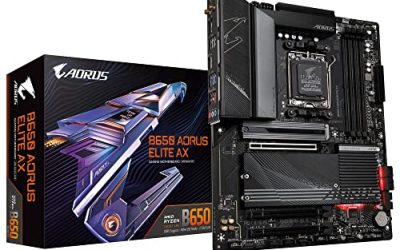
GIGABYTE B650 AORUS Elite AX
This ATX board is the sensible midpoint of the B650 family. The title lists the AM5 socket, support for Ryzen 9000, 8000 and 7000 series processors, DDR5 memory, a 14+2+1 power phase design, a PCIe 5.0 M.2 slot, a USB-C 3.2 Gen 2 port and built-in wireless. For someone assembling a mainstream gaming PC around a mid-range Ryzen chip, that list covers the essentials without paying for the extras of a newer chipset.
- The 14+2+1 power phase configuration is a generous number for the mid-range chips this board is aimed at.
- One PCIe 5.0 M.2 slot makes it possible to fit a current-generation fast SSD.
- A USB-C 3.2 Gen 2 connection is useful for external drives and modern phones.
- It is a B650 board, so it sits one generation behind the B850 boards listed after it.
- The title does not state the total M.2 slot count or the wireless version, so check the listing details.
Skip it if you want the newest wireless standard or you plan to fill several storage slots. Compared with the B850 AORUS Elite WIFI7 that follows, it gives up newer-platform features but is the closer pick for someone building around a mid-range processor and a stable plan. It is also the board to look at if you want a familiar, widely documented layout, since mid-range B650 designs have been on the market long enough for plenty of BIOS updates and user notes to exist.
GIGABYTE B850 AORUS Elite WIFI7
If you want the step-up chipset in the same ATX family, this is the direct comparison. The title lists B850, the AM5 socket, support for Ryzen 9000, 8000 and 7000 series chips, DDR5, a 14+2+2 power phase design, three M.2 slots, PCIe 5.0, a USB-C port and Wi-Fi 7 in the model name. It reads like the B650 AORUS Elite AX with a newer feature set and an extra pair of phases.
- The 14+2+2 power phase layout offers more headroom than the B650 sibling.
- Three M.2 slots allow a main drive plus extra storage without adapters.
- Wi-Fi 7 in the name signals the newest wireless standard.
- Wi-Fi 7 only pays off with a Wi-Fi 7 router, so many buyers will not use it fully on day one.
- The newer chipset naturally carries a higher cost than the older B650 models.
Skip it if your plan is a modest build and your router is several years old; the B650 model gives the same ATX size for less. Next to the B650 Eagle AX, this is the more fully equipped board and the stronger long-term pick. The extra pair of phases and the third M.2 slot are the practical differences, and a buyer who already plans a second SSD within a year will find the added slot saves an adapter purchase.
GIGABYTE B650 Eagle AX
The Eagle line is the quieter, plainer branch of the Gigabyte catalog. The title states AM5 with the LGA 1718 socket designation, an ATX size, DDR5, a triple M.2 arrangement with one PCIe 5.0 slot and two PCIe 4.0 slots, a USB 3.2 Gen2x2 Type-C port, WiFi 6E and a Realtek gigabit Ethernet controller. That level of detail makes it easy to plan a storage layout before you buy.
- The three M.2 slots are described clearly, with one fast PCIe 5.0 slot and two PCIe 4.0 slots.
- USB 3.2 Gen2x2 Type-C offers a fast port for external storage.
- WiFi 6E is current enough for most home networks.
- Ethernet is gigabit rather than the faster 2.5Gb named on other boards in this list.
- The power phase count is not stated in the title, so check it if you plan a high-core-count processor.
Skip it if you want multi-gig networking or if you plan heavy overclocking. Compared with the micro-ATX B850M board next in the list, this Eagle gives you a full-size ATX layout with extra slots, while the B850M gives up slots for a smaller footprint. This is the board for a builder who wants an ordinary, dependable ATX layout without paying for headline features, and who is happy with a single fast drive plus two slower ones.
GIGABYTE B850M AORUS Elite WIFI6E ICE
This board is the micro-ATX answer for people who want a small, light-colored build. The title lists the B850 chipset, micro-ATX size, support for Ryzen 9000, 8000 and 7000 series, DDR5, a 12+2+2 power phase design, two M.2 slots and PCIe 5.0, with WIFI6E in the name. The ICE label typically points to a white color scheme, which suits a build with a light case and white fans.
- Micro-ATX fits compact cases and keeps the overall build small.
- The B850 chipset keeps the newer platform features in a smaller board.
- A 12+2+2 power phase layout is a reasonable setup for mainstream Ryzen chips.
- Only two M.2 slots are listed, which limits big storage plans.
- WiFi 6E is one step below the Wi-Fi 7 named on its ATX siblings.
Skip it if you want many drives or multiple expansion cards. It sits between the ATX Eagle before it and the ASUS ROG Strix B850-G after it: smaller than the former, with fewer storage slots than the latter. Light-colored builds are easier to match when the board, the cooler shroud and the fans share a tone, so this is the entry for buyers who care about the look of the finished machine as much as the spec line.
ASUS ROG Strix B850-G Gaming WiFi
For small builds that still need lots of storage, this ASUS is the standout. The title lists the AM5 socket, the B850 chipset, a micro-ATX form factor, 14+2+1 power stages, DDR5 slots, four M.2 slots and PCIe 5.0 readiness, with an Advanced AI PC Ready tag in the name. Four M.2 slots on a compact board is rare and attractive for creators and gamers with large libraries.
- Four M.2 slots are a strong selling point on a micro-ATX board.
- 14+2+1 power stages are a healthy number for the size.
- Built-in wireless is named in the product title.
- The AI PC Ready phrase is marketing language and says little about daily performance.
- The title does not give the wireless generation, so confirm it in the listing.
Skip it if you want a full-size case with many expansion cards, since micro-ATX offers fewer slots. Compared with the ROG Strix B650-A that follows, the B850-G is smaller and newer, while the B650-A is a full ATX layout on the older chipset. Four M.2 slots also let a buyer keep a game drive, a project drive and a backup drive on the board itself, which is why this pick suits people with large libraries more than people with a single boot drive.
ASUS ROG Strix B650-A Gaming WiFi
The B650-A is an established design on the previous chipset generation. The title lists AMD B650, AM5, support for Ryzen desktop 9000, 8000 and 7000 series, ATX size, 12+2 power stages, DDR5, three M.2 slots, PCIe 4.0 and a networking mention that is cut off in the listing, so the exact Ethernet speed needs confirming. It targets builders who want a well-known gaming brand without the latest features.
- Three M.2 slots allow a decent storage plan.
- Support for three generations of Ryzen processors keeps upgrade options open.
- ATX size gives room for extra expansion cards and better spacing around the graphics card.
- PCIe 4.0 is named rather than PCIe 5.0, so it trails the newer boards for next-generation drives and graphics cards.
- 12+2 power stages is the lowest stage count among the ATX boards in this guide.
Skip it if you want future-proof PCIe lanes. Next to the MSI B850 GAMING PLUS WIFI, this ASUS offers a more premium brand line but fewer modern interface claims on paper. Buyers who like the ROG Strix look and want a wide choice of AM5 processors will be comfortable here, but anyone planning a next-generation graphics card should weigh the PCIe 4.0 label against the PCIe 5.0 boards.
MSI B850 GAMING PLUS WIFI
MSI uses the title to advertise memory capability. It lists ATX size, support for AMD Ryzen 9000 to 7000 processors, AM5, DDR5 memory at 8200+ MT/s (OC), PCIe 5.0 x16 and 4.0 x16 slots, M.2 Gen5 and Wi-Fi. The overclocked memory number is a ceiling that depends on the specific kit and processor, so treat it as potential rather than a guarantee. Most buyers who pair a board like this with a standard EXPO kit will never touch the extreme settings, so the practical benefit is a board whose memory support is not the bottleneck.
- Both a PCIe 5.0 x16 slot and a 4.0 x16 slot are named, which helps with multi-card or capture card setups.
- A Gen5 M.2 slot is listed for the fastest drives.
- The memory overclock claim shows the vendor targets enthusiast kits.
- The title omits power stage counts, so VRM strength is unknown without further reading.
- OC memory speeds are not guaranteed and often require manual tuning.
Skip it if you want a simple plug-in-and-forget experience with standard memory. It is similar in size to the ASUS TUF Gaming B850-PLUS that closes the list, which publishes more concrete power and connectivity details. Since the MSI title is silent on power stage counts and slot totals, the sensible step is to read the manufacturer page before choosing it over a board with a full specification line.
ASUS TUF Gaming B850-PLUS WiFi
The TUF Gaming B850-PLUS is the most feature-complete ATX board in the list. The title shows the AM5 socket, B850 chipset, 14+2+1 power stages at 80A, AI Ready branding, DDR5, PCIe 5.0, three M.2 slots, Wi-Fi 7, 2.5Gb LAN and DisplayPort and HDMI outputs. Those video outputs matter for builds that begin with a Ryzen processor that has integrated graphics.
- 80A power stages are a stronger power delivery claim than any other board in this guide.
- Wi-Fi 7 and 2.5Gb LAN cover both wireless and wired networking.
- DisplayPort and HDMI outputs help during setup or while waiting for a graphics card.
- It is a newer-generation ATX board, so it generally costs more than the B650 models.
- The title says AI Ready, which is marketing wording more than a technical specification.
Skip it if you are building a budget machine. It is the pick when you want the strongest spec sheet in the group and plan to keep the board through several processor upgrades. Because the title lists both DisplayPort and HDMI, it also suits a builder who plans to use a Ryzen chip with integrated graphics for a while and add a discrete card later.
Who Should Buy a DDR5 Motherboard in 2026
Choosing DDR5 is no longer a premium decision on the AM5 platform; it is simply how the socket works. These boards fit a few distinct kinds of buyer.
First-time builders on a Ryzen platform
A full ATX board such as the B650 AORUS Elite AX or ROG Strix B650-A is forgiving: more spacing, more headers, more room to route cables. If this is your first build, extra space is worth more than a micro-ATX saving.
Upgraders coming from an older platform
Moving from an older DDR4 system means replacing the motherboard, memory and usually the processor. The upside is a socket that supports Ryzen 7000, 8000 and 9000 series chips, so the board you choose now can take a later processor upgrade without another motherboard swap. Many upgraders underestimate how much of the bill goes to memory and the board rather than the processor, so budget for all three parts together.
Storage-heavy and creative users
If you keep project files, game libraries or video footage on fast drives, slot count matters. The ROG Strix B850-G with four M.2 slots and the TUF Gaming B850-PLUS with three are built for you, and they remove the need for adapter cards in most cases. Photographers, streamers and modders who juggle project drives will also appreciate boards with a front-panel USB-C header and rear USB-C ports for fast external storage.
How to Choose a DDR5 Motherboard
Processor support and BIOS
All boards here name Ryzen 7000, 8000 and 9000 series support, but a board on the shelf may ship with an older BIOS that cannot recognize the newest processor. Look for a BIOS flashback button or a stated ready-to-go sticker, and plan a firmware update if it is not clear. This single step prevents a no-boot surprise on a new Ryzen 9000 build. If the processor you want is not on the support list at all, move on to another board rather than hoping.
Memory capacity and speed
On AM5, a 32GB kit of two 16GB sticks at DDR5-6000 is the practical sweet spot for gaming and general use. Use two sticks, not four, since four-stick configurations often force lower memory speeds. Capacity of 16GB is a floor, 32GB is comfortable, and 64GB is for editing, virtual machines or heavy multitasking. EXPO profiles are the AMD equivalent of XMP: enable one in the BIOS and the kit runs at its advertised speed. Sticks above DDR5-6000 can run, but the memory controller on many Ryzen chips prefers 6000 with tight timings, so a faster label does not guarantee a faster system.
Power delivery
Power stage counts such as 12+2, 14+2+1 and 14+2+2 give a rough picture of the voltage regulator design. For mainstream Ryzen 5 and Ryzen 7 chips, any board in this guide is more than adequate. For a Ryzen 9 or a plan to overclock, favor the higher counts and the 80A rating on the TUF Gaming board. Do not buy on a phase count alone, since cooling on the regulator heatsink matters too. Motherboards in this class commonly carry a heatsink over the power stages, but a bare plate with no fins on a budget model can run warm during long workloads. What to ignore: the number of RGB zones and the length of the marketing slogan.
M.2 slots and PCIe generation
Plan storage first. One PCIe 5.0 M.2 slot is enough for a main drive, and two or three additional slots keep you from buying expansion cards later. PCIe 5.0 graphics slots matter mostly for the newest graphics cards, while PCIe 4.0 is perfectly adequate for the vast majority of current ones. Check the manual for lane sharing, because on many boards a second or third M.2 slot runs at a lower speed or disables a SATA port. A drive of 2TB in the main slot, with a smaller second drive for backups, is a common and sensible layout.
Networking and ports
Wi-Fi 6E is fine for most homes; Wi-Fi 7 helps only with a matching router. Ethernet at 2.5Gb is useful for fast home networks and file transfers, while gigabit is still enough for internet use. Count USB-C ports, because a rear USB-C 3.2 Gen 2 or Gen2x2 connection is increasingly handy.
Size, warranty and what to ignore
Match the board to the case: ATX for standard mid-towers, micro-ATX for compact cases. Ignore the AI branding and RGB headers; they rarely influence everyday use. Budget boards sometimes cut corners on heatsinks, rear I/O and the number of fan headers, so check those items when you compare listings. A three-year warranty is typical in this category, so a shorter term is a signal to look harder. Also look for a rear panel that includes a BIOS flashback button, since it lets you update firmware without a processor installed.
B650 vs B850: Which Chipset Deserves Your Money
Four boards in this guide use B650 or B850 in an ATX size, so this is the comparison most buyers face. The table below uses only what the titles state.
| Feature | B650 boards | B850 boards |
|---|---|---|
| Wireless in the titles | Wi-Fi named as present, WiFi 6E on the Eagle | Wi-Fi 7 on two boards, WiFi 6E on one |
| PCIe 5.0 mentions | M.2 slot on the AORUS and Eagle | M.2 and graphics slot named on several |
| M.2 slots | Three on the Eagle and ROG Strix B650-A | Two to four slots |
| Power design in titles | 12+2 to 14+2+1 | 12+2+2 to 14+2+2, one at 80A |
| Price position | Generally lower | Generally higher |
When B650 is enough
If your plan is a mainstream Ryzen 5 or Ryzen 7 with a single fast SSD and a graphics card that does not need PCIe 5.0, a B650 board does everything you need. The money you save can go to a better graphics card or more memory, which usually improves gaming results more than extra chipset features do.
When B850 is worth the extra
The decision is also about timing. A board you buy now will likely stay in the case for years, and the processor generation you pair it with will change before the board does.
Choose B850 if you want Wi-Fi 7, a PCIe 5.0 graphics slot, more storage options or a board that will feel current for several processor generations. It is the better match for a high-end Ryzen 9 build or a creator workstation. It also helps if you want a board with a newer wireless card installed, since replacing an onboard wireless module later is awkward.
Setup, Compatibility and Upgrade Tips
What to check before buying
Confirm your processor is an AM5 model, because older AM4 chips will not fit. Check your case supports ATX or micro-ATX, and verify your cooler’s mounting kit includes AM5 hardware. Look at the memory support list on the manufacturer page for your exact kit. Measure the clearance between the top of the board and your case roof if you use a large air cooler, and check that your graphics card does not block the first M.2 slot.
What to upgrade first
The processor and graphics card shape gaming performance most, but the motherboard sets the ceiling. After the build is stable, the best first upgrade is usually a second M.2 SSD for storage, followed by faster memory only if your current kit is below DDR5-5600. Cooling comes next: a better air cooler or an extra case fan often lowers noise more than any chipset choice. Keep the board box and the download link for the LAN and Wi-Fi drivers, since a fresh Windows install may not include them.
Common compatibility traps
Do not mix DDR4 sticks with a DDR5 slot, because they are physically different. Make sure your power supply has the 8-pin processor connectors the board needs. Install M.2 drives under their heatsinks in the right order, since a drive in a shared lane may disable a SATA port on some boards. Update the BIOS before swapping in a newer processor. Finally, check that your case front-panel connectors match the headers, because USB-C front ports need a specific connector that older cases do not provide.
Which One Fits Your Situation
A mid-range gaming PC with a Ryzen 5 or Ryzen 7
The GIGABYTE B650 AORUS Elite AX covers power, storage and USB-C without overspending, and its ATX size makes cable routing easy for someone who has never built a PC before.
A small white build for a living room
The GIGABYTE B850M AORUS Elite WIFI6E ICE gives a compact micro-ATX size with a light color scheme, which helps when a white case and white fans are already chosen.
A video editor with several fast drives
The ASUS ROG Strix B850-G Gaming WiFi offers four M.2 slots in a micro-ATX body, so footage, caches and exports can live on separate drives.
A builder who wants the strongest specification and long-term support
The ASUS TUF Gaming B850-PLUS WiFi has the 80A stages, Wi-Fi 7, 2.5Gb LAN and three M.2 slots on the same board, which reduces the chance of needing a new board when the next Ryzen generation arrives.
Common Mistakes
- Buying a board without checking whether it ships with a BIOS that supports Ryzen 9000.
- Filling all four memory slots and expecting the same speed as two sticks.
- Paying for Wi-Fi 7 while using an older router and a wired connection anyway.
- Choosing micro-ATX and then discovering the build needs more expansion slots than it has.
- Ignoring M.2 heatsinks and lane-sharing notes in the manual.
- Judging a board by marketing terms such as AI Ready instead of specific ports and slot counts.
Frequently Asked Questions
Are all AM5 motherboards DDR5 only?
Yes. The AM5 platform uses DDR5 memory exclusively, so any AM5 board you pick requires DDR5 sticks. DDR4 modules do not fit the slots.
Is B650 or B850 better?
B850 is the newer chipset and tends to bring newer connectivity, while B650 remains capable and often costs less. Choose by the features you will use, not the number alone.
How much DDR5 memory do I need?
16GB is the minimum, 32GB is comfortable for gaming and general use, and 64GB suits editing and heavy multitasking. Two matching sticks are better than four.
Do I need Wi-Fi 7?
Not unless your router supports it and your network benefits. Wi-Fi 6E is enough for most homes, and wired Ethernet is often the better route for stability.
Will these boards work with Ryzen 9000 processors?
The titles list support for Ryzen 9000, 8000 and 7000 series, though older stock may require a BIOS update before the newest chip boots. Check the manufacturer page for the BIOS version.
Is micro-ATX a bad choice?
No. Micro-ATX suits compact builds well, and boards like the ROG Strix B850-G still offer four M.2 slots. The trade-off is fewer expansion slots and tighter spacing.
Final Words
Because every board here uses AM5 and DDR5, the decision comes down to chipset, size and slots. For a mainstream gaming build, the GIGABYTE B650 AORUS Elite AX is a sound default. If you want newer features, the GIGABYTE B850 AORUS Elite WIFI7 and ASUS TUF Gaming B850-PLUS WiFi lead the ATX group, while the ASUS ROG Strix B850-G is the compact storage pick. Update the BIOS, use two memory sticks, and plan your M.2 slots before you buy. Anything that looks unclear in a title, such as the wireless version on an ASUS model or the power stages on an MSI model, deserves a quick look at the manufacturer page first.