Choosing a honeycomb gaming mouse is really a decision about how much shell you are willing to trade for speed. The perforations strip away grams and let air reach your palm, but they also change how a mouse feels under a tight grip, how it handles dust and sweat, and how stiff the body stays during hard flicks. Two mice can share the same weight class and still suit completely different hands.
This roundup is for competitive FPS players who want the lightest shell they can control, claw and fingertip grippers with smaller hands, and anyone curious whether wireless honeycomb models have caught up with wired ones. Every pick below was chosen from the names and specification fields on its Amazon product page, so the weights, sensors and switch types quoted here come from the listings themselves rather than from marketing roundups.
Top 3 picks at a glance

Quick Picks
As an Amazon Associate we earn from qualifying purchases.
| Product | Best for | Key spec from title |
|---|---|---|
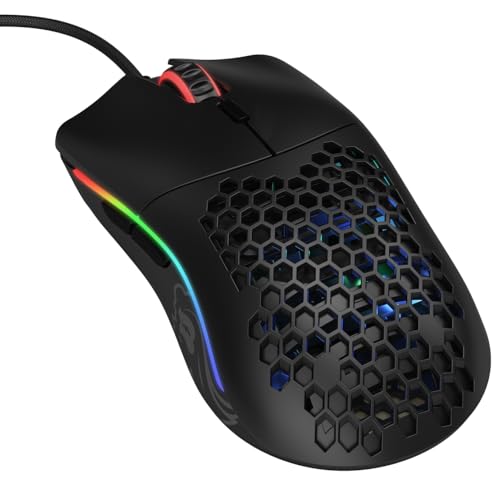
| Glorious Model O Wired (Matte Black) | Palm and claw players with medium to large hands | 67g superlight honeycomb design |
| Glorious Model O- (Minus) (Matte Black) | Small hands and fingertip grips | 58g compact honeycomb design |
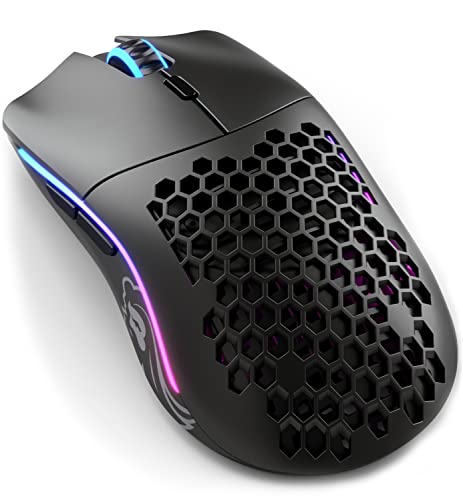
| Glorious Model O Wireless | Players cutting the cable without adding weight | 69g honeycomb shell, 2.4GHz wireless |
| Cooler Master MM711 (Matte Black) | RGB fans who still want a wired connection | 60g honeycomb shell, 16,000 DPI sensor |
| SteelSeries Aerox 3 Wireless (2022, Onyx) | Long sessions and spill-prone desks | 68g holey shell, IP54 AquaBarrier |
How to Choose
What the perforations actually change
A honeycomb shell does three things at once: it removes material so the mouse gets lighter, it vents heat and moisture away from your palm, and it slightly reduces the contact area your fingers rest on. The first effect is easy to measure, the second matters most in warm rooms and long sessions, and the third is pure preference. Players who squeeze hard in a claw grip sometimes feel the hole edges through the shell, while relaxed palm players rarely notice them. If you have never used a perforated mouse, expect an adjustment period of a few days before the texture fades into the background.
Weight means little without the right size
Dropping below 70 grams helps fast swipes, yet a shell that is too long or too short for your hand will undo that advantage within a single match. The Model O- trims the standard Model O shape down for smaller hands, while the full-size Model O suits medium to large hands that palm or claw. Measure your hand from fingertip to wrist crease, then compare it with the length printed on each listing. A mouse roughly 60 percent of that hand length is a workable starting point for claw and fingertip grips, and palm players usually prefer a touch more.
Sensor ceilings are high everywhere, so look at the details
Every mouse in this list tracks at speeds no human arm can exceed, so headline DPI figures separate these products far less than the smaller print does. What matters more is how the sensor behaves at the low settings most FPS players actually use, whether the polling rate stays at 1,000 Hz, and how much lift-off distance the shape encourages. The Cooler Master entries run PixArt PMW3389 sensors, the wired Glorious models use the PixArt 3360, and the wireless picks move to newer low-power sensors built to sip battery while tracking. Pick based on connection and shape first; the sensors here are all competent.
Wired simplicity against wireless freedom
A wired honeycomb mouse never needs charging, never drops a connection, and usually weighs the least because there is no battery inside. The trade is cable drag, which flexible braided cables like the Glorious Ascended line and Cooler Master’s Ultraweave reduce to a faint tug on wide swipes. Wireless models remove that tug entirely and add freedom to reposition the mouse, but they carry a battery, a receiver you must keep close, and a charging habit you have to maintain. If your desk sits far from your PC or you travel to LAN setups, wired stays the simpler tool.
The 5 Best Options
Glorious Model O Wired (Matte Black)
The original Model O is the mouse that turned honeycomb shells from a modding curiosity into a mainstream category, and its formula still holds up: an ambidextrous body at 67 grams, a PixArt 3360 sensor, and a flexible braided cable that stays out of the way during low-sensitivity arm aiming. Its length suits medium to large hands best, and the flat sides give claw and fingertip players a secure purchase without forcing the fingers into a fixed groove. RGB strips along the flanks show through the perforations for players who like the glow.
Specs
- Weight: 67g
- Shell: Honeycomb design, matte black finish
- Sensor: PixArt 3360 optical, up to 12,000 DPI
- Switches: Omron mechanical switches
- Shape: Ambidextrous
- Lighting: RGB
- Connectivity: Wired, flexible braided cable
Best for: Palm and claw players with medium to large hands who want the classic wired honeycomb shape.
Watch out for: The listing covers several finishes and colors under similar names, so confirm the matte black wired version is the one in your cart before ordering.
Glorious Model O- (Minus) (Matte Black)
Shrinking a proven shape is harder than it sounds, and the Model O- pulls it off by trimming the Model O’s length and width while keeping the same honeycomb shell, PixArt 3360 sensor and Omron switches. At 58 grams it is the lightest wired pick here, which makes it a natural fit for fingertip players who steer with small, quick corrections rather than full arm sweeps. Smaller hands that found the standard Model O stretching their grip will feel immediately more in control, and the compact body also travels well in a laptop bag.
Specs
- Weight: 58g
- Shell: Compact honeycomb design, matte black finish
- Sensor: PixArt 3360 optical
- Switches: Omron mechanical switches
- Shape: Ambidextrous, compact size
- Lighting: RGB
- Connectivity: Wired
Best for: Small to medium hands, and fingertip grippers who want the lightest wired shell in this list.
Watch out for: Anyone with large hands should skip this one, because the shortened shell can cramp a palm grip; also confirm the Minus model rather than the full-size Model O when ordering, since the names differ by a single character.
Glorious Model O Wireless
This is the full-size Model O shape with the cable removed and almost nothing added in return: the wireless version lands at 69 grams, only two grams above its wired sibling. Its BAMF optical sensor, developed with PixArt, reaches 19,000 DPI and tracks at 400 IPS, while the 2.4GHz connection keeps latency in line with wired play. Battery life is quoted at up to 71 hours with the lighting switched off, and the USB-C port lets you plug in and keep playing while it charges. Players who loved the original shape but hated cable drag finally get to keep the shape and lose the cable.
Specs
- Weight: 69g
- Shell: Honeycomb design
- Sensor: Glorious BAMF optical (PixArt-based), up to 19,000 DPI, 400 IPS
- Polling rate: Up to 1,000 Hz
- Switches: Omron, rated for 20 million clicks
- Connectivity: 2.4GHz wireless and USB-C wired
- Battery: Up to 71 hours with RGB off
- Feet: G-Skates premium PTFE
- Model: GLO-MS-OW-MB
Best for: Model O fans who want wireless freedom for a clean desk without moving to a heavier mouse.
Watch out for: The 71-hour battery figure assumes the RGB lighting stays off, so expect noticeably shorter runs with the lights on; confirm a live offer on the listing, because availability on this model has fluctuated.
Cooler Master MM711 (Matte Black)
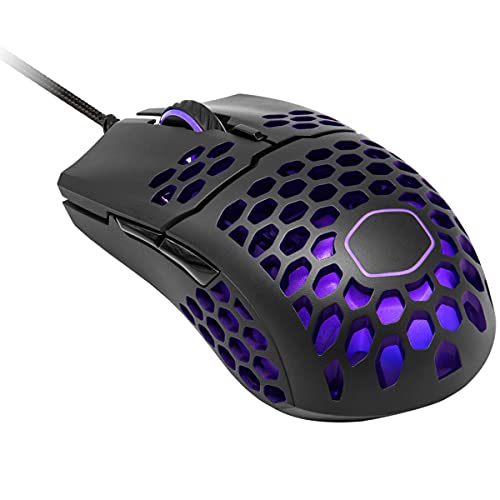
Cooler Master’s entry pairs the honeycomb formula with the strongest sensor in the wired group: a PixArt PMW3389 that runs to 16,000 DPI across seven sensitivity levels, tracks at 400 IPS, and polls at 1,000 Hz. The shell weighs 60 grams, the Ultraweave cable is soft enough to forget about, and the internal board carries a dust- and water-resistant coating, a thoughtful touch on a mouse whose openings invite crumbs. RGB glows through the scroll wheel and logo rather than the whole shell, which keeps the look restrained for a perforated design.
Specs
- Weight: 60g
- Shell: Honeycomb, matte black finish
- Sensor: PixArt PMW3389 optical, up to 16,000 DPI in 7 levels
- Tracking: 400 IPS, 1,000 Hz polling rate
- Switches: Omron, rated for 20 million clicks
- Cable: Ultraweave, 1.8 m, USB
- Feet: PTFE
- Dimensions: 116.5 x 62.4 x 38.3 mm
- Model: MM-711-KKOL1
Best for: Wired players who want a top-tier sensor and a slightly smaller shell than the Model O offers.
Watch out for: Listing snapshots for this model run older than the rest of this list, so confirm a live offer before ordering; the seven preset DPI steps also mean fine sensitivity tuning happens in Cooler Master’s software rather than on the mouse.
SteelSeries Aerox 3 Wireless (2022, Onyx)

SteelSeries took a different route with its holey shell: instead of leaving the internals exposed, the Aerox 3 seals them behind an AquaBarrier rated IP54, so splashes, dust and crumbs stay away from the electronics. The 2022 Onyx edition weighs 68 grams, runs a TrueMove Air sensor up to 18,000 CPI, and connects over Quantum 2.0 Wireless at 2.4GHz or Bluetooth 5.0 for a second machine. Battery life stretches to 200 hours on Bluetooth, and USB-C fast charging covers the 2.4GHz gaming stretches in between. It is the honeycomb mouse for people who eat at their desk and refuse to apologize for it.
Specs
- Weight: 68g
- Shell: Holey perforated shell with AquaBarrier protection
- Sensor: TrueMove Air optical, up to 18,000 CPI
- Connectivity: Quantum 2.0 Wireless (2.4GHz), Bluetooth 5.0, USB-C wired
- Battery: Up to 200 hours on Bluetooth
- Protection: IP54 water and dust resistance
- Switches: TTC mechanical
- Feet: Virgin-grade PTFE glide skates
- Model: 62612
Best for: Wireless players who want the longest battery life here and protection against desk spills and dust.
Watch out for: Many listings for this mouse are renewed units, so check that the listing you open is the new 2022 Onyx version rather than a refurbished one before ordering.
Which One Fits Your Situation
You compete in tactical shooters and aim with your whole arm
Low sensitivity and wide swipes reward the lightest shell you can still stop precisely. The Model O- at 58 grams and the MM711 at 60 grams both disappear during fast turns, and their wired connections remove any worry about a receiver dropping mid-round. Choose the O- if your hands run small, and the MM711 if you want the stronger PMW3389 sensor and a slightly larger body to brace against.
Your desk doubles as a dining table
Crumbs, coffee rings and the occasional splash are rough on open shells, because everything that lands on the mouse can fall straight through the holes. The Aerox 3 Wireless answers that directly with its IP54 AquaBarrier sealing the internals, and its Bluetooth mode makes it easy to push aside and pair with a laptop when work takes over the desk. No other pick here offers any ingress protection at all.
You want one mouse for the gaming PC and the work laptop
Dual-device life favors the two wireless models. The Aerox 3 Wireless switches between its 2.4GHz receiver and Bluetooth, so one channel can stay with the gaming rig while the other follows the laptop. The Model O Wireless lacks Bluetooth, but its lighter shell and USB-C charging suit players whose second machine only borrows the mouse occasionally. Either way, you stop unplugging cables every time you change chairs.
You are buying your first ultralight and feel unsure about the holes
Start with the wired Model O. Its shape is the reference point the rest of this category is measured against, the cable removes charging from the learning curve, and the medium-large shell forgives grip experimentation while you decide whether you are a palm, claw or fingertip player. If the perforations bother your palm after a week, grip tape over the contact points is a gentler fix than replacing the mouse.
Common Mistakes
- Buying the smallest shell for the lightest number, then fighting cramped fingers because the mouse never matched the hand in the first place.
- Assuming every honeycomb mouse handles dust the same way, when only some seal their internals and the rest need regular cleaning with compressed air.
- Leaving RGB at full brightness on a wireless model and blaming the battery for dying days earlier than the quoted figure suggested.
- Ignoring finish variants at checkout, since matte and glossy versions of the same mouse often sit on separate listings with near-identical names.
- Judging a perforated shell in the first hour, before your grip has adjusted to the texture, and returning a mouse that would have settled in by the weekend.
Frequently Asked Questions
Do honeycomb holes make a mouse feel flimsy?
Not on the models listed here. The perforations remove material from areas that carry little load, and the remaining lattice keeps the shell rigid under normal grip pressure. You may notice a faint flex if you deliberately squeeze the sides hard, but in play the bodies feel solid, and the internal frames on picks like the MM711 add structure behind the openings.
Will dust and sweat get inside an open shell?
Some of both will, which is the honest trade for the weight saving. A quick blast of compressed air every few weeks keeps the interior tidy, and wiping the shell after long sessions limits grime around the holes. If your desk attracts more than the usual crumbs, the Aerox 3 Wireless and its sealed AquaBarrier design sidestep the issue entirely.
Is wireless fast enough for competitive shooters now?
On the 2.4GHz connections used by the Model O Wireless and the Aerox 3 Wireless, yes. Both pair their wireless links with 1,000 Hz-class reporting and sensors built for low-power tracking, so the practical difference against a cable sits below what players can perceive. Bluetooth modes are meant for everyday use and travel, not ranked matches, and both mice still work wired over USB-C when you want zero doubt.
How do I know whether the compact Model O- fits my hand?
Measure your hand from the tip of your middle finger to the base of your palm. The Model O- suits small to medium hands and fingertip or claw grips, while the standard Model O covers medium to large hands across all three grip styles. If your palm rests fully on a mouse when you play, size up; if only your fingers touch it, the Minus was built for you.
Related guides
More from Amazon
Programs that pair well with the guide above. Offers and eligibility are set by Amazon and may change.
A free business account with business pricing and bulk-buying tools for work, shop or home office.
Create a business accountFree shipping on eligible items, Prime Video and more. Eligible new members can start with a free trial.
Start a Prime free trialAudiobooks and podcasts to listen to on the go. Eligible new members can start with a free trial.
Try Audible freeAd-free music streaming. Eligible new subscribers can start with a free trial.
Try Music Unlimited freeAs an Amazon Associate we earn from qualifying purchases.






