Our Short List of 3
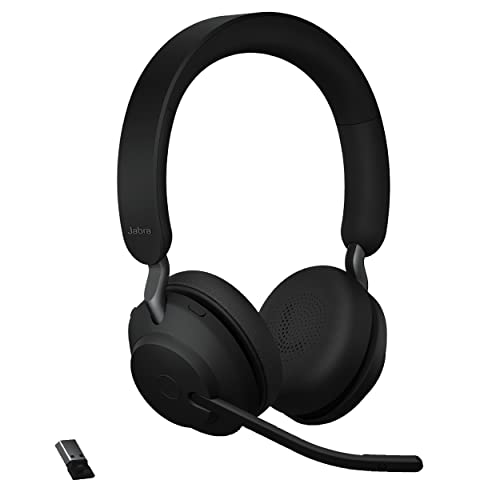
- Best for: laptop-based Teams and Zoom users who want dongle reliability without giving up phone pairing.
- Connection: Bluetooth wireless with Link 380a USB-A adapter included
- Battery life: up to 37 hours, per the listing title
- Design: stereo, black
- Noise cancelling: passive noise cancelling

- Best for: workers in loud, changing environments who need active cancelling on the listening side.
- Connection: Bluetooth wireless
- Noise cancelling: adaptive hybrid ANC
- Microphone: noise-canceling, per the listing title
- Color: black

- Best for: hybrid workers who want certified call controls and ANC in one stereo headset.
- Connection: Bluetooth stereo headset, USB-A for PC and Mac
- Microphone: boom mic
- Noise cancelling: active noise canceling
- Certification: works with Teams (certified) and Zoom, per the listing title
All 5 Picks at a Glance
| Product | Specs | Action |
|---|---|---|
| Jabra Evolve2 65 UC Stereo |
| Check price on Amazon |
| Logitech Zone Wireless 2 ES |
| Check price on Amazon |
| Poly Voyager Focus 2 UC |
| Check price on Amazon |
 Jabra Evolve2 40 UC Wired |
| Check price on Amazon |
 Poly Voyager 4310 UC |
| Check price on Amazon |
A meeting headset succeeds or fails on one thing: how you sound to everyone else. A gaming headset can hide a mediocre microphone behind big drivers and RGB, but on a client call there is nowhere to hide. If your mic passes keyboard clicks, a barking dog and the washing machine straight into the meeting, the headset has failed at its only real job, no matter how good the music sounds in your own ears.
This guide is for remote workers in noisy homes, office staff on back-to-back Teams or Zoom calls, and anyone who pairs a laptop with a phone across the day. Every pick below was chosen from the product names and specifications on its Amazon listing, with the microphone setup, connection type and platform certification read straight from the listing rather than from marketing roundups.
Our Top Picks
Top 3 picks at a glance
Quick Picks
As an Amazon Associate we earn from qualifying purchases.
| Product | Best for | Key spec from title |
|---|---|---|
| Jabra Evolve2 65 UC Stereo | Wireless calls with a USB-A dongle | 37 hours of battery life |
| Logitech Zone Wireless 2 ES | Noisy rooms that need active cancelling | Adaptive hybrid ANC |
| Poly Voyager Focus 2 UC | Stereo focus with certified call controls | Active noise canceling, Teams certified |
| Jabra Evolve2 40 UC Wired | A fixed desk with zero charging | Wired USB-A connection |
| Poly Voyager 4310 UC | One ear free for the room around you | Single-ear with noise-canceling mic |
How to Choose
Put the microphone first, not the speakers
In meetings, the microphone is the product. Look for a boom design that sits near your mouth and a listing that talks about noise cancelling on the microphone itself, not just on the earcups. Ear cup cancelling helps you hear; mic cancelling is what stops your dog, your keyboard and your housemates reaching the call. A headset can sound wonderful for music and still be a poor meeting tool if the listing is silent about the mic, so treat detailed mic language in the title as the first filter.
Decide between one ear and two
Stereo headsets cover both ears and help you concentrate in a shared office or a loud house, and passive or active cancelling adds to that isolation. A single-ear model leaves one ear open, which suits people who need to hear a doorbell, a child or colleagues walking up to the desk. Neither is better in general. Match the format to your room: isolation when the noise is the problem, one open ear when awareness is the problem, and be honest about which situation describes most of your calls.
Check how it connects to laptop and phone
Most people now take calls on two devices. A USB dongle gives a laptop a stable, pre-paired connection that survives sleep and wake cycles, while plain Bluetooth pairs directly with a phone. Some headsets here include a dongle in the box and still connect to a phone over Bluetooth, which is the flexible arrangement. Wired USB removes pairing and charging entirely, at the cost of a cable. Before buying, list the devices you actually join calls from and confirm the headset covers all of them in one setup.
Look for certification for your meeting platform
Listings that state Teams or Zoom certification, or UC optimization, are telling you the headset’s buttons and mute controls are built to work with that software, including answering calls and syncing mute state. That matters more than it sounds: a mute button the app ignores is a privacy risk. If your company runs Microsoft Teams all day, a Teams-certified or Teams-optimized listing is the safer buy. If you hop between Zoom, Meet and browser calls, a UC model aimed at all platforms is the more sensible match.
The 5 Best Options
Jabra Evolve2 65 UC Stereo
- Best for: laptop-based Teams and Zoom users who want dongle reliability without giving up phone pairing.
- Connection: Bluetooth wireless with Link 380a USB-A adapter included
- Battery life: up to 37 hours, per the listing title
- Design: stereo, black
- Noise cancelling: passive noise cancelling
laptop-based Teams and Zoom users who want dongle reliability without giving up phone pairing.
this UC version is optimized for Teams rather than carrying a dedicated Teams button variant, and the dongle is USB-A, so a USB-C-only laptop needs an adapter.
This is the straightforward wireless recommendation for people whose meetings live on a laptop. The included Link 380a USB-A adapter means the headset arrives pre-paired to your computer, sidestepping the flaky built-in Bluetooth on many office laptops, and it still works as a normal Bluetooth headset for a phone. The listing quotes up to 37 hours of battery life, so charging becomes a weekly habit rather than a daily one, and the stereo earcups with passive noise cancelling suit shared spaces where you need to focus between calls as well as during them.
Logitech Zone Wireless 2 ES
- Best for: workers in loud, changing environments who need active cancelling on the listening side.
- Connection: Bluetooth wireless
- Noise cancelling: adaptive hybrid ANC
- Microphone: noise-canceling, per the listing title
- Color: black
workers in loud, changing environments who need active cancelling on the listening side.
the listing centers on Bluetooth pairing, so if your laptop’s Bluetooth is unreliable you will want to confirm your machine’s connection or choose a dongle model instead.
Where the Jabra relies on passive isolation, the Zone Wireless 2 ES goes after noise actively, with adaptive hybrid ANC named in the listing title. That makes it the pick for open-plan offices and busy households where the background changes through the day. It is a Bluetooth headset, so it pairs with a laptop and a phone without a cable, and the design is a conventional over-ear style that reads as office equipment rather than gaming gear on camera. If your main complaint is hearing the meeting, not being heard in it, start here.
Poly Voyager Focus 2 UC
- Best for: hybrid workers who want certified call controls and ANC in one stereo headset.
- Connection: Bluetooth stereo headset, USB-A for PC and Mac
- Microphone: boom mic
- Noise cancelling: active noise canceling
- Certification: works with Teams (certified) and Zoom, per the listing title
hybrid workers who want certified call controls and ANC in one stereo headset.
Poly sells this model in USB-A and USB-C versions and with or without a charging stand, so confirm the exact variant on the listing before ordering.
The Voyager Focus 2 UC combines active noise canceling with a boom microphone and explicit platform credentials: the listing title states it works with Teams as a certified device and with Zoom as well. It connects to a PC or Mac over its USB-A setup and pairs as a Bluetooth stereo headset, so it covers the desk-and-phone pattern most hybrid workers live in. Choose this one if call controls that the software actually respects are a priority, since certified status is exactly the promise that mute and answer behave the way the app expects.
Jabra Evolve2 40 UC Wired
- Best for: desk-based staff who want a headset that is always ready and never needs charging.
- Connection: wired USB-A
- Design: stereo, black, on-ear
- Noise cancelling: passive noise cancelling
- Platform: UC-optimized, per the listing title
desk-based staff who want a headset that is always ready and never needs charging.
the cable ties you to the laptop, and this is the USB-A version, so a USB-C-only machine needs the USB-C variant or an adapter.
A wired headset sounds old-fashioned until you count what it removes: no battery to die mid-presentation, no pairing menus, no dongle to lose. The Evolve2 40 plugs into a USB-A port and simply works, with passive noise cancelling in the earcups and a UC-optimized design aimed at calls and music at a fixed desk. It is the sensible choice for a permanent workstation, a call-heavy role where the headset never leaves the desk, or anyone tired of wireless quirks. The trade-off is written into the product: you are tethered to the machine.
Poly Voyager 4310 UC
- Best for: people who take calls all day but still need to hear what is happening around them.
- Connection: Bluetooth, with BT700 USB-C adapter and USB-C to USB-A adapter
- Microphone: noise-canceling mic
- Design: single-ear (mono)
- Compatibility: works with Teams and Zoom, per the listing title
people who take calls all day but still need to hear what is happening around them.
mono sound is a poor fit for music and video between calls, and this Amazon Exclusive listing should be checked for the exact adapter configuration before ordering.
The single-ear entry in this guide, the Voyager 4310 UC keeps one ear open to the room while its noise-canceling microphone handles your side of the call. The listing describes a single-ear Bluetooth headset that connects a PC or Mac through its USB-C BT700 adapter, with a USB-C to USB-A adapter in the model configuration, and a phone over Bluetooth, and it states compatibility with Teams and Zoom. For reception-style roles, home workers who must hear the house, and anyone who finds two covered ears fatiguing across a full day, this format makes immediate sense.
Which One Fits Your Situation
You work from a noisy home
Start with the Logitech Zone Wireless 2 ES, whose adaptive hybrid ANC targets the listening side of the problem, or the Poly Voyager Focus 2 UC if certified call controls matter as much as cancelling. Both are stereo and wireless, so you can close the door on the household noise and still move around. The Jabra Evolve2 65 is the fallback if your laptop’s Bluetooth is weak, thanks to its included USB-A dongle.
Your desk never changes
Take the Jabra Evolve2 40 UC Wired and stop thinking about headsets. It plugs into USB-A, never needs charging, and its passive cancelling is enough when the room itself is reasonably quiet. It is also the easiest model here to hand to a whole team, because there is nothing to pair and nothing to update before the first call. Just confirm your machine still has a USB-A port, or order the USB-C variant instead.
You split calls between laptop and phone
The Jabra Evolve2 65 and the Poly Voyager 4310 UC both bridge that gap, one in stereo and one in mono. Each gives the computer a proper adapter-based connection while the phone pairs over Bluetooth, so a mobile call does not mean re-pairing anything. Pick stereo if you also listen to music at the desk, and the Voyager 4310 if you need one ear on the room while you talk.
You present or sell on calls all day
Your voice is the product, so prioritize the boom-microphone models with platform certification in the title: the Voyager Focus 2 UC for stereo, or the Voyager 4310 UC if clients and colleagues also reach you in person between calls. Certified controls mean the mute button on the headset and the mute state in Teams or Zoom stay in agreement, which is the detail that prevents the classic unmuted-aside mistake.
Common Mistakes
- Buying a gaming headset for meetings because the drivers are bigger, while its microphone was designed for squad chat rather than client calls.
- Confusing earcup noise cancelling with microphone noise cancelling; only the second one cleans up what other people hear from your room.
- Ignoring the dongle question and discovering your laptop’s built-in Bluetooth drops the headset every time the machine wakes from sleep.
- Choosing stereo isolation when your job actually requires hearing the room, or choosing a mono headset and then hating it for music.
- Assuming any headset with a mute button syncs with Teams or Zoom, when uncertified models can leave you live while the headset shows muted.
Frequently Asked Questions
Does certification for Teams or Zoom actually matter?
It matters for controls more than for sound. A certified or UC-optimized headset is built so its answer, volume and mute buttons work with the app, and the app’s mute state matches the headset’s. Any Bluetooth headset will carry audio, but uncertified models can leave you unmuted when you believe you are muted, which is the failure certification exists to prevent.
Is a wired headset still worth buying?
Yes, for a fixed desk it is often the most reliable option in this guide. A wired USB headset never needs charging, never drops a pairing, and is ready the second a call starts. The cost is freedom of movement: you cannot make coffee during a long meeting. If your calls happen at one desk on one computer, wired removes more problems than it creates.
Can one headset handle both my laptop and my phone?
Several picks here are built for exactly that. The Jabra Evolve2 65 and Poly Voyager 4310 UC give the computer an adapter-based connection while the phone pairs over Bluetooth, and the Logitech and Poly stereo models pair over Bluetooth as well. Check the listing for your exact combination of ports, since USB-A and USB-C dongle variants are sold as separate listings.
Should I choose one ear or two?
Choose two ears when noise is the problem: stereo coverage plus passive or active cancelling helps you hear and concentrate. Choose one ear when awareness is the problem, for example with children in the house, a doorbell you cannot miss, or colleagues who approach your desk. The Voyager 4310 UC is the single-ear option here; the other four picks all cover both ears.
Related guides
More from Amazon
Programs that pair well with the guide above. Offers and eligibility are set by Amazon and may change.
A free business account with business pricing and bulk-buying tools for work, shop or home office.
Create a business accountFree shipping on eligible items, Prime Video and more. Eligible new members can start with a free trial.
Start a Prime free trialAudiobooks and podcasts to listen to on the go. Eligible new members can start with a free trial.
Try Audible freeAd-free music streaming. Eligible new subscribers can start with a free trial.
Try Music Unlimited freeAs an Amazon Associate we earn from qualifying purchases.