
If you are searching for the best HD graphics card, you probably mean a card for 1080p gaming. That is still the most sensible target for many PCs: it offers a sharp image, works well on affordable monitors, and does not require a high-end GPU. The right choice depends less on buying the fastest card available and more on your games, power supply, monitor refresh rate, and how long you expect to keep the card.
For most buyers, the sweet spot is an entry-level or mid-range card with 8GB of VRAM. Cheaper 4GB cards can be fine for esports and older games, but they have less room for modern textures and future releases. Spending substantially more only makes sense if you also plan to move to 1440p or use demanding ray-tracing effects.
As an Amazon Associate we earn from qualifying purchases at no extra cost to you.


Our Top Picks
 GIGABYTE Radeon RX 9070 XT Gaming OC 16GRADEON9070XT11.34 x 5.2 x 2.2 Inches3.9 PoundsCheck on Amazon
Top 3 picks at a glance
The best HD graphics card choices
| Type of card | Best for | Main advantage | Main drawback |
|---|---|---|---|
| Budget 1080p card | Older games and esports | Low purchase price and power use | Limited VRAM and weaker future-proofing |
| Modern 8GB mid-range card | Most 1080p gaming PCs | Good balance of frame rate, image quality, and longevity | Costs more than strictly necessary for light gaming |
| Value-focused Intel card | Buyers prioritizing performance per dollar | Often strong raw performance for the money | Driver behavior and older-game compatibility need more care |
| Feature-focused NVIDIA card | Ray tracing, upscaling, streaming, and creative software | Strong software features and broad application support | Usually costs more for similar conventional 1080p performance |
Best for most people: an 8GB 1080p card
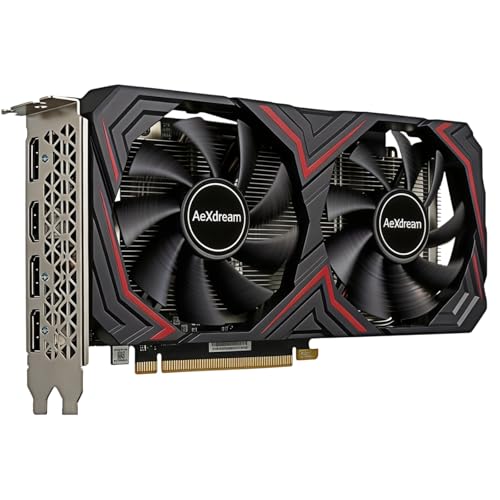
The safest recommendation is a current mid-range card with 8GB of VRAM. Shop the 8GB 1080p graphics cards category, then compare actual prices rather than assuming one brand is always best.
This class of card is suited to high settings in most 1080p games, with enough performance for a 60Hz or 100Hz monitor depending on the title. It is also a better choice than a very cheap card if you play large open-world games, use high-resolution texture packs, or want to keep the same GPU for several years.
The trade-off is that 8GB is not unlimited. Some new games can exceed that capacity at maximum settings, particularly when ray tracing is enabled. Lowering texture quality one step is usually enough, but buyers expecting flawless ultra settings should consider a faster card with more VRAM—or a 1440p-oriented model instead.
When a cheaper card is enough
A budget card is perfectly reasonable for competitive games such as Counter-Strike 2, Valorant, League of Legends, and Fortnite, especially if your monitor runs at 60Hz or 75Hz. It can also be a good replacement for an old office-PC GPU when you mainly want smoother desktop use and occasional gaming.
Look at budget graphics cards for 1080p gaming if you want to spend as little as possible. A 4GB model may deliver good frame rates today, but its limitations are easy to hit. Texture pop-in, stuttering, sudden frame-time spikes, or the need to use medium settings are common failure modes when a game needs more VRAM than the card provides.
Do not pay extra for a budget card with a large factory overclock. A small clock-speed increase rarely transforms the experience. A quiet cooler, a reliable warranty, and a sensible size are usually more valuable.
AMD, Intel, or NVIDIA?
AMD is often the straightforward choice for conventional 1080p gaming. Its cards generally offer competitive rasterized performance and sensible memory configurations. They suit buyers who want to install a game and play without making ray tracing the center of the decision.
Intel can offer excellent value, particularly when its cards are discounted. Newer games using modern graphics APIs usually work well, but older games and unusual applications can expose driver rough edges. Intel is best for a buyer willing to check recent driver notes and confirm compatibility with their favorite older titles. It is less suitable as a blind gift for someone with a large legacy game library.
NVIDIA is the strongest fit when features matter as much as frame rate. Upscaling, frame-generation support, ray tracing, video encoding, and software compatibility can justify the price. The problem is value: at the same conventional 1080p performance, an NVIDIA card may cost more or offer less VRAM than an AMD or Intel alternative. Buy NVIDIA for the feature set, not simply because the logo is familiar.
Check these details before buying
Power supply: Confirm the recommended wattage and power connectors. A graphics card that technically fits may still cause crashes if the power supply is old, low quality, or operating near its limit. Replace a questionable power supply before upgrading the GPU.
Case clearance: Measure the available card length, height, and thickness. Two-slot and three-slot designs can block neighboring expansion slots. Front radiator mounts and drive cages can also reduce usable length.
CPU balance: A very fast graphics card will not solve low frame rates caused by an old processor, especially in simulation games and high-refresh esports titles. At 1080p, the CPU can become the limiting part sooner than it would at 1440p.
Monitor connection: Check whether the card supports the monitor’s required HDMI or DisplayPort standard. Also confirm adaptive-sync support if you want to reduce tearing.
Used cards: A used card can be good value, but test it before the return period expires. Watch for crashes, visual artifacts, abnormal fan noise, and temperatures that rise quickly. Avoid cards with damaged connectors, missing fans, or an unclear repair history.
Which one should you buy?
Choose a budget card if you play light games, use a 60Hz display, or need the lowest-cost upgrade. Choose a modern 8GB mid-range card if you want the best all-round 1080p experience and expect to keep it for several years. Choose Intel when the price is compelling and you are comfortable checking compatibility. Choose NVIDIA when ray tracing, upscaling, streaming, or creative applications are central to your use.
Be cautious about overspending for 1080p. A high-end card can produce impressive benchmark numbers, but the visible improvement may be small on a 60Hz monitor. Put the saved money toward a better monitor, a larger SSD, or a more reliable power supply unless you already know you will upgrade to 1440p.
FAQ
Is 4GB of VRAM enough for HD gaming?
It is enough for esports, older games, and reduced settings. For new AAA games, 8GB is a more comfortable minimum because 4GB can cause stuttering and texture limits.
Do I need ray tracing for 1080p?
No. Ray tracing is optional and can reduce frame rates substantially. Buy for it only if you value the visual effect and are comfortable using upscaling or lowering other settings.
Is a used graphics card worth buying?
It can be, provided the seller offers a return period and you can test the card. Check temperatures, fan noise, stability, and display outputs before keeping it.
How much should I spend on a 1080p graphics card?
Spend enough for a current 8GB mid-range card if you want several years of use. Spend less for esports and older games, but avoid paying premium prices for a card with only 4GB of VRAM.



