
Choosing the best GPU is less about buying the most expensive card and more about matching performance, resolution, power use, and software features to your monitor. A graphics card that is excellent for 4K gaming can be wasteful for a 1080p display, while a budget card may struggle if you expect ray tracing or high-refresh-rate 1440p play.
This guide covers the three main choices: NVIDIA GeForce, AMD Radeon, and Intel Arc. Prices change frequently, so treat the performance class as the important part. Before ordering, check the card’s current price, physical dimensions, power connector, and your power supply’s recommended wattage.
As an Amazon Associate we earn from qualifying purchases at no extra cost to you.


Our Top Picks
 GIGABYTE Radeon RX 9070 XT Gaming OC 16GRADEON9070XT11.34 x 5.2 x 2.2 Inches3.9 PoundsCheck on Amazon
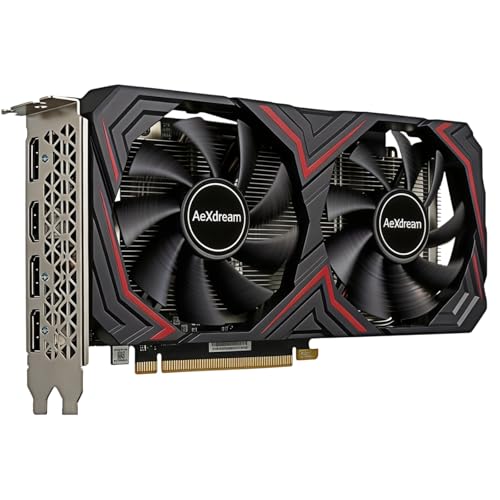
Top 3 picks at a glance
Quick picks by use case
| Use case | Best fit | Main trade-off |
|---|---|---|
| 1080p gaming on a budget | Entry-level AMD Radeon or Intel Arc | Ray tracing and demanding new games may require reduced settings |
| High-refresh 1080p or mainstream 1440p | Midrange AMD Radeon, NVIDIA GeForce, or Intel Arc | You may need to choose between more raw performance and better upscaling features |
| 1440p with high settings | Upper-midrange AMD Radeon or NVIDIA GeForce | Prices rise quickly for extra VRAM and ray-tracing headroom |
| 4K gaming | High-end NVIDIA GeForce or AMD Radeon | Even expensive cards benefit from upscaling in demanding games |
| Creator work and AI software | NVIDIA GeForce, unless your application specifically favors another vendor | Often costs more than a similarly fast gaming-focused card |
Best budget GPU: buy for the games you actually play
For a basic 1080p gaming PC, an entry-level 1080p graphics card is usually enough. This class suits esports games, older releases, and modern games played at medium or high settings without ray tracing. It is also a sensible choice for a secondary PC or a first gaming build.
AMD often offers strong rasterization performance and useful video memory at this price. Intel Arc can also be appealing when heavily discounted, particularly for newer systems with Resizable BAR enabled. Intel’s drivers have improved substantially, but game-by-game behavior can still be less predictable than with AMD or NVIDIA. Check recent benchmarks for the games you play rather than relying on one average score.
The main failure mode at this level is buying too little memory for your intended games. A card that runs today’s 1080p titles acceptably may need texture settings reduced sooner if it has a narrow memory capacity. Avoid paying extra for a premium cooler on a low-power card; the performance difference is usually negligible.
Best 1440p GPU: the sweet spot for most buyers
For a new gaming PC, 1440p is often the best balance between image quality and cost. A good 1440p gaming graphics card should deliver smooth performance at high settings while leaving some room for future games.
AMD Radeon cards are often the value choice when you care primarily about conventional rasterized performance. They can provide more memory or higher frame rates for the money, which helps at 1440p with high-resolution textures. The compromise is that NVIDIA generally has the stronger ray-tracing experience and a broader set of creator and AI application support.
NVIDIA GeForce is the safer pick if you use ray tracing regularly, stream games, edit video, or want access to mature frame-generation and upscaling tools. These features can make a major difference in supported games, but they are not free performance. Upscaling can soften fine detail, and frame generation does not replace the low-latency feel of genuinely high base frame rates. Look at both native and enhanced results before deciding.
Intel Arc is worth considering in this range only when the price is clearly lower or your favorite games perform well on it. It can be a capable value option, but older games, unusual engines, and systems without the required BIOS features can expose more driver-related quirks.
Best 4K GPU: prioritize memory and sustained performance
4K gaming places much greater pressure on the GPU and its memory subsystem. A high-end card is appropriate if you want high settings, ray tracing, and a high refresh rate, but do not assume that any flagship-class product will run every new game at native 4K without compromises.
At this level, NVIDIA is usually the easier recommendation for ray tracing, upscaling, and frame generation. AMD can be the better buy if its price is substantially lower and you mainly play rasterized games. The best value depends on whether you measure performance with enhancements enabled or with native rendering.
Memory capacity matters more at 4K, especially with large texture packs and demanding open-world games. However, more VRAM does not automatically make a slower GPU faster. Favor a balanced card with enough memory, rather than choosing solely by the largest capacity listed on the box.
Before buying, measure your case. Large high-end cards can occupy three or more expansion slots, block adjacent motherboard connectors, and require careful power-cable routing. Poorly seated or sharply bent power cables can cause instability or connector damage. Leave clearance around the card and follow the manufacturer’s cable guidance.
AMD vs. Intel vs. NVIDIA
AMD Radeon: Usually strongest when price-to-raster-performance and memory capacity are priorities. It suits buyers who want straightforward gaming performance and do not use ray tracing in every title. Radeon’s weakness is that its advantage can narrow in ray-traced games and some productivity applications.
Intel Arc: A value-focused alternative with improving drivers and competitive media features. It can be a smart budget purchase for a modern PC, but compatibility is more variable. Confirm that your motherboard supports Resizable BAR and check benchmarks for older games before committing.
NVIDIA GeForce: The broadest all-round option for ray tracing, upscaling, frame generation, streaming, and software compatibility. The drawback is price: you may pay more for features you will never use, and some cards offer less memory than similarly priced alternatives.
What to check before you buy
- Monitor resolution and refresh rate: A 1080p 60Hz display does not need a high-end GPU. A 1440p 165Hz monitor does.
- Power supply: Check both total wattage and the required connectors. An aging or low-quality PSU can cause crashes under load.
- Case clearance: Compare the card’s length, height, and thickness with your case specifications.
- VRAM: Enough memory helps with high-resolution textures, but it does not compensate for weak GPU performance.
- Upscaling support: Treat it as a useful option, not a reason to ignore poor native performance.
- Return policy: Coil whine varies between individual cards. It is not usually a performance fault, but a good return policy matters if noise bothers you.
For most buyers, the sensible target is a midrange card matched to a 1440p monitor. Spend more only when you need 4K, heavy ray tracing, professional software support, or a particularly high refresh rate. If the cheaper card already meets your monitor’s needs, the extra money is better spent on a faster CPU, more storage, or a quieter case.
FAQ
Is NVIDIA always better than AMD?
No. NVIDIA is usually the stronger choice for ray tracing and software features, while AMD can offer more conventional gaming performance or memory for the money. Compare performance in the games you play.
Is Intel Arc good enough for gaming?
Yes, especially at an attractive price and in a modern PC with Resizable BAR enabled. Its driver support is improving, but older games and unusual titles deserve extra research.
How much VRAM do I need?
For current 1080p gaming, a sensible entry-level amount can be enough. For 1440p and 4K, more memory provides useful headroom, particularly with high-resolution textures. Capacity alone should not determine the purchase.
Should I buy a GPU for ray tracing?
Buy for ray tracing if you regularly play supported games and value the lighting effects. Otherwise, a cheaper card with stronger rasterized performance may deliver more useful frame rates.



