
For most productivity PCs, the best GPU is not the fastest one you can afford. It is the card that matches your software, monitor setup, and workload without wasting money on gaming performance you will never use.
Office work, web browsing, spreadsheets, and most programming tasks run well on integrated graphics. A discrete GPU becomes worthwhile for video editing, 3D work, GPU-accelerated design software, local AI tools, multiple high-resolution monitors, or workloads that use CUDA, OpenCL, or video encoders.
The right choice usually comes down to three questions: which applications you use, how much video memory they need, and whether you value low power use over maximum acceleration.
As an Amazon Associate we earn from qualifying purchases at no extra cost to you.


Our Top Picks
 GIGABYTE Radeon RX 9070 XT Gaming OC 16GRADEON9070XT11.34 x 5.2 x 2.2 Inches3.9 PoundsCheck on Amazon

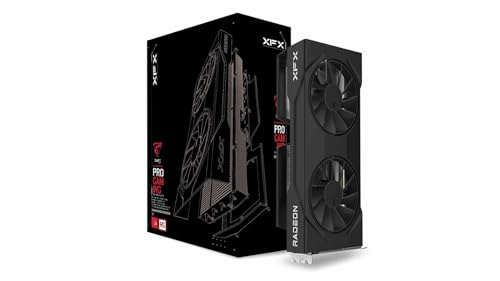
Top 3 picks at a glance
The best productivity GPU options at a glance
| Best for | Recommended direction | Main advantage | Main drawback |
|---|---|---|---|
| Office and general work | Integrated graphics or a basic discrete GPU | Low cost and power use | Limited 3D and GPU compute performance |
| Video editing and streaming | Midrange NVIDIA GeForce or Intel Arc | Strong hardware encoding and broad software support | Some applications still favor NVIDIA |
| 3D rendering and CUDA software | RTX 4060, RTX 4070-class, or newer equivalent | CUDA, OptiX, and mature creator support | Usually costs more than comparable AMD hardware |
| Open-standard creative workloads | AMD Radeon RX 7600-class or faster | Good raster performance and often strong value | Less consistent support in specialist applications |
| Local AI and large projects | GPU with as much VRAM as your budget allows | Fewer memory-related limits | High-end cards can be expensive and power-hungry |
Best overall: a midrange NVIDIA GPU
A midrange NVIDIA GeForce card is the safest recommendation for mixed productivity. NVIDIA has broad support in video editors, 3D applications, CAD tools, streaming software, and GPU-accelerated AI packages. CUDA support matters here: two GPUs with similar gaming performance can behave very differently when an application is built around NVIDIA’s platform.
An RTX 4060-class card is enough for 1080p and many 1440p editing, design, and rendering systems. It is also relatively efficient and usually easy to cool. Choose an RTX 4070-class card or above if you work with complex 3D scenes, high-resolution timelines, heavy effects, or several demanding applications at once.
The main weakness is memory capacity. Some midrange cards have enough VRAM for ordinary projects but become restrictive with large textures, high-resolution video, or local AI models. If the software you use lists VRAM as a requirement, check that before buying. Do not assume a newer GPU automatically has more useful capacity.
Shop NVIDIA GeForce productivity graphics cards when application compatibility is more important than getting the most raw hardware for your money.
Best for video editing and streaming
Video editing is not one workload. Cutting ordinary 1080p footage barely needs a powerful GPU, while color grading, noise reduction, motion effects, multicamera 4K timelines, and export can benefit substantially from one.
NVIDIA remains the lower-risk choice for users who move between Premiere Pro, DaVinci Resolve, After Effects, OBS, and third-party plugins. Its hardware encoders and decoders are widely supported, and current cards handle modern codecs such as H.264, HEVC, and AV1. Intel Arc cards are also worth considering if AV1 encoding is central to your workflow. They can offer impressive media features for the money, but application support and driver behavior deserve more checking.
For editing, prioritize encoder support, VRAM, and application benchmarks over gaming frame rates. A cheaper card can be perfectly adequate if you mostly edit short 1080p videos. Spending more will not make a poorly optimized plugin or slow storage system behave like a new workstation.
Best for 3D rendering, CAD, and GPU compute
For Blender, Octane, V-Ray, CUDA-based engineering software, and many machine-learning tools, NVIDIA is usually the practical default. CUDA and OptiX support can reduce render times and avoid compatibility problems. This is one of the cases where paying more for NVIDIA may be justified even when an AMD card offers similar gaming performance.
AMD Radeon cards make sense for software that supports HIP, OpenCL, or Vulkan well. They can provide strong performance in compatible workloads and are often attractive for general 3D viewport work. The failure mode is buying one based on a gaming benchmark, then discovering that your renderer lacks the expected acceleration path or performs substantially better on CUDA.
Professional workstation cards are a separate category. They can offer certified drivers, larger memory configurations, and support agreements, but they are poor value for a home user who simply wants faster rendering. Buy one only when your employer or software vendor requires certification, or when downtime has a measurable business cost.
When AMD is the better buy
AMD is a sensible choice for users whose applications do not require CUDA and who want strong conventional GPU performance for less money. An RX 7600-class card is enough for light creative work, several monitors, and moderate GPU acceleration. Faster Radeon cards suit larger projects, provided your software supports them properly.
AMD can also be attractive when you need more VRAM at a given price. That does not guarantee faster work, but it can prevent crashes, texture swapping, or project-size limits. Check your application’s supported APIs first, particularly for rendering, AI, and professional video effects.
Use this AMD Radeon graphics card search if your workload uses open standards and memory capacity matters more than CUDA access.
Where Intel Arc fits
Intel Arc is most interesting for budget-conscious video creators and users who want modern media support, including AV1 encoding. It can deliver good value in applications that use its media engine effectively, and newer generations have improved substantially over early Arc cards.
It is not the universal productivity choice. Older software, unusual monitor configurations, and specialist 3D programs may expose driver or compatibility issues that NVIDIA avoids. Intel Arc is a good targeted purchase, not a blind recommendation. Check recent benchmarks for your exact editor or renderer before ordering.
What to check before buying
- Software support: Confirm whether your main application uses CUDA, OptiX, HIP, OpenCL, Vulkan, or a specific encoder.
- VRAM: Eight gigabytes is workable for many projects, but 12GB or more is safer for large 3D scenes, high-resolution video, and local AI.
- Power supply: Check the card’s recommended PSU and its connector requirements. A cheap upgrade can become expensive if it also needs a new power supply.
- Physical size: Three-slot cards may block expansion slots or fail to fit in compact cases.
- Monitor outputs: Verify the number and type of outputs, especially if you use multiple 4K or high-refresh displays.
- Noise and efficiency: A slightly slower, efficient card can be a better workstation choice if the PC runs all day.
For basic office work, keep your existing integrated graphics and spend the budget on more RAM, a larger SSD, or a better monitor. For mixed creative use, buy the least expensive GPU that supports your software’s preferred acceleration and has enough VRAM for your projects. That approach avoids both underbuying and paying for gaming performance that productivity applications never use.
FAQ
Do I need a graphics card for Microsoft Office and browsing?
No. Integrated graphics are normally sufficient for office applications, web browsing, video playback, and ordinary multitasking.
Is NVIDIA better than AMD for productivity?
Not universally. NVIDIA is usually the safer choice for CUDA, OptiX, AI, and many professional applications. AMD can be better value when your software supports its APIs and you do not need CUDA.
How much VRAM should a productivity GPU have?
Eight gigabytes is enough for light editing and general creative work. Choose 12GB or more for large 3D scenes, high-resolution projects, or local AI workloads when your software benefits from it.
Is Intel Arc good for video editing?
It can be, particularly for AV1 encoding and budget systems. Check support and recent benchmarks for your specific editor first, because performance and stability vary more between applications than they do with established NVIDIA cards.



