
Our Top Picks


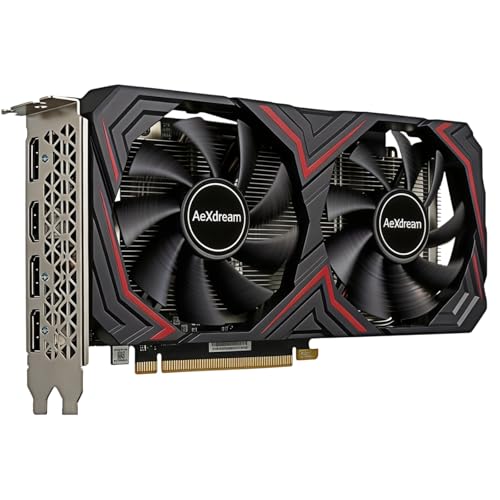
Best GPU for i3 4170
The Intel Core i3-4170 is a two-core, four-thread desktop processor from 2015. It can still handle everyday computing and older or less demanding games, but it will limit performance in many modern titles. That makes buying a powerful graphics card a poor use of money: the GPU may spend much of its time waiting for the CPU.
For most owners, a used, low-power entry-level card is the sensible match. The right choice depends on your power supply, case, games and whether you are willing to buy used. Check those details before shopping; a card that fits the budget but needs a power connector your system lacks can turn into an expensive hassle.
Quick picks
- Best general match: a used GTX 1650-class card, if the price is reasonable and the card does not require a power connector your PC lacks.
- Best for a very weak power supply: a low-power card that draws power only from the motherboard slot.
- Best for modern games: consider a platform upgrade first. The i3-4170 will hold back even a much faster GPU.
What to expect from this processor
The i3-4170 runs at 3.7 GHz, but its two physical cores are a bigger limitation than its clock speed in newer games. Expect playable results in older releases, esports games and lighter titles, especially at 1080p with modest settings. Newer open-world games, busy multiplayer matches and games that rely on several CPU threads can stutter or run poorly, even when the graphics card is capable.
A stronger GPU can still help if your current card is very old, or if you also plan to upgrade the rest of the PC later. But do not expect a new graphics card to make this processor behave like a current gaming CPU. At very low settings, the processor may become the bottleneck sooner, not later.
GPU options compared
| Option | Best for | Main trade-off |
|---|---|---|
| Used GTX 1650-class card | 1080p gaming on a modest system | Used-card condition and pricing vary; check power requirements |
| Used GTX 1050 Ti-class card | Older games and PCs with limited power | Less performance headroom; dated for demanding games |
| New low-power entry-level card | Warranty and low power draw | May cost more than a faster used card |
| Midrange or high-end GPU | Only if you will upgrade the platform soon | Substantial CPU bottleneck and wasted budget in the current PC |
Best value: a used GTX 1650-class card
A GTX 1650-class card is a practical upper limit for many i3-4170 builds. It is substantially more capable than the processor’s integrated graphics and can make older games and lighter 1080p gaming much more comfortable. Some versions draw power entirely from the PCIe slot; others need a six-pin connector, so verify the exact card rather than relying on the family name.
Used cards are worth considering only when the savings are meaningful. Ask for the exact model, a photo of the card’s power connectors, and evidence that it works under load. Avoid listings with no return option if you cannot test the card yourself. Search for used GTX 1650-class graphics cards, but compare the total price against newer low-power alternatives before buying.
This option suits someone who already owns the PC, has a compatible power supply and mainly plays older or lighter games. It is not a good reason to spend heavily on a system that also needs more memory, an SSD or a replacement power supply.
For limited power: a lower-power card
If the computer has a small or generic power supply with no PCIe power leads, prioritize a card that takes all its power from the motherboard slot. A GTX 1050 Ti-class card is an older example of this category; performance is lower than the better options, but it can be a sensible fit for older games and basic display upgrades. Confirm that the specific card has no auxiliary power connector and that it fits the case.
New entry-level cards can offer a warranty and avoid the uncertainty of used hardware, but they may be poor value if priced close to a more capable model. Check reviews for the exact card, not just the GPU name: cooler size, power draw and performance can vary. Browse low-power graphics cards without an external power connector and compare dimensions with your case.
This is the safer choice for an office PC being repurposed for light gaming. It is not a fix for games that demand more CPU cores or newer graphics features.
When to skip a faster GPU
A midrange or high-end card may technically work in a system with the right motherboard, power supply and case, but that does not make it a good match. In CPU-heavy games, the i3-4170 can cap frame rates and cause uneven frame pacing. You may pay for graphics performance the PC cannot use, while still getting a choppy experience.
If you want to play current demanding games, put the budget toward a newer CPU, motherboard and memory platform first, then choose a GPU around that system. If you are upgrading in stages, a faster card can make sense only if it will move to the replacement PC soon and your current power supply is adequate. Otherwise, keep the GPU spend modest. Avoid buying a card solely because a benchmark shows high frame rates on a modern test system.
Check these before buying
- Power supply: Check its label for rated wattage and identify any PCIe power connectors. Do not assume a card is safe just because the power supply advertises a large wattage.
- Space: Measure card length and thickness, especially in compact prebuilt PCs.
- Memory and storage: For a usable gaming PC, 8 GB of system memory is a bare minimum; 16 GB is preferable. An SSD also helps loading and general responsiveness.
- Video outputs: Make sure the card supports your monitor’s connection and resolution.
- Used-card risk: Prefer a seller with returns, and test the card promptly for crashes, artifacts and excessive fan noise.
For a replacement GPU on a tight budget, compare budget 1080p graphics cards against local used prices. If a suitable card costs nearly as much as a newer platform upgrade, save the money for the upgrade instead.
FAQ
Will a GTX 1650 work with an i3-4170?
Usually, if the motherboard has a PCIe x16 slot and the card fits. Check the exact card’s power connector and your power supply before buying.
Is a stronger graphics card worth it?
Only if you plan to upgrade the rest of the PC soon or have a workload that benefits from the GPU. For gaming on this processor, a much faster card often goes underused.
Can I play modern games with this CPU?
Some lighter or older titles may run acceptably, but demanding modern games can stutter or perform poorly because the processor has only two cores.
Should I buy a used graphics card?
It can be good value when the seller accepts returns and you can test it. If you need a warranty or cannot verify its condition, a new low-power card may be worth the extra cost.



