
FiveM is not an especially demanding game at its core, but the servers people play on can make it much harder to run than standard GTA V. Large roleplay servers, high-resolution texture packs, dense traffic, extended view distance, ReShade effects, and crowded city areas can all reduce frame rates. The best GPU for FiveM depends less on chasing maximum benchmark numbers and more on your resolution, visual settings, and the rest of your PC.
For most players, a modern mid-range graphics card is the sensible choice. Spending heavily on a flagship GPU will not fix a weak CPU, poor server scripting, or a FiveM client that is limited by one busy processor thread.
As an Amazon Associate we earn from qualifying purchases at no extra cost to you.


Our Top Picks
 GIGABYTE Radeon RX 9070 XT Gaming OC 16GRADEON9070XT11.34 x 5.2 x 2.2 Inches3.9 PoundsCheck on Amazon
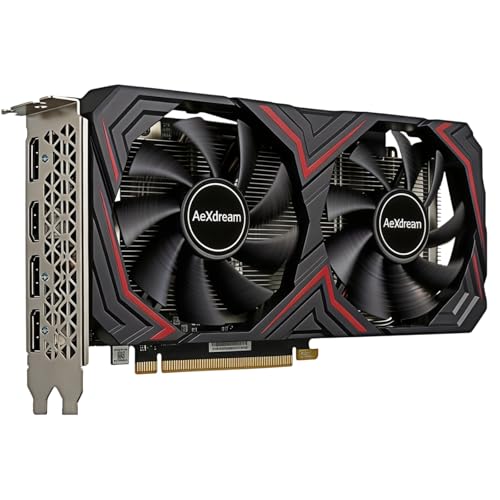
Top 3 picks at a glance
Quick picks
| Use case | Recommended GPU level | Best fit | Main limitation |
|---|---|---|---|
| 1080p, normal settings | Entry-level modern GPU | Affordable upgrades and budget builds | Less headroom for heavy graphics mods |
| 1080p, high settings and large servers | Mid-range GPU with 8GB or more VRAM | Most FiveM players | CPU performance still matters heavily |
| 1440p, high settings | Upper mid-range GPU with 12GB or more VRAM | High-refresh monitors and visual mods | Costs more than FiveM alone requires |
| 4K or extensive texture packs | High-end GPU with ample VRAM | Players prioritising image quality | Diminishing returns and greater CPU limits |
Best for most players: a modern 1080p mid-range GPU
A card in the current 1080p mid-range is the right target for most FiveM builds. Look for something with at least 8GB of VRAM, although 12GB gives you more breathing room when using high-resolution texture packs or playing at 1440p.
NVIDIA’s GeForce RTX 4060 class is efficient, compact, and usually easy to cool. It suits a 1080p gaming PC, especially if your power supply is modest or your case has limited airflow. Its weaknesses are its relatively narrow memory configuration and limited value when priced close to faster cards. It is a reasonable choice at a clear discount, not automatically the best buy at every price.
AMD’s Radeon RX 7600 class is another suitable 1080p option. It often delivers strong traditional raster performance for the money and has enough VRAM for ordinary FiveM use. The trade-offs are higher power consumption than some competing cards and less useful ray-tracing performance. Ray tracing is not central to FiveM, so that disadvantage matters less here than it would in newer single-player games.
For current pricing, compare 1080p gaming graphics cards rather than choosing by brand alone. Board design, warranty, cooler noise, and the actual sale price can matter more than a small difference between GPU models.
Best for 1440p: upper mid-range with more VRAM
If you use a 1440p monitor, play on busy servers, or install visual mods, move up to an upper mid-range card. A GeForce RTX 4070 Super-class card is more than FiveM needs at 1080p, but it provides useful headroom at 1440p and can maintain higher settings with fewer compromises. It also offers good efficiency and features such as DLSS in games that support them, though FiveM performance should not be judged on upscaling features alone.
AMD’s Radeon RX 7700 XT class is a strong alternative for 1440p rasterised gaming. It generally offers more memory than cheaper 8GB cards, which helps with texture-heavy configurations. Its value depends on local pricing: if it is close to a faster Radeon model, the more expensive card may make more sense; if discounted, it can be a sensible FiveM-focused purchase.
Search for 12GB 1440p gaming graphics cards if you want room for other demanding games as well. Do not buy extra VRAM expecting it to solve every stutter. FiveM can hitch because of server scripts, asset streaming, storage speed, or CPU limits even when the GPU has plenty of memory available.
When a cheaper GPU is fine
An entry-level modern GPU is enough if you play at 1080p, use normal or high settings, and do not run aggressive graphics mods. Cards such as the GeForce RTX 3060 or Radeon RX 6600 class can still be perfectly usable when found at a sensible price, especially as upgrades for older systems.
The important distinction is between playable performance and maximum settings. A cheaper card may require lower grass quality, reduced extended distance scaling, less traffic, or modest texture settings. Those changes can have a larger effect in FiveM than moving from one mid-range card to another.
Used cards can also work, but inspect them carefully. Ask whether the card was used for mining, check for abnormal fan noise, confirm that all display outputs function, and avoid models with damaged coolers or missing shrouds. A cheap used GPU is not a bargain if it needs a replacement fan or causes crashes under load.
NVIDIA, AMD, or Intel?
NVIDIA is usually the easy choice for compact systems, lower power draw, and broad software support. Its encoder can also be useful if you stream or record gameplay. The drawback is that some NVIDIA cards offer less VRAM or weaker raw performance than similarly priced AMD alternatives.
AMD often gives more raster performance or memory at a given price. That makes it attractive for a conventional gaming PC where ray tracing and specialised creator features are not priorities. Check the card’s length, power connectors, and cooler quality before buying; some inexpensive designs are louder than expected.
Intel Arc cards can be interesting when heavily discounted, but they deserve more research. Driver support has improved substantially, yet older games and unusual configurations can still be less predictable than on NVIDIA or AMD. FiveM compatibility may also vary with the wider system, driver version, and server setup. Intel is best for an informed buyer who is comfortable troubleshooting, not someone seeking the safest plug-and-play upgrade.
Do not overlook the CPU and memory
FiveM frequently becomes CPU-limited in crowded areas. A fast six-core processor is a practical baseline for a new gaming build, while an older four-core CPU can cause frame-time spikes even with a powerful GPU. If your GPU usage regularly falls below roughly 90 percent while one CPU thread is heavily loaded, replacing the graphics card may produce little improvement.
Use 16GB of system memory as a minimum for a modern FiveM setup, with 32GB preferable for large modded servers, browser tabs, Discord, and recording software. Install the game on an SSD. An SSD will not increase average frame rate much, but it can reduce asset-loading delays and improve general system responsiveness.
Also check your power supply. A graphics card upgrade may need a higher-wattage unit or a different power connector. Avoid pairing a new GPU with an old, low-quality power supply simply because the computer still turns on. Unstable power can look like a graphics driver problem.
How to choose the right card
Start with your monitor resolution, then set a realistic graphics target. For 1080p FiveM, buy the best-value card with 8GB or more VRAM that fits your case and power supply. For 1440p, prioritise 12GB or more where possible. Only move into high-end cards for 4K, extensive texture modifications, or demanding games beyond FiveM.
Compare gaming GPUs with 12GB of VRAM when prices are close, but do not pay a large premium for memory alone. A faster 8GB card can outperform a slower 12GB card in ordinary settings. Consider the complete package: performance, noise, warranty, dimensions, power requirements, and whether your CPU can keep up.
FAQ
Is 8GB of VRAM enough for FiveM?
Yes, for 1080p and ordinary settings. More than 8GB is useful for 1440p, high-resolution texture packs, and visual modifications, but it does not prevent CPU or server-related stutter.
Does FiveM need an expensive graphics card?
No. A modern entry-level or mid-range card is enough for 1080p. Expensive GPUs make more sense for 1440p, 4K, high refresh rates, or other demanding games.
Is NVIDIA better than AMD for FiveM?
Neither is universally better. NVIDIA often has lower power use and strong software support, while AMD can offer more raster performance or VRAM for the price. Compare actual prices and your power-supply limits.
Why does FiveM stutter with a powerful GPU?
The cause may be a CPU bottleneck, heavy server scripts, streamed assets, insufficient system memory, slow storage, or poor optimisation. Monitor CPU and GPU usage before buying another graphics card.



