
Dota 2 is an easy game to run compared with modern AAA releases, but the best GPU depends heavily on your monitor, resolution, and whether you want a quiet, low-cost PC or high refresh-rate performance. Spending $600 on a graphics card for a standard 1080p Dota 2 system is usually unnecessary. Your CPU, memory, and stable frame times matter at least as much.
For most players, the sweet spot is a modern entry-level or midrange card such as an RTX 4060-class, Radeon RX 7600-class, or Intel Arc B580-class model. These cards leave plenty of headroom for 1080p and 1440p while remaining useful in other games. A cheaper card is also perfectly reasonable if Dota 2 is your main game.
As an Amazon Associate we earn from qualifying purchases at no extra cost to you.


Our Top Picks
 GIGABYTE Radeon RX 9070 XT Gaming OC 16GRADEON9070XT11.34 x 5.2 x 2.2 Inches3.9 PoundsCheck on Amazon
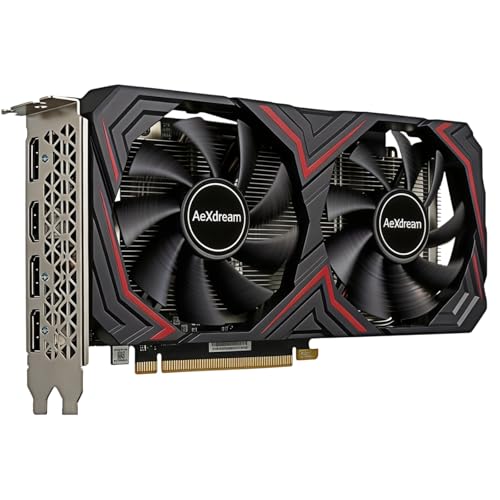
Top 3 picks at a glance
Quick picks
| GPU category | Best for | Typical Dota 2 target | Main trade-off |
|---|---|---|---|
| Integrated graphics | Existing office PCs and very tight budgets | 1080p at reduced settings, depending on the CPU | Less consistent frame rates in busy team fights |
| Budget discrete GPU | 1080p high settings | High frame rates with modest power use | Limited upgrade value for demanding future games |
| Midrange GPU | 1440p and high-refresh 1080p | Comfortable high settings with headroom | Costs more than Dota 2 alone requires |
| Upper-midrange GPU | 1440p gaming beyond Dota 2 | Very high frame rates and broader game support | Poor value if Dota 2 is your only demanding game |
Best overall: a sensible 1080p or 1440p midrange GPU
The best all-round choice is a midrange graphics card with at least 8GB of VRAM. Look at RTX 4060, RX 7600, and Arc B580 graphics cards when comparing prices. All are more than capable for Dota 2, and they also handle modern games better than the cheapest current options.
At 1080p, these cards can generally push well beyond the refresh rate of a 60Hz monitor. With a 144Hz or 165Hz display, the GPU is unlikely to be the main limitation in ordinary matches. At 1440p, they provide a more comfortable experience than budget cards, particularly when effects are turned up and the screen is crowded with heroes, creeps, particles, and summoned units.
The choice between them should come down to price, power consumption, software features, and the rest of your game library. NVIDIA cards typically offer mature encoding and upscaling support. AMD often competes strongly on traditional rendering performance and price. Intel can offer excellent value, but driver support and game behavior have improved over time rather than being equally trouble-free in every older title. Dota 2 itself is not a demanding test case for these differences.
Best budget choice: a low-cost discrete GPU
If you play at 1080p and want high settings without spending much, a budget graphics card is enough. Search the budget 1080p graphics card market, but check the exact model’s power connector, length, and memory capacity before ordering.
This is the right choice for a system with an older processor, a basic 1080p monitor, or a limited power supply. Dota 2 will usually run smoothly, and you do not need expensive ray-tracing hardware because ray tracing is not central to the game. An 8GB card is preferable if the price difference is small, especially if you expect to play other games later.
The main failure mode is buying a card that looks cheap but has poor cooling or only 4GB of VRAM. Four gigabytes can still work for Dota 2, but it leaves less room for newer games and high-resolution texture settings. Very small single-fan cards can also run hot and loud. That does not make them unusable, but compact cooling is a compromise worth accepting only when the case requires it.
Can integrated graphics run Dota 2?
Yes, in many cases. A recent desktop processor with competent integrated graphics can run Dota 2 at 1080p, especially with medium settings and a sensible frame-rate cap. This is the cheapest option if you are building a general-purpose PC or already own a suitable processor.
Integrated graphics use system memory, so dual-channel RAM is important. A PC with one memory stick can perform noticeably worse than the same machine with two matched sticks. Eight gigabytes of total system RAM is also a poor target for a new gaming PC; 16GB is a more practical minimum.
Integrated graphics become less attractive when you want a 144Hz monitor, consistently high settings, or strong performance in other games. They can also expose CPU limitations more clearly because the processor handles both game logic and graphics work. If your budget allows a discrete GPU without sacrificing the CPU, power supply, or memory, the separate card is the safer long-term option.
Best for 1440p and high-refresh monitors
Dota 2 is not automatically difficult at 1440p, but a higher-resolution monitor increases the rendering workload. A midrange card is the sensible starting point, while an upper-midrange model makes more sense if you also play demanding games such as recent open-world or ray-traced releases. Browse 1440p gaming graphics cards with 12GB VRAM if your budget covers broader gaming use.
Do not buy a high-end GPU solely to guarantee a fixed frame rate in Dota 2. At very high frame rates, the CPU can become the limit, particularly during large team fights or when many game events are being processed. A faster graphics card cannot fix a weak processor, background software, thermal throttling, or inconsistent network latency.
For a 240Hz monitor, a fast modern CPU and low-latency memory configuration matter. You may see a higher average frame rate after upgrading the GPU, but the improvement in the worst moments can be smaller than expected. Use an in-game frame-time or FPS monitor rather than judging performance from the menu or an empty lane.
What to check before buying
First, confirm your power supply. Some entry-level cards draw power only from the motherboard, while stronger cards may require an eight-pin or newer power connector. Do not rely on a cheap adapter if the power supply is old, unbranded, or already near its limit.
Next, measure the case. Graphics cards vary greatly in length, thickness, and cooler design. A two-and-a-half-slot card can block expansion slots or interfere with front-mounted fans. Also check monitor outputs if you use multiple screens.
Finally, compare total system balance. A better GPU will not compensate for 8GB of RAM, a severely outdated CPU, a hard drive causing long loading pauses, or overheating. For a new build, 16GB of dual-channel memory and an SSD are sensible foundations. If you already have those, the budget or midrange GPU upgrade is straightforward.
FAQ
Is an RTX 4060-class GPU overkill for Dota 2?
For 1080p at 60Hz, usually yes. It becomes reasonable for 144Hz gaming, 1440p, or a PC that will also run newer games.
Is AMD or NVIDIA better for Dota 2?
Both are suitable. Choose based on price, cooler quality, power use, and your other games rather than expecting a major Dota 2 advantage from either brand.
Can Intel Arc graphics run Dota 2?
Yes, modern Arc cards are viable, but check current driver reviews and game-specific testing. They can be excellent value when discounted, while NVIDIA and AMD may offer a simpler experience for mixed older game libraries.
Do I need 12GB of VRAM for Dota 2?
No. Dota 2 itself does not require 12GB. More VRAM is useful mainly for newer games, higher resolutions, and longer-term flexibility.



