
Our Top Picks
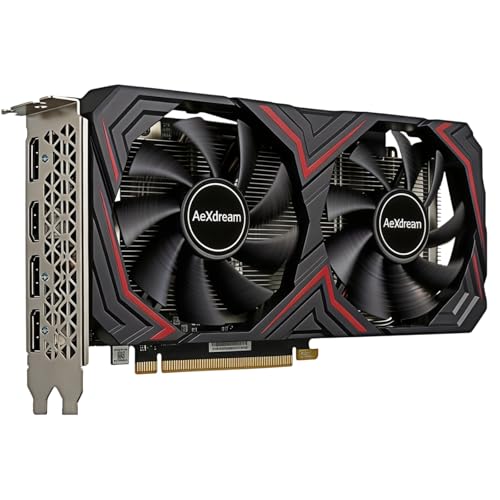

What 1080p at 60fps really needs
For 1080p gaming at 60 frames per second, you don’t need a high-end graphics card. A sensible current-generation budget GPU can handle most games at high settings, while demanding new releases may require medium settings, upscaling, or a few visual compromises. The right choice depends less on the resolution than on which games you play, whether you want ray tracing, and how long you expect to keep the card.
For a new build, start with a modern card with at least 8GB of VRAM. That’s a practical baseline, not a promise that every game will run at maximum textures indefinitely. Older or less demanding games can run well on less, but memory limits can cause stuttering or force lower texture settings in newer titles. Check your power supply, case clearance, and monitor connections before buying; a good deal is no good if the card doesn’t fit or your PSU can’t support it.
Best value: a mainstream 8GB GPU
For most people who want 1080p and a steady 60fps, the best fit is a mainstream 8GB graphics card from AMD, Intel, or NVIDIA. It should give you room to run many games at high settings without paying for performance your 60Hz monitor can’t display. In demanding games, expect to adjust a setting or two rather than insist on every option at ultra.
AMD’s budget cards are often worth checking first if traditional, non-ray-traced performance per dollar is your priority. Intel’s Arc options can be compelling when priced well, but game performance and compatibility can vary more by title; make sure your system supports Resizable BAR, and look for recent benchmarks of the games you play. NVIDIA is a sensible pick if you value its upscaling, ray-tracing performance, or software features, though you may pay more for comparable conventional performance.
How the main options compare
| Option | Good fit for | Main trade-off |
|---|---|---|
| Entry-level 8GB card | Esports, older games, and 1080p with sensible settings | May need lower settings in demanding new releases |
| Mainstream 8GB card | Most 1080p players targeting 60fps | Ray tracing and ultra textures can still be too demanding |
| Faster card with 12GB or more | Longer ownership, higher refresh rates, or heavier games | Costs more than a 60fps target requires |
| Used previous-generation card | Buyers comfortable checking condition and warranty | Unknown wear, limited warranty, and older features |
These are broad categories, not guarantees: performance varies by game, processor, drivers, and specific card. Compare independent benchmarks at 1080p in the titles you actually play. Averages alone can hide dips below 60fps, so check frame-time or 1% low results when available.
When spending more makes sense
Move up to a 12GB-or-larger graphics card if you play demanding new games, want high-resolution texture packs, use mods, or plan to keep the card for several years. Extra VRAM gives games more room for assets, but it does not automatically make a GPU faster. A slower card with more memory may still struggle to hold 60fps when its processing power is the bottleneck.
Ray tracing is another reason to consider a faster model, particularly if you’re interested in NVIDIA’s stronger ray-tracing and upscaling ecosystem. At 1080p, ray tracing can be expensive even on capable cards. Upscaling can help, but image quality varies with the game and mode; don’t buy on the assumption that it will always look as sharp as native resolution. If ray tracing is a must-have, budget for a higher tier rather than expecting a basic card to deliver it smoothly.
On the other hand, don’t spend extra just to match an advertised “ultra” preset. High settings often look close to ultra while running faster, and the difference may be hard to notice during play. If you have a 60Hz display and mostly play lighter games, a more expensive card may provide little practical benefit. Consider putting the savings toward a better monitor, more storage, or a quieter card design.
When cheaper or used is fine
An entry-level card can be enough if your library is mostly esports, indie games, or older releases. A budget 8GB graphics card can meet a 1080p/60fps goal in those games without stretching your budget. The failure mode is buying too little GPU for the games you intend to play: a card that handles a competitive shooter easily may need reduced settings in a new, graphically demanding single-player game.
Used cards can offer better raw performance for the money, but weigh the discount against the risks. Ask about the remaining warranty, check the return policy, and inspect the card for damage or a noisy fan. Avoid a used purchase if the seller won’t let you test it or provide a clear return route. For a small price difference, a new card with a full warranty is usually the safer buy.
Also check the rest of your PC. An old or low-end processor can hold back frame rates, especially in esports games, and a weak power supply can cause instability. Verify the card’s power connectors and recommended PSU capacity against your exact model; specifications differ even within the same GPU family.
FAQ
Is 8GB of VRAM enough for 1080p?
It’s a reasonable baseline for a budget 1080p build. Some newer games may need lower texture settings, especially with ray tracing or high-resolution texture packs.
Do I need a 12GB card for 60fps?
No. A faster 8GB card can be a better value for a 60fps target. Consider 12GB or more if you play demanding games, use mods, or want extra room for future releases.
Should I buy AMD, Intel, or NVIDIA?
Compare the specific cards at your price, not just the brand. AMD can be attractive for conventional performance per dollar, NVIDIA for ray tracing and its feature set, and Intel when its pricing and game compatibility suit your system.
Can a 1080p card run a 1440p monitor?
Yes, but demanding games may need lower settings or upscaling to stay near 60fps. If you plan to game at 1440p regularly, choose a faster card than one intended mainly for 1080p.



