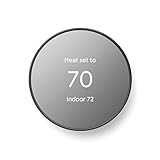
The best Google Nest thermostat for most homes in 2026 is the Nest Learning Thermostat (4th gen). It has the best display, the most complete feature set and support for Nest Temperature Sensors. If you just want schedules, app control and a lower price, the Nest Thermostat (2020 model) does the core job. Check your wiring first, because neither model works with line-voltage heating such as electric baseboards.
As an Amazon Associate we earn from qualifying purchases at no extra cost to you.


Our Top Picks
Top 3 picks at a glance
Quick comparison of the Nest thermostat options
| Pick | Best for | Key specs | Price range |
|---|---|---|---|
| Nest Learning Thermostat (4th gen) | Best overall, larger homes, rooms that run hot or cold | Color display, learns your schedule, supports Nest Temperature Sensors, low-voltage (24V) systems, Matter-era smart home support | Premium |
| Nest Thermostat (2020) | Best budget, simple homes | Mirrored display, touch-sensitive side control, manual or app scheduling, 24V systems | Budget to mid-range |
| Nest Learning Thermostat (4th gen) + Nest Temperature Sensor (2nd gen) | Best for a gaming room or bonus room | Reads temperature in a chosen room, not just the hallway | Premium plus accessory cost |
| Nest Learning Thermostat (3rd gen), where still available | Bargain hunters, older Nest setups | Older design, 24V systems, still receives core features | Mid-range, varies by stock |
Specs and feature lists follow Google’s published product pages. Stock, regional variants and bundles change, so confirm the current lineup in your country before buying.
Best overall: Nest Learning Thermostat (4th gen)
This is the model to buy if you want the thermostat to manage itself. It watches how you adjust the temperature, builds a schedule from that, and uses its occupancy sensing to set an away temperature when the house is empty. The 4th-gen display is clearer and brighter than the older design, and it shows the current temperature and status from across a room.
Who it suits: households with irregular hours, anyone who forgets to set a schedule, and homes where one room is much warmer or colder than the hallway. It is also the pick for people who want the most complete Google Home integration and the option to add remote sensors.
Main trade-off: it costs the most of the group. If your schedule is fixed and predictable, a lot of the “learning” value goes unused.
Best budget: Nest Thermostat (2020)
The Nest Thermostat has no rotating ring and no learning mode in the Learning sense. You still get app control, schedule suggestions, Eco temperatures and energy history, plus Google Assistant voice control. For a small apartment or a house where everyone is home on a predictable schedule, that covers most of the savings.
Who it suits: first-time smart thermostat buyers, rental-friendly swaps where the landlord allows it, and people replacing a basic programmable unit.
Main trade-off: a simpler display and fewer automatic behaviors. If you want the thermostat to react to a hot room, check sensor compatibility for this model on Google’s support page before assuming it works the same as the 4th gen.
Best for a gaming room: Learning Thermostat plus a Temperature Sensor
A gaming PC turns electricity into heat almost one for one. A thermostat in a hallway cannot see that heat, so the rest of the house can be comfortable while your desk is not. A Nest Temperature Sensor placed in the gaming room lets the thermostat use that room’s reading when you tell it to.
Worked calculation: how much heat your rig adds
Electrical watts convert to heat at 3.412 BTU per hour per watt.
- Gaming PC drawing 450 W under load: 450 × 3.412 ≈ 1,535 BTU/h
- Monitor, speakers and peripherals, 80 W: 80 × 3.412 ≈ 273 BTU/h
- Total: about 1,800 BTU/h
A small portable air conditioner is often rated in the range of 8,000 BTU/h, so your setup adds roughly a fifth of that cooling load into one room. Over a three-hour session the room absorbs about 5,400 BTU. In a closed small room that is easily enough to push the temperature several degrees above the hallway reading. A sensor in that room gives the thermostat the real number, so it can call for cooling when needed instead of waiting for the hallway to warm up.
Main trade-off: the sensor makes the system cool or heat the whole house to satisfy one room, which can leave other rooms colder. Pair it with closed or partly closed vents and sensible schedules.
Older option: Nest Learning Thermostat (3rd gen)
The 3rd-gen Learning Thermostat remains in some listings and in many existing homes. It still handles the basics. Treat it as a bargain buy only when the price gap to the 4th gen is large, since the older hardware has a less modern display and fewer new features. Check its status with Google before purchasing, as availability differs by region.
Decision matrix: match your situation to a model
| Your situation | Choose | Reason |
|---|---|---|
| Predictable schedule, small home | Nest Thermostat (2020) | Fixed schedules capture most savings |
| Changing shifts or hybrid work | Learning Thermostat (4th gen) | Learns and adjusts automatically, uses presence sensing |
| Hot or cold bonus room, home office or gaming room | Learning (4th gen) + sensor | Controls to the room that matters |
| Multi-story house with uneven temperatures | Learning (4th gen) + 2 or more sensors | Averages or prioritizes rooms by schedule |
| Electric baseboard or other 120/240 V heaters | None of these | Nest models are low-voltage; use a line-voltage thermostat |
| Heavy Apple Home or Alexa use | Check Matter support first | Ecosystem support varies by model and firmware |
Check your wiring before you buy
Most buyers lose time here, not on the model choice. Open the cover on your current thermostat and look at the terminal labels.
- R/Rc/Rh: 24 V power from the transformer. Required.
- W: heat call. Y: cooling call. G: fan.
- C: common wire for continuous power. Preferred, but many systems work without it.
- O/B: heat pump reversing valve. Supported by Nest models, but confirm in Google’s compatibility checker.
- L1/L2 or 120/240 V labels: line-voltage system. Not compatible.
Take a photo of the wiring before disconnecting anything and switch off the breaker for the HVAC system. If there is no C wire, Google’s own guidance lists options such as the included power connector accessory on the Learning model, or running a new wire. For the Learning Thermostat, treat the power connector as the first fix before paying an installer.
Will it pay for itself? A simple payback calculation
Use this formula: payback in years = thermostat cost ÷ (annual heating and cooling spend × savings rate). Google has published Nest field-study figures of roughly 10 to 12 percent savings on heating and about 15 percent on cooling, and the US Department of Energy says setting back the temperature by 7 to 10 °F for eight hours a day can save up to about 10 percent a year. Your real result depends on your climate, insulation and habits.
| Thermostat cost as share of yearly HVAC bill | Savings rate | Payback |
|---|---|---|
| 10% | 10% | 1.0 year |
| 10% | 5% | 2.0 years |
| 20% | 8% | 2.5 years |
| 20% | 3% | 6.7 years |
The lesson: if you already keep a strict setback schedule, your savings rate will be low and the cheaper Nest Thermostat is the better value. If you currently run a constant temperature, the savings rate is higher and the Learning model pays back faster.
Settings worth changing after installation
- Eco temperatures: set heat around 62 to 66 °F and cool around 78 to 82 °F for away time. The wider the gap from your comfort setting, the larger the saving, within what your home and any pets tolerate.
- Sensor schedule: with sensors, set the gaming room as the active room for the hours you play, and the bedroom for the night.
- Fan or system limits: if the thermostat short-cycles your system, check the equipment settings in the app rather than the schedule.
- Home/Away: turn on presence sensing and confirm that phone location sharing is enabled in Google Home, or the thermostat may think you are always home.
How to choose
- Confirm it is a 24 V system, not baseboard or line voltage.
- Run the Google compatibility checker with your wire labels.
- Pick the Nest Thermostat if your schedule is regular and cost matters most.
- Pick the Learning Thermostat if your hours vary or you need sensors.
- Add a Temperature Sensor only if a specific room is uncomfortable.
Frequently Asked Questions
Which Google Nest thermostat is best overall?
The Nest Learning Thermostat (4th gen) is the best overall choice. It has the most polished display, automatic scheduling and support for remote temperature sensors. It makes the most sense when your schedule changes or your home has rooms that run at different temperatures.
Is the cheaper Nest Thermostat good enough?
Yes, for many homes. It offers app control, voice control, scheduling and energy history. You give up the Learning model’s display, learning behavior and some sensor features, so it suits households with predictable routines.
Do I need a C wire for a Nest thermostat?
Not always. Many systems work without one, and Google provides a power connector for the Learning model when power is a problem. If you see random reboots or low battery warnings, that points to a power issue and the usual fix is a C wire or the power connector.
Do Nest thermostats work with electric baseboard heaters?
No. Nest thermostats are designed for low-voltage 24 V systems, and baseboard heaters typically use 120 or 240 V. Connecting one to a line-voltage circuit can damage the thermostat and is a safety risk, so use a thermostat built for line voltage instead.
Can a Nest Temperature Sensor help with a hot gaming room?
It can, because it lets the thermostat respond to the temperature in that room rather than the hallway. A rig drawing about 500 W adds roughly 1,700 BTU/h of heat, enough to make a small closed room noticeably warmer. Keep in mind that the whole system runs to satisfy that room, so other rooms may end up cooler.
Is a smart thermostat worth it in 2026?
It is worth it if your current setup is a manual thermostat held at one temperature, or if you cannot control the system when away. Payback runs from about one year to well over five depending on your savings rate and the thermostat’s cost relative to your bill. Use the payback formula above with your own numbers.
Related guides
More from Amazon
Programs that pair well with the guide above. Offers and eligibility are set by Amazon and may change.
A free business account with business pricing and bulk-buying tools for work, shop or home office.
Create a business accountFree shipping on eligible items, Prime Video and more. Eligible new members can start with a free trial.
Start a Prime free trialAudiobooks and podcasts to listen to on the go. Eligible new members can start with a free trial.
Try Audible freeAd-free music streaming. Eligible new subscribers can start with a free trial.
Try Music Unlimited freeAs an Amazon Associate we earn from qualifying purchases.


