The best budget smart thermostat for most homes is the Google Nest Thermostat, because it is inexpensive, works on many systems without a C-wire, and has a simple scheduling app. If your system already has a C-wire and you want remote room sensing, the ecobee Smart Thermostat Essential or a Sensi Lite are the other strong low-cost options. Wiring, not features, decides which one works in your home, so check that first.
As an Amazon Associate we earn from qualifying purchases at no extra cost to you.
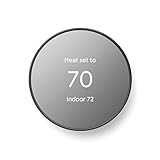


Top 3 picks at a glance
Quick comparison of budget smart thermostat picks
| Pick | Best for | Key specs (per manufacturer listings) | Price tier |
|---|---|---|---|
| Google Nest Thermostat | Best overall budget pick, homes without a C-wire | 24V systems, Wi-Fi, heat pump support, app scheduling, Google Home integration | Budget |
| Emerson Sensi Lite | Best for simple, no-frills control | 24V systems, Wi-Fi, app and schedule control, C-wire expected | Budget |
| ecobee Smart Thermostat Essential | Best for big-feature value and multi-room setups | 24V systems, Wi-Fi, app and voice assistant support, optional remote sensor support | Budget to lower mid-range |
| Wyze Thermostat | Best for existing Wyze smart home users | 24V systems, C-wire required, Wi-Fi, Wyze app | Budget |
| Honeywell Home T5 | Best for people who want a familiar brand and a physical interface | 24V systems, Wi-Fi, geofencing, C-wire generally needed | Budget to lower mid-range |
Features and bundled accessories change between hardware revisions, so confirm the current box contents and compatibility checker on the manufacturer’s page before buying.
Step one: confirm your system is compatible
A thermostat is cheap only if it works the first time. Remove the cover of your current thermostat (after switching the HVAC power off at the breaker) and look at the wire labels. Take a photo before disconnecting anything.
Low-voltage or line-voltage?
Almost every budget smart thermostat is designed for low-voltage 24V systems: forced-air furnaces, central AC, heat pumps and many hot-water boilers. Electric baseboard heaters and some wall heaters run on 120V or 240V line voltage and need a different, line-voltage thermostat. If your existing thermostat has thick wires and a warning about high voltage, stop here.
Wire-to-system decision matrix
| Your wires | Likely system | What you need |
|---|---|---|
| R, W, Y, G | Furnace plus central AC, no C-wire | A thermostat that supports power-stealing, or a C-wire adapter or added wire |
| R, W, Y, G, C | Furnace plus AC with common wire | Any budget model on this list |
| R, W only | Heat-only furnace or boiler | A model that supports a 2-wire setup, or an adapter kit; check the compatibility tool |
| Y, G, O/B, R (plus optional W for aux heat) | Heat pump | Explicit heat pump support and a correct O/B reversing valve setting |
| Separate Rc and Rh | Systems with separate heating and cooling transformers | A model with both terminals, and the jumper removed during setup |
The C-wire (common wire) is the most common problem. It gives the thermostat constant 24V power. Without it, some thermostats borrow power through the heating or cooling wires, which can cause a buzzing furnace relay, short-cycling or a Wi-Fi dropout. If your thermostat has no C-wire, either choose a model built for that case (the Nest Thermostat is the typical example, per Google’s compatibility page), or install the manufacturer’s power adapter or run a new wire.
Best overall: Google Nest Thermostat
This is the model to pick if you want the lowest-risk budget purchase. It has a clean interface, a simple schedule and a straightforward install flow. It supports many 24V systems, including heat pumps, and is designed to work on many without a dedicated C-wire.
Trade-off: it has no support for a remote room sensor in the same way ecobee does, and it is tied closely to the Google Home ecosystem. It also will not control line-voltage heating.
Best for room-by-room comfort: ecobee Smart Thermostat Essential
This is the pick for homes with a hot upstairs or a gaming room that runs warm. The ecobee line is known for its sensor ecosystem and good app, and the Essential is the cheaper entry. The practical benefit is that a thermostat in a hallway cannot tell that your office with a PC is warmer than the rest of the house.
Trade-off: it needs a C-wire or the power adapter it is sold with in some regions, and remote sensors, if supported, are an added cost. Check what is in the box for your region.
Best simple pick: Emerson Sensi Lite
The Sensi Lite is a straightforward Wi-Fi thermostat with app control and scheduling, and it is a good fit for homeowners who only want remote adjustment and a schedule. Trade-off: a C-wire is expected, and the feature set is intentionally limited compared with the Nest and ecobee.
Best for Wyze users: Wyze Thermostat
If your cameras, plugs and sensors already live in the Wyze app, this keeps everything in one place and sits at the low end of pricing. Trade-off: a C-wire is required per the manufacturer’s setup instructions, and the platform is less established than Google or ecobee for heat pumps and complicated systems.
Best for a familiar brand: Honeywell Home T5
The T5 is a reasonable choice if you want a well-known HVAC brand and conventional controls such as geofencing and scheduling. Trade-off: a C-wire is generally needed, and the interface and app feel less polished than the newer rivals.
How much will a budget smart thermostat save?
The U.S. Department of Energy says you can save up to about 10 percent a year on heating and cooling by turning the thermostat back 7 to 10°F for 8 hours a day from its normal setting. A smart thermostat automates that habit. Your real result depends on your climate, insulation and how consistently you were already adjusting the thermostat.
Use this payback formula: payback (years) = thermostat cost ÷ (annual HVAC bill × savings fraction).
- Budget thermostat costs one-tenth of your yearly HVAC bill, savings 8 percent: 0.10 ÷ 0.08 = 1.25 years, about 15 months.
- A thermostat costing one-fifth of your yearly bill at the same 8 percent: 0.20 ÷ 0.08 = 2.5 years, about 30 months.
- Budget thermostat with only 4 percent savings (you already used a programmable model well): 0.10 ÷ 0.04 = 2.5 years.
The takeaway is that extra features rarely justify themselves financially unless they solve a real comfort problem. If a thermostat costs twice as much, you need twice the savings to break even in the same time.
Why gamers should care about placement and heat load
A gaming PC turns nearly all of its electrical draw into heat. A system pulling 400 W under load puts out about 400 × 3.412 ≈ 1,365 BTU/h, similar to a small space heater running at a low setting. Add a 150 W monitor and peripherals and the room might gain another 500 BTU/h.
That has two consequences:
- A thermostat in a hallway will not react to a room that is 4 to 6°F warmer during gaming sessions. A remote sensor or a thermostat in that room helps.
- Do not mount the thermostat near a PC exhaust, sunny window or supply vent. Those spots skew readings and can cause short cycling.
Settings that matter on day one
- Setback: start with 5 to 7°F of setback when asleep or away. Larger swings on heat pumps can trigger expensive auxiliary heat, so keep them smaller (2 to 3°F) unless the app has a heat pump-aware recovery option.
- Minimum run time and differential: leave the defaults unless the system short-cycles. Frequent on-off cycles shorten equipment life.
- Heat pump O/B setting: if the thermostat has it, set it to match your reversing valve. A wrong setting heats when you ask for cooling.
- Geofencing: enable it only if everyone in the household uses the app. Otherwise the house may switch to away mode while someone is home.
- Wi-Fi: use 2.4 GHz if the thermostat only supports it, and place a router or extender close enough that signal does not drop inside the wall.
How to choose: quick decision guide
- No C-wire and a standard system: Google Nest Thermostat.
- Hot or cold rooms, or a PC room: ecobee Smart Thermostat Essential with a sensor, if supported.
- C-wire present, wants simplicity: Sensi Lite.
- Already using Wyze: Wyze Thermostat with a C-wire in place.
- Prefers a major HVAC brand: Honeywell Home T5.
- Baseboard or line-voltage heat: skip all of these and buy a line-voltage smart thermostat.
Frequently Asked Questions
What is the best budget smart thermostat for most people?
The Google Nest Thermostat is the safest pick for most homes because it is low-cost, simple to set up and works on many systems without a C-wire. If you want multi-room control, look at the ecobee Smart Thermostat Essential instead.
Do I need a C-wire for a smart thermostat?
Many do, because Wi-Fi needs constant power. Some models can borrow power through other wires, and others ship with an adapter. If you have only two or four wires, check the manufacturer’s compatibility tool before you buy.
Will a cheap smart thermostat work with a heat pump?
Only if the product lists heat pump support. You must configure the O/B wire correctly, and you should be careful with aggressive setbacks because they can trigger auxiliary heat. Always verify with the compatibility checker first.
Can I install a smart thermostat myself?
Often yes. Turn off power at the breaker, photograph the wiring, label each wire and follow the app’s setup flow. Hire an HVAC technician if your system uses line voltage, has unlabeled or unusual wiring, or the thermostat shows a compatibility warning.
Is a smart thermostat worth it if I already have a programmable one?
It is worth it mainly for remote control, better scheduling and room sensing. If you already use a programmable thermostat well, your energy savings will probably be small, so the payback period may be longer than the 15 to 30 months in the examples above.
How long should a budget smart thermostat last?
Many last for years, but long-term support depends on the manufacturer’s app and cloud service. Prefer a brand with local manual controls, so the thermostat still works if the app or Wi-Fi connection goes down.
Related guides
More from Amazon
Programs that pair well with the guide above. Offers and eligibility are set by Amazon and may change.
A free business account with business pricing and bulk-buying tools for work, shop or home office.
Create a business accountFree shipping on eligible items, Prime Video and more. Eligible new members can start with a free trial.
Start a Prime free trialAudiobooks and podcasts to listen to on the go. Eligible new members can start with a free trial.
Try Audible freeAd-free music streaming. Eligible new subscribers can start with a free trial.
Try Music Unlimited freeAs an Amazon Associate we earn from qualifying purchases.


